

How do you know when your marketplace has outgrown its platform?
Usually, not from one big failure. There is no dramatic crash, no red warning across the admin panel, no vendor email saying, "Bad news, your marketplace is now too complex for us."
It happens in quieter ways.
A supplier cannot upload products without help from operations. Catalog rules live in a spreadsheet because the platform cannot handle category-specific logic. A new integration requires another plugin, and that plugin breaks something that worked last week. Moderation gets slower, not because the team is lazy, but because the platform only offers "approved" and "rejected" while the real workflow has 12 messy steps in between. Reporting? Someone still exports data to Excel every Friday and hopes the numbers match.
That is the marketplace platform ceiling.
A marketplace platform ceiling is the point at which a growing marketplace’s operational requirements become too specific, too interconnected, or too risky for the platform’s native configuration. The business still runs. Orders still come in. Revenue may even be growing. But the system underneath has stopped keeping up with how the business actually works.
And this problem is becoming more common because marketplaces have grown fast. Digital Commerce 360 reported in 2024 that five years earlier it counted just 75 B2B marketplaces; by 2024, that number had grown to as many as 750, with a projection that it could reach 1,000 soon after. That is not a small category anymore. That is a lot of operators discovering the same awkward truth: the platform that helped them launch may not be the platform that helps them scale operationally.
Buyer expectations are moving too. McKinsey’s 2024 B2B Pulse Survey found that B2B buyers now use an average of ten interaction channels during their buying journey, up from five in 2016. McKinsey also put it plainly: "E-commerce is indispensable." Among companies that offer e-commerce, e-commerce now accounts for more than one-third of revenue, and buyers are more comfortable making large purchases through remote or self-service channels.
So the pressure is not just technical. It is commercial.
If buyers expect digital self-service, suppliers expect clean onboarding, and leadership expects real-time visibility, then a marketplace cannot run forever on plugins, exports, admin hacks, and tribal knowledge. At some point, the hidden cost becomes visible. Or worse, it stays hidden but slows everything down.
That hidden cost has a name: technical debt. A 2024 Morning Consult and Unqork survey of 500 business and technology leaders found that more than nine in ten respondents said their organization carried some form of technical debt. Nearly 80% said it had caused ed or canceled business-critical projects, higher costs, ed innovation, or organizational paralysis. The same report describes legacy systems as tools that need constant effort just to keep "keeping the lights on."
Marketplace teams know that feeling. They know the supplier portal nobody wants to touch. The catalog import nobody fully understands. The moderation queue only works because one senior operations manager knows every exception by memory. The plugin stack that makes every release feel slightly cursed.
Here’s the thing, though: outgrowing a platform does not automatically mean you should rebuild the whole marketplace from scratch.
That is the trap.
Platform vendors often act like configuration can solve everything. Some development teams go the other way and recommend a full rebuild too early. Both answers can be wrong.
Most marketplaces need something more practical: identify the components where custom logic creates real business value, then replace those parts without tearing down everything that still works. For many operators, that means custom development for supplier onboarding, catalog management, moderation, reporting, or integration logic. Payments, basic storefront features, email notifications, and standard shipping connections can often stay on existing tools.
The real question is sharper: when do marketplace platform limitations become expensive enough that custom development is the safer, cleaner, more business-friendly move?

The Growth Trap Every Marketplace Operator Recognizes Too Late
The first version of a marketplace is usually built for speed.
That is not a bad thing. Actually, it is often the right thing. A founder or CTO does not need a perfect supplier portal, a custom catalog engine, an advanced moderation workflow, and 20 integrations before the business has proven demand. Early on, the job is simple: get suppliers in, get products live, let buyers order, fix the ugly bits later.
A small operations team can check supplier files by hand. A category manager can clean product titles. A developer can adjust a plugin. Someone from support can message a seller when a listing looks wrong. The platform does not need to understand every rule because the team still can.
Then the marketplace grows, and the same habits become expensive.
The supplier base goes from 15 to 150. The catalog goes from a few clean categories to thousands of products with different attribute rules, variant logic, pricing exceptions, documents, regional limits, and approval steps. Buyers expect search to work properly. Suppliers expect self-service. Finance expects clean commission reports. Leadership expects a dashboard that explains what is happening without five CSV exports and one tired analyst.
This is the trap: the marketplace keeps growing, so everyone assumes the platform is working.
But growth can hide friction for a long time.
Orders still come in. Revenue still moves. The board still sees progress. Meanwhile, the internal system becomes harder to change. Each new feature touches more plugins. Each supplier needs more manual help. Each catalog update creates more risk. Each integration adds another small dependency that nobody wants to own.
That is how a marketplace platform ceiling usually feels from inside the business. Not like a broken website. More like walking through wet cement.
The broader market helps explain why this is happening more often. Digital Commerce 360 reported that five years ago there were only 75 B2B marketplaces; by 2024, there were more than 600 across industries, with the global total expected to surpass 1,000 in the next few years. The 2024 B2B Marketplace 750 Report also described B2B marketplaces as the fastest-growing B2B digital sales channel, expected to exceed $350 billion that year.
So this is not a niche platform problem. It is a maturity problem.
The first wave of marketplace work is about launch. The second wave is about control. Control over product data. Control over supplier quality. Control over workflows. Control over reporting. Control over the parts of the business that used to fit inside a generic admin panel but no longer do.
McKinsey’s 2024 B2B Pulse Survey puts more pressure on the same point. The report says B2B buyers now use an average of ten channels during the buying journey, up from five in 2016. It also says, very directly, "E-commerce is indispensable." For companies that offer e-commerce, it now brings in more than one-third of revenue.
That matters because a marketplace is no longer just a sales surface.
For many companies, it becomes part of the operating model. Suppliers use it to submit and manage product data. Buyers use it to compare vendors. Internal teams use it to approve listings, track quality, resolve order issues, manage fees, watch stock, and report performance. If the platform cannot properly support those jobs, the business does not stop. It compensates.
And compensation looks innocent at first:
One spreadsheet.
One manual approval step.
One private plugin.
One weekly export.
One "temporary"
One person who knows how the whole thing works.
You know what? None of those things is terrible on its own. Every growing company has scrappy fixes. The problem starts when the workaround becomes the process.
That is when marketplace technical debt stops being a developer issue and becomes a business issue.
A 2024 Morning Consult and Unqork survey of 500 business and technology leaders found that more than nine in ten respondents said their organizations had some form of technical debt. Nearly 80% said this debt caused ed or canceled business-critical projects, ed innovation, higher costs, or even organizational paralysis.
Marketplace teams feel that in very practical ways. The product team stops asking for improvements because every change is "risky." Operations keeps adding people instead of removing manual steps. Engineering spends more time protecting the platform from side effects than building new capability. Supplier managers apologize for broken import templates. Leadership gets reports late, and when the numbers arrive, someone still has to explain why they do not match.
The platform was fine at launch. The plugin solved a real need. The spreadsheet helped the team move faster. The manual review kept quality under control. Each decision made sense in its moment.
A marketplace that runs on workarounds becomes harder to reason about. The team cannot easily answer basic operational questions because the answer is split across the platform, spreadsheets, plugins, inboxes, and human memory. This creates a kind of quiet fragility. Not dramatic. Not visible to buyers at first. But very real.
For a CTO, the ceiling often shows up as a bad tradeoff:
Move fast and risk breaking something.
Move carefully and slow the business down.
Neither option feels good.
For a founder, it shows up differently:
The marketplace has demand, but every new supplier adds more operational weight.
Every new category adds more catalog mess.
Every new buyer's expectation exposes another platform limit.
Growth is still happening, but it feels heavier than it should.
That is the moment to stop asking, "Can the platform technically do this?"
Most platforms can technically do a lot of things if you push hard enough.
The better question is: "Can the platform support this workflow cleanly, repeatedly, and without turning our team into the missing feature?"
If the answer is no, the marketplace has probably reached its ceiling.
Five Signs Your Marketplace Has Outgrown Its Platform
A marketplace does not outgrow its platform because the admin panel looks old.
That can be annoying, sure. But an outdated interface is not the real warning sign. The real warning signs are operational. They show up when normal marketplace work needs side routes, manual fixes, and quiet exceptions.
The tricky part is that these problems rarely arrive as clean technical tickets. They arrive as everyday complaints:
"Can we just approve this supplier manually?"
"The platform does not support this category rule."
"We need to export it first."
"Do not update that plugin yet."
"Ask Anna, she knows how that import works."
That is how platform limitations usually sound in the wild.
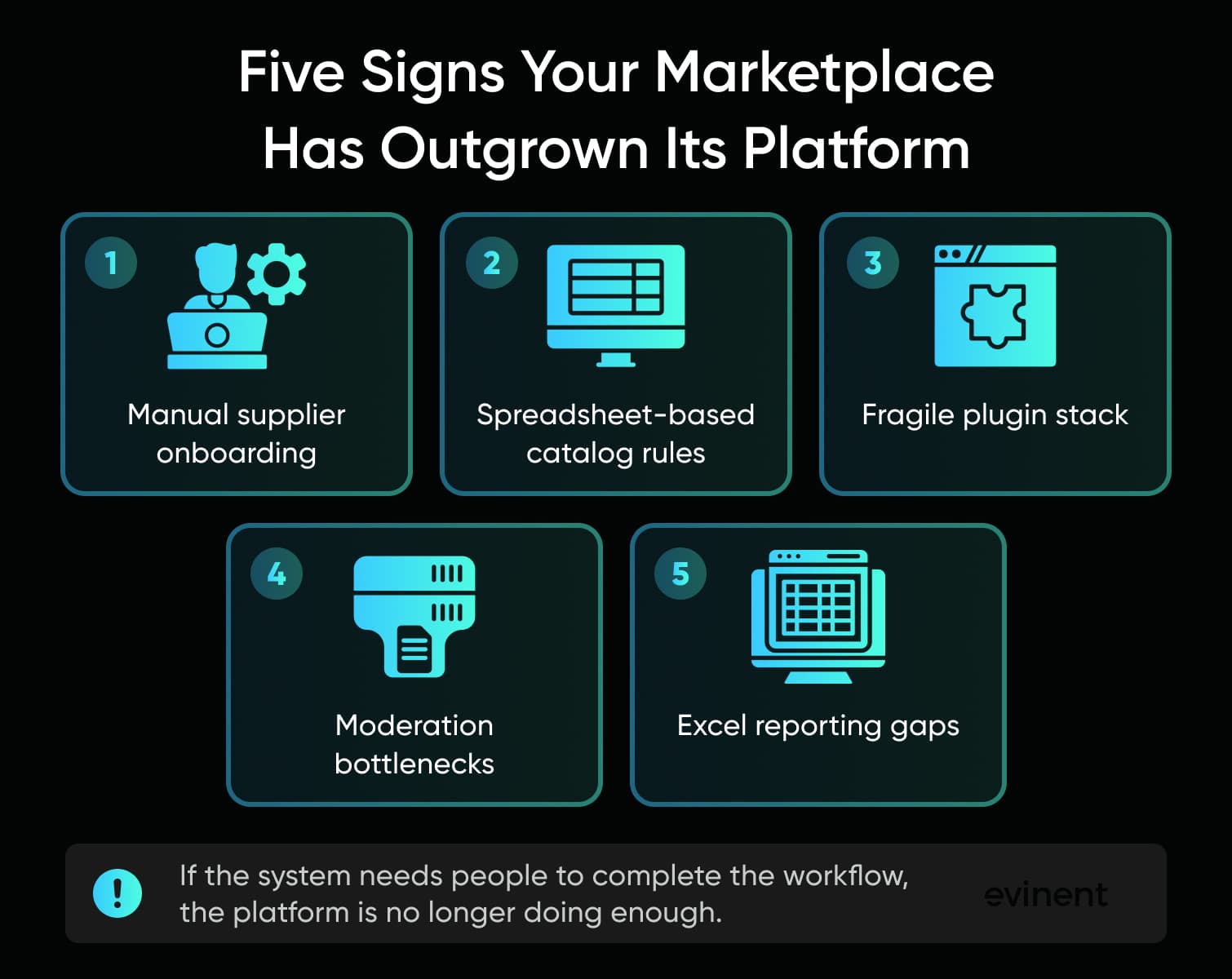
Below are five signs worth taking seriously. Not because any one of them means you must leave your SaaS marketplace tomorrow. But together, they show that the business has grown beyond what the platform can cleanly handle.
Sign 1: Supplier Onboarding Requires Manual Workarounds The Platform Wasn’t Built For
Supplier onboarding looks simple in sales demos.
One sends product data from an ERP that exports fields in a strange order. Another has correct stock data but weak descriptions. Another needs category-specific certificates. Another sells products that cannot be published until documents are checked. One supplier can manage pricing but not product content. Another should only edit inventory. Another needs approval from the marketplace team before any brand claim goes live.
Now the platform has a problem.
Most marketplace platforms can handle basic supplier registration. Many can handle product submission. Some can handle approval status. But mature supplier onboarding is not just "create account and upload SKU." It is a workflow with rules, roles, documents, validation, feedback, and audit history.
When the platform cannot express that workflow, the team starts filling the gaps.
At first, it is fine. Operations reviews files before upload. Supplier managers send instructions by email. A category specialist checks missing attributes. Someone builds an Excel template with required fields marked in yellow. Someone else writes a "read me first" PDF for suppliers.
Then the workaround grows legs.
Supplier onboarding becomes dependent on people rather than the system. New suppliers ask the same questions again and again. Internal teams keep explaining the same validation rules. Product uploads wait in inboxes. Errors are found late, usually after someone has already spent time cleaning the file.
This is one of the clearest signs that a marketplace has outgrown its platform.
If supplier onboarding occurs across email, spreadsheets, and platform screens simultaneously, nobody has a clear view of the process. You cannot easily see where suppliers get stuck. You cannot measure which validation rule fails most often. You cannot compare onboarding speed by supplier type. You cannot tell whether s come from the supplier, the category team, legal review, missing product data, or the platform itself.
And because the process is partly outside the system, it becomes hard to improve.
A custom supplier portal starts making sense when onboarding rules are specific to your business and repeated often enough to slow growth. The goal is not to build a fancy login area. The goal is to make supplier work visible, structured, and easier to manage.
A strong supplier portal can handle things like:
role-based permissions for supplier teams;
category-specific product validation;
required document upload and expiry tracking;
product import mapping by supplier format;
approval workflows with clear rejection reasons;
status tracking for suppliers and internal teams;
clean sync with the marketplace platform, ERP, or PIM.
That last part matters. A supplier portal should not become another disconnected tool. It should reduce the number of places where supplier data hides.
A simple test: if your team needs to explain the onboarding process to every serious supplier individually, the platform is probably not carrying enough of the workload.
Sign 2: Catalog Logic Lives In Spreadsheets Outside The Platform
Every marketplace team eventually creates "the spreadsheet." It has category rules, required attributes, supplier notes, pricing exceptions, marketplace feed logic, image rules, banned words, approved brands, and some columns nobody fully understands anymore. It probably has a name like category_rules_final_final_v6.xlsx.
This is funny until it becomes the source of truth.
Catalog logic moves into spreadsheets when the platform can store products but cannot manage the rules that make those products usable. And in a marketplace, product data is not just content. It affects search, filtering, SEO, recommendations, ads, supplier quality, buyer trust, and conversion.
A basic product model works well at launch. Title, description, price, SKU, stock, category, attributes, images. Enough to start.
But marketplace catalogs do not stay simple for long.
One category needs size charts. Another needs compatibility data. Another needs safety documents. Another needs brand approval. Some products have variants. Some have bundles. Some need restricted claims. Some can be sold in one region but not another. Some need different descriptions for marketplace pages, ads, feeds, and internal search.
A standard platform may allow custom attributes. That helps. For a while.
The ceiling appears when the attribute structure is not enough. The marketplace needs rules.
For example:
Product type A requires five attributes before publishing.
Product type B requires a certificate if the supplier is outside the EU.
Product type C needs a compatibility table.
Supplier X can edit stock but not technical specs.
Marketplace channel Y needs a shorter title.
Search should treat some attributes as filters, but others as ranking signals.
AI-generated descriptions need human approval before publishing.
If those rules live outside the platform, your catalog is split in two. The platform stores product data. The spreadsheet explains what the data should mean.
That is dangerous.
It results in slow publishing, messy search, duplicate products, poor filters, incorrect category placement, weak SEO pages, and endless manual cleanup. It also makes supplier self-service almost impossible because suppliers cannot follow rules the system does not enforce.--
This is where custom catalog management can become a serious business tool.
Not because every marketplace needs a custom PIM. Many do not. But if catalog logic is central to marketplace quality, it should not live in a spreadsheet maintained by one exhausted category manager.
A custom catalog component can help define:
category-specific attribute models;
required and optional fields;
validation rules;
product completeness scores;
supplier-specific mappings;
duplicate detection;
approval rules;
version history;
change logs;
publishing readiness;
export logic for channels and feeds.
The emotional tell is simple: if your team is afraid to change the catalog structure because nobody knows what will break, your platform is no longer managing the catalog. Your people are.
And people should not have to act like a hidden database.
Sign 3: Every New Integration Requires A Plugin That Breaks Something Else
Plugins are useful.
Let’s say that clearly before blaming them for everything. A good plugin can save weeks of work. It can connect payments, shipping, analytics, reviews, CRM, marketplace feeds, marketing tools, or stock sync without custom development. Early marketplace teams should use that advantage.
The problem starts when plugins stop being support tools and become the architecture.
A marketplace with five plugins is normal. A marketplace with thirty plugins, unclear ownership, overlapping data changes, fragile updates, and mysterious background jobs is a different animal.
That is plugin hell.
It usually starts with a simple request.
"We need to connect the ERP."
"We need better search."
"We need product feeds."
"We need loyalty."
"We need a supplier import."
"We need a fraud check."
"We need shipping rates."
"We need reviews."
"We need multi-currency."
"We need advanced pricing."
Each request is reasonable. Each plugin solves one piece. But over time, the platform becomes a crowded room where too many tools are touching the same data.
One plugin modifies checkout. Another changes the order status. Another writes product attributes. Another change stock. Another syncs data overnight. Another depends on a platform version you cannot upgrade yet. Another is no longer actively maintained, but removing it would break reporting.
The team starts living with rules that sound ridiculous but are very real:
"Do not update that extension before the weekend."
"Run the import only after the stock sync finishes."
"That field looks editable, but do not touch it."
"If the order status is wrong, check the plugin logs first."
"We cannot upgrade the platform until we test the shipping module."
This is not just a technical nuisance. It slows business decisions.
When every new integration carries the risk of breaking something else, product teams become cautious. Engineering loses time to regression testing. QA becomes the safety net for architecture problems. Operations loses trust in the system. Leadership starts by asking why simple changes take so long.
A healthy marketplace stack can use plugins without becoming dependent on plugin luck.
The warning sign is not the number of plugins by itself. The warning sign is uncertainty. If nobody can explain which system owns which data, which plugin changes which field, or what happens when an API call fails, the marketplace has outgrown the integration model.
This is where a custom integration layer can help.
Instead of allowing every plugin to connect directly to every process, the marketplace can create clearer boundaries. Product data flows one way. Order data flows to another. Supplier updates pass through validation. Failed syncs are logged. Retries are controlled. The platform stays useful, but it is no longer the place where every integration improvises.
Think of it like adding traffic lights to a busy intersection. The cars were already there. The road was already there. The issue was control.
Sign 4: Your Moderation Team Is The Bottleneck, Not A Feature Of Your Platform
Marketplace moderation is one of those things that looks small until it starts eating the business.
At launch, moderation may be simple. Review new suppliers. Check product listings. Remove obvious mistakes. Approve or reject.
Then the supplier volume grows. Categories multiply. Product data gets more complex. Bad listings start affecting search quality. Buyers complain about wrong information. Internal teams disagree on what should be approved. Compliance rules appear. Brand rules appear. Category rules appear. And suddenly, "approve or reject" is not a workflow. It is a coin toss with extra steps.
Many platforms treat moderation as a status field.
A mature moderation workflow needs context. It needs rejection reasons, comments, rule references, supplier feedback, role permissions, escalation, bulk actions, audit logs, and reporting. It also needs to separate different types of reviews.
A product image issue is not the same as a compliance issue.
A missing attribute is not the same as a suspicious supplier.
A weak title is not the same as a restricted product claim.
A duplicate listing is not the same as a fake product.
If the platform treats all of that as "rejected," the moderation team becomes the missing workflow engine.
That creates two problems.
First, moderation gets slow. Listings are ed because reviewers need to manually inspect too many things. Suppliers ask what went wrong. Category managers chase corrections. The same issues repeat because the system does not learn from them.
Second, moderation becomes inconsistent. Different people approve different things. Rules live in documents, Slack threads, or memory. Suppliers get mixed feedback. Internal teams argue about exceptions.
That inconsistency can hurt the marketplace more than people expect. Bad moderation affects catalog quality. Catalog quality affects search. Search affects buyer trust. Buyer trust affects conversion. Conversion affects supplier satisfaction. Supplier satisfaction affects marketplace supply. There is a chain reaction.
Custom moderation development makes sense when the marketplace needs structured control over what gets published and why. The system should make good decisions easier, not depend on heroic reviewers.
A better moderation component can support:
review queues by category, supplier, risk, or product type;
standard rejection reasons;
internal notes and supplier-facing comments;
automatic checks for missing fields or banned terms;
document review;
escalation paths;
audit history;
repeat issue tracking by supplier;
reporting on approval time and rejection patterns.
This does not mean everything must be automated. Please, no. Some marketplace decisions still need human judgment.
But humans should review exceptions rather than act as the entire operating system.
Sign 5: Reporting Requires Exporting To Excel
Excel is not the enemy.
Honestly, Excel has saved more businesses than the most expensive dashboards. It is quick. It is flexible. Everyone knows how to make a slightly ugly but useful table. For analysis, experiments, and one-off questions, Excel is fine.
The warning sign is different.
If your marketplace requires manual exports to understand basic operations, your platform is not providing leadership with enough visibility.
Standard marketplace dashboards usually answer standard questions:
How many orders came in?
What was the revenue?
Which products were sold?
What is the conversion rate?
Which traffic sources performed?
Useful. But growing marketplaces need operational answers too.
They need to know:
Which suppliers are stuck in onboarding?
Which categories have the most rejected listings?
Which product attributes are most often missing?
Which suppliers send the most broken data?
Which moderation rules slow publishing?
Which integrations fail most often?
Which catalog gaps hurt search?
Which products have traffic but cannot convert because data is incomplete?
Which sellers are technically active but commercially weak?
Which workflow creates the most support tickets?
Those are not vanity metrics. Those are management questions.
When the platform cannot answer them, teams export data. Then they clean it. Then they combine it. Then they argue about definitions. Then someone builds a report. By the time leadership sees the answer, the problem may already be old.
This is especially painful for C-level teams because the marketplace can look healthy at the top level while rotting in specific workflows.
Revenue may grow while supplier activation slows.
Traffic may grow while catalog quality drops.
Orders may grow while the moderation increases.
Product count may grow while useful product data gets worse.
Without operational reporting, leaders see outcomes but not the machinery behind them.
Custom reporting does not need to mean a giant BI project. Sometimes it starts with a focused operational dashboard that pulls from the platform, supplier portal, catalog component, moderation queue, and integration logs.
The point is to show the marketplace as a working system, not just a sales channel.
A good marketplace reporting layer might track:
supplier onboarding time;
product approval time;
catalog completeness;
listing rejection reasons;
import failure rates;
integration errors;
search gaps;
stock sync s;
category-level data quality;
operational workload by team.
Here is the practical test.
If your weekly marketplace report depends on someone manually exporting, cleaning, merging, and explaining data, the platform is not supporting decision-making. It is storing transactions.
Those are different jobs. And once the marketplace becomes a serious revenue channel, storing transactions is not enough.
What "Going Custom" Actually Means (And What It Doesn’t)
"Custom marketplace development" sounds heavier than it often is.
For some executives, the phrase evokes the worst possible picture: a two-year rebuild, a huge budget, a nervous board, a tired engineering team, and a launch date that keeps getting pushed back. Nobody wants that. Especially not a marketplace that is already profitable and cannot simply pause operations while someone rebuilds the machine beneath it.
But going custom does not always mean replacing the whole platform.
In fact, for many marketplaces, that would be the wrong move.
The smarter question is not, "Should we leave SaaS?" It is, "Which parts of our marketplace are now too specific, too fragile, or too important to keep forcing into a generic platform?"
That is a very different question.
A marketplace can keep its existing storefront. It can keep payments. It can keep a basic checkout. It can keep parts of the supplier admin. It can keep standard integrations that still work. Custom development should focus on the areas where the marketplace’s business logic creates friction.
Think of it like a restaurant that started in a shared kitchen. At first, the shared setup was perfect. Low cost. Fast start. No need to buy every piece of equipment. But as the restaurant grows, it may need its own prep station, cold storage, and ordering process. That does not mean it needs to build a farm, a delivery fleet, and a new electric grid. It needs control over the parts that affect the food.
Marketplaces are similar.
There are three practical levels of custom development.
Level 1: Extend The Existing Platform
This is the smallest move.
You keep the current marketplace platform and add custom logic around it. That may mean a private plugin, a small internal tool, middleware, a custom import validator, a reporting connector, or a lightweight admin panel for a narrow workflow.
This path makes sense when the platform is still mostly working.
Orders are fine. Checkout is fine. Suppliers can still use the system. The catalog is annoying but not collapsing. The team has a few specific pain points that native settings cannot solve.
For example, a marketplace may build:
a custom CSV validator before supplier uploads enter the platform;
a small dashboard showing failed product imports;
a middleware service that sends order data to ERP;
a custom admin screen for category managers;
athat checks required attributes before publishing;
a private plugin for supplier-specific pricing rules.
This can be a good step when the problem is narrow and the risk is low.
The upside is speed. The team can fix a single painful workflow without touching the entire architecture. Costs are lower. Training is easier. Business disruption is limited.
The downside is that extensions can become another layer of patches if the core platform model is already wrong.
If your catalog rules are too complex for the platform, adding one more validator may help for three months. But if every category needs different rules, every supplier needs different mapping, and every publishing flow needs different approval logic, the validator becomes a polite bandage on a broken process.
So Level 1 works best when the platform ceiling is local.
One workflow hurts.
One integration needs help.
One report is missing.
One validation step needs structure.
If the pain is everywhere, extension will not be enough.
Level 2: Replace Specific Marketplace Components
This is the middle path, and honestly, it is where many mature marketplaces should start.
You keep the platform parts that still do their job, but replace the components that have become too important or too specific to keep inside generic settings.
This might mean building a custom supplier portal while the existing commerce platform continues to handle product display and checkout. Or building a custom catalog management layer that feeds the marketplace platform. Or replacing the moderation workflow while keeping the current storefront. Or creating a reporting layer that pulls data from the platform, ERP, supplier portal, and catalog tools.
This is component replacement.
It is not as light as a plugin. It is not as risky as a full rebuild. It is the "fix the part that actually hurts" option.
Common custom marketplace components include:
supplier onboarding portal;
catalog management system;
moderation workflow;
marketplace reporting dashboard;
integration layer;
pricing or commission engine;
seller performance module;
product data quality tool.
This approach works because marketplace platforms often fail unevenly.
The storefront may be fine, but supplier onboarding may be painful.
Checkout may be fine, but catalog logic may be a mess.
Payments may be fine, but reporting may be useless.
Product display may be fine, but moderation may be blocking growth.
So why replace the whole thing?
The technical idea behind this is not new. AWS describes the strangler fig pattern as a way to migrate a monolithic application incrementally, with lower transformation risk and less business disruption. Microsoft’s Azure Architecture Center explains the same pattern: gradually replacing parts of legacy functionality with new applications and services.
That same thinking fits marketplaces well.
You do not have to move everything at once. You can add a new component alongside the old workflow, route part of the process through it, test the output, expand its usage, and only then retire the old process.
A custom supplier portal can start with one supplier group.
A catalog component can start with one category.
A moderation workflow can start with new listings only.
A reporting dashboard can start with the operational metrics leadership needs most.
This keeps the marketplace alive during change.
The upside is control. The marketplace gets custom logic where it matters without losing the stability of tools that still work.
The downside is discipline. Component replacement needs clear data ownership, clean APIs, rollout planning, and a real understanding of which system is the source of truth.
Without that, the new component becomes one more place to check. That is the opposite of progress.
A good component replacement should remove a workaround, not create a prettier one.
Level 3: Build The Core From Scratch
Sometimes the platform really is the wrong base.
It happens.
The marketplace model may be too specific. The workflow may be too B2B-heavy. The supplier logic may be too complex. The data model may be too far from what the platform supports. The business may need strict control over security, roles, pricing, contract terms, approval flows, or system behavior. Or the existing platform may have become so loaded with plugins and exceptions that every new feature feels like surgery.
In those cases, a full custom marketplace build can make sense.
But it should be treated as a serious business decision, not a default answer.
A full rebuild is not just a development project. It is a migration project, a training project, a QA project, a data governance project, a stakeholder management project, and probably a patience project too.
The risk is not only the cost. The risk is time.
While the team rebuilds, the current marketplace still needs support. Suppliers still need help. Buyers still expect the site to work. Competitors do not wait politely. Internal teams may start asking why the new system is not ready yet. Then the scope expands because everyone wants their long-awaited fixes included.
This is how full rebuilds become heavy.
A full custom core may be the right choice when:
the current platform cannot support the business model;
core data structures are wrong and cannot be fixed around the edges;
platform performance or security risks are serious;
supplier, buyer, and internal workflows are all limited by the same foundation;
the company needs deep ownership over product direction;
component replacement would only the same decision.
Even then, the rebuild should be staged.
The worst version is the big reveal: the old platform runs for a year while the new one is built in private, then everyone switches at once. Sometimes that works. Often it creates stress, hidden gaps, and a long tail of post-launch repairs.
The safer version borrows from the same incremental thinking: replace business domains step by step where possible. Keep old and new systems connected while the new core proves itself. Test with real suppliers. Move data in controlled phases. Let internal teams learn before the old system disappears.
A full rebuild should not feel like jumping off a cliff because someone promised there is a trampoline at the bottom.
It should feel like building a bridge while traffic still moves.
How To Choose The Right Level
The choice between extension, component replacement, and full rebuild depends on where the pain lives.
If one workflow is broken, extend.
If one business-critical area is broken, replace that component.
If the whole operating model does not fit the platform, consider rebuilding the core.
That sounds simple. In practice, teams blur the lines.
A useful decision table:
Situation | Better First Move | Why |
One missing report slows a weekly meeting | Extend existing platform | The problem is narrow |
Supplier onboarding depends on email and spreadsheets | Replace supplier portal | The workflow is repeated and business-critical |
Catalog rules live outside the platform across many categories | Replace catalog component | The data model needs stronger control |
Plugins conflict during every release | Build an integration layer or replace the affected component | The architecture needs clearer boundaries |
The platform cannot support pricing, roles, catalog, supplier workflows, or integrations | Consider a full custom core | The mismatch is structural |
Checkouts and payments work well, but operations are manual | Keep checkout, customize operations | No reason to rebuild what works |
The practical advice is almost boring: start with the smallest move that removes the largest constraint. The smallest move that truly reduces the business bottleneck.
That is the difference between smart custom development and expensive custom noise.
Which Components Are Worth Building Custom
Not every marketplace component deserves custom development.
That sentence sounds obvious, but it saves budgets.
When a marketplace starts to feel constrained, the natural reaction is to question everything. The platform, plugins, admin panel, integrations, database, storefront, supplier tools, and reporting. Suddenly, every part of the stack looks suspicious.
But custom development should not be used like a hammer.
Some components are worth building because they carry your marketplace’s specific logic. Others are better bought, rented, or left on the current platform because they are standard, well-tested, and expensive to recreate without real advantage.
The question is not, "Can we build this?"
Of course, you can build it. With enough time, budget, and stubbornness, most things can be built.
The better question is, "Would owning this component make the marketplace stronger, faster, cleaner, or harder to copy?"
If the answer is yes, custom may make sense. If the answer is no, do not romanticize ownership. Nobody gives you bonus points for building your own email notification system when SendGrid, Mailchimp, Customer.io, Klaviyo, or Braze can already do the job.
The cleanest way to decide is to split components into two groups:
components that contain marketplace-specific business logic;
components that are standard infrastructure or commodity workflows.
The first group is where custom development can create value.
The second group is where custom development can quietly eat money.
Build Custom When The Component Carries Your Marketplace Logic
Some marketplace components are not generic because the marketplace itself is no longer generic.
A B2B spare-parts marketplace, a healthcare procurement marketplace, a fashion resale marketplace, a construction materials marketplace, and a multi-vendor electronics marketplace may all be called "marketplaces." Under the hood, they behave very differently.
That is where custom marketplace component development becomes useful. Not because custom code is somehow nobler than SaaS. It is not. Custom only wins when it lets the marketplace express logic that packaged tools keep flattening.
Custom Supplier Portal
A supplier portal is worth building custom when supplier onboarding involves more than just account creation.
For many marketplaces, supplier onboarding includes company verification, contract data, product upload, document collection, role permissions, catalog mapping, approval steps, and ongoing supplier performance tracking. That is already more than a standard seller profile.
The warning sign is easy to spot: your supplier managers spend more time explaining the process than improving it.
A custom supplier portal can support:
supplier-specific onboarding steps;
product upload templates by category;
validation before data enters the platform;
document upload and expiry tracking;
role-based access for supplier teams;
supplier status dashboards;
approval comments and rejection reasons;
integration with ERP, PIM, CRM, or the main marketplace platform.
This is not just about making life easier for suppliers. It also gives the marketplace team cleaner data earlier.
That matters because bad supplier data does not stay in onboarding. It leaks into search, filters, SEO pages, buyer experience, analytics, and support tickets.
A custom supplier portal can also reduce the "please email us the file" habit. And that habit is dangerous. Once product data starts arriving by email, the platform is no longer the workflow. It is just the place where someone eventually pastes the result.
For marketplaces where supplier growth is a core growth lever, supplier portal development is often one of the most practical custom investments.
Custom Catalog Management
Catalog management is one of the strongest candidates for custom development.
Why? Because catalog logic often becomes the marketplace’s real operating system.
A marketplace catalog is not just a list of products. It defines how buyers search, compare, filter, trust, and buy. It also defines how suppliers submit data, how moderators review listings, how SEO pages are built, how product feeds work, and how internal teams understand assortment quality.
When the catalog is simple, a packaged platform can manage it.
When the catalog becomes rich, uneven, regulated, supplier-driven, or category-specific, the platform often starts to bend.
Custom catalog management makes sense when you need:
category-specific attribute models;
product completeness scoring;
supplier data mapping;
duplicate detection;
variant and bundle logic;
approval rules by category;
channel-specific product descriptions;
controlled taxonomy changes;
product data history;
custom export rules;
data quality reporting.
This is especially important for marketplaces where search quality depends on structured attributes.
A buyer searching for "black office chair under 300 euros" does not care that the supplier uploaded "dark ergonomic seat" into the wrong field. The buyer just sees bad filters. Or no results. Or irrelevant results. Then they leave.
Catalog quality feels like a back-office issue until it becomes a revenue issue.
Custom catalog management does not always mean replacing a PIM. Sometimes it means building a marketplace-specific layer on top of an existing PIM or commerce platform. The question is where the rules should live.
If the rules live in spreadsheets, the marketplace has a problem.
If the rules live in a custom catalog component that validates, tracks, and syncs product data, the marketplace has control.
This is the kind of component that can be tied directly to ecommerce marketplace software development, because the catalog structure affects almost every other workflow in the marketplace.
Custom Moderation Workflow
Moderation is rarely treated as a product feature early enough.
That is understandable. It does not look exciting. It does not make a nice landing page screenshot. It sounds like an internal admin problem.
Then supplier volume grows, and moderation becomes one of the main reasons products do or do not go live.
A custom moderation workflow is worth building when approval decisions need structure. That usually happens when product quality, compliance, supplier trust, brand rules, or marketplace safety are part of the business model.
Basic platform statuses are not enough:
draft;
pending;
approved;
rejected.
Real moderation needs more context.
Why was the product rejected? Which rule failed? Was the supplier notified? Has the same issue happened before? Did a human reviewer override an automated rule? Which categories create the biggest queue? Which suppliers keep sending broken listings?
Without those answers, moderation becomes a human memory system.
That does not scale well.
A custom moderation component can include:
review queues by category, risk, supplier, or product type;
standard rejection reasons;
supplier-facing comments;
internal-only notes;
escalation rules;
document checks;
automated pre-validation;
audit logs;
reviewer workload tracking;
analytics on rejection patterns.
This is one of those components where custom development can reduce both risk and frustration.
And frustration matters. If moderators hate the workflow, suppliers feel it. Products get stuck. Feedback gets vague. The marketplace runs more slowly than it should.
A good moderation system does not remove human judgment. It protects it. It lets people focus on real exceptions instead of checking the same missing fields all day.
Custom Reporting Dashboard
Marketplace reporting often starts with sales numbers. But C-level teams usually need more than sales reporting once the marketplace becomes operationally complex.
They need to understand what is happening inside the machine.
A custom reporting dashboard is worth building when platform analytics answer marketing questions but not marketplace management questions.
For example:
How long does supplier onboarding take by supplier type?
Which step creates the longest ?
Which categories have the lowest product data quality?
Which suppliers create the most moderation work?
Which product attributes are most often missing?
Which integrations fail repeatedly?
Which products are visible but not buyable?
Which listings lose traffic due to a lack of filters?
Which operational issues affect revenue?
These questions are too specific for most standard platform dashboards.
A custom reporting layer can pull from the marketplace platform, supplier portal, catalog component, moderation tool, ERP, CRM, and integration logs. It does not need to become a giant BI monster on day one. It can start with one dashboard that shows the operational metrics leadership actually uses.
Honestly, this is where many marketplaces get immediate value.
Not because dashboards are magical. They are not. A dashboard with bad data is just a prettier lie.
But when the reporting layer is tied to clean workflows and clear data ownership, it changes conversations. Teams stop arguing about whose export is correct. Leaders stop waiting for manual analysis. Operations can see where work gets stuck. The product can be prioritized based on real bottlenecks.
This is also where custom reporting can connect to products like Evinent Analytics if the marketplace needs deeper customer, transaction, campaign, or predictive analysis later. The useful starting point is still simple: show the work, show the s, show the weak spots.
Custom Pricing Or Commission Engine
Pricing and commission logic can look harmless at first.
A simple marketplace commission might be 10% per transaction. Easy.
Different supplier tiers get different rates. Some categories have different margins. Some buyers have contract pricing. Some products have minimum advertised prices. Some suppliers pay listing fees. Some orders include marketplace-funded discounts. Some commissions depend on fulfillment type, geography, payment method, or negotiated agreements.
Now the simple commission rule has become financial logic.
If the platform cannot model that logic clearly, teams start patching it. A plugin here. A manual adjustment there. A finance spreadsheet at the end of the month.
This is risky because money logic needs trust.
A custom pricing or commission engine may be worth building when marketplace revenue rules are too specific to platform settings and too important to correct manually.
It can support:
supplier-specific commission rules;
category-based fees;
contract pricing;
promotional rules;
minimum margin checks;
multi-currency logic;
order-level fee breakdowns;
audit history;
finance exports;
dispute support.
This does not mean every marketplace needs a custom pricing engine. Many do not. But once the finance team starts manually correcting commissions, the system is asking for help.
A pricing engine is not just a technical component. It is a trust component.
Suppliers need to trust payouts. Finance needs to trust reports. Leadership needs to trust margin data. Buyers need to see correct prices.
If pricing logic is scattered across plugins, platform settings, and spreadsheets, trust becomes fragile.
Custom Integration Layer
An integration layer is worth considering when the marketplace has too many direct connections between systems. The problem is not the integrations themselves. Modern marketplaces need them. The problem is uncontrolled integration logic.
A custom integration layer can create a cleaner flow between systems. It can define how data moves, what happens when sync fails, which system wins during conflicts, and how teams monitor errors.
This is especially useful when marketplace platform constraints create a plugin dependency.
A good integration layer can handle:
API orchestration;
queue-based processing;
retry logic;
error logging;
data transformation;
conflict rules;
monitoring;
supplier data ingestion;
ERP and PIM sync;
marketplace platform updates.
The business value is fewer surprises.
When a product update fails, someone knows why. When stock sync is ed, the system displays a notice. When an ERP field changes, it does not quietly poison the marketplace catalog. When a supplier import fails, the error is visible before buyers see bad data.
That is boring in the best possible way.
Keep Or Buy Commodity Components
Now for the other side.
Some components should usually stay on the platform or be bought from established vendors. Building them custom can be a distraction unless your marketplace has unusual requirements.
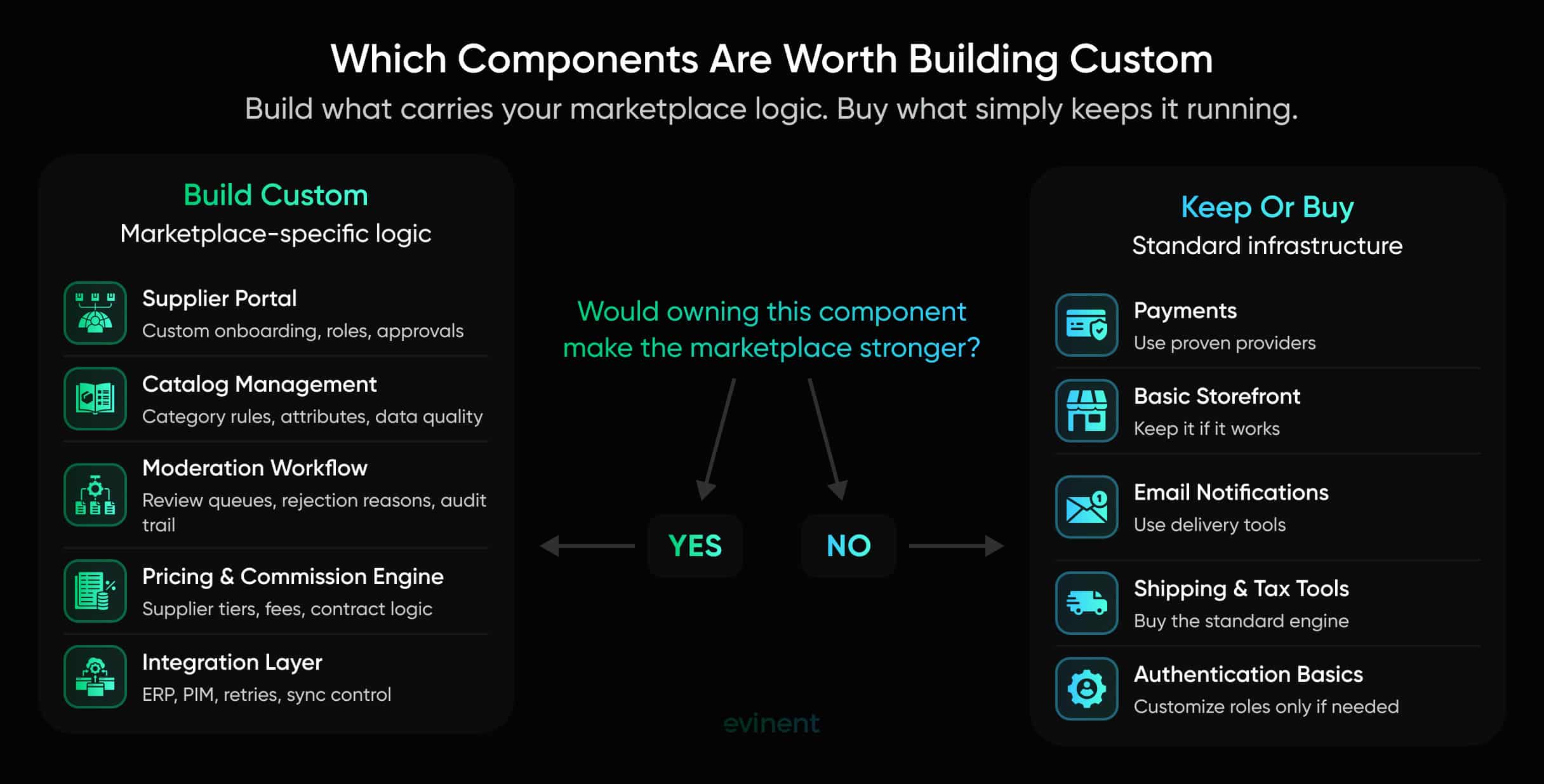
Payments
Payments are rarely the place to be creative. Stripe, Adyen, PayPal, Braintree, Checkout.com, Mollie, and other payment providers already handle a lot of difficult work: cards, wallets, fraud checks, compliance, payouts, refunds, disputes, regional payment methods, and security requirements.
For most marketplaces, the smart move is to integrate with proven payment infrastructure and build custom logic around marketplace-specific payout rules only when needed.
Do not build payment plumbing unless there is a very strong reason.
There usually is not.
Basic Storefront
If the buyer-facing storefront works well, keep it.
A custom storefront can make sense when UX, search, personalization, B2B workflows, or performance are major competitive factors. But if the platform storefront is stable, fast enough, and easy to manage, rebuilding it may not be the highest-value move.
Many marketplaces have bigger problems behind the curtain.
Supplier data is messy.
Moderation is slow.
Catalog rules are unclear.
Integrations are fragile.
Reporting is manual.
Fix those first if they are the real constraint.
A beautiful storefront sitting on bad product data is just a nice window display with the wrong items behind it.
Email Notifications
Transactional emails are important, but usually not worth building from scratch.
Order ation, password reset, supplier status updates, moderation feedback, shipping updates, invoice notices. These should work reliably, but the sending infrastructure can usually come from existing tools.
The custom part may be the trigger logic, not the email system itself.
For example, a custom moderation component may decide when a supplier gets a rejection notice and what reason appears in it. But the actual email delivery can still go through a standard provider.
That is a good split.
Own the business logic. Rent the delivery pipe.
Shipping Integrations
Shipping can get complicated very quickly.
Rates, labels, carriers, delivery zones, returns, tracking, cross-border rules, package dimensions, pickup points, partial shipments. It is a lot.
Unless shipping is part of your marketplace’s core advantage, use proven shipping integrations where possible.
Custom development may still be needed around rules: which supplier ships, who pays, how orders split, how tracking updates reach buyers, how exceptions are handled. But building the entire shipping layer from scratch is usually not the first move.
Tax And Compliance Tools
Tax calculation is another area where building everything yourself can create risk.
VAT, sales tax, cross-border rules, marketplace facilitator laws, invoicing requirements, local reporting. These rules change. They are easy to get wrong and painful to fix later.
Use trusted providers where possible. Build custom connectors or reporting logic if your marketplace needs them.
Again, the pattern holds: buy the standard engine, customize the marketplace-specific workflow around it.
Authentication Basics
Identity and access management can be bought or built on mature frameworks.
That said, marketplace role logic often needs custom work. A supplier admin, supplier editor, category manager, moderator, finance user, buyer admin, buyer employee, and internal support person do not need the same permissions.
The basic login system can be standard.
The permission model may need careful custom design.
This is especially true in B2B marketplaces, where buyers may have approval chains, purchasing limits, company accounts, and multiple users under one organization.
The Build-Vs-Buy Rule For Marketplaces
Here is the simplest rule:
Build what makes your marketplace different. Buy what makes your marketplace function.
That is not perfect, but it is useful. Custom development should not be a status symbol. It should remove a constraint.
That is the real ROI test.
The Migration Risk Nobody Talks About: Continuity During Transition
Most marketplace migration conversations start in the wrong place.
They start with the future architecture.
New services. Cleaner APIs. Better data model. Stronger supplier workflows. Less plugin dependency. More control. Lovely diagram. Everyone nods.
But the hard part is not the future-state diagram.
The hard part is what happens on a normal Tuesday while the marketplace is still running.
Suppliers still need to upload products. Buyers still need correct prices. Orders still need to move. Stock still needs to sync. Moderators still need to approve listings. Finance still needs commission data. Support still needs to know where to look when something goes wrong.
That is the real fear for a CTO.
Not "Can we build the new component?"
Usually, yes.
The fear is: "Can we move without breaking the business?"
Marketplace migration risk is not only downtime. Downtime is obvious. Everyone understands the fear of the site being unavailable. But many marketplace transitions fail in quieter ways. The website is technically up, yet product data is wrong. Suppliers are confused. Internal teams check two systems. Reports stop matching. Orders flow, but statuses arrive late. Nobody is sure which system owns what.
That kind of disruption is harder to explain because it looks smaller from the outside.
Inside the business, it can feel awful.
The Marketplace Cannot Pause While You Fix the Marketplace
A marketplace is not a brochure site.
You cannot put up a polite maintenance message for three weeks and come back with a better architecture. Even a short freeze can hurt supplier trust, buyer confidence, and revenue.
This is especially true for marketplaces with active supplier operations. Suppliers are not sitting there waiting for your migration plan to become elegant. They have their own teams, systems, catalogs, deadlines, and commercial pressure.
If the new workflow creates friction, they will not write a thoughtful product feedback document. They will send files by email again. They will call their account manager. They will uploads. They will find the path of least resistance.
And then the manual process returns.
That is one of the most common migration traps: the new component goes live, but the old workaround persists because the rollout did not align with actual supplier behavior.
A migration plan should account for that.
Not in a vague "change management" way. In a very practical way:
Which suppliers move first?
Which suppliers need training?
Which suppliers have custom import formats?
Which suppliers are business-critical?
Which categories are too risky to move first?
Which internal team handles issues during the transition?
What happens if a supplier refuses or fails to use the new process?
Those questions are not glamorous. They are the work.
Data Continuity Is More Than Data Migration
Data migration often gets treated like a technical task: export from old system, transform, import into new system, validate, done.
If only.
Marketplace data has context. Lots of it.
A product record may include supplier ownership, category mapping, attributes, images, pricing, stock, moderation status, rejection history, SEO fields, channel rules, variant links, compliance documents, and internal notes. Some of that data may be stored in the platform. Some may live in plugins. Some may live in spreadsheets. Some may live in email threads. Some may live only in people’s heads, which is the worst database but somehow still common.
So when teams say "we need to migrate product data," the real question is: which product truth?
The published product?
The supplier-submitted product?
The moderated version?
The enriched version?
The ERP version?
The search-indexed version?
The version used for ads?
The version shown to buyers?
A custom marketplace component can only work if data ownership is clear.
Before transition, each data object needs a source of truth. Not someday. Before build.
For example:
Data Object | Possible Source Of Truth | Migration Risk |
Supplier legal profile | ERP or supplier portal | Conflicting company data |
Product attributes | Catalog component or PIM | Missing or wrongly mapped fields |
Stock | ERP or WMS | Overselling or hidden products |
Price | Platform, ERP, or pricing engine | Wrong buyer price |
Moderation status | Moderation component | Products stuck in review |
Product images | DAM or platform media storage | Broken product pages |
Commission rules | Finance system or custom engine | Supplier payout disputes |
Reporting events | Analytics layer | Inconsistent dashboards |
The table looks simple. The work behind it is not.
But without this clarity, migration becomes guesswork. And guesswork around marketplace data is expensive.
Supplier Disruption Is A Business Risk, Not A UX Detail
Marketplace teams often underestimate supplier disruption.
They assume that if the new portal is better, suppliers will use it. That is a sweet thought. Sometimes true. Often incomplete.
Suppliers care about speed, clarity, and commercial value. They do not care that the new system has cleaner architecture. They care whether they can upload products faster, fix errors without emailing support, see approval status, and understand what the marketplace wants from them.
If the migration makes their work harder for even a short period, supplier managers will hear about it.
This is why supplier migration should usually happen in waves.
Do not start with the most complex supplier. Do not start with the highest-revenue supplier either, unless there is a strong reason. Start with a group that is sufficiently representative to test the workflow, but not so critical that every issue becomes a fire.
A practical rollout may look like this:
Internal team testing with historical supplier data.
One friendly supplier with a simple catalog.
A small supplier group in one category.
A supplier group with more complex import rules.
High-volume suppliers.
New supplier onboarding only through the new portal.
Existing suppliers moved by category or contract cycle.
This gives the team time to learn.
And yes, it may feel slower. But a controlled rollout is often faster than a broken launch followed by six weeks of apology emails.
The Old And New Systems Need A Temporary Peace Treaty
During migration, old and new systems often need to run together.
That is uncomfortable, but normal.
The mistake is pretending this temporary phase will be simple. It will not be simple unless someone designs it properly.
AWS and Microsoft both describe the strangler fig pattern as an incremental approach to replacing old system functions with new services over time, rather than switching everything at once. The idea is simple enough: route part of the workflow to the new component, prove it works, expand it, then retire the old function.
For marketplace component migration, this can mean:
new suppliers use the custom supplier portal, while existing suppliers stay on the old flow for now;
one category uses the custom catalog model, while other categories remain in the platform;
new listings go through the custom moderation workflow, while historical listings stay unchanged;
operational reports pull from both systems until the old workflow is retired;
platform APIs still publish products, but validation happens in the new component first.
The goal is not to live with two systems forever. The goal is to create a safe bridge. A bridge is temporary. It still needs engineering.
Reporting Must Stay Trustworthy During The Move
Migration can damage trust in reporting faster than people expect.
Before the migration, leadership may already be frustrated with manual exports. But at least the old reporting method is familiar. During the transition, numbers may start to differ.
The old platform says 42,000 active products.
The new catalog component says 39,800 publish-ready products.
The moderation tool says 3,100 products are pending.
The supplier portal says 500 uploaded products failed validation.
Finance has another number.
None of these numbers may be wrong. They may simply mean different things.
That is why metric definitions need to be written down before rollout.
For example:
What counts as an active supplier?
What counts as an active product?
What does "published" mean?
What does "ready to publish" mean?
What is a failed upload?
What is a rejected listing?
What is a moderation ?
What timestamp defines onboarding completion?
This sounds painfully detailed because it is. But marketplace reporting depends on definitions.
If definitions are unclear, teams lose trust in the new component even if it works well.
A migration dashboard can help here. Not a polished executive dashboard. A practical transition dashboard that shows:
records migrated;
records failed;
sync errors;
products pending review;
supplier groups moved;
API failures;
rollback events;
data mismatches;
old vs new workflow volume.
During transition, this dashboard is less about insight and more about safety.
It tells the team where the floor is creaking.
Rollback Planning Is Not Pessimism
Some teams avoid rollback planning because it feels negative.
That is a mistake.
Rollback planning is not a lack of confidence. It is respect for reality.
Marketplace systems are connected. A change to the supplier portal can affect catalog data. Catalog data can affect search. Search can affect conversion. Moderation status can affect product availability. Product availability can affect revenue. A small issue can travel.
Before launching a custom component, the team should know:
what can be rolled back;
how long rollback takes;
which data may need reconciliation;
who makes the rollback decision;
which suppliers or categories are affected;
how support communicates during the issue;
what happens to records created during the failed window.
This is especially important if old and new systems run in parallel.
A rollback is not always "go back to the old system." Sometimes it means pausing a sync, disabling one workflow, moving one supplier group back, or switching a category to manual approval until the issue is fixed.
The point is to avoid improvising under pressure.
Because under pressure, teams make weird decisions. Everyone does.
The Best Migration Feels Uneventful
This may sound strange, but a good marketplace migration is often boring. That does not mean the work is easy. It means the risk was managed before it became visible.
For C-level teams, this is worth remembering. A migration that looks uneventful from the outside may be the result of very good planning. The business keeps running. Suppliers adapt. Internal teams learn. Reports stay usable. The old workaround gets removed.
That is success. Success is when the marketplace can do the work it already needs to do, with less manual effort, less risk, and less reliance on people remembering hidden rules.
That is what continuity during transition is really about.
How To Scope A Custom Marketplace Component: A Practical Framework
A custom marketplace component should not start with a feature list.
Someone says, "We need a supplier portal." Then the team starts listing screens: login, dashboard, product upload, documents, messages, analytics, settings, user roles, approvals. The list grows. Everyone adds one more thing. The MVP becomes a "small" version of a huge platform. Six weeks later, nobody is fully sure what problem the component is supposed to solve first.
So start somewhere else.
Start with the bottleneck.
A good custom component should remove a specific constraint from the marketplace. It should make a painful workflow faster, safer, clearer, or less dependent on manual work. If it does not do that, it may still be nice software, but it will not change the business.
Here is a practical way to scope it.
1. Name The Operational Problem, Not The Feature
"Build a custom supplier portal" is not a problem.
It is a possible answer.
The problem may be:
supplier onboarding takes 21 days;
45% of uploaded products need manual correction;
category managers maintain validation rules in Excel;
moderation has no rejection reason history;
product import failures are found too late;
supplier support tickets grow every time a new category launches;
leadership cannot see which suppliers are stuck.
That is the real starting point.
The sharper the problem, the easier the scope. A vague problem creates vague software. And vague software tends to become expensive because nobody knows where to stop.
For example, "we need better supplier onboarding" is too soft.
Better version:
"New suppliers need an average of 18 working days to publish their first approved product because product files are reviewed manually, required documents are checked outside the platform, and suppliers cannot see what failed validation."
Now the project has shape.
The custom component must reduce onboarding time, structure file validation, manage required documents, and show suppliers what needs fixing. That is already much clearer than "supplier portal."
2. Map The Current Workflow, Including The Ugly Parts
Do not map the ideal workflow first.
The real workflow is where the truth lives. It includes the spreadsheet nobody mentions in official process docs. The Slack message to the category manager. The email from the supplier with a corrected file. The manual database change. The Friday export. The person who checks one field because the platform cannot.
This may feel awkward. Good. That means you are close to the useful stuff.
For a supplier onboarding component, the current workflow map should answer:
Who invites the supplier?
Where does the supplier enter company data?
Who checks legal or contract details?
How are product files received?
Where are validation rules stored?
Who checks missing attributes?
Who approves documents?
How is feedback sent to the supplier?
When is the supplier considered active?
Which data enters the marketplace platform?
Which data is copied manually?
Where do errors usually appear?
Many teams discover that the "current workflow" is not a single workflow. It is five workflows wearing the same coat.
That is normal.
The purpose of mapping is not to shame the current process. The current process probably helped the marketplace survive. The purpose is to decide which parts should become software and which should be removed.
A small warning: do not automate every current step just because it exists. Be a little ruthless.
3. Define The Source Of Truth Before Development Starts
This is one of the biggest scoping mistakes in marketplace projects.
Teams design a component, build screens, connect APIs, and only then ask, "Wait, which system owns this data?"
Too late.
A custom marketplace component needs clear data ownership from the beginning. Otherwise, it becomes another place where data can disagree.
Take product data as an example. For each important data object, decide:
Data Object | Source Of Truth | Who Can Edit It | Sync Direction | Conflict Rule |
Supplier company profile | ERP or supplier portal | Supplier + internal admin | Portal to ERP/platform | Internal admin wins |
Product attributes | Catalog component | Supplier + category team | Catalog to platform/search | Catalog wins |
Stock | ERP or WMS | Supplier system or operations | ERP/WMS to platform | ERP/WMS wins |
Price | ERP, pricing engine, or platform | Finance or supplier role | Defined by pricing model | Pricing owner wins |
Documents | Supplier portal | Supplier + compliance team | Portal to internal storage | Latest approved document wins |
Moderation status | Moderation component | Marketplace reviewers | Moderation to platform | Moderation wins |
This table does not need to be fancy. It needs to exist.
Without it, the team will create hidden conflicts.
A supplier changes product data in the portal. A category manager changes the same field in the platform. An ERP sync overwrites both. Search shows old data. Reporting shows another version. Then everyone loses half a day trying to find out why.
Data ownership is not paperwork. It is protection.
4. Separate MVP Logic From "Someday" Logic
Marketplace people are very good at imagining edge cases.
That is useful. It can also destroy an MVP.
When scoping a custom component, split requirements into three groups:
Group | Meaning | Example |
Must Work On Day One | Required to replace the manual workflow | Supplier uploads products, validation runs, admin approves |
Soon After Launch | Important but not needed for first rollout | Supplier performance dashboard, bulk document reminders |
Later If Proven Useful | Nice, risky, or dependent on more data | AI listing suggestions, advanced supplier scoring |
This prevents the common trap where the MVP becomes a wish list.
A supplier portal MVP may not need every supplier insight, every permission detail, every message type, and every dashboard view. It may only need to handle the first painful workflow better than the current process.
For example:
Day-one supplier portal scope:
supplier login;
company profile;
user roles;
product file upload;
basic validation;
document upload;
status tracking;
admin review;
rejection reasons;
sync to platform.
Not day one:
advanced supplier analytics;
AI product description generation;
complex supplier scorecards;
chat with account managers;
predictive assortment suggestions;
full contract management.
Those may be useful later. But if they the part that removes manual onboarding pain, they are hurting the project.
A good MVP is not the smallest thing the team can build. It is the smallest thing that changes the workflow.
5. Write The Integration Map Early
Every custom marketplace component has neighbors.
Do not leave integrations as a vague technical note.
A supplier portal may need to connect with:
marketplace platform;
ERP;
PIM;
CRM;
identity provider;
file storage;
notification tool;
moderation workflow;
analytics;
internal admin tools.
A catalog component may need to connect with:
supplier portal;
platform product database;
search engine;
recommendation system;
ad feeds;
ERP;
PIM;
translation tool;
media storage.
For each integration, define what moves, when it moves, and what happens if it fails.
A basic integration map should answer:
What data is sent?
What data is received?
Is it real-time, scheduled, or manual?
What system starts the sync?
What fields are required?
What errors can happen?
Where are errors shown?
Who fixes failed records?
Is there retry logic?
Is there a rollback plan?
This may sound too detailed for early planning, but it saves pain later.
Marketplace integrations fail in very normal ways. APIs time out. Fields change. A supplier uploads 30,000 rows instead of 300. An image URL is broken. A platform rejects a product because a required field is missing. An ERP sends stock as text instead of a number. A sync runs twice.
These are not rare events. The component should expect them.
6. Decide What Needs Human Review
A common mistake is treating custom development and automation as the same thing.
They are not.
A custom component can structure work without automating every decision. In fact, this is often the better starting point.
For example, a moderation component may automatically check for missing attributes, unsupported file types, duplicate SKUs, banned phrases, or expired documents. But product claims, brand rules, suspicious supplier behavior, or category exceptions may still need human review.
That is fine.
The purpose of software is not to remove people from every step. The purpose is to stop wasting people's time on steps that do not require judgment.
A useful scoping question:
Which decisions are rule-based, and which decisions need judgment?
Rule-based:
required field is missing;
image format is wrong;
document has expired;
SKU already exists;
price is below allowed range;
category does not accept this attribute.
Judgment-based:
product claim sounds risky;
supplier seems suspicious;
image quality is technically valid but weak;
product belongs in a borderline category;
listing may duplicate another product with different wording.
Custom software should handle the first group as much as possible. Humans should focus on the second.
That is how you reduce workload without creating a blind automation machine.
7. Choose Rollout Boundaries Before Launch
Rollout is part of the scope. This is easy to forget. Teams scope features, not rollout. Then they build the component and ask, "Who should use it first?"
Ask earlier.
A marketplace component can be rolled out by:
supplier group;
category;
region;
product type;
internal team;
workflow;
new records only;
new suppliers only.
Each option changes the risk.
For example, rolling out a new supplier portal to all suppliers at once may create too much support pressure. Rolling it out only to new suppliers may be safer but slower to prove value. Rolling it out by category may help test catalog rules. Rolling it out with one friendly supplier may reveal usability problems before larger suppliers get involved.
There is no universal answer.
But there should be a deliberate answer.
A practical first rollout often looks like this:
Internal test with copied real data.
Friendly supplier with a simple catalog.
Small supplier group in one category.
More complex supplier group.
New supplier onboarding through the new component only.
Existing suppliers moved in waves.
This gives the team space to fix the process before the process becomes public at full volume.
8. Define Success Metrics Before Anyone Celebrates
A custom component can look successful in a demo and fail in operations.
The demo shows the happy path. Real life shows everything else.
That is why success metrics should be defined before development starts.
For a supplier portal, track:
average time from supplier invite to first approved product;
number of emails per supplier onboarding;
upload error rate;
percentage of files passing validation on first try;
manual correction time;
supplier support tickets;
supplier activation rate.
For catalog management, track:
attribute completion rate;
duplicate product rate;
rejected listing rate;
time from upload to publish-ready;
number of products blocked by missing data;
category data quality score;
search zero-result rate where catalog data is the cause.
For moderation, track:
average approval time;
queue age;
rejection reason distribution;
repeat issues by supplier;
reviewer workload;
percentage of rule-based checks automated;
escalation volume.
For reporting, track:
hours spent preparing weekly reports;
number of manual exports removed;
data mismatch incidents;
time needed to answer leadership questions;
number of operational metrics available without manual cleanup.
Pick a few. Not twenty.
The goal is to know whether the component changed the workflow. If it did not, the project may have shipped code without removing the ceiling.
That happens more often than people admit.
9. Include Decommissioning In The Scope
A custom component is not finished when the new workflow launches. It is finished when the old workaround is gone.
Decommissioning should be planned like any other project task.
Define:
what old tools will be removed;
when they will be removed;
who owns the removal;
what data must be archived;
what reports must be rebuilt;
what teams need training;
what suppliers must be notified;
what fallback remains, if any.
This prevents the new component from becoming one more layer.
A lot of companies build new software and keep old processes alive because nobody wants to be the person who turns them off. Understandable. Also costly.
If the old workaround stays forever, the marketplace did not be simplified. It duplicated.
10. Keep The Scope Honest
This is the part nobody wants to hear: not every marketplace pain deserves custom development.
Custom development works when the business rule is real, repeated, and worth owning.
Before building, ask:
Is this workflow repeated often enough?
Does it affect revenue, costs, risks, or the supplier experience?
Is the current workaround measurable?
Can we define the source of truth?
Do we know what old process will be removed?
Can we roll out safely?
Will this component still matter in two years?
If the answer is yes, custom development may be the right move.
And for marketplaces that have already hit their platform ceiling, clean scope is what keeps custom development from becoming the next ceiling.
How Evinent Approaches Marketplace Component Development
Evinent does not treat custom marketplace development as a synonym for "rebuild everything."
That distinction matters.
A marketplace can have real platform limitations and still have parts of the platform worth keeping. The payment flow may be fine. The storefront may be fine. The basic order process may be fine. Even the existing admin panel may be fine for some teams.
The problem is usually more specific. That is where Evinent usually starts: not with the question "What can we replace?", but with "Where is the business being forced into manual work because the platform cannot express the real process?"
It is a small shift. But it changes the whole project.
Start With The Constraint, Not The Stack
Many marketplace projects begin with technology talk too early.
Should we use React or Angular?
Should the backend be .NET or Node.js?
Should we move to microservices?
Should we go headless?
Should we replace the platform?
Those questions matter, but they are not first.
The first question is simpler and harder:
What part of the marketplace is blocking growth?
For example:
suppliers cannot self-onboard without help;
product data cannot be validated before publishing;
category rules are stuck in spreadsheets;
moderators work from memory instead of workflow;
reporting cannot show operational bottlenecks;
integrations break because too many plugins touch the same data.
Only after that does the technical shape become clear.
Sometimes the answer is a small platform extension. Sometimes it is a custom supplier portal. Sometimes it is a catalog management layer. Sometimes it is an integration service between the marketplace platform, ERP, PIM, and analytics tools. Sometimes, yes, it is a larger modernization project.
But the point is not to start with the biggest possible answer.
Evinent’s broader positioning is built around modernizing outdated systems, optimizing data workflows, reducing redundant data, and reshaping rigid systems into more flexible infrastructure. The company’s own positioning also emphasizes audits, realistic planning, cost control, and reducing technical debt rather than replacing software for its own sake.
That is the right mindset for work on the marketplace component.
Because a marketplace platform ceiling is rarely due to a single technical defect. It is a mismatch between how the marketplace now operates and how the original platform expected it to operate.
Build The Component Around The Workflow
A custom marketplace component should feel as if the workflow has finally become visible.
Not prettier. Visible.
Take supplier onboarding. In many marketplaces, onboarding already exists, but it is spread across email, supplier calls, spreadsheets, admin screens, and someone’s memory. The work is real. It just is not properly captured by software.
A custom supplier portal changes that only if it reflects the actual workflow:
who enters supplier data;
which documents are required;
which product fields are checked;
which category rules apply;
who approves what;
how suppliers see errors;
how approved data reaches the marketplace platform;
how internal teams track progress.
The same applies to catalog management.
If catalog managers already maintain category-specific attributes, duplicate rules, product quality rules, and channel-specific publishing rules outside the platform, then a custom catalog component should not just store products. It should carry those rules.
That is where custom development becomes useful. It turns hidden operating logic into structured software.
A good custom component removes ambiguity. People know where to work. Suppliers know what failed. Moderators know why something is blocked. Leadership can see where the process slows down.
That is a much better goal than "new platform."
Keep Commodity Functions Where They Belong
Evinent’s approach should not push clients into owning software they do not need.
That is important for trust.
Marketplace operators do not need custom development for every layer. They need control over the layers that make their marketplace different.
This is the middle-ground answer many CTOs are looking for: "keep the parts that work and replace the parts that block growth."
That also makes projects easier to defend commercially. A custom component can be tied to one measurable bottleneck: supplier activation time, product approval speed, catalog completeness, manual correction rate, report preparation time, integration failure rate, or operational cost.
If the component cannot be tied to a real metric, it probably needs a sharper scope.
Use Modernization Experience Without Forcing A Full Modernization Project
Evinent’s e-commerce modernization work gives a useful example.
In one retail e-commerce project, the client needed to replace an outdated platform, integrate third-party systems such as payment gateways and marketplaces, improve performance, support international sales with multi-currency and multi-language features, and increase operational efficiency through automation. The project ran for 12 months with a dedicated team of 10 people, including a project manager, business analyst, frontend and backend developers, QA engineers, and a DevOps specialist.
That was a larger modernization project, not a small component replacement. But the lesson transfers well to marketplace ceiling work.
The project started with discovery and analysis, then moved into architecture redesign, platform development, third-party integrations, testing, deployment, documentation, and staff training. It also dealt with very familiar marketplace-type problems: outdated architecture, poor performance, weak mobile support, payment integrations, marketplace APIs, analytics, marketing tools, and the need for better reporting.
The outcomes were business-facing: 21% conversion growth, 17% higher average order value, 19% lower bounce rate, an increase in NPS from 30 to 42, and 12% operational cost savings through automation.
That is the useful part.
The result was not valuable because the architecture sounded modern. It was valuable because the new system improved commercial and operational metrics.
A marketplace component project should be judged the same way.
Treat Reporting As Part Of The Product, Not An Afterthought
Marketplace reporting deserves special attention because it often exposes the ceiling before anyone admits the platform has one.
If the team cannot see where suppliers are stuck, which products fail validation, which categories have weak data, or which integration keeps failing, then the marketplace is being managed through fragments.
Evinent already has experience with analytics products that collect detailed customer, transaction, and interaction data, support statistical and correlational analysis, provide campaign reporting, compare performance across periods, and export data in visual or tabular formats.
For a marketplace, that kind of thinking can be applied operationally:
which supplier workflow failed most often;
which product data issue slowed publishing;
which category has the weakest attribute coverage;
which moderation rule creates the longest ;
which integration creates the most support work;
which supplier has high volume but low data quality.
This is where a custom reporting layer becomes more than BI.
It becomes a management tool for the marketplace operating model.
And honestly, this is often where C-level teams feel the value first. Not because dashboards are exciting, but because they reduce the constant fog around operations.
Design For Long-Term Ownership
A custom component should not become a black box.
This is one of the reasons many companies fear custom development. They have seen systems that only one vendor understands, with no documentation, no clear ownership, no clean APIs, and no practical way for internal teams to work with them.
That is not a good outcome.
For marketplace component development, long-term ownership should be part of the scope from the beginning.
That means:
clear documentation;
readable data models;
defined integration contracts;
role-based access;
monitoring and logs;
error handling;
handover for internal teams;
a clear support model;
a roadmap that separates must-have logic from future ideas.
The component should make the marketplace less dependent on hidden knowledge, not more.
A supplier portal should reduce the number of people who need to manually explain onboarding. A catalog component should reduce the number of rules trapped in spreadsheets. A moderation workflow should reduce dependency on individual reviewers’ memory. A reporting layer should reduce the need for analysts to rebuild the same export every week.
Connect The Work To The Right Evinent Services And Proof
For the published version, this section should not end with a block of promotional links. The links should sit inside the argument, where they actually help the reader.
For example, when discussing supplier workflows, the article can highlight Evinent’s B2B eCommerce development services, particularly the marketplace development angle. This is the most natural service link for readers thinking about supplier-buyer platforms, multi-vendor workflows, and operational control.
When the article talks about platform limits, integrations, storefront logic, and operational bottlenecks, it can link to Evinent’s ecommerce development services. That page fits the broader context: marketplace systems rarely exist alone. They usually connect to ERP, inventory, order management, analytics, and other business-critical tools.
When the text moves into platform constraints, old architecture, performance issues, or migration risk, the stronger service anchor is legacy application modernization services. That link works especially well in the migration section because the reader is already thinking about how to change the system without breaking operations.
For proof, the article should link to real portfolio work, not just service pages. The e-commerce modernization example can naturally point to Evinent’s case on custom ecommerce website development for a leading Central Asian retailer. It supports the argument around complex integrations, enterprise e-commerce growth, and long-term platform improvement.
Another useful proof link is the scalable e-commerce platform case. This fits the sections about performance, infrastructure, and growth pressure. It also gives the reader a concrete next step if they want to see how Evinent handles e-commerce systems that need more stability and room to grow.
The article can also strengthen topical depth with internal blog links. When discussing marketplace architecture and supplier-side complexity, link to E-commerce Marketplace Software Development. When discussing catalog workflows, link to Multi-Vendor Catalog Management: Why It Breaks At Scale. And when the article talks about catalog quality, moderation, validation, and revenue impact, link to Marketplace Product Data Quality: The Hidden Revenue Problem.
The wording should stay calm. No aggressive CTA. No “we are the best partner.” CTOs can smell that from another tab.
A better line is:
If the platform still works for checkout but fails around supplier workflows, catalog rules, moderation, or reporting, Evinent can help scope the right component instead of pushing a full rebuild. The work may start as B2B marketplace development, ecommerce platform improvement, or legacy application modernization, depending on where the ceiling actually sits.
What This Means For CTOs And Founders
A marketplace platform ceiling is not a failure.
In many cases, it means the marketplace worked.
The early platform helped you launch. It helped you test demand. It helped you bring in suppliers, get buyers moving, and prove the business had a reason to exist. That is not nothing. Many marketplaces never get that far.
The problem starts when the same platform becomes too small for the operating model around it.
That is the part worth taking seriously.
A growing marketplace is not only a website with vendors. It is a living operating system made of supplier workflows, product data, moderation rules, pricing logic, integrations, reports, buyer expectations, and internal decisions. When those parts no longer fit inside the platform, the business starts paying a hidden tax.
When teams become afraid to change the marketplace, the platform has stopped being a growth tool. It has become a constraint.
But the answer is not automatically a full rebuild.
That is the main point.
Some marketplaces should stay on their current platform and make only minor extensions. Some should replace one or two critical components. Some, yes, eventually need a deeper platform migration. But most teams should not start with the biggest answer. They should start with the clearest bottleneck.
Where does the business feel the ceiling most?
If suppliers cannot self-onboard, look at the supplier portal.
If catalog rules live in spreadsheets, look at catalog management.
If listings wait too long for approval, look at moderation.
If every new integration creates risk, look at the integration layer.
If leadership depends on exports, look at operational reporting.
If pricing, commission, supplier rules, buyer roles, and catalog logic all fight the platform at once, then the issue may be deeper.
The goal is to stop forcing a growing marketplace through workflows it has already outgrown.
That is the ceiling. And once you can see it clearly, you can decide what to replace, what to keep, and what to leave alone.
FAQ
How Do You Know When Your Marketplace Has Outgrown Its Platform?
Your marketplace has outgrown its platform when normal business processes require repeated manual workarounds. The clearest signs are supplier onboarding through email, catalog rules stored in spreadsheets, fragile plugin chains, moderation queues with no real workflow, and reporting that depends on manual exports.
One isolated issue does not always mean the platform is wrong. But if several teams are building side processes around the platform, the platform may no longer match the business.
What Is A Marketplace Platform Ceiling?
A marketplace platform ceiling is the point where a marketplace’s operational needs become too complex for the platform’s native settings and standard extensions.
The platform may still run orders, payments, and storefront pages. The ceiling appears when supplier workflows, catalog logic, integrations, moderation, reporting, or pricing rules become too specific to manage cleanly inside the platform.
What Does Custom Marketplace Development Actually Involve?
Custom marketplace development can mean three different things.
The lightest version is extending the existing platform with private plugins, middleware, or small internal tools. The middle version replaces specific components, such as supplier onboarding, catalog management, moderation, reporting, and integrations. The heaviest version is rebuilding the marketplace core.
Most growing marketplaces do not need to rebuild everything. They need to replace the components that now carry business-critical logic.
When Should A Marketplace Leave A SaaS Platform?
A marketplace should consider leaving a SaaS platform when it blocks core business logic, creates excessive manual work, limits data ownership, cannot support required integrations, or makes growth risky.
But leaving SaaS should not be the first assumption. If checkout, payments, storefront management, or basic order processing still work well, it may be smarter to keep those parts and build custom components around the workflows that hurt most.
Which Marketplace Components Are Worth Building Custom?
The strongest candidates for custom development are components that contain marketplace-specific logic.
These often include supplier portals, catalog management systems, moderation workflows, operational reporting dashboards, integration layers, pricing engines, and commission logic.
Commodity functions are usually better bought or kept on the current platform. Payments, email delivery, standard shipping connectors, basic tax tools, and basic storefront features rarely need to be custom unless the marketplace has unusual requirements.
How Do You Migrate Marketplace Components Without Downtime?
The safest approach is phased migration.
Start by defining data ownership and source-of-truth rules. Then build the new component around one workflow, category, supplier group, or product type. Run the old and new workflows in parallel for a short period, compare the outputs, fix any issues, and then expand the rollout.
A good migration should protect continuity. Suppliers should still be able to work. Buyers should still see correct data. Orders should still move. Internal teams should know which system owns each step.
How Long Does It Take To Build A Custom Marketplace Component?
A focused custom marketplace component can often start with a 3–4-month MVP if the scope is clear and integrations are known.
More complex work can take longer, especially if it involves supplier data migration, ERP integration, catalog restructuring, moderation history, multi-region rollout, or replacement of old plugins. The timeline depends less on the number of screens and more on workflow complexity, data quality, and integration risk.
Is Custom Marketplace Development More Expensive Than Staying On A Platform?
In the short term, custom development usually costs more than keeping the platform as it is.
But the better question is what the current workaround layer already costs.
Manual supplier onboarding, catalog cleanup, failed integrations, ed reports, slow moderation, and release risk all have a cost. They may not appear as a single line item in the budget, but they affect operations, revenue, supplier satisfaction, and engineering speed.
Custom development makes sense when the cost of a workaround exceeds the cost of owning the right component.
Should We Build A Custom Supplier Portal?
A custom supplier portal is worth considering when supplier onboarding requires repeated manual help, product uploads need category-specific validation, documents must be reviewed, supplier roles are complex, or suppliers cannot see why their products are blocked.
The goal is not to create a nicer login area. The goal is to make the supplier work structured, trackable, and easier to improve.
Should We Build Custom Catalog Management?
Custom catalog management makes sense when product data rules are too specific for the current platform.
This usually happens when categories require different attributes, suppliers send inconsistent data, product completeness affects search quality, duplicate products are hard to control, or catalog rules are stored in spreadsheets.
If catalog quality directly affects buyer trust, SEO, filters, search, recommendations, or conversion, catalog management may be one of the most valuable components to own.
What Is The Biggest Mistake In Marketplace Replatforming?
The biggest mistake is treating replatforming as a technical switch instead of an operational transition.
A marketplace cannot stop while the system changes. Suppliers, buyers, support, finance, and internal teams all need continuity. Data ownership, rollout waves, training, rollback plans, and reporting definitions matter as much as the new architecture.
Another common mistake is rebuilding too much too early. If the real problem is supplier onboarding or catalog governance, a focused custom component may solve the constraint without a full rebuild.
Share