

Should you build a custom PIM or buy an off-the-shelf PIM for retail? For most retail companies, the honest answer is simple: buy when your product data model is standardized; build when your catalog logic, supplier workflows, ERP rules, and AI readiness no longer fit within a packaged configuration. That tipping point usually appears in four places: non-standard attribute models, deep ERP/OMS integration, supplier-specific validation rules, and product data structures that need to support automation, search, recommendations, and AI agents.
The timing matters because PIM is no longer a quiet back-office tool. Gartner’s 2025 Market Guide for Product Information Management Solutions says the complexity of digital commerce is pushing organizations to improve how they "create, maintain and publish product information" across downstream channels. That is a tidy analyst sentence. In retail operations, it means something less tidy: product data now touches pricing, search, merchandising, supplier onboarding, marketplaces, mobile apps, AI enrichment, customer support, returns, and sometimes even store operations.
The market numbers tell the same story. Grand View Research estimated the global product information management market at USD 11.49 billion in 2023 and expects it to reach USD 32.84 billion by 2030, with a 16.7% CAGR from 2024 to 2030. Large enterprises held the largest revenue share in 2023, which makes sense. The bigger the catalog, the more painful bad product data becomes.
And the pain is not theoretical. Baymard’s 2024 product finding research uncovered 1,000+ medium-to-severe ecommerce product finding usability issues after 5,550+ hours of research and 219 qualitative user/site usability test sessions. Its 2026 ecommerce search research also found that 56% of ecommerce sites fail to adequately support users’ search needs. That is a frontend symptom, yes, but the disease often starts deeper: weak attributes, inconsistent taxonomy, missing product relationships, poor supplier data, and catalog rules that live in spreadsheets rather than systems.
Most articles about product information management fall into two camps. SaaS vendors say, "Buy the platform." Comparison sites say, "Here are ten tools to compare." Useful? Sometimes. But neither format really helps a CTO who is sitting with a 30,000-SKU catalog, five supplier data formats, custom pricing rules, a half-modern ERP, and a catalog team that still keeps one "temporary" spreadsheet alive because the official system cannot handle exceptions.
Everyone knows that spreadsheet. Nobody likes it. Somehow, it survives every transformation project.
Imagine the setup. Supplier A sends clean Excel files. Supplier B sends XML. Supplier C has an API that technically works but still needs human babysitting. One supplier refers to the attribute as "capacity." Another calls it "volume." A third writes "size" and hopes for the best. The ecommerce team wants channel-specific titles. The marketplace team needs stricter validation. The search team wants normalized attributes for filters and autocomplete. Finance wants pricing logic tied to ERP. Now the AI team asks whether the product data can support enrichment, duplicate detection, and agent-readable metadata.
Then someone says, "Can’t the SaaS PIM just handle this?"
Sometimes it can. Sometimes it almost can. "Almost" is where budgets go missing.
A custom PIM is a product information management system built around a retailer’s own data model, business rules, and integration architecture. It is not just a prettier admin panel with extra fields. It is the product data control layer that determines how supplier data enters the system, how it is checked, which fields become part of the official product record, how changes are approved, and how product data moves into ERP, OMS, ecommerce platforms, marketplaces, site search, analytics tools, and AI workflows.
That does not mean custom PIM development retail projects are always the smarter choice. Honestly, they are not. If your catalog is simple, your sales channels are standard, and your team needs a working tool fast, packaged PIM may be the cleanest route. Google’s own guidance for content is a good editorial reminder here too: helpful content should be made "to benefit people," not to push a predetermined answer. The same logic applies to this decision. The answer should serve the business, not the vendor, the agency, or the internal team that already has a favorite tool.
So the real question is not "Is custom better than SaaS?"
The better question is: when does SaaS stop being a shortcut and start becoming the bottleneck?
The answer depends on four variables most vendors will not show you upfront: total cost of ownership, catalog complexity, integration depth, and ownership of the product data model.
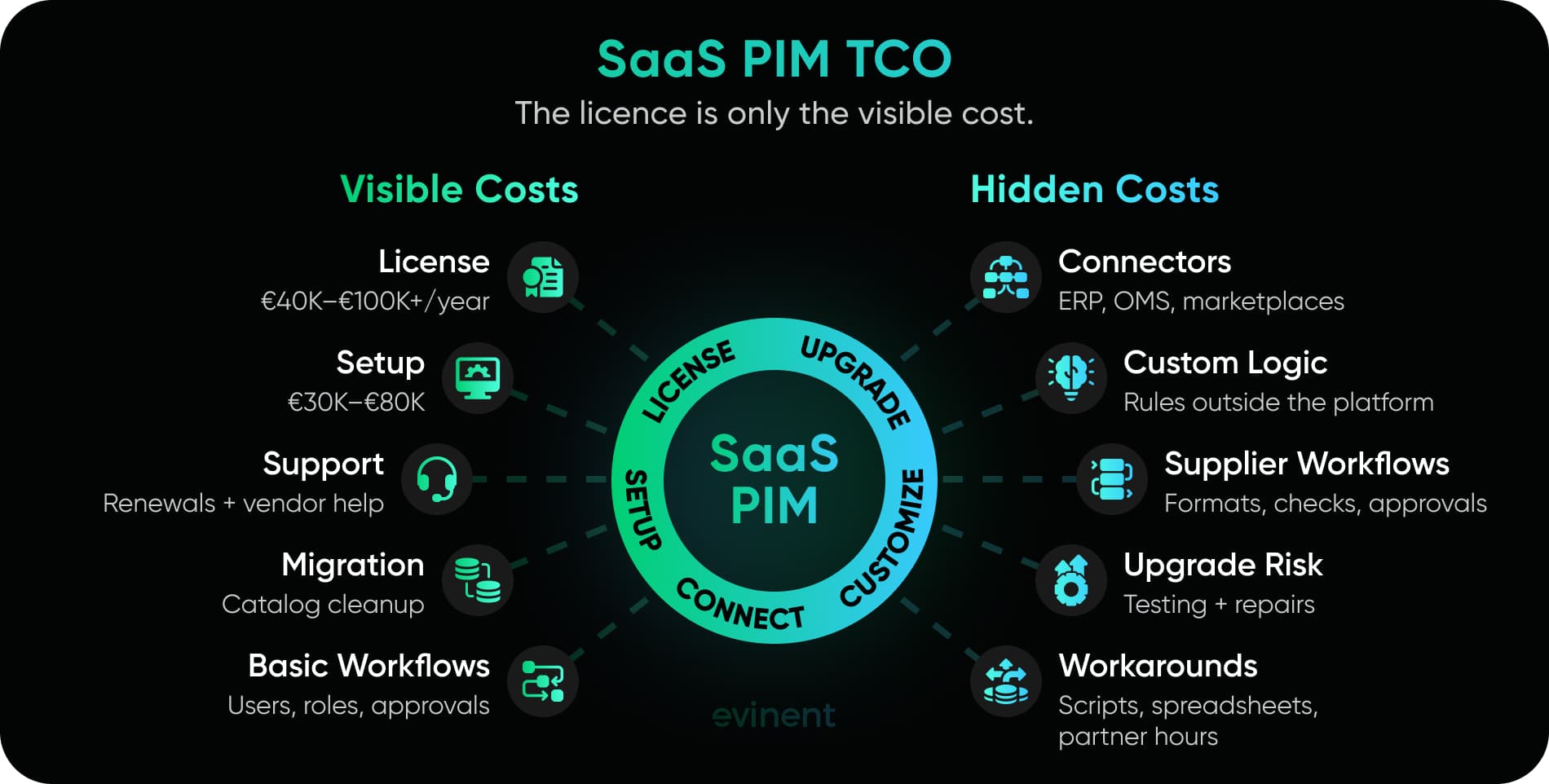
What SaaS PIM Actually Costs: Beyond The Licence Fee
A SaaS PIM licence is rarely the full cost. It is the sticker on the shelf, not the receipt after checkout.
Public pricing guides tell a pretty consistent story: small PIM tools can start low, but enterprise-grade SaaS PIM pricing quickly moves into serious budget territory. One 2026 pricing guide says enterprise PIM software can cost $90,000 or more per year, and warns that the “sticker price alone” does not show the real cost. Another 2026 guide puts enterprise PIM pricing at £10,000 to £100,000+ per year, depending on SKU volume, channels, and architecture. A separate 2026 comparison notes that the first-year cost of an enterprise SaaS PIM can range from €50,000 to €250,000 once implementation services are included.
That range is wide because PIM is not priced like a simple subscription. Catalog size matters. User count matters. The number of sales channels matters. Supplier count matters. Integrations really matter. And then there is the ugly little category nobody likes to talk about: all the business logic that does not fit neatly inside the tool.
For a retail CTO, the useful question is not:
“How much is the license?”
The better question is:
“How much will it cost to make this PIM behave like our business?”
Because that is where the budget starts to move. First, the license. Then the implementation. Then ERP integration. Then marketplace connectors. Then supplier onboarding changes. Then custom validation. Then workflow edits. Then a new channel. Then a major upgrade. Then regression testing. Then someone quietly adds a spreadsheet because one process still does not work.
And suddenly the clean SaaS business case looks a little less clean.
Here is a practical three-year view. These figures are indicative, not vendor quotes. They are useful for board-level planning, early budget conversations, and PIM build-versus-buy analysis. Real numbers depend on catalog complexity, SKU volume, integrations, supplier workflows, internal team size, and the amount of custom logic required.
Cost Category | Enterprise SaaS PIM | Custom PIM |
Year 1 License or Development | €40,000–€100,000+ annual licence | €90,000–€180,000 MVP build |
Year 1 Implementation | €30,000–€80,000 setup, configuration, partner work | Usually part of discovery/build or €15,000–€40,000 for architecture and planning |
ERP / OMS / Marketplace Connectors | €10,000–€50,000+ depending on systems and depth | €25,000–€80,000 depending on integration logic |
Supplier Portal / Vendor Workflows | Often available, but advanced rules may require paid configuration | Built around real supplier formats and approval rules |
Custom Validation Logic | Limited by the platform configuration model | Built directly into the product data layer |
Annual Support And Maintenance | License renewal, support tier, partner hours | Hosting, support, monitoring, minor releases |
Major Upgrade Impact | Vendor roadmap can force testing or connector repair | Internal roadmap controls release timing |
Best Fit | Standard catalog, fast rollout, common channels | Complex catalog, deep integration, unique workflows, AI-ready product data |
This is where people sometimes get defensive. SaaS teams think custom people are attacking SaaS. Custom teams think SaaS people are selling convenience over long-term fit.
Off-the-shelf PIM can be the right call when your catalog model is standard, and the business needs to order fast. It gives your catalog team a central workspace, approval flows, enrichment tools, exports, channel mapping, and vendor-managed updates. For a retailer moving away from spreadsheets, that can be a huge step forward.
But enterprise retail has a way of punishing almost-right systems.
A PIM that fits 80% of your process may still leave the most important 20% outside the system. And that 20% is usually where margin, supplier quality, search performance, compliance, and operational speed live.
Hidden Cost #1: Connector Fees
Every PIM sales deck has an integration slide. ERP here. OMS there. Ecommerce platform. Marketplace connectors. DAM. Analytics. Arrows everywhere. But real integrations are less calm.
There are three very different meanings hidden inside the word “integration.”
The first is export. The PIM sends product data somewhere. That is the easy version.
The second is sync. The PIM sends and receives data, tracks updates, handles errors, and maintains consistent records.
The third is shared business logic. The PIM, ERP, OMS, ecommerce platform, pricing engine, search system, and marketplaces all depend on each other to decide what a product is, where it can be sold, at what price, with which content, and under which restrictions.
That third version is where connector fees start to hurt.
A generic connector may move fields from A to B. It will not magically understand that your ERP stores product families differently from your ecommerce frontend. It will not know that one supplier can update technical attributes but cannot overwrite approved internal descriptions. It will not decide whether ERP price changes should override marketplace-specific promo rules.
Someone has to model that logic.
Sometimes the vendor partner can do it. Sometimes they can almost do it. “Almost” is the expensive word here.
For a 20,000-SKU retailer, a basic ERP-PIM connector may be fine. For a 100,000-SKU retailer with several supplier formats, channel rules, localization needs, marketplace exports, and legacy ERP constraints, connector work can become a project inside the project.
And then there is maintenance. APIs change. ERP fields change. Marketplace requirements change. Internal data ownership rules change. Every connector has a life after launch. That life costs money.
Hidden Cost #2: The Customization Ceiling
Most packaged PIM platforms are configurable. That is good.
Configurable does not mean unlimited.
Usually, a retailer can add fields, create workflows, assign roles, set required attributes, map exports, and build approval paths. For many teams, that is enough. Really. No need to overbuild what configuration can solve.
But retail catalog logic has a nasty habit of slipping past normal cases.
A few examples:
Product bundles that inherit certain attributes from child items while using separate merchandising copy.
Configurable products where variants differ by more than size, color, or material.
Channel-specific titles, descriptions, images, compliance notes, and pricing labels.
Products that appear as one item online but are several items in ERP.
Supplier data that needs different checks by category, brand, country, or sales channel.
Product rules that depend on stock status, margin, supplier contract terms, marketplace restrictions, or service availability.
An off-the-shelf PIM may handle pieces of this. The problem is the ceiling.
Once the business logic goes beyond the platform’s expected data model, teams start bending the system. They add extra fields. They invent naming rules. They write external scripts. They ask users to remember exceptions. They keep one spreadsheet alive “just for now.”
That phrase should make any CTO nervous.
“Just for now” often becomes permanent architecture.
The customization ceiling is not always visible during vendor selection because demos are inherently clean. Demo data behaves. Suppliers behave. ERP behaves. Approval flows behave. Nobody uploads a broken file five minutes before a campaign launch.
The real test is not whether the PIM can manage products.
The test is whether it can manage your product logic without forcing the team into workarounds.
Hidden Cost #3: Upgrade Lock
SaaS upgrades can be beneficial because, in many cases, they are. New features arrive. Security patches are handled. The platform keeps moving. Nobody has to maintain a dead system in the basement.
Good.
But if your SaaS PIM has extensive custom connectors, external scripts, unusual workflows, and partner-built logic, every major upgrade becomes a small risk event.
Will the connector still work?
Will the export mapping behave the same way?
Will the API response change?
Will the custom validation still fire?
Will the catalog team need retraining?
Will the marketplace feed break at the worst possible time?
The more you bend a packaged system, the more each upgrade needs regression testing. That cost rarely appears in the first business case. It shows up later as partner hours, QA cycles, hotfixes, ed releases, and internal frustration.
This is why SaaS can be both cheaper and more expensive, depending on fit.
Used cleanly, SaaS PIM gives you speed, managed hosting, product updates, and a ready-made workspace. Used as a heavily modified shell around unique retail logic, it can become a paid dependency with a permanent workaround budget.
A good build vs buy decision should not ask whether SaaS is “good” or “bad.”
It should ask:
“How much of our catalog logic can live inside the platform without becoming fragile?”
That question is less exciting than a product demo. It is also much more useful.

Four Signals Your Retail Business Has Outgrown Off-The-Shelf PIM
Most retailers do not outgrow off-the-shelf PIM in one dramatic moment. There is no alarm bell. No angry dashboard. No vendor email saying, "Bad news, your catalog is now too weird for our platform."
It happens slowly.
First, one supplier needs a special import template. Then one product category needs different validation rules. Then ERP becomes the source of truth for some fields, but not others. Then the marketplace team needs channel-specific logic. Then search fails because product attributes are inconsistent. Then someone creates a spreadsheet called "final_catalog_rules_v3_REAL.xlsx."
That is usually the moment.
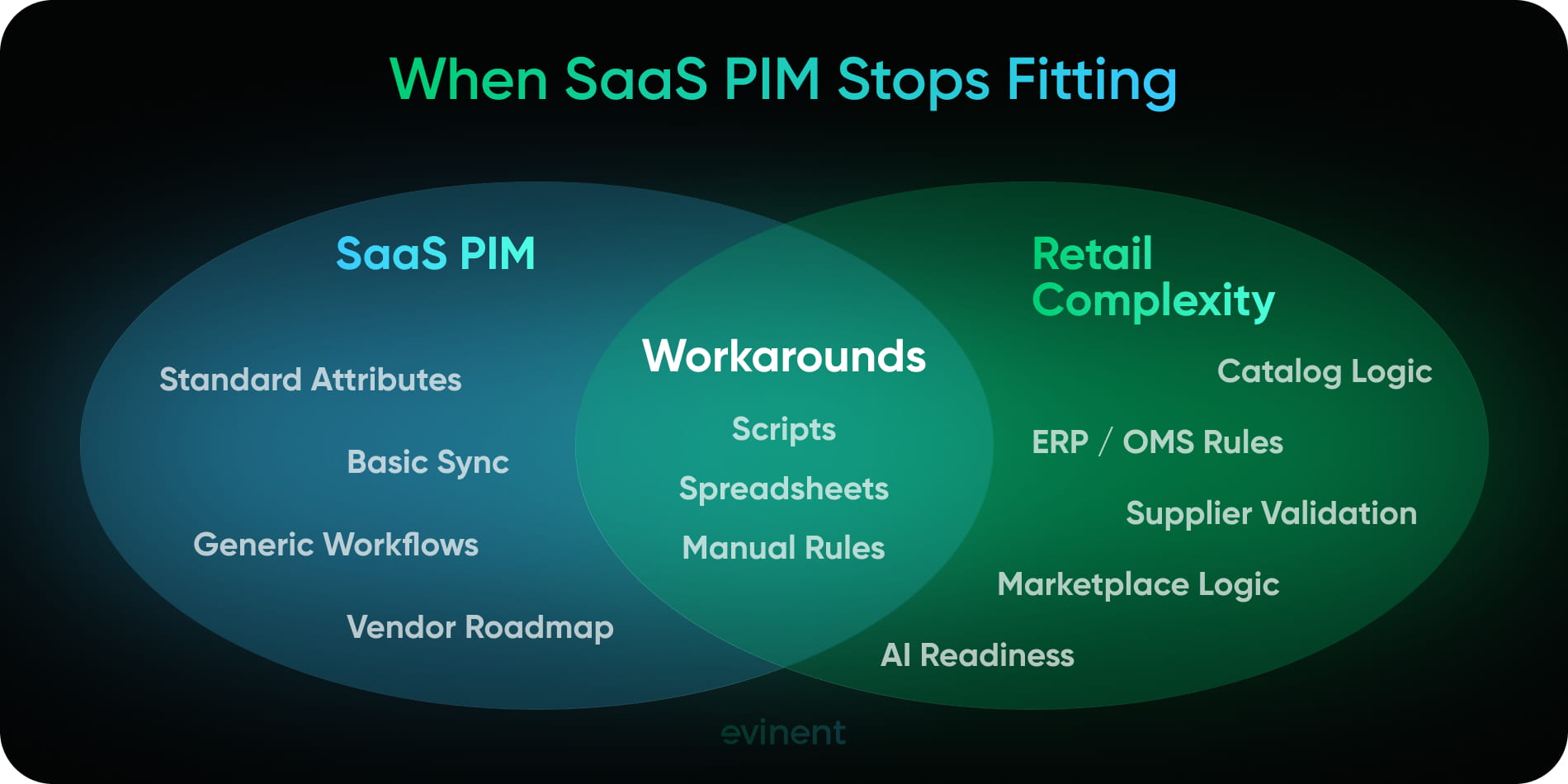
Here are the four signals that packaged PIM has stopped being a clean product information management system and has started becoming a workaround machine.
Signal 1: Your Catalog Logic Does Not Fit Standard Attribute Models
Off-the-shelf PIM platforms are usually built around a familiar structure: product records, attributes, variants, categories, assets, languages, and channels. That model works well for many catalogs.
Until your catalog refuses to behave.
A standard attribute model starts to struggle when your products have relationships that are not just "parent product → child variant." Retail catalogs often include bundles, kits, configurable items, replacement parts, installation services, warranty add-ons, compatibility rules, country restrictions, marketplace-specific fields, and product families that behave differently by channel.
Take a home appliance retailer. A washing machine can be:
a standalone product;
part of a bundle with installation;
part of a seasonal promo;
a product in a comparison table;
a marketplace listing with shorter copy;
a service-linked item with warranty terms;
a search result that needs structured attributes like load capacity, energy class, depth, noise level, color, and smart features.
The SKU may be one thing in ERP, another thing in ecommerce, and something slightly different in marketplace export. Nobody is trying to make life difficult. That is just retail.
A packaged PIM may let you create custom fields for this. It may even support product families and variant structures. But the issue is not whether a field can be created. The issue is whether the system understands the logic behind the field.
There is a big difference between:
"Here is a field called bundle type." and "This product inherits technical specs from child SKUs, uses its own marketing copy, has channel-specific pricing labels, and cannot be published unless each child item is active in ERP."
That second sentence is where off-the-shelf PIM limitations usually begin.
Baymard’s 2024 product finding research found 1,000+ medium-to-severe ecommerce product finding UX issues across tested sites. Many of these issues appear on the frontend, but the cause often sits inside the catalog: weak attributes, poor taxonomy, missing product relationships, or filters that do not match how people actually shop. Baymard also notes that good filters help users narrow large product lists down to a few relevant options, which only works when product attributes are structured well enough to support filtering.
That is the quiet business cost of a bad product data model. Customers do not care that the attribute was hard to model. They just leave when they cannot find what they need.
For a CTO, the signal is clear: If your team keeps inventing naming rules, external scripts, manual exceptions, or "temporary" fields to represent core product logic, your catalog model has probably outgrown the packaged structure.
A custom catalog management system starts to make sense when product relationships affect pricing, search, recommendations, supplier quality, merchandising, returns, or operational speed.
Not every field deserves custom development.
But core catalog logic should not live in comments, naming conventions, and human memory.
Signal 2: You Need Deep ERP/OMS Integration, Not Just Data Sync
A lot of PIM implementation trouble starts with one dangerous assumption: "We just need to sync the data."
In many retail companies, ERP remains the system of record for commercial data: SKU, supplier, purchase price, stock status, tax rules, warehouse data, margin, sometimes category logic. The PIM usually owns enrichment: descriptions, attributes, media, translations, product completeness, channel copy, and approval states.
Then OMS enters the room. Ecommerce enters too. Marketplaces ask for their own format. Search needs clean attributes. Analytics wants event-level product data. Suddenly "sync" sounds like a toy word.
The real question becomes: Where does product truth live?
If ERP says an item is active, but PIM says required product content is incomplete, can ecommerce publish it?
If a supplier changes a product dimension, should that update ERP automatically, trigger review, or stay locked until the catalog team approves it?
If OMS needs product data for order routing, should it read from ERP, PIM, ecommerce, or a separate product API?
If a marketplace rejects a listing because of missing compliance data, where does that error return?
This is not basic ERP PIM integration. This is shared decision logic across systems.
And this is where SaaS PIM enterprise projects often get expensive. A connector can move fields. It cannot automatically decide ownership rules, conflict handling, approval states, fallback logic, or audit requirements. Those decisions are architecture decisions, not connector settings.
Gartner’s 2025 PIM Market Guide frames PIM around the need to create, maintain, and publish product information to downstream channels as digital commerce becomes more complex. That "downstream" part matters. PIM does not sit alone. It feeds the systems where revenue, fulfillment, search, and customer experience happen.
A packaged PIM can integrate with ERP. Let’s be fair about that. Many do it well when the flow is clear.
The warning sign appears when integration is not just a flow. It is logic.
For example:
ERP owns SKU status, but PIM owns publish readiness.
ERP owns base price, but ecommerce owns promo display.
PIM owns product attributes, but search owns searchable weight.
OMS needs product dimensions for shipping rules.
Marketplaces need different title, category, and compliance mappings.
Supplier updates need review before they can overwrite approved records.
If your PIM implementation depends on dozens of "if this, then that" rules across ERP, OMS, ecommerce, marketplaces, and internal teams, a standard SaaS configuration may not be enough.
The CTO signal is this:
If your integration meetings are mostly about business rules, not field mapping, you are no longer buying a connector. You are designing a product data architecture.
And once you are designing architecture anyway, custom PIM development retail becomes a serious option.
Signal 3: Your Supplier Onboarding Has Unique Validation Rules
Supplier onboarding looks very clean in vendor demos. Supplier uploads file. PIM checks file. Catalog team approves product. Product goes live.
Lovely.
Now add real suppliers. One sends titles in uppercase. One sends images with the wrong background. One sends good technical data but weak descriptions. One updates products every week. One sends product data once, then disappears. One supplier is strategic and gets a faster review path. Another is new and needs stricter checks. A regulated category needs extra compliance fields. A marketplace channel has title length limits. The search team wants normalized attributes. Legal wants audit trails. Merchandising wants product copy that does not sound like it was copied from a cardboard box.
At that point, supplier onboarding is not a form. It is a controlled intake system.
The question is not "Can suppliers submit data?"
The question is: Can suppliers submit data without damaging the official catalog?
For multi-vendor catalog management, supplier validation rules often become the real control layer. The system needs to catch issues before they spread into ecommerce, marketplaces, search filters, recommendations, analytics, and customer-facing pages.
A generic supplier portal can work when supplier rules are simple. But if each supplier has different formats, quality patterns, permissions, categories, and approval paths, a packaged supplier workflow can become too blunt.
Common supplier validation rules include:
Required attributes by category, brand, channel, supplier tier, or country.
Allowed units and controlled values for technical specs.
Image size, format, naming, background, and duplication checks.
Duplicate detection before new products enter the main catalog.
Rules that stop supplier data from overwriting approved internal fields.
Different approval paths for high-risk categories.
Change logs for every update.
Supplier quality scoring based on errors, missing fields, and approval time.
Human review for AI-generated enrichment before publication.
This is where retail product data gets political, by the way. Suppliers want speed. Catalog teams want control. Ecommerce wants products live. Legal wants safety. IT wants fewer exceptions. Leadership wants growth. Everyone is right from their own angle.
A good PIM should not pretend those tensions do not exist. It should make the rules visible and enforceable.
If your team currently reviews supplier files manually, copies corrections into spreadsheets, or uses email threads to approve product changes, the supplier onboarding process is probably too specific for a generic workflow.
That does not automatically mean you need to replace the whole PIM. Sometimes a custom supplier onboarding layer connected to an existing PIM is enough.
But if supplier data quality drives time to market, product accuracy, customer trust, marketplace acceptance, and return rates, the intake layer deserves real architecture.
Not just another upload button.
Signal 4: You Are Building AI Readiness Into Your Product Data Layer
AI does not fix messy product data. It usually exposes it.
A model can enrich product descriptions, extract attributes, detect duplicates, classify products, suggest taxonomy mappings, flag low-quality content, and help catalog teams move faster. Useful stuff. But AI needs a clean place to stand.
It needs product data with structure, source tracking, approval states, consistent attributes, version history, permissions, and clear definitions of what is official and what is only suggested.
If your product data lives partly in PIM, partly in ERP, partly in connector scripts, partly in marketplace exports, and partly in someone’s spreadsheet, AI will not know what to trust. It may still produce output. That does not mean the output should enter your catalog.
Recent ecommerce AI research is moving heavily toward structured attributes and product knowledge graphs. A 2026 paper on ecommerce attribute taxonomies argues that missing fine-grained attributes can limit search, filtering, query understanding, and semantic retrieval. The same paper describes a human-in-the-loop LLM framework deployed at Rakuten Taiwan, where 67,277 generated attributes were created across 2,694 subcategories, and over 5.4 million products were tagged with generated attributes.
Another 2025 paper on AI agent-driven product knowledge graph construction points to the same problem from a different angle: ecommerce platforms have huge volumes of unstructured product data, which creates problems for search, recommendations, and analytics.
That is the AI readiness problem in plain English.
The future of product discovery depends on how well machines can understand your catalog.
And machines are annoyingly literal.
They do not know that "charcoal," "graphite," "dark grey," and "anthracite" may need normalization. They do not know that one supplier’s "capacity" is another supplier’s "volume." They do not know that one attribute is safe for public display and another should only be used internally. They do not know that generated content needs legal review before publication.
Unless your data model tells them.
For retail, AI-ready product data means:
each important field has an owner;
product relationships are structured, not implied;
attributes have accepted values and units;
supplier data is separated from approved internal data;
generated content has review states;
changes are logged;
sensitive fields have permissions;
search, recommendations, and AI tools can read approved product context;
the system can explain why a value exists and where it came from.
This matters for more than content enrichment. It matters for AI shopping assistants, internal catalog agents, supplier data cleanup, semantic search, product comparison, product recommendations, and automated quality checks.
There is a recent retail debate around AI agents and commerce infrastructure too. Some 2026 retail commentary argues that AI agents will require retailers to rethink internal decision systems, permissions, audit trails, and data ownership, not just add chatbot features on top of existing platforms. That point fits PIM perfectly. If the catalog data layer is messy, AI will not make it cleaner by magic.
The CTO signal is simple: If your product data roadmap includes AI enrichment, automated attribute extraction, agent-assisted catalog operations, semantic search, or product knowledge graphs, your PIM needs to support machine-readable structure from the start.
Not later, because later is where cleanup projects are born.
When Off-The-Shelf PIM Is The Right Answer
Now the part that makes the article more trustworthy: sometimes SaaS PIM is absolutely the right answer.
Not every retailer needs custom PIM development. Not every catalog problem deserves a custom system. And honestly, building custom software just because the business has a few unusual workflows is a very expensive way to avoid making process decisions.
Packaged PIM exists for a reason. Gartner’s 2025 product information management category page lists core PIM capabilities such as workflow, data modeling, hierarchy management, product content authoring, multichannel publishing, product information contextualization, DAM/MAM, and product variant management. For many retailers, that is exactly the operational base they need.
So no, off-the-shelf PIM is not the enemy.
The enemy is buying off-the-shelf PIM while pretending your business is standard when it is not.
SaaS PIM works well when the retailer needs a central place to clean product data, enrich descriptions, manage assets, support translations, control approval workflows, and send product content to common digital channels. If the company is still managing product data across email threads, old spreadsheets, shared folders, and random ERP exports, a packaged PIM can feel like someone finally opened a window in a very stuffy room.
That matters.
A good SaaS PIM can give the catalog team structure fast. Product records become easier to find. Images stop living in five different places. Required attributes become visible. Approval workflows are easier to follow. Channel exports stop depending on one person who knows the “real” file format.
For a growing retailer, this can be enough. More than enough.
SaaS PIM Works Well When Your Catalog Is Standard Enough
The phrase “standard enough” is doing a lot of work here.
A retailer does not need a perfect catalog to use packaged PIM. Nobody has a perfect catalog. The question is whether most of the business can fit into the platform’s default logic without ugly workarounds.
Off-the-shelf PIM is usually a good fit when products follow familiar patterns:
simple SKUs;
parent-child variants;
category-based attributes;
standard product families;
common image and asset rules;
predictable approval flows;
normal language and channel needs.
A fashion retailer with size and color variants may do very well with SaaS PIM. A cosmetics brand with product descriptions, ingredients, images, translations, and marketplace exports may also be fine. A small electronics retailer with clean supplier feeds and standard category attributes may not need custom catalog management at all.
The business may still have edge cases. That is normal. Edge cases do not automatically justify custom development.
The warning sign appears when edge cases become the operating model.
If 80-90% of the catalog fits the platform and the remaining 10-20% can be handled through clean configuration, SaaS probably makes sense. If 40% of the catalog needs exceptions, special rules, external scripts, or manual fixes, the team is not using SaaS anymore. It is fighting it.
SaaS PIM Works Well When Speed Matters More Than Perfect Fit
Sometimes the right system is the one you can launch quickly.
A retailer entering a new market, opening a marketplace channel, cleaning up product content after a migration, or replacing spreadsheet-based catalog operations may not have time for a custom build. In that case, packaged PIM can be the practical move.
This is especially true when leadership needs visible progress in weeks, not quarters.
Custom PIM development can still move quickly when the scope is controlled, but it requires discovery, data model design, architecture decisions, development, testing, training, and rollout. A SaaS PIM already has the base product. The team configures it, migrates data, connects systems, trains users, and starts improving catalog operations.
That speed has value.
For example, if the business has a 60-day deadline to prepare product data for a marketplace launch, building a custom PIM first would likely be the wrong priority. A packaged solution can help the team centralize product information, fill missing attributes, assign tasks, and publish cleaner data sooner.
That does not mean the SaaS platform will be the final long-term architecture. It may be a bridge. And bridges are useful.
The danger is forgetting that it is a bridge.
A SaaS PIM chosen for speed can become a long-term bottleneck if the company later adds complex supplier workflows, ERP logic, AI enrichment, and custom channel rules without revisiting the architecture.
SaaS PIM Works Well When Your Team Does Not Have Technical Ownership
Someone inside the business has to understand why the system exists, how the data model works, which workflows matter, what should be built next, and when to say no. Without that, a custom PIM can become another legacy system with a modern logo.
A packaged PIM may be safer when the company does not have:
an internal product owner for catalog systems;
a data architect or technical lead;
a team that can manage integration decisions;
clear catalog governance;
budget for ongoing improvements;
internal discipline around product data rules.
That sounds harsh, but it is fair.
A custom PIM gives more control. More control means more responsibility. If nobody owns the product data layer after launch, the system will age badly. Fields will multiply. Workflows will drift. Exceptions will pile up. The catalog team will create workarounds. And then, two years later, someone will call it “legacy.”
Packaged PIM reduces some of that risk. The vendor maintains the platform. Documentation exists. Support exists. New employees may already know similar tools. The business still needs governance, of course, but it does not have to own the whole product roadmap.
For some companies, that tradeoff is worth it.
SaaS PIM Works Well When Product Data Is Operational, Not Strategic
Here is a useful board-level question:
Does your catalog logic create business advantage, or does it simply need to be organized?
If product information management is mostly about keeping titles, descriptions, images, translations, and attributes clean across channels, SaaS PIM is probably a good answer.
If catalog logic affects margin, supplier quality, search relevance, product recommendations, marketplace speed, return reduction, AI automation, or store operations, the decision becomes more serious.
This does not mean every strategic product data layer must be custom. But it does mean the CTO should treat PIM as architecture, not just software procurement.
A packaged tool can manage product data. A custom system can encode product logic.
Different job.
For some retailers, product data is a content operations problem. For others, it is the nervous system of commerce. The wrong choice happens when leadership treats both cases the same.
Short Checklist: SaaS PIM Works Well When...
Use this as a quick sanity check before pushing custom development into the conversation.
SaaS PIM Is Probably The Better Fit When... | Why It Matters |
Your catalog uses standard products, variants, attributes, and categories | The platform’s default data model will likely fit without heavy workarounds |
Supplier onboarding rules are mostly the same | Generic upload, validation, and approval workflows may be enough |
ERP integration is mostly field sync | You do not need deep shared business logic across ERP, OMS, PIM, and ecommerce |
You need a working catalog workspace fast | SaaS can reduce setup time compared with a custom build |
Your internal IT team is small or fully occupied | Vendor-managed platform work can reduce internal load |
Your product data does not drive unique business logic | Standard tools can handle standard operations well |
You can accept vendor roadmap limits | You do not need full control over release timing, architecture, or data model changes |
This is why the custom PIM vs off-the-shelf PIM question should not start with technology.
It should start with fit.
If the business needs speed, standard workflows, vendor support, and a central product workspace, buy the SaaS PIM. Make the process cleaner. Get the catalog team out of spreadsheet chaos. That is a real win.
But if the business needs custom catalog rules, supplier-specific validation, deep ERP/OMS logic, AI-ready product structures, and full ownership of the product data model, packaged PIM may only the harder decision.
SaaS is great when it fits.
When it does not fit, it does not stay cheap for long.
Custom PIM Development: What The Process Actually Looks Like
Custom PIM development sounds heavier than it usually needs to be.
A lot of CTOs hear "custom product information management system" and immediately picture a two-year build, a nervous CFO, and a roadmap that keeps growing every time someone says, "Could we also add one small thing?"
Bad custom software projects happen when teams try to build the whole platform before the business gets value from it. That is the trap. A retail PIM does not need to start as a giant system with every future workflow already finished. It needs to start with the part of the catalog operation that creates the most pain: product data structure, supplier intake, validation, approvals, and the integrations that make product data usable across ERP, OMS, ecommerce, marketplaces, search, and analytics.
A well-scoped custom PIM MVP for retail can usually reach first go-live in 3-4 months. Not the final version. Not the perfect version. The first working version that handles real product data, real users, real validation rules, and real integration flows.
That distinction matters.
The goal is not to build "a PIM platform" in the abstract. The goal is to build the product data control layer your business already needs, without forcing catalog teams to hide logic in spreadsheets, scripts, and tribal knowledge.
What You Get That SaaS Cannot Always Give You
Before the timeline, let’s be clear about the actual value. Custom PIM is not valuable because it is custom. Custom for the sake of custom is just expensive decoration.
It becomes valuable when the business needs ownership over the logic.
Custom PIM Gives You | Why It Matters In Retail |
Full ownership of the product data model | Your catalog structure follows your products, not a vendor’s default object model |
Business rules built into the system | Validation, approval, publishing, and supplier rules are enforced by software, not memory |
Integration logic designed around your stack | ERP, OMS, ecommerce, marketplaces, search, and analytics can share clear rules |
No licence dependency | Costs shift from annual platform fees to owned software, hosting, and development |
Control over roadmap timing | You decide when to change the system, not the SaaS release calendar |
AI-ready product data structure | Product data can be prepared for enrichment, semantic search, agents, and quality checks |
Supplier workflows that match reality | Each supplier can have its own formats, permissions, mappings, and validation rules |
The catch? You must scope it properly.
A custom PIM should not begin with a wishlist. It should begin with a catalog logic audit. That sounds less exciting, but it prevents the most expensive mistake: building screens before understanding the data model.
Screens are easy to change.
Bad product architecture is not.
Phase 1: Catalog Logic Audit, Weeks 1-2
The first step is not design. It is not development. It is not choosing a frontend framework.
It is figuring out how the catalog really works.
Not how it is described in a process document from three years ago. Not how leadership thinks it works. How it actually works on a busy day when a supplier sends an incomplete file, ERP has one status, ecommerce has another, and the marketplace team needs products live by Friday.
This phase usually includes interviews with catalog managers, ecommerce leads, ERP owners, merchandising, marketplace teams, suppliers if possible, and whoever owns search or analytics. That last part is often overlooked. Search and analytics teams suffer when product data is bad, so they usually know where the bodies are buried.
The audit should document:
product types, variants, bundles, kits, and service-linked products;
required attributes by category, channel, market, and supplier;
supplier data formats and recurring quality issues;
which system owns which fields;
which fields can be overwritten and which cannot;
ERP, OMS, ecommerce, marketplace, search, and analytics dependencies;
current approval flows;
manual corrections and exception paths;
spreadsheets, scripts, and unofficial workarounds;
product data issues that affect conversion, returns, support, or operational speed.
This phase often exposes a funny problem: the company thought it had a PIM problem, but it also has a governance problem.
That is not bad news. It is useful news.
A custom PIM cannot fix unclear ownership by magic. If nobody knows whether ERP or PIM owns a field, the software will not decide it for you in a meaningful way. The team has to define that rule.
The deliverable from this phase is a catalog logic map. It should be specific enough that engineering, catalog operations, and leadership can all see the same picture.
A good catalog logic map answers questions like:
What enters the system?
Who can change it?
What gets checked?
What becomes official?
Where does it go next?
What happens when data is wrong?
Simple questions. Surprisingly hard answers.
Phase 2: Data Model Design, Weeks 3-4
This is where custom PIM starts earning its keep.
The data model decides how the system understands products. If this layer is wrong, every workflow built on top of it will feel slightly broken. Maybe not on day one, but soon.
Retail product data is rarely flat. Even when it looks flat in a spreadsheet, it usually has hidden relationships: variants, bundles, channel versions, supplier versions, localized content, inherited attributes, marketplace mappings, search attributes, compliance fields, internal-only notes, and product lifecycle states.
A custom PIM data model should define:
what counts as a product record;
what counts as a SKU;
how variants work;
how bundles and kits work;
which attributes are global;
which attributes are category-specific;
which values change by channel or country;
which fields are supplier-provided;
which fields are internally approved;
which fields are inherited;
which fields feed search, filters, recommendations, or AI tools;
how product status changes from draft to approved to published.
This is where many off-the-shelf PIM limitations become visible. A packaged PIM may let you create custom fields, but a field is not a data model. A field is just a container. The model is the logic that says how that value behaves.
For example, "material" may be a public filter in one category, an internal compliance field in another, and irrelevant in a third. "Size" may mean clothing size, storage capacity, screen diagonal, package dimension, or dog food weight. If the system treats all of these as generic text, search and filtering will suffer later.
A strong data model does not make the catalog complicated. It makes existing complexity visible and manageable.
The deliverable from this phase is a product data model specification. It should include entities, relationships, attribute rules, ownership rules, validation states, and data flows.
Not a 200-page monster document. Please no.
Enough detail for engineering to build without guessing.
Phase 3: ERP/OMS Integration Architecture, Weeks 4-6
Now the project moves from "what is the product?" to "where does product truth live?"
This is usually where meetings get tense, because ERP teams, ecommerce teams, and catalog teams often see the same product differently.
ERP may care about SKU, supplier, tax, stock, warehouse logic, purchase price, and margin. PIM cares about enrichment, completeness, attributes, media, localization, and approvals. OMS cares about availability, shipping, substitutions, and order rules. Ecommerce cares about what the customer sees and can buy. Search cares about findability. Marketplaces care about their own templates and rejection rules.
Everybody is right. Annoying, but true.
Integration architecture defines how these systems talk without stepping on each other.
It should cover:
source of record by field group;
sync direction;
sync frequency;
API contracts;
event triggers;
error handling;
conflict resolution;
fallback behaviour;
audit logs;
retry logic;
publication rules;
rollback paths.
This is where custom PIM can be much cleaner than a heavily modified SaaS setup. The integration logic can be designed around the retailer’s actual stack instead of being squeezed into a vendor connector model.
For example:
ERP owns commercial status, but PIM owns publish readiness.
Supplier data can update draft fields, but not approved fields.
Ecommerce receives only approved channel-specific content.
Marketplace exports apply channel-specific mapping and validation.
Search receives normalized attributes, synonyms, and category signals.
OMS receives dimensions and availability-related product data through a controlled API.
That is not "data sync." That is catalog architecture.
The deliverable from this phase is an integration design: diagrams, API contracts, field ownership rules, sync logic, and failure handling.
A small note here: failure handling is not optional.
Retail systems fail in boring ways all the time. APIs time out. Files arrive late. ERP fields change. Suppliers send nonsense. The PIM needs to show what failed, why it failed, and what to do next.
Otherwise the catalog team becomes the monitoring system.
Nobody wants that job.
Phase 4: Supplier Onboarding Layer, Weeks 6-10
Supplier onboarding is often the first place where users feel the difference.
Instead of sending files by email, uploading data into a generic portal, or asking catalog teams to clean everything manually, suppliers enter the system through controlled intake paths. The PIM validates the data before it touches the official catalog.
This layer can start simple and still create a lot of value.
The first release may support:
CSV, Excel, XML, JSON, or API-based intake;
supplier-specific mapping templates;
category-specific required attributes;
automated checks for missing values;
unit normalization;
duplicate detection;
image format and size checks;
change detection against approved records;
approval workflows;
error reports for suppliers;
internal review queues.
The point is not to make suppliers happy at all costs. The point is to make supplier work safer.
Suppliers should be able to manage their product data. They should not be able to damage the marketplace or retail catalog.
That sentence is worth repeating because it is the whole supplier portal problem.
A supplier-facing workflow needs permissions, limits, and review logic. Maybe a trusted supplier can update certain fields automatically. Maybe a new supplier needs every change reviewed. Maybe technical specs can be updated faster than product claims. Maybe images require a stricter check for marketplace channels. Maybe regulated categories need legal approval.
Those rules are business rules. If they sit outside the system, people forget them. If they are built into the PIM, the process becomes repeatable.
The deliverable from this phase is a working supplier onboarding layer with validation, mapping, upload or API intake, review queues, and supplier-facing error feedback.
Good supplier error feedback is underrated, by the way.
"File rejected" is useless.
"Row 145: capacity must use liters, not text. Image 3 is below minimum resolution. Attribute energy_class is missing for this category" is useful.
Small difference. Huge operational impact.
Phase 5: AI Readiness Layer, Weeks 10-14
AI readiness should not be a shiny add-on near the end.
It should be part of how the product data layer is designed.
That does not mean the MVP needs advanced AI features from day one. Usually, it should not. The first goal is to make product data structured, trusted, and easy to access safely. AI can come after that. But the data model should not block it.
An AI readiness layer may include:
source tracking for every field;
confidence scores for supplier data or generated suggestions;
separation between raw, suggested, reviewed, and approved values;
controlled vocabularies for important attributes;
category-specific attribute sets;
version history;
logs for automated enrichment;
human review states;
API access to approved product context;
metadata for search, recommendations, and semantic retrieval.
This is the difference between "we added AI" and "our data can support AI safely."
A retail team might later use AI to:
suggest missing attributes;
normalize supplier values;
detect duplicate products;
classify new products into categories;
generate draft descriptions;
rewrite channel-specific copy;
flag suspicious claims;
improve search synonyms;
create product comparison summaries;
support internal catalog assistants.
But none of that should bypass governance.
AI-generated product content still needs review. Attribute suggestions need confidence and approval states. Product claims need checks. Supplier data needs separation from official records.
A custom PIM can design that structure directly into the workflow.
A packaged PIM may support some AI features too, but the question is whether the retailer can control how generated data enters the product record. Who approves it? Where is it stored? Can it be rolled back? Does it feed search automatically? Can suppliers see it? Can marketplaces receive it? Can legal block it?
Those are not AI questions, really. They are product data governance questions with AI in the room.
The deliverable from this phase is an AI-ready data structure and, if included in MVP scope, first automation features such as missing attribute detection, duplicate warnings, or enrichment suggestions.
Start boring. Boring is good here.
Boring means safe.
Phase 6: MVP Go-Live And Controlled Rollout, Weeks 14-16
The first go-live should be narrow enough to control and real enough to matter.
A common mistake is trying to migrate the entire catalog, every supplier, every category, and every channel at once. That is how teams turn a PIM launch into a group stress test.
A better rollout starts with a meaningful slice:
one product category with real complexity;
one or two important suppliers;
one ERP integration path;
one ecommerce publication flow;
one marketplace export if needed;
core approval workflows;
reporting for validation errors and product completeness.
This gives the team enough reality to test the system without drowning in every edge case at once.
The rollout should include:
data migration for selected categories;
user acceptance testing with catalog and ecommerce teams;
supplier testing if supplier workflows are included;
integration testing with ERP, OMS, ecommerce, and search;
performance checks;
permission testing;
training;
launch support;
post-launch bug fixing;
backlog prioritization for the next release.
The first weeks after launch are usually where the most useful feedback appears. Users will find naming issues, workflow friction, missing statuses, awkward filters, and reports they wish they had.
That is normal.
The goal is not to avoid every adjustment. The goal is to avoid structural surprises.
If the catalog logic audit and data model were done well, post-launch changes should be refinements, not panic rebuilds.
What The First MVP Should Include
For a retail custom PIM, the MVP should be practical. It should not try to compete feature-for-feature with mature SaaS tools on day one.
A good first release often includes:
MVP Area | What It Should Cover |
Product Data Model | Products, SKUs, variants, bundles, category attributes, channel-specific content |
Supplier Intake | Upload/API intake, supplier mappings, validation rules, error feedback |
Workflow | Draft, review, approved, rejected, published states |
Integrations | ERP, ecommerce, OMS or marketplace depending on priority |
Validation | Required fields, allowed values, units, duplicate checks, asset rules |
Permissions | Role-based access for internal teams and suppliers |
Audit Trail | Change history, source tracking, approval logs |
Reporting | Completeness, validation errors, supplier quality, publication status |
AI Readiness | Structured attributes, source tracking, review states for generated content |
Notice what is not there: every possible feature.
No need for perfection. No need to rebuild a full enterprise suite before launch. The MVP should solve the pain that made the company consider custom PIM in the first place.
The Practical Timeline
Here is the clean version of the process.
Phase | Timeline | Main Deliverable |
Catalog Logic Audit | Weeks 1-2 | Catalog logic map, pain points, data ownership notes |
Data Model Design | Weeks 3-4 | Product data model, attribute rules, relationship structure |
Integration Architecture | Weeks 4-6 | ERP/OMS/ecommerce integration design, API contracts |
Supplier Onboarding Layer | Weeks 6-10 | Intake workflows, mappings, validation, review queues |
AI Readiness Layer | Weeks 10-14 | Structured product data, source tracking, review states |
MVP Go-Live | Weeks 14-16 | First working release with real users and real data |
This timeline assumes the business can make decisions quickly. That is the hidden dependency in every custom project.
If field ownership takes three weeks to approve, the project slows. If nobody can decide whether suppliers may update certain attributes, the project slows. If ERP rules are undocumented and the only person who understands them is on vacation, the project slows.
Custom PIM development is not just a software build. It is a catalog decision process turned into software.
That is why it works best when the CTO, ecommerce lead, catalog owner, ERP owner, and supplier operations team stay close to the project.
Not in daily meetings forever. Nobody needs that.
But close enough that decisions do not sit unanswered while developers guess.
TCO Comparison: Custom PIM vs Enterprise SaaS Over 3 Years
This is the section finance will care about.
And yes, TCO tables are always a little annoying because they look more precise than reality. A table gives the comforting feeling of control. Retail systems laugh at that. The real cost depends on catalog size, supplier chaos, ERP age, channel count, data quality, internal decision speed, and how many exceptions the business has normalized over the years.
Still, a working model is better than a vague debate.
Public PIM pricing research gives enough range to build a useful planning view. One 2026 PIM cost guide lists data migration at $5,000-$30,000+, integration or connector fees at $3,000-$20,000+ per integration, and says implementation and onboarding at enterprise level can be equal to or higher than the annual licence. Another 2026 TCO guide says enterprise PIM pricing typically ranges from £10,000 to £100,000+ per year, with TCO including licence, integration, onboarding, data migration, and ongoing operational costs. A separate 2026 market comparison places enterprise SaaS PIM licence cost at €15,000-€25,000+ per year at the lower enterprise entry point, with implementation partner fees adding €30,000-€200,000, bringing first-year cost to €50,000-€250,000 in many cases.
So no, the licence line is not the decision.
The decision is the three-year cost of making the product data layer work.
Below are two practical models: one for a mid-market retailer with around 20,000 SKUs, and one for an enterprise retailer with 100,000+ SKUs. The numbers are indicative and should be treated as planning ranges, not quotes. They assume a serious retail environment with ERP, ecommerce, supplier onboarding, validation rules, and at least some channel complexity.
Scenario A: Mid-Market Retailer With 20,000 SKUs
Assumptions: around 20,000 SKUs, 8-12 internal users, 3-5 regular suppliers, one ERP, one ecommerce platform, moderate supplier validation, and limited marketplace complexity.
Cost Line | SaaS PIM Year 1 | SaaS PIM Year 2 | SaaS PIM Year 3 | SaaS 3-Year Total | Custom PIM Year 1 | Custom PIM Year 2 | Custom PIM Year 3 | Custom 3-Year Total |
Licence Or Development | €45,000 | €45,000 | €45,000 | €135,000 | €120,000 | €0 | €0 | €120,000 |
Implementation / Discovery | €35,000 | €5,000 | €5,000 | €45,000 | €25,000 | €0 | €0 | €25,000 |
ERP / Ecommerce Connectors | €25,000 | €8,000 | €8,000 | €41,000 | €35,000 | €8,000 | €8,000 | €51,000 |
Maintenance And Support | €12,000 | €15,000 | €15,000 | €42,000 | €18,000 | €28,000 | €28,000 | €74,000 |
Custom Workflow Logic | €20,000 | €18,000 | €18,000 | €56,000 | €20,000 | €35,000 | €35,000 | €90,000 |
Upgrade / Regression Work | €0 | €10,000 | €15,000 | €25,000 | €0 | €5,000 | €5,000 | €10,000 |
Estimated Total | €137,000 | €101,000 | €106,000 | €344,000 | €218,000 | €76,000 | €76,000 | €370,000 |
At this size, SaaS and custom can be surprisingly close over three years.
That may feel counterintuitive because custom has a much higher Year 1 number. But SaaS has a recurring licence, configuration cost, connector maintenance, partner hours, and upgrade testing. Custom has more upfront work, then shifts into maintenance, support, and planned feature releases.
For a mid-market retailer, SaaS often wins when the catalog is standard. If 80-90% of product workflows fit packaged configuration, there is no need to build a system from scratch. The company can get a working product information management system faster and keep the internal IT burden lower.
Custom PIM starts to look better when the retailer already knows the packaged setup will need heavy workarounds: supplier-specific rules, unusual product structures, ERP logic that cannot be represented cleanly, or product data that must feed search, recommendations, and AI enrichment in a controlled way.
In this scenario, the TCO difference is not dramatic enough to decide alone.
Fit decides.
If SaaS fits, buy it. If SaaS almost fits, be careful. “Almost” can be expensive.
Scenario B: Enterprise Retailer With 100,000+ SKUs
Assumptions: 100,000+ SKUs, 25-50 users, 20+ suppliers, ERP, OMS, ecommerce, marketplaces, product search, analytics, complex channel rules, supplier validation, and higher data governance needs.
Cost Line | SaaS PIM Year 1 | SaaS PIM Year 2 | SaaS PIM Year 3 | SaaS 3-Year Total | Custom PIM Year 1 | Custom PIM Year 2 | Custom PIM Year 3 | Custom 3-Year Total |
Licence Or Development | €100,000 | €100,000 | €100,000 | €300,000 | €240,000 | €0 | €0 | €240,000 |
Implementation / Discovery | €80,000 | €15,000 | €15,000 | €110,000 | €45,000 | €0 | €0 | €45,000 |
ERP / OMS / Marketplace Connectors | €75,000 | €25,000 | €25,000 | €125,000 | €95,000 | €20,000 | €20,000 | €135,000 |
Maintenance And Support | €30,000 | €40,000 | €45,000 | €115,000 | €45,000 | €65,000 | €70,000 | €180,000 |
Custom Workflow Logic | €60,000 | €65,000 | €70,000 | €195,000 | €50,000 | €80,000 | €85,000 | €215,000 |
Upgrade / Regression Work | €0 | €30,000 | €40,000 | €70,000 | €0 | €10,000 | €10,000 | €20,000 |
Estimated Total | €345,000 | €275,000 | €295,000 | €915,000 | €475,000 | €175,000 | €185,000 | €835,000 |
This is where custom PIM development retail projects can become the rational choice, not the expensive indulgence.
The SaaS route starts lower in Year 1, but the recurring licence and partner-dependent changes keep adding weight. The custom route starts higher, then drops into a more controlled run-and-improve model. The retailer owns the data model, the integration logic, the supplier validation layer, and the roadmap.
But again, do not read this as “custom is always cheaper.”
It is not.
Custom can become more expensive if the scope is poorly controlled, if stakeholders cannot make decisions, if every department treats the PIM as a wish-granting machine, or if the company has no internal owner after launch.
The custom model works when the business is serious about product data architecture.
Not just when it is tired of SaaS invoices.
The Cost That Does Not Fit Nicely In A Table
The table covers visible IT cost. Licence. Development. Integrations. Maintenance. Support. Upgrade work.
But retail loses money in quieter ways too.
A weak product data setup can create costs that finance rarely labels as “PIM cost”:
Hidden Operational Cost | What It Looks Like In Practice |
Slow Supplier Onboarding | New products take weeks to approve because data needs manual cleanup |
Catalog Team Rework | Teams fix the same errors across ERP, PIM, ecommerce, and marketplace files |
Search And Filter Problems | Customers cannot narrow product lists because attributes are missing or inconsistent |
Marketplace Rejections | Listings fail because required fields, titles, images, or category mappings are wrong |
Campaign s | Merchandising cannot launch promos because product data is incomplete |
Higher Return Risk | Product descriptions, dimensions, compatibility data, or images are inaccurate |
AI Readiness Debt | Future automation projects stall because product data is not structured or trusted |
Vendor Dependency | Every unusual workflow requires partner work, roadmap waiting, or a paid workaround |
This is where a CFO and CTO may see different realities.
The CFO sees the SaaS invoice.
The CTO sees the engineering work around the SaaS invoice.
The catalog team sees the manual cleanup.
The ecommerce team sees the missed launch.
The customer sees the wrong product page and leaves.
All of that is part of PIM TCO retail planning, even when it does not sit in the procurement spreadsheet.
Where SaaS Usually Wins On TCO
SaaS PIM usually wins when the business has standard product workflows and wants speed.
If the retailer has clean product families, common variants, predictable attributes, limited supplier complexity, and basic ERP sync, the SaaS route can be cheaper and safer. It gives the company a working platform without owning every technical detail.
SaaS also wins when internal IT capacity is tight. A vendor-managed system reduces the need for internal platform maintenance. The team still needs integration ownership and catalog governance, but it does not need to own the full codebase.
There is another simple case: if the company is still in spreadsheet chaos, a packaged PIM can be a very good first step. You do not always need custom architecture on day one. Sometimes you need one central system, visible workflows, and cleaner product records.
That is not glamorous. It works.
Where Custom Usually Wins On TCO
Custom PIM usually wins when the business keeps paying to work around packaged limits.
The signs are familiar:
too many connector changes;
too many supplier exceptions;
too much manual validation;
too many channel-specific rules outside the system;
too many product relationships that the PIM cannot represent properly;
too much ERP/OMS logic living in scripts;
too many catalog decisions handled by people instead of software.
Custom also wins when long-term product data ownership matters more than short-term setup speed.
If the retailer wants to build AI-ready product data, advanced supplier scorecards, custom validation, product knowledge graphs, internal catalog agents, or tight search and recommendation logic, owning the product data model becomes more valuable. Not because custom sounds better. Because the data layer is part of the business system.
In that case, paying annual licence fees for a platform that still cannot represent core catalog logic may be the more expensive path.
The Board-Level View
For leadership, the cleanest way to frame this is not “build vs buy.”
It is “rent the model vs own the model.”
With SaaS PIM, the retailer rents a strong existing product model and configures it. That is smart when the model fits.
With custom PIM, the retailer owns the product model and builds around it. That is smart when the model is part of how the business runs.
So the TCO question becomes:
Are we paying for software, or are we paying for fit?
If the software fits, SaaS is often the better business decision.
If the fit requires constant paid workarounds, the cheaper-looking option can quietly become more expensive over three years. Not only in invoices. In , cleanup, dependency, and missed commercial speed.
How Evinent Builds Custom PIM For Retail
Evinent builds custom PIM and catalog management systems for retail and ecommerce companies when packaged tools can no longer support the real logic of the catalog.
That is the practical line.
Not “custom because custom sounds better.” Not “SaaS is bad.” Not “let’s rebuild everything because we can.” The work starts when product data has become too important, too connected, or too specific to sit inside a generic configuration model.
A custom PIM project usually begins with one uncomfortable question:
What is actually controlling the catalog today?
Sometimes the answer is ERP. Sometimes it is the ecommerce platform. Sometimes it is a SaaS PIM with five external scripts around it. Sometimes it is a group of people, a few exports, a supplier inbox, and a spreadsheet that everyone pretends is temporary.
Evinent’s work sits in that messy middle: legacy systems, ecommerce platforms, ERP/OMS integrations, supplier workflows, search, analytics, and product data architecture. The company helps retailers through ecommerce development services, legacy application modernization services, and custom commerce architecture projects where product data has to move cleanly between ERP, OMS, ecommerce, marketplaces, search, and analytics.
For custom PIM development retail projects, the starting point is not the admin panel. It is the catalog architecture.
Step 1: Audit The Existing Catalog Architecture
The first step is to map the current product data flow.
Where does supplier data enter?
Who checks it?
Which system owns SKU status?
Where do attributes get cleaned?
Who approves product content?
What feeds ecommerce search?
Which fields go to marketplaces?
What still happens manually?
This phase usually covers ERP, OMS, ecommerce, marketplaces, supplier files, internal approval flows, product search, recommendation logic, and analytics. It also identifies where packaged PIM creates a ceiling: attribute structure, supplier validation, connector logic, channel rules, or AI-readiness gaps.
For retailers already dealing with legacy commerce platforms, this work often overlaps with legacy software modernization. Outdated ERP, CRM, ecommerce, or internal catalog systems can slow down product operations long before the customer sees the issue on the frontend.
A retailer may think the problem is “bad product data.” Then the audit shows something deeper: supplier data enters through five routes, ERP owns fields nobody trusts, marketplace exports use different mappings, and search filters depend on attributes that are not required anywhere.
That is not a content problem.
That is architecture.
Step 2: Design The Product Data Model Around Retail Logic
Once the current state is clear, the next step is the data model.
This is where custom PIM becomes useful. A retailer does not need another generic product table. It needs a model that reflects how products behave in its business.
For example:
products, SKUs, variants, bundles, and kits;
category-specific attributes;
channel-specific content;
supplier-provided vs internally approved values;
inherited attributes;
compliance and internal-only fields;
marketplace mappings;
search and filter attributes;
AI enrichment states;
change history and ownership rules.
This is also where the team decides which fields belong in ERP, which belong in PIM, which belong in ecommerce, and which should be exposed through APIs.
The same idea appears in Evinent’s ecommerce work. In the scalable ecommerce platform case study, the project included cloud infrastructure, product and promotion management, Evinent Search, and improved product discovery. That is the bigger point: catalog architecture is not isolated. It affects search, merchandising, recommendations, mobile experience, and conversion.
Step 3: Build Supplier Intake And Validation Rules
For multi-vendor catalog management, supplier onboarding is usually where the business feels pain first.
Supplier files arrive in different formats. Attributes are named differently. Images fail marketplace requirements. Some suppliers are trusted. Some need strict review. Some categories need extra checks. Some product claims should never go live without approval.
So Evinent does not treat supplier onboarding as a simple upload form. The supplier layer should act more like a controlled intake system.
A custom supplier onboarding layer can include:
supplier-specific mapping templates;
CSV, Excel, XML, JSON, or API intake;
category-specific required fields;
allowed values and unit normalization;
image checks;
duplicate detection;
approval workflows;
supplier error reports;
quality scoring;
change logs.
The point is not to slow suppliers down. The point is to stop bad data before it reaches the official catalog.
For companies where supplier workflows are tied to broader ecommerce growth, this layer naturally connects with B2B ecommerce development services and custom vendor-facing portals. If supplier onboarding, catalog approval, and channel publishing are already too specific for packaged software, they should be designed as part of the product data architecture, not treated as a side workflow.
Step 4: Connect PIM With ERP, OMS, Ecommerce, Search, And Analytics
A custom PIM should not become another silo.
That sounds obvious, but many retail systems fail exactly there. Product data is technically stored in one place, but the actual business logic is scattered across ERP, OMS, ecommerce, marketplaces, search, analytics, and supplier workflows.
Evinent’s ecommerce and search experience is relevant here. The company provides ecommerce development services for enterprise and mid-sized businesses and builds ecommerce site search solutions that depend on clean, structured, well-indexed product data.
For PIM, this matters because search quality depends on product data quality.
If attributes are inconsistent, filters break.
If taxonomy is weak, search relevance suffers.
If product relationships are unclear, recommendations get worse.
If marketplace fields are incomplete, listings fail.
If ERP status and PIM publish status do not agree, products go live too early or too late.
A strong PIM integration layer should define:
field ownership by system;
sync direction and timing;
API contracts;
event triggers;
conflict handling;
publication rules;
marketplace export logic;
search indexing requirements;
error reporting;
audit logs.
This is the point where PIM stops being “a catalog tool” and becomes part of the commerce architecture.
Step 5: Prepare The Catalog For AI Workflows
AI-readiness should not be added after the catalog is already messy.
For retail, useful AI work depends on product data that is structured, traceable, and approved. A model can suggest missing attributes, normalize supplier values, classify products, generate draft descriptions, detect duplicates, and support internal catalog assistants. But it needs rules.
The PIM should know:
which values came from suppliers;
which values are approved;
which values were generated;
which values need review;
which attributes can feed search;
which fields are safe for AI access;
who changed what and when.
Evinent’s experience with AI development services, data analytics, and commerce search can support this layer when retailers want to move from basic product data management to AI-assisted catalog operations.
This does not mean the first custom PIM release needs advanced AI features.
Usually, it should start smaller:
missing attribute detection;
duplicate product warnings;
supplier data quality scoring;
suggested category mapping;
AI-assisted description drafts with human approval;
structured attributes for semantic search;
logs for generated changes.
Start with safe automation. Add more only when the data foundation is ready.
Step 6: Launch MVP First, Then Extend
The safest custom PIM route is MVP first.
A first release should solve the highest-friction catalog problem, not every future dream. For a retail company, that could mean one product category, one ERP connection, two supplier formats, approval workflows, and ecommerce publication. Enough to prove the model. Not so much that the project collapses under its own ambition.
Evinent’s case studies show this practical pattern across retail and ecommerce projects. The legacy application migration for ecommerce scalability and performance case covers platform modernization, API integration, system optimization, third-party integrations, performance improvements, and international ecommerce support. The custom ecommerce website development for a leading Central Asian retailer case also shows the same broader retail reality: ecommerce systems need reliable integrations, performance, cost efficiency, and long-term platform thinking.
A typical custom PIM MVP can include:
MVP Area | What It Covers |
Product Data Model | Products, SKUs, variants, bundles, category attributes |
Supplier Intake | Upload/API intake, supplier mappings, validation rules |
Workflow | Draft, review, approved, rejected, published states |
Integrations | ERP, ecommerce, OMS, search, or marketplace connections |
Validation | Required fields, units, allowed values, duplicate checks |
Permissions | Role-based access for internal teams and suppliers |
Audit Trail | Source tracking, change history, approval logs |
Reporting | Completeness, errors, supplier quality, publication status |
AI-Ready Structure | Approved values, generated suggestions, review states |
The first version should usually go live in 3-5 months, depending on scope, integration depth, and decision speed. That last part matters more than people admit. If stakeholders cannot decide field ownership, validation rules, or supplier permissions, developers will sit and wait. Or worse, they will guess.
And guessed catalog logic becomes technical debt very fast.
Evinent Case Reference: Why Product Data Architecture Matters
Evinent’s retail and ecommerce portfolio is useful here because it shows PIM-adjacent architecture in action.
The scalable ecommerce platform case study shows how improved product discovery, Evinent Search, modernized cloud infrastructure, and product/promotion management can support stronger ecommerce performance. The legacy application migration for ecommerce scalability and performance case shows another side of the same challenge: outdated architecture, slow performance, third-party integrations, and the need to support international sales with multi-language and multi-currency features.
Important caveat: these should not be framed as “PIM-only” results.
That would be too neat, and too neat usually smells like marketing.
The better takeaway is this: product data architecture affects the whole retail system. Catalog structure, search, order management, mobile experience, platform performance, and infrastructure all work together. When they are designed as connected parts, the business can move faster. When they are patched together with fragile connectors and manual fixes, every new supplier, category, campaign, and AI initiative becomes harder than it should be.
The Practical Position
Evinent is a good fit for custom PIM work when the retailer has outgrown standard catalog tooling but does not want a risky “big bang” rebuild.
The ideal project profile looks like this:
20,000+ SKUs;
multiple suppliers or vendors;
ERP/OMS/ecommerce integration needs;
marketplace or multi-channel publishing;
supplier-specific validation rules;
catalog data issues affecting search, conversion, or operations;
plans for AI enrichment, semantic search, or automated product data quality checks;
leadership that wants ownership of the product data model.
The wrong fit?
A simple catalog, standard supplier files, no deep integration logic, and a team that mainly needs faster product enrichment. In that case, buy SaaS. It will probably be faster, cheaper, and easier to operate.
That honesty matters.
Custom PIM should not be sold as the universal answer. It is the right answer when the catalog itself has become part of the retailer’s operating logic. When product data controls how fast the business can launch products, fix supplier issues, improve discovery through ecommerce site search, modernize legacy commerce systems with legacy application modernization, and build stronger ecommerce operations through custom ecommerce development, owning the model becomes a practical business decision.
Not a technical indulgence.
Decision Framework For Retail CTOs: Buy, Build, Or Extend?
By this point, the custom PIM vs off-the-shelf PIM question should feel less like a technology debate and more like an operating model decision.
That is exactly what it is.
A packaged PIM gives you a ready product structure, a vendor-managed platform, standard workflows, and faster setup. A custom PIM gives you ownership of the data model, business rules, integration logic, and roadmap. Neither path is automatically smarter. The wrong path is the one that ignores how your retail business actually works.
So instead of asking, “Should we build or buy?”, ask a more useful question:
What kind of product data company are we becoming?
If product data is mostly a content operations problem, buy. If product data is becoming the control layer for supplier onboarding, ERP logic, search, marketplaces, automation, AI, and customer experience, the answer changes.
Here is a simple way to think about it.
Buy When Speed And Standardization Matter Most
Buy an off-the-shelf PIM when the company needs to bring order to product content quickly and the catalog model is standard enough.
This usually fits retailers that have:
simple SKU and variant structures;
predictable category attributes;
standard supplier files;
limited ERP complexity;
common sales channels;
a small catalog operations team;
no need for deep custom validation;
no internal team to own custom software.
This does not mean the business is small or unsophisticated. It just means the product data model is not where the business needs to be different.
A SaaS PIM can still be a very good decision. It can move teams away from spreadsheets, make product completeness visible, organize product assets, support translations, and give catalog managers a proper workspace. That alone can improve day-to-day operations.
The mistake is not buying SaaS.
The mistake is buying SaaS while knowing your core logic will live outside it.
Build When Catalog Logic Is Business Logic
Build custom when the catalog is not just content. Build when product data decides how the business runs.
That usually means:
product relationships are complex;
ERP and PIM share decision logic;
supplier onboarding requires strict rules;
marketplaces need channel-specific validation;
search and filters depend on structured attributes;
product data quality affects conversion, returns, and support;
AI enrichment or catalog automation is part of the roadmap;
teams already rely on scripts, spreadsheets, and manual exceptions around the current PIM.
This is where custom PIM development retail projects become rational.
Not glamorous. Not “innovation theatre.” Rational.
Because if the business is already paying for workarounds, partner hours, connector fixes, manual review, duplicate cleanup, search issues, marketplace rejections, and ed launches, the cost exists. It just does not appear in one neat budget line.
A custom PIM makes sense when the business wants those rules inside the system, not in people’s heads.
Extend When Replacing Everything Is Too Much
There is also a third path, and it is often the most practical one.
You do not always need to replace the existing PIM.
Sometimes the smarter move is to build a custom layer around the pain points:
a supplier onboarding portal;
a validation engine;
an ERP/PIM middleware layer;
a marketplace export layer;
a product data quality dashboard;
an AI enrichment review workflow;
a custom search indexing layer.
This works when the packaged PIM is good enough for core product content but weak in specific workflows. Maybe the catalog team likes the SaaS interface. Maybe the problem is not enrichment, but supplier intake. Maybe ERP integration is the real issue. Maybe marketplaces need better data mapping.
In that case, extending the architecture can be cheaper and less risky than a full replacement.
This is also a good route when the company wants to reduce vendor dependency gradually. Instead of doing a giant rebuild, the team moves the most important business logic into owned services step by step.
Less drama. More control.
The CTO Test: Where Does The Pain Actually Live?
Before making the decision, map the pain.
Not the symptoms. The actual pain.
If the main complaint is “we need one place to store product content,” SaaS is probably enough.
If the complaint is “our product data cannot move correctly between suppliers, ERP, OMS, ecommerce, marketplaces, and search,” then the PIM is not just a tool problem. It is an architecture problem.
If the complaint is “we cannot trust supplier data before it enters the catalog,” supplier onboarding is the pain.
If the complaint is “search and filters are bad because attributes are messy,” the product data model is the pain.
If the complaint is “every new channel requires custom scripts,” integration ownership is the pain.
If the complaint is “AI enrichment produces output but we do not know how to approve, trace, or publish it safely,” governance is the pain.
That is the decision framework in plain language.
Find the pain. Then choose the system shape.
Do not let the vendor demo decide it for you.
What The Board Needs To Hear Before Approving The Budget
A CTO may understand the technical argument. The board still needs the business argument.
And the business argument should not sound like this:
“We need a more flexible product information management architecture to support future catalog operations.”
That sentence is technically fine. It is also dead on arrival in most boardrooms.
Try this instead:
“Our current product data setup slows down supplier onboarding, creates manual catalog repair, limits search quality, and makes every new channel more expensive. We can either keep paying for workarounds or invest in a product data layer that fits how the business actually operates.”
That is clearer.
For C-level stakeholders, the PIM decision should be tied to business outcomes they already care about:
faster product launches;
fewer supplier data errors;
fewer marketplace rejections;
better product discovery;
lower manual catalog work;
cleaner ERP and ecommerce data;
stronger AI readiness;
less dependency on external platform limits;
better control over product data ownership.
This is also where numbers matter.
If catalog teams spend 30 hours a week fixing supplier data, calculate it.
If marketplace listings are rejected because of missing attributes, track it.
If products miss campaign deadlines because content is incomplete, count it.
If search filters fail because attribute values are inconsistent, estimate the conversion loss.
If every custom connector change requires partner work, show the annual cost.
The PIM build vs buy decision gets much easier when hidden costs become visible.
A board does not need to love the architecture.
It needs to understand what the current architecture is costing the business.
FAQ
How Much Does Custom PIM Development Cost Compared To Off-The-Shelf Solutions?
Custom PIM development usually has a higher upfront cost than off-the-shelf PIM because the data model, business rules, workflows, integrations, and validation logic are built around the retailer’s own operations. For a mid-market retail MVP, a realistic first release can often start in the €90,000–€180,000 range, while larger enterprise systems can cost more depending on SKU volume, ERP/OMS complexity, supplier workflows, and channel count.
Off-the-shelf PIM often starts with a lower initial cost, but the full budget includes licence fees, implementation, partner work, connectors, data migration, training, support, and future custom changes. SaaS is usually cheaper when the catalog is standard. Custom can become more cost-effective when the retailer keeps paying to work around packaged limits.
When Is It Worth Building A Custom PIM Instead Of Buying?
It is worth building a custom PIM when product data rules are too specific for standard configuration. The clearest signs are complex product relationships, deep ERP/OMS integration, supplier-specific validation, marketplace rules, AI-readiness requirements, and too many manual workarounds around the current system.
A good test is simple: if your team can describe the catalog process inside the SaaS PIM without saying “except when,” buying is probably fine. If almost every workflow has an exception, custom PIM development deserves a serious look.
How Long Does Custom PIM Development Take For A Retail Business?
A focused custom PIM MVP for retail can usually reach first go-live in 3–4 months. That first version should not try to replace every possible PIM feature. It should cover the core product data model, supplier intake, validation, approval workflows, and the most important integrations.
A fuller rollout can take 5–9 months, especially when the system needs multiple ERP/OMS integrations, marketplace exports, AI-assisted enrichment, and supplier portals. The timeline depends not only on development speed, but also on how quickly the business can make decisions about field ownership, approval rules, and data governance.
Can A Custom PIM Integrate With SAP And Existing ERP Systems?
Yes. A custom PIM can integrate with SAP and other ERP systems through APIs, middleware, scheduled sync, event-based architecture, file exchange, or custom connectors.
The technical connection is only part of the work. The more important part is deciding which system owns which data. ERP may own SKU, stock, tax, supplier, and commercial status. PIM may own product enrichment, attributes, media, channel content, and publish readiness. A strong integration design defines those rules before development starts.
What Are The Main Limitations Of SaaS PIM For Enterprise Retail?
The main limitations of SaaS PIM for enterprise retail are fixed data models, connector costs, limits on custom validation, dependency on vendor roadmap, and difficulty representing business-specific catalog logic.
SaaS PIM can work very well for standard products, common workflows, and fast setup. The problems start when the retailer needs the PIM to act as a custom product data control layer across suppliers, ERP, OMS, marketplaces, ecommerce, search, analytics, and AI tools.
Is Custom PIM Always Better Than SaaS PIM?
No. Custom PIM is not always better.
SaaS PIM is often better when the company needs speed, standard workflows, vendor support, and a ready-made interface. Custom PIM is better when the retailer needs full ownership of the product data model, deep system integration, supplier-specific rules, and AI-ready catalog architecture.
The right answer depends on fit, not ideology.
Can A Retailer Start With SaaS PIM And Move To Custom Later?
Yes, and many retailers should.
SaaS can be a good first step when the business needs to organize product content quickly. Later, if the catalog becomes more complex, the company can build custom layers around supplier onboarding, validation, ERP integration, marketplace exports, or AI workflows.
A full replacement is not always necessary. Sometimes the best architecture is hybrid: SaaS for standard enrichment, custom services for the workflows that create real business advantage.
What Data Should A Retailer Prepare Before Starting A PIM Project?
Before starting a PIM project, collect examples of real product data, supplier files, ERP exports, marketplace requirements, approval workflows, product categories, attribute lists, and known catalog issues.
The most useful preparation is not a perfect requirements document. It is evidence. Show where product data breaks, where people use spreadsheets, where suppliers make mistakes, where products get ed, and where the current system cannot enforce rules. That gives the project team something real to design around.
Final Take: The PIM Is Not The Catalog. It Is The Control Layer
A retail catalog used to be a list of products.
Now it is closer to a living system.
It feeds ecommerce pages, mobile apps, marketplaces, search, filters, recommendations, ERP, OMS, supplier workflows, analytics, advertising feeds, customer support, and AI tools. When product data is clean and structured, all of those systems work better. When product data is messy, every team feels it in a different way.
That is why the custom PIM vs off-the-shelf PIM decision matters.
For some retailers, packaged PIM is the right move. It brings order, speed, and structure. It helps teams stop managing product content through email, shared folders, and spreadsheet gymnastics. If the catalog logic is standard, there is no reason to overcomplicate the decision.
Buy the tool. Use it well.
But for retailers with complex product relationships, supplier-specific validation, deep ERP/OMS logic, marketplace pressure, search issues, and AI-readiness plans, SaaS PIM can quietly stop being the shortcut. It becomes the bottleneck.
Not because SaaS is bad.
Because the business has outgrown the model.
That is the moment when custom PIM development becomes a practical option. It gives the retailer ownership of the product data model, the rules, the integrations, and the roadmap. It moves catalog logic out of spreadsheets and into software. It makes supplier onboarding safer. It makes search and filters more reliable. It gives AI something cleaner to work with.
And maybe most important, it lets the business stop asking, “Can the platform do this?”
Instead, the question becomes:
“What does our product data need to do next?”
Share