

How can generative AI be used in HR when you do not have Moderna’s 3,000-GPT budget? For a mid-sized company, the best starting points are usually drafting job descriptions, generating interview questions, and resolving employee policy queries. These are frequent, language-heavy HR tasks that do not require a new HRIS, an internal AI team, or a six-month data cleanup program. They do require something less flashy but much more useful: clear inputs, human review, and a workflow your HR team will actually follow.
That distinction matters because most examples of generative AI for HR come from companies operating at a very different scale. Moderna has developed more than 3,000 custom GPTs through its OpenAI partnership, including an Ask HR assistant that acts as the "front door to HR support at Moderna" and routes employees toward resources for performance, career, and benefits questions. Tracey Franklin, Moderna’s Chief People and Digital Technology Officer, gave the more useful lesson behind the headline: "success depends on staying grounded in real business needs with strong data, governance, and change foundations in place." That is the part mid-market companies should pay attention to. Not the 3,000 GPTs. The foundations.
IBM’s HR story is just as impressive, and just as hard to copy directly. In 2024, AskHR handled more than 11.5 million interactions, contained 94% of them inside the platform, and completed more than one million transactions. IBM also reported a 40% reduction in HR operating budget over four years and said its HR work contributed to USD 3.5 billion in productivity savings in 2024. But IBM did not simply paste AI onto messy processes. Its HR team used the mantra "Eliminate, simplify, automate" and even consolidated more than 25 leave types into a single type before expanding automation. That is the unsexy part of the case study, and probably the most important one.
Meanwhile, HR teams outside the enterprise spotlight are under pressure. The Hackett Group’s 2025 research found that HR workloads are expected to rise by 10% while HR budgets shrink by 1.5% and headcount drops by 2%, creating a 12% productivity gap. The same study found that 66% of HR organizations already use AI-powered tools in some capacity, with 52% using AI to write job descriptions, 48% using it to draft employee communications, and 45% planning to use AI to answer common HR questions. In other words, HR is not waiting for the perfect AI roadmap. It is already experimenting because the workload math is getting ugly.
Gartner’s data points in the same direction. In January 2024, 38% of HR leaders said they were piloting, planning, or already using generative AI, up from 19% in June 2023. Their top priorities were employee-facing chatbots, administrative tasks and document generation, and recruiting work such as job descriptions and skills data. Dion Love, Vice President of Advisory in Gartner’s HR practice, said more organizations are moving from exploring gen AI to implementing it, but 67% of HR leaders still did not plan to add gen AI-specific roles to their HR function in the next 12 months. That is exactly the mid-market reality: HR wants the value, but it is not getting a new AI department to deliver it.
So yes, generative AI for HR works. But it works best when the use case is narrow, the source material is clean, and the output is reviewed by someone who understands the business. If your job descriptions are inconsistent, AI will make them inconsistent faster. If your policies are outdated, AI will repeat outdated policy with confidence. If managers write vague performance notes, AI will turn those notes into longer vague paragraphs. Not better. Just longer.
That is why this article does not treat Moderna, IBM, or Walmart as a roadmap. They are proof that gen AI can work in HR at scale. Useful proof, sure. But a 300-person company needs a different playbook. The real question is not whether generative AI belongs in HR. It already does. The question is which HR use cases for generative AI work on your stack with your data without an AI team, and which ones require infrastructure you do not yet have.
What Gen AI Actually Does In HR Without The Hype
Generative AI for HR is not the same thing as HR automation with a shinier label. That distinction gets blurred a lot, creating bad expectations from the start.
Traditional HR automation follows rules. It moves a PTO request to a manager. It sends a reminder when a document is missing. It publishes an approved job post to the ATS. It works best when the data is structured, and the path is predictable.
Generative AI handles language-heavy work. It reads, drafts, rewrites, summarizes, compares, and explains. NIST describes generative AI as AI systems that can create content such as text, images, audio, video, or code from learned patterns in data. In HR, the useful part is usually text: job descriptions, policy answers, interview notes, onboarding messages, performance review drafts, and employee communications.
That sounds simple. It is simple, in a way. But it changes where HR teams can get value.
Most HR teams already automated the clean, rule-based tasks at least partially years ago. The work that remained manual did so for a reason. It was messy. It needed context. It needed someone to understand tone, exceptions, role nuance, or the weird way a manager explains a hiring need after three meetings and one Slack message.
That is where gen AI for HR is actually useful.
What Rule-Based HR Automation Does | What Generative AI Adds |
Routes a job requisition through approval and publishes it to the ATS | Turns a rough role brief into a structured job description with responsibilities, requirements, and tone |
Filters candidate profiles by fields, keywords, knockout questions, or workflow status | Summarizes candidate fit in plain language and helps recruiters compare notes, with human review |
Sends employee questions to the right HR queue or shows a static FAQ page | Reads policy documents and answers common employee questions with context and source references |
Sends the same onboarding checklist to every new hire in a given workflow | Adapts onboarding messages and first-week content by role, team, location, and employment type |
Collects ratings, goals, and review form inputs | Drafts a first version of a performance review from manager notes and company review criteria |
Pulls HR dashboards, exports reports, and shows workforce metrics | Turns workforce data into plain-English summaries and flags patterns that need a human read |
The point is not that generative AI replaces automation. It does not. In fact, the two work better together. Automation moves the process. Gen AI helps with the language inside the process.
Think about recruiting. The ATS can store the job, route approvals, collect applications, and track candidate status. Great. But someone still has to write the job description, create interview questions, summarize feedback, and write candidate messages that do not sound like they were assembled from spare corporate parts. That is where generative AI starts to earn its keep.
SHRM’s 2025 Talent Trends research shows why recruiting is getting so much early attention. Among organizations using AI for recruiting, 66% use it to generate job descriptions, 44% to review or screen resumes, 32% to automate candidate searches, and 29% to communicate with applicants. Nearly 9 in 10 HR professionals using AI in recruiting say it saves time or improves efficiency.
That does not mean every recruiting use case carries the same risk. Drafting job descriptions is easier to review. Interview question generation is easier to validate. Automated resume screening is more sensitive because it starts influencing who gets seen, who moves forward, and who quietly disappears from the process.
So the safer starting point is not "AI in recruiting" as one giant bucket. It is the pieces of recruiting where AI drafts or organizes work, while humans keep control of decisions.
The same logic applies to HR operations.
A policy chatbot sounds simple: an employee asks a question, and the AI answers. But the real value is not the chatbot. The real value is reducing repeat questions that eat HR capacity every week. "How many PTO days do I have?" "Where is the parental leave policy?" "Can I work remotely from another country?" Some of these questions are simple. Some are not. A good gen AI setup knows the difference.
Gartner found that 38% of HR leaders were already piloting, planning, or using generative AI by early 2024, up from 19% in mid-2023. The most common priority areas were employee-facing chatbots, HR administrative tasks, policy and document generation, and recruiting tasks such as job descriptions and skills data. Dion Love from Gartner’s HR practice put it plainly: "More organizations are moving from exploring how GenAI might be used to implementing solutions."
That shift matters because HR teams are no longer asking abstract questions. They are asking what can be used next quarter without breaking payroll, annoying managers, or creating a compliance headache.
For a mid-market company, gen AI’s highest-value contribution is usually not replacing an existing HR system. It is helping with the work that never fit cleanly into a system in the first place.
A few examples:
A recruiter does not need AI to "own hiring." Please have her submit a better first draft of the job post by 10 a.m.
An HR generalist does not need AI to "manage employee experience." He needs fewer repeat policy questions so he can handle the sensitive ones properly.
A manager does not need AI to "evaluate performance." She needs help turning scattered notes into a review draft that HR can audit and the employee can actually understand.
A COO does not need a grand AI strategy deck. They need to know whether HR can save 30 hours a month without creating new risk.
The Six Gen AI Use Cases That Deliver ROI Without Replacing Your HRIS
The smartest first use cases for generative AI in HR are not the most dramatic. They are the ones your HR team can test quickly, review safely, and measure without asking IT to rebuild the whole HR stack.
That is why this section does not start with automated candidate ranking, compensation recommendations, or AI-driven promotion decisions. Those may come later for some companies, with serious governance. But for a 200-500-person organization, the better starting point is the work that is already repetitive, language-heavy, and painful enough to motivate people to actually use the tool.
Recruiting is the obvious entry point. SHRM’s 2025 Talent Trends research found that 51% of organizations use AI to support recruiting, and among those organizations, 66% use it to generate job descriptions, 44% use it to review or screen resumes, and 29% use it to communicate with applicants. Nearly 9 in 10 HR professionals using AI in recruiting say it saves time or improves efficiency. That tells us something useful: the market is not waiting for perfect AI maturity. HR teams are already using AI where the writing burden is highest.
The trick is choosing use cases where AI drafts, organizes, or answers, while humans still review and decide. Here are the six that usually make sense first.
1. Job Description Drafting And Standardization
Job descriptions are a near-perfect starting point for gen AI in HR because the work is frequent, annoying, and easy to review before anything goes public.
In practice, the HR team gives the model a role brief: title, department, seniority, must-have skills, responsibilities, reporting line, location, and tone. The AI turns that into a structured first draft. HR edits the draft instead of staring at a blank page or copying an old job post that was already copied from an even older one.
This use case does not require a new HRIS. It needs a template, several approved job description examples, and a style guide. If the company has job families or competency models, even better. If not, the pilot can still work with a clean role brief template.
A realistic time saving is 60-80% on first-draft creation. A job description that used to take 45 minutes may take 10-18 minutes to review and polish. The exact number will depend on how complete the manager’s role brief is. AI can speed up the writing. It cannot magically extract clarity from a manager who sends "need strong operations person ASAP" and disappears.
The most common failure is inconsistent ing. One recruiter asks for a sharp, plain-English job post. Another asks for a "dynamic and exciting opportunity," and suddenly the company sounds like three different employers. The fix is boring but effective: use one approved template, one review checklist, and one owner for final language.
There is also a bias issue. AI-generated job descriptions can repeat inflated requirements or exclusionary language if the source examples contain them. HR still needs to check requirements, seniority language, flexibility, and "culture fit" wording before anything reaches candidates.
2. Interview Question Generation
Interview question generation is the next easy win. It saves time, but more importantly, it reduces interview chaos.
Without structure, interviews drift. One manager asks about teamwork. Another asks about tools. A third asks whatever came to mind in the elevator. Then HR gets feedback like "seems good" or "not sure about culture fit," which is not exactly a strong hiring signal.
Gen AI can take a job description and produce role-specific questions by interview stage, competency, and interviewer type. HR might get behavioral questions. The hiring manager might get situational questions. A technical interviewer might get practical scenario questions. The point is not toevery conversation. The point is to give interviewers a better starting point.
This use case requires a job description, a simple competency map, and a scoring approach. Even a lightweight version works: three to five competencies, sample strong answers, and red flags to watch for.
The time saving is usually 30-45 minutes per role. That may not sound huge until the company is hiring for ten roles at once and every manager wants "just a quick question set."
The weak spot is vague input. If the job description says "good communicator" and nothing else, the AI will produce generic questions. Fine-looking questions, sure. But generic. HR needs to validate whether each question maps to a real requirement for the role.
This is also where companies should be careful not to slide from interview support into automated selection. The EEOC has made clear that federal employment discrimination laws still apply when AI systems are used in employment activities, including recruiting, screening, hiring, performance monitoring, productivity assessment, pay decisions, promotion, and termination. That does not mean HR cannot use AI. It means humans need to stay responsible for the process and its outcomes.
3. Employee Policy Query Resolution
This is where generative AI for HR starts to feel less like a writing assistant and more like a capacity tool.
Every HR team knows the repeat questions. How many PTO days do I have? Where is the parental leave policy? What documents do I need for sick leave? Can I work remotely from another country for two weeks? Is this training mandatory?
Some of these questions are simple. Some are not. A good policy assistant answers the straightforward questions from approved policy documents and routes the more complex ones to HR with the necessary context attached.
This use case requires clean, readable policy documents, a retrieval setup, and clear escalation rules. The assistant should cite or reference the source policy behind the answer. It should also know when not to answer. "Talk to HR" is not a failure when the question involves an exception, a sensitive case, or a legal risk.
A realistic target is a 30-50% reduction in FAQ-tier HR queries once employees trust the tool. Gartner’s 2024 survey found that the top gen AI priority for HR leaders was employee-facing chatbots, with 43% of respondents citing it. HR operations support and policy or document generation were also among the top use cases. That lines up with what mid-market HR teams feel every day: repeat questions are not difficult, but they are relentless.
The big risk is stale policy. If the assistant reads an outdated document, it will give outdated answers with a straight face. That is worse than a broken FAQ page because the answer comes across as personal and confident.
So before launch, HR needs to answer a dull but critical question: who owns policy updates? If nobody owns the source documents, nobody owns the AI answer either
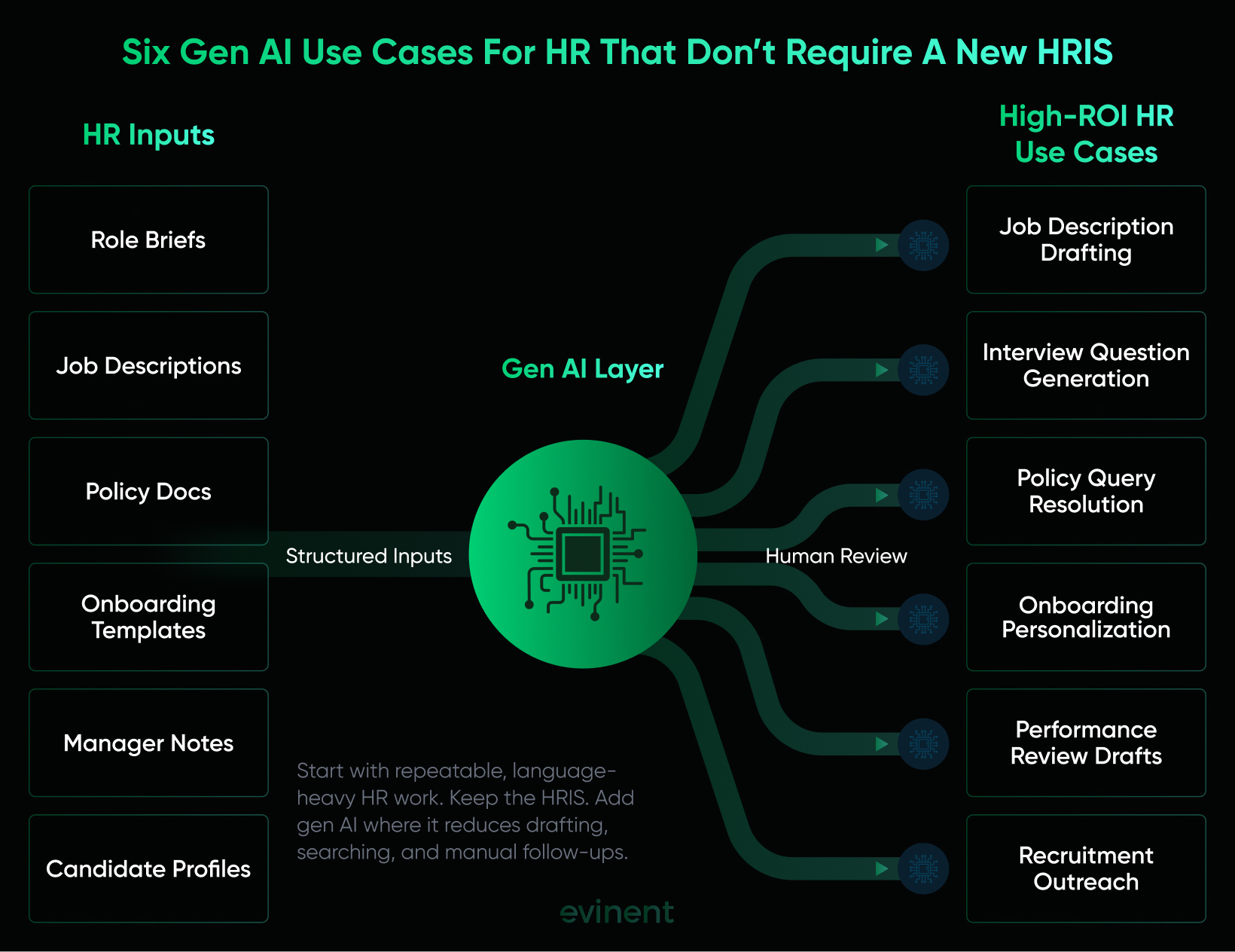
4. Onboarding Content Personalization
Onboarding is full of small details that matter more than people admit.
A remote product manager in Berlin does not need the same first-week instructions as an on-site warehouse supervisor in Texas. A finance hire needs different systems, training, and compliance reminders than a sales hire. A new manager needs different guidance than an individual contributor.
Gen AI can adapt onboarding messages, checklists, welcome notes, first-week agendas, and manager talking points by role, location, department, and employment type. It can turn one approved onboarding framework into several useful versions without asking the HR coordinator to rewrite everything manually.
This use case requires structured onboarding templates and reliable employee data. The model needs to know role, department, location, start date, employment type, manager, and any location-specific rules. It does not need a new HRIS, but it does need the existing data to be correct.
The realistic time saving is 40-60% for HR coordinator prep work, especially in companies hiring across multiple locations or departments. The hidden benefit is consistency. New hires get clearer information, managers get better s, and HR spends less time patching gaps after day one.
The failure mode is wrong personalization. If the location field is outdated, the new hire gets the wrong office instructions. If the department data is messy, the onboarding checklist sends them to tools they do not need. This is why onboarding personalization should start with a few common employee groups rather than every possible variation.
There is also a tone issue. Personalized onboarding should feel helpful, not overly familiar. A welcome message should not sound as if the company fed the new hire’s entire online life into a machine. Keep it useful. Keep it normal.
5. Performance Review First Drafts
Performance reviews are one of the most tempting use cases for gen AI for HR. They are also one of the easiest to mishandle.
The reason is obvious. Managers hate writing reviews. HR hates chasing managers to finish reviews. Employees hate receiving vague reviews. Everyone wants the process to be better, or at least less painful.
Gen AI can help by turning manager inputs into a structured first draft. The manager provides notes, goal progress, ratings, project examples, peer feedback, and development areas. The model creates a review draft that follows the company’s performance framework. The manager edits, adds judgment, and owns the final version.
This use case requires a structured input form. That is non-negotiable. If the manager gives the AI three lazy bullet points, the output will be a longer version of those three lazy bullet points. The model needs evidence: what happened, what changed, what was delivered, where expectations were met or missed, and what support or development is needed next.
The time saving can be 50-70% on manager drafting time. That is meaningful during review season. It may also improve consistency because every draft follows the same review structure.
But this use case handles sensitive content, so the controls need to be stronger. Performance reviews may include compensation context, health-related accommodations, interpersonal conflicts, protected leave history, or disciplinary concerns. That content should not be pasted into public AI tools. For many companies, this is where a private AI setup becomes the safer route.
The main risk is fairness. AI can make uneven manager inputs look equally polished. A manager who provides detailed evidence may produce a stronger review than a manager who gives vague notes, even if the employee performance is similar. HR needs to audit drafts across teams and watch for patterns in tone, specificity, and development feedback.
6. Recruitment Outreach Personalization
Recruitment outreach is another practical use case because bad outreach is everywhere.
Candidates get messages that say "I was impressed by your background" when the recruiter clearly did not read it. They get role pitches that have nothing to do with their experience. They get the same template with a different first name. Nobody is fooled.
Gen AI can help recruiters write more specific outreach from a base template. It can connect the role to the candidate’s background, adjust the tone by seniority, and keep the company’s employer value proposition consistent. The recruiter still reviews before sending.
This use case requires candidate profile data, a role description, approved messaging, and privacy rules. Recruiters need guidance on what is okay to reference. A candidate’s public work history is fair game. Random personal details scraped from social posts? No. That crosses a line fast.
The time saving is usually measured in minutes per candidate, but it adds up quickly. It may also improve response quality because the message feels more relevant. SHRM’s 2025 data shows that 29% of organizations using AI in recruiting use it to communicate with applicants, which makes sense. Outreach is repetitive, but the best outreach still needs a human read before it goes out.
The risk is over-personalization. A message that says "I saw you commented on burnout last week" does not feel thoughtful. It feels invasive. Another risk is false inference. The AI might assume a candidate wants leadership, relocation, or a career change based on weak signals.
Recruitment outreach should sound specific, but not surveillance-flavored. That is the line.
For most mid-market HR teams, the best first move is not to launch all six use cases at once. Start with one. Maybe two if the workflows are simple. Job descriptions plus interview questions make a clean recruiting pilot. Policy query resolution makes a clean HR operations pilot. Performance reviews should wait until the team has stronger review habits, better data rules, and a safer deployment model.
That order may feel cautious. It is. HR is not a sandbox. People’s jobs, pay, privacy, and trust are embedded in these workflows. Generative AI can help a lot, but only when the company is honest about where it is ready and where it is not.
HR Competencies Needed For The AI Era: What Actually Changes For Your Team
This is the part that gets weirdly personal for HR teams.
Most discussions about the HR competencies needed for the AI era sound like they were built for a conference slide: digital fluency, analytical mindset, change leadership, ethical governance, business partnership. None of that is wrong. It is just too tidy.
For a real HR generalist, recruiter, HRBP, or HR Director, the change feels more ordinary and more uncomfortable. The work does not vanish. It shifts. The first draft appears faster. The simple question gets answered before it reaches HR. The report can be summarized in seconds. Then the human is left with the harder part: checking, interpreting, calming people down, spotting what the tool missed.
That is not a small shift. Gartner’s 2025 research found that only 8% of HR leaders believe managers currently have the skills to use AI effectively, and only 14% of organizations provide managers with guidance on how to integrate generative AI into daily work. That gap matters because managers are exactly the people who will use AI for performance notes, hiring inputs, employee communications, and team planning. HR will be expected to guide them, regardless of whether HR feels ready.
From Writing To Editing
The first change is simple on paper: HR writes less from scratch and edits more.
A recruiter who used to spend 45 minutes writing a job description may now spend 15 minutes reviewing a gen AI draft. An HR generalist who used to write every onboarding email manually may now adjust a draft created from a template. A manager who used to freeze at a blank performance review form may now start with a structured first draft.
That sounds like relief. And it is, partly.
But editing AI output is not the same as proofreading. It is judgment work. The HR professional has to ask: is this accurate? Is this requirement real? Is the tone too inflated? Did the AI make the role sound more senior than it is? Did it add a skill we do not need? Did it use language that could narrow the candidate pool? Did it turn a manager’s vague notes into a polished paragraph that still says nothing?
This is where some teams stumble. Before AI, writing and review often happened inside one person’s head. The same person drafted, checked, softened, fixed, and sent. With gen AI, those steps are split apart. The draft is easy. The review becomes the real skill.
SHRM’s 2025 reporting makes this point from the employee side too: 80% of workers said a human should review AI outputs before they are used, and 74% said AI should complement human capabilities rather than replace them. That is a useful trust signal for HR. Employees may accept AI in the workflow, but they still expect a person to be accountable for what goes out under the company’s name.
So the new competency is not " writing" in the gimmicky sense. It is quality control. HR teams need people who can read an AI draft and quickly spot what is off, what is missing, and what could pose a risk later.
From Answering To Escalating
The second shift is from answering volume to handling exceptions.
If gen AI answers basic policy questions, HR receives fewer "where do I find this?" messages. Great. Nobody joined HR because they dreamed of sending the same benefits link 19 times a month.
But the questions that do reach HR may become harder.
An AI assistant can answer, "Where is the PTO policy?" It should not casually resolve, "My manager denied leave after I disclosed a health issue. What can I do?" It can explain the remote work policy. It should escalate when someone reports a conflict, a medical concern, a harassment complaint, or a possible termination issue.
That means HR professionals spend less time repeating information and more time working through nuance. More gray areas. More emotion. More context. More judgment calls.
Honestly, that can be a relief and a burden at the same time.
For HR teams buried in admin work, gen AI gives them room to do the work they were supposed to be doing all along. For teams measured primarily on ticket speed and process volume, the shift may feel uncomfortable. Fast answers are easier to track than careful handling of a sensitive case.
This is also where HR needs to clearly define escalation rules. The AI should not try to be brave. Brave AI in HR is usually bad AI. A good assistant knows when to stop, cite the policy, and hand the case to a human.
From Reporting To Interpreting
The third shift is from producing reports to making sense of them.
Generative AI can draft a workforce summary. It can explain attrition patterns in plain English. It can compare engagement survey themes. It can turn a dense HR dashboard into a leadership-ready paragraph. That is useful, especially for lean teams that lack a people analytics function.
But a summary is not the same as insight.
If attrition rises in one department, the AI can point to the number. HR has to know the story behind it. Was there a manager change? A compensation issue? A project ending? A hiring freeze? A bad quarter? A policy change nobody liked? Data without memory is just a chart with confidence.
Deloitte’s 2025 Human Capital Trends research makes a related point: as AI takes over routine tasks, employees want clarity about the human skills that still matter, including creativity, empathy, critical thinking, and problem-solving. More than 70% of managers and employees said they are more likely to join and stay with a company that helps them grow in an AI-shaped work environment.
For HR, that means people analytics can no longer be treated as a side hobby for whoever likes spreadsheets. HR professionals need sufficient data confidence to challenge patterns, explain context, and translate workforce signals into decisions leaders can act on.
Not every HR person needs to become a data scientist. Please no. But they do need to become better interpreters.
If the AI says exit interview comments point to "manager communication issues," HR needs to ask which managers, which teams, which time period, and whether the pattern matches other evidence. If the AI indicates lower engagement among new hires, HR needs to review onboarding, manager touchpoints, workload, and hiring sources. If the AI indicates that one role has higher turnover, HR needs to determine whether the issue is pay, expectations, work design, or simply a small sample size causing noise.
That is the real skill: knowing when the pattern is meaningful and when it is just a pattern.
None of these competencies is entirely new. Editing, escalation, and interpretation were always part of good HR work. They were just crowded out by admin volume, last-minute requests, messy documents, and managers who needed "one quick thing" every day.
Gen AI removes some of that volume. Then it asks an uncomfortable question: when the repetitive work gets lighter, is the team ready for the judgment work underneath?

What Stops Gen AI For HR From Working: The Three Real Blockers
The risks around generative AI for HR are real. Bias, privacy, worker surveillance, explainability, and legal accountability are not abstract concerns when AI touches hiring, performance, pay, promotion, or termination.
Regulators are paying attention for a reason. The U.S. Department of Labor’s 2024 AI guidance stresses human oversight, responsible worker data use, worker input, and clear governance when employers use AI in the workplace. The EEOC has also warned that AI tools can affect employment decisions such as hiring, training, pay, layoffs, and termination, which means anti-discrimination rules still apply even when a vendor supplies the tool. In the EU, the AI Act treats many employment and worker-management AI systems as high-risk, especially tools used for recruitment, candidate evaluation, promotion, termination, task allocation, and performance monitoring.
But here’s the thing: most mid-market gen AI for HR projects do not fail first because of a grand ethical dilemma. They fail earlier. They fail because the role brief is bad. The policy folder is stale. The ATS does not connect. The AI tool sits outside the normal workflow, so people use it twice and then go back to old habits.
Less dramatic. More common.
Blocker 1: The Data Quality Problem Nobody Talks About Until Go-Live
Generative AI produces output quality in proportion to input quality. That sounds obvious until the first pilot goes live and everyone realizes the source material is messier than expected.
A job description draft is only as good as the manager’s role brief. Interview questions are only as good as the job requirements. A policy assistant is only as good as the policy documents they read. A performance review draft is only as good as the notes the manager provides.
In many 200-500-person companies, those inputs are uneven. One manager sends a thoughtful role brief. Another sends two lines and a job title. One PTO policy is current. Another document in the shared drive still refers to an office the company closed three years ago. Job titles differ between the HRIS, the ATS, and payroll. Department names are not always consistent. Someone knows the truth, but the system does not.
Gen AI does not fix that. It makes the mess easier to publish.
That is the dangerous part. Before AI, weak source material often looked weak. A vague role brief looked vague. An outdated policy PDF looked dusty. With AI, weak input becomes smooth output. A confident paragraph appears. It has structure. It sounds official. It may even sound kind. And it can still be wrong.
For HR, "wrong" is not a small thing. An incorrect policy answer can create trust issues for employees. A wrong job requirement can narrow the candidate pool. A vague performance note can turn into a polished but unfair review. A manager may trust the format more than the facts.
So before launching generative AI for HR, ask a few blunt questions:
Which document is the source of truth?
Who owns updates?
Are role briefs complete enough to generate usable drafts?
Are job titles and departments consistent across systems?
Do managers provide evidence in performance notes, or just impressions?
Can HR audit AI output before it reaches employees or candidates?
That is not glamorous AI work. It is housekeeping. But for gen AI, housekeeping is a strategy.
The U.S. Department of Labor’s AI principles point in the same direction from a worker-protection angle: AI systems should support legitimate business aims, protect worker data, and be used with clear oversight. If the source data is unclear, outdated, or poorly governed, the company has a shaky foundation before the model even starts producing text.
Blocker 2: The Integration Gap Between Gen AI And The HR System Of Record
Many gen AI tools are good at creating content. They are not always good at putting that content where HR work actually happens.
The AI drafts the job description. Then the recruiter copies it into the ATS. The AI generates interview questions. Someone pastes them into a shared doc. The AI answers a policy question. HR still has to create a case note manually. The AI drafts a performance review. The manager copies it into the performance system, edits it there, then HR asks where the original input went.
At first, this feels fine. The draft is faster, so the copy-paste step seems harmless.
Then version control starts to rot.
One person edits in the AI tool. Another edit in the ATS. A manager uses an old draft. HR approves one version, but the published version is slightly different. Nobody means to create chaos. The workflow just has too many handoffs.
This is one of the most common reasons gen AI for HR loses momentum. The tool helps with one piece of the task but does not connect to the system of record. So people have to remember another step, another login, another place to check. Optional tools lose to busy days.
The fix is not always a giant integration project. For an early pilot, a controlled manual process can work. But if the use case proves value, the AI output needs to move closer to the workflow.
For example:
Approved job descriptions should flow into the ATS.
Interview question sets should attach to the hiring workflow.
Policy assistant escalations should carry the employee’s question and the cited source document into the HR ticket.
Performance review drafts should stay inside the review process, not float around in random docs.
This becomes especially important for companies with older HRIS platforms. Some legacy systems have limited APIs. Some have awkward export formats. Some require custom connectors. That does not make gen AI impossible, but it does mean the implementation needs integration thinking from day one.
Otherwise, you get a fast writing tool sitting beside a slow workflow. The writing gets faster. The process stays clunky.
And clunky processes have a way of winning.
Blocker 3: Deploying Gen AI As A Feature, Not A Workflow Change
"Now we have AI in HR" is not an implementation plan.
A chatbot on the intranet does not mean employees will use it. A writing assistant does not mean managers will submit better review inputs. A shiny AI button in a recruiting tool does not mean the hiring process is more consistent.
The difference is workflow design.
Let’s take job descriptions. A weak rollout says, "Recruiters can use AI to write job descriptions if they want." Some will. Some will not. The results will vary. Leadership will look at usage after three months and wonder why adoption is patchy.
A stronger rollout changes the process:
The hiring manager submits a structured role brief.
Gen AI creates the first draft using the approved template.
HR reviews accuracy, tone, requirements, and risk of bias.
Legal or compliance reviews sensitive language when needed.
The approved version moves into the ATS.
The final posting is stored as a source example for future roles.
That is not "using AI." That is redesigning the work, so AI has a defined job.
The same applies to policy questions. A weak rollout says, "Employees can ask the AI assistant." A stronger rollout defines which documents the assistant can read, which questions it must escalate, whether it cites source policies, how HR reviews failed answers, and who updates the knowledge base.
Performance reviews need even more structure. If managers submit weak notes, AI will not save the review cycle. A good workflow requires structured manager input first: goals, examples, ratings, evidence, development points, and context. No useful input, no useful draft.
This is where change management shows up, whether the company calls it that or not. SHRM reported that only 1 in 4 HR professionals played a leading role in AI implementation, even though 2 in 3 believe HR should lead change management and training. SHRM also noted that AI requires more than buying a new tool; it needs leadership, preparation, and clear workplace adoption practices.
That point is easy to underestimate. Mid-market companies often buy software because they need relief fast. Fair enough. HR is overloaded. But gen AI is not a normal software feature. It changes how people draft, review, answer, document, and decide.
If nobody explains the new process, people create their own.
And when people create their own AI process inside HR, risk spreads quietly. Candidate messages get written in different tones. Managers use different review s. Employees receive inconsistent policy answers. Someone uploads sensitive data to the wrong tool because nobody told them not to.
The project does not collapse in one dramatic moment. It gets messy, slowly.
That is why the real blocker is not the model. It is the gap between the model and the work.
A practical rule of thumb: if the workflow would still be confusing without AI, AI will not make it any clearer. That will only increase the confusion.
How Evinent Deploys Gen AI For HR On The Stack You Already Have
The Moderna case study is not your roadmap.
Your roadmap starts with the two or three HR tasks that consume the most time and produce the least consistent output. Maybe it is job description drafting. Maybe it is interview prep. Maybe it is the same set of policy questions hitting HR every week. Maybe it is performance review season, when managers suddenly remember they need to write thoughtful feedback for 47 people by Friday.
That is where Evinent starts: with the workflow, not with the model.
This matters because generative AI for HR does not create value in isolation. A model can generate a good draft, sure. But if that draft sits in a separate tool, outside the ATS, outside the HRIS, outside the review process, and outside the place where HR actually works, the team still has to copy, paste, check, rename, resend, and store the output manually.
That is not a productivity gain. I have attached a slightly faster draft to the same old mess.
Evinent’s broader work is built around modernizing outdated systems, improving data workflows, reducing technical debt, and connecting new software layers to the systems companies already use. The company’s positioning specifically focuses on mid-sized and enterprise businesses that need to improve older systems without tearing everything down at once.
Workflow-First Deployment
Evinent does not start a gen AI for HR project by asking, "Which AI tool should we add?"
The better question is, "Which HR workflow is slow, repetitive, inconsistent, and safe enough to improve first?"
That usually leads to one of a few practical pilots:
job description drafting
interview question generation
employee policy query resolution
onboarding content preparation
recruitment outreach personalization
performance review first drafts
Each pilot gets mapped as a real workflow. Who provides the input? What does the AI generate? Who reviews it? Where does the approved output go? What should be logged? What should be escalated to a person? What should the AI never touch?
This sounds basic. It is also where many projects go wrong.
For example, a job description pilot should not mean "HR can ask ChatGPT to write job posts." That is too loose. A proper workflow looks more like this: the hiring manager fills out a structured role brief, Gen AI creates a first draft using an approved template, HR reviews the draft for accuracy and potential bias, and the final version is entered into the ATS.
That one workflow can be measured. Drafting time before and after. Number of HR edits. Manager satisfaction. Posting consistency. Candidate-facing quality.
A vague AI initiative cannot be measured that cleanly.
Integration With Existing HR Systems
Most mid-market companies do not want to replace their HRIS just to test generative AI for HR. They should not have to.
A useful gen AI layer should work with the HR systems already in place, such as HRIS, ATS, ticketing tool, document repository, performance review platform, or LMS. Sometimes that means a direct API connection. Sometimes it means a lightweight middleware layer. Sometimes, for older systems, it means custom connectors because the existing platform was never built for modern AI workflows.
Evinent has specific experience with legacy system modernization, data migration, custom integrations, and connecting outdated platforms with newer tools. Its legacy modernization materials describe work such as database optimization, infrastructure migration, code modernization, security analysis, data preparation, migration, implementation, testing, launch, and user handover.
That matters to HR because the most annoying part of AI adoption is often not the AI itself. It is the handoff.
If the AI drafts a job description, it should not live forever in a random doc. It should land in the ATS after approval.
If the policy assistant escalates a question, HR should receive the employee’s question, the AI’s answer, and the source document used.
If the AI creates a performance review draft, it should stay inside the review workflow, not float around as an uncontrolled file.
If the onboarding assistant creates a first-week plan, that plan should connect back to the employee’s role, department, location, and start date.
That is the unglamorous part of implementation. It is also the part that decides whether people keep using the system after the pilot.
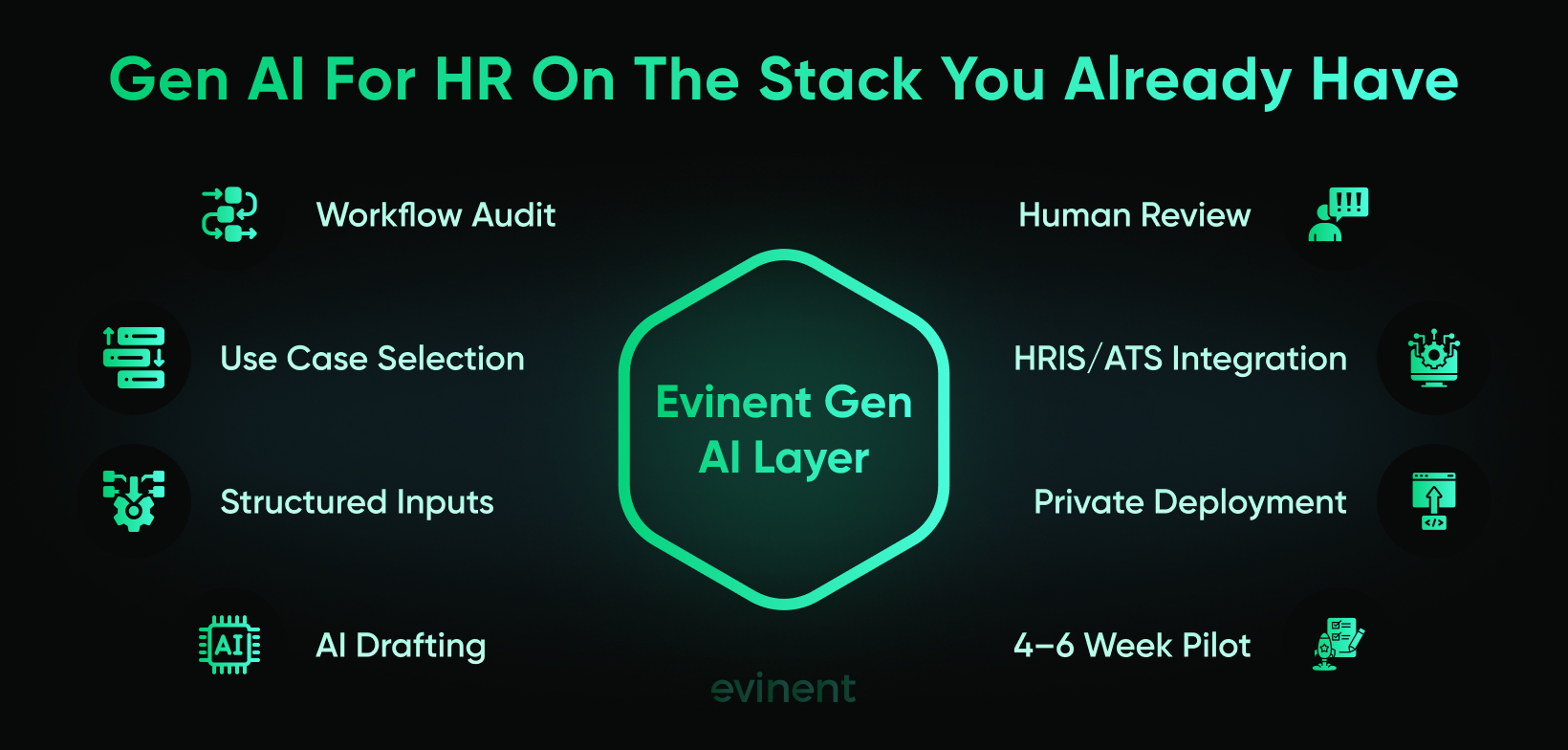
Private Deployment For Sensitive HR Content
Some HR use cases are fine for approved enterprise AI tools, especially when the content is generic and easy to review. Job description drafts, interview question templates, and general onboarding copy can often start there.
Other use cases are different.
Performance reviews, compensation data, candidate assessments, employee relations notes, medical accommodation context, and internal complaints are sensitive. They should not be copied into random AI tools just to save 20 minutes.
For these workflows, Evinent can support a private gen AI deployment inside the client’s infrastructure. The model runs within the company’s controlled environment, and employee or candidate content does not get routed through public AI services. That is especially relevant for healthcare, finance, regulated employers, and companies where exposure of HR data would damage employee trust.
This connects naturally with Evinent’s security-first work in regulated and sensitive-data environments. Its healthcare materials mention encryption, strict access control, regular security checks, healthcare integrations, legacy software modernization, and secure data migration as part of its approach to custom software development.
For HR, this is not about being dramatic. It is about matching the deployment model to the data.
A policy FAQ assistant needs one level of control.
A performance review drafting assistant needs another.
An AI tool that touches compensation, employee relations, or health-related information needs stricter rules again.
The more sensitive the HR content, the closer the AI should sit to the company’s own infrastructure, access rules, audit logs, and data retention policies.
A Practical Pilot Instead Of A Giant AI Program
A good Evinent pilot for gen AI in HR can start small. Four to six weeks is usually enough to test one narrow workflow if the scope is realistic.
The pilot does not need to promise a new HR operating model. It needs to answer a few specific questions:
Can the AI reduce drafting or query-handling time?
Can HR review the output quickly and confidently?
Can the workflow integrate with the existing HRIS, ATS, or document management system?
Can the source data be trusted?
Can sensitive content stay protected?
Can the team measure the result without inventing fake ROI?
For example, a job description pilot might measure how long it takes to create a draft before and after AI support, how many edits HR makes, whether postings follow a consistent structure, and whether hiring managers provide better role briefs over time.
A policy query pilot might measure how many repeat questions are answered without HR involvement, which topics trigger escalation, how often source documents need updates, and whether employees trust the answers.
A performance review pilot might measure manager drafting time, HR edit volume, review consistency, and whether outputs stay evidence-based.
That is the kind of pilot a COO or CFO can understand. Not "we launched AI." More like: "We reduced job description drafting time from 45 minutes to 12 minutes, kept HR review in place, and pushed approved content into the ATS."
Much better.
What Evinent Actually Changes
The goal is not to make HR look more AI-heavy. Nobody needs that.
The goal is to remove the parts of HR work that are repetitive enough to exhaust people but contextual enough that old automation never handled them well.
Evinent does that by connecting three things:
First, the HR workflow. The real one, with all its awkward handoffs and unofficial workarounds.
Second, the existing system stack. HRIS, ATS, ticketing, document storage, LMS, performance tools, and even older platforms that require custom integration.
Third, the right AI deployment model. Lightweight when the data is low-risk; private when the content is sensitive.
That is the difference between "AI as a feature" and gen AI for HR that people can actually use.
The final point is simple: mid-market companies do not need Moderna’s 3,000 GPTs. They need two or three well-chosen workflows, clean source material, human review, and a gen AI layer that fits the systems they already run.
How To Start A Gen AI For HR Pilot Next Quarter
A mid-market company does not need a giant AI program to start using generative AI for HR. In fact, that may be the worst way to begin.
The better first move is a narrow pilot with one workflow, one owner, one review process, and one set of metrics. Not "AI for HR." Too broad. Not "let’s test a few tools and see what happens." Too vague. Pick one painful workflow and make it measurably better.
For most 200-500-person companies, the cleanest starting point is either drafting job descriptions or resolving employee policy queries. Job descriptions are easier because the risk is lower and the output is reviewed before it goes public. Policy query resolution can provide greater operational relief, but it depends on whether the policy documents are current, well-structured, and owned by someone.
Performance review drafting should usually come later. It can save a lot of manager time, but it also touches sensitive employee data. If the company does not yet have clear AI usage rules, access control, and a private deployment option, this is not the first place to experiment.
Week 1: Pick The Workflow And Clean The Inputs
Start by choosing one workflow where the pain is obvious.
For example:
HR spends too much time writing job descriptions from scratch.
Recruiters create interview questions manually for every role.
HR answers the same policy questions again and again.
Managers performance reviews because writing feedback takes too long.
Onboarding content must be rewritten for each location or department.
Then collect the source material. This is where the pilot gets real very quickly.
For job descriptions, gather five to ten strong examples, the current role brief template, and any tone or employer branding rules. For policy questions, collect the actual policy documents employees should rely on. For onboarding, collect checklists, welcome emails, location-specific notes, equipment instructions, and manager guidance.
Do not skip the cleanup. If the source material is outdated, duplicated, or contradictory, the AI will not politely fix it. It will turn confusion into neat paragraphs.
That is worse.
Week 2: Create The And Review Process
The goal is not to let every HR team member invent their own . That creates inconsistent output within a week.
Create one approved template for the workflow. Keep it specific. Tell the AI which source material to use, which format to follow, which tone to maintain, what not to invent, and when to flag uncertainty.
For a job description workflow, the should include:
role title
department
seniority level
reporting line
must-have skills
responsibilities
location or work model
salary transparency rules, if relevant
approved tone
banned phrases or requirements
final output structure
Then define the review process. Who checks the draft? What do they check for? What happens if the output is weak? Where is the approved version stored?
A good review checklist is short but strict:
Is the role accurate?
Are requirements realistic?
Is the language inclusive and plain?
Did the AI add anything unsupported?
Does the structure match company standards?
Is the final version ready for the ATS?
This is where HR’s new AI-era skill shows up: editing with judgment.
Week 3: Test With Real Work, Not Demo Scenarios
Demo examples are usually too clean. Real HR work is messier. That is the point.
Test the workflow on five to ten real cases. For job descriptions, use upcoming or recently opened roles. For policy questions, use actual employee questions from the last few months, with personal data removed. For onboarding, test a few recent hire profiles across different teams or locations.
Measure before and after.
If a job description used to take 45 minutes, how long does the AI-assisted version take? If HR usually answers 40 repeat policy questions a month, how many could the assistant answer from approved documents? If managers spend three hours writing reviews, how much of that time is first-draft pain?
Do not measure only speed. Speed can hide quality problems.
Track:
time saved
number of edits needed
reviewer confidence
missing or outdated source material
escalation cases
repeated failure patterns
user feedback from HR or managers
If the AI saves 30 minutes but creates 40 minutes of review anxiety, the workflow is not ready.
Week 4: Connect The Output To The Actual HR Workflow
This is where many pilots either prove useful or remain side experiments.
If the AI helps draft job descriptions, the approved version should move into the ATS. If the AI answers policy questions, unresolved cases should move into the HR ticketing system with the question and source context attached. If the AI drafts onboarding content, that content should connect to the employee’s role, location, and start date.
For the first pilot, some manual handling is acceptable. Nobody needs to build deep integration before proving value. But the team should already know what would be needed to connect later.
Ask:
Where does the approved output live?
Who can edit it?
How is the final version tracked?
What happens when the source document changes?
Can the workflow scale beyond one HR person?
Does the process create extra copy-paste work?
A pilot that saves drafting time but adds version chaos is not a win. It is a warning.
Weeks 5-6: Decide Whether To Expand, Fix, Or Stop
The last stage is not a celebration deck. It is a decision.
If the pilot worked, expand carefully. Add more roles, more policy categories, more onboarding paths, or more departments. If the pilot worked only sometimes, fix the weak point before expanding. Usually, the issue is one of three things: poor inputs, unclear review ownership, or output sitting outside the workflow.
If the pilot did not work, do not force it. Some workflows are not ready. That is useful information too.
A clean pilot should end with answers to these questions:
Did the workflow save measurable time?
Did HR trust the output?
Did managers or employees find it useful?
Were the source documents good enough?
Did the review process catch issues?
Did the workflow create a new risk?
What integration is needed next?
Should this use case move toward private deployment?
For C-level leaders, the final pilot summary should be concrete, not fluffy.
Weak version: "The HR team tested AI and found it promising."
Better version: "AI-assisted job description drafting reduced average first-draft time from 45 minutes to 14 minutes across eight roles. HR review remained mandatory. The main quality issue was incomplete manager role briefs, so the next step is updating the role intake form before expanding to all hiring teams."
What C-Level Leaders Should Measure Before Scaling Gen AI For HR
Once the pilot works, the next temptation is obvious: expand it everywhere.
Job descriptions worked? Great, let’s add candidate outreach, interview feedback summaries, onboarding content, employee policy questions, performance reviews, learning recommendations, manager coaching, workforce reporting, and maybe a chatbot named something painfully cheerful.
Slow down.
Generative AI for HR should scale only when the company can prove three things: the workflow saves time, the output remains trustworthy, and the risk does not quietly shift elsewhere.
That last part is easy to miss. A tool can save HR time while creating more work for managers. It can reduce ticket volume while increasing employee confusion. It can make documents look more consistent while hiding weak inputs underneath. So the question for leadership is not only "Did AI save time?" It is "Did the workflow get better?"
Time Saved Is Useful, But It Is Not Enough
Time saved is the easiest metric to understand, so yes, measure it.
For job descriptions, compare the average time from role intake to approved draft. For interview questions, compare preparation time per role. For policy query resolution, track the number of employee questions answered without HR involvement. For performance review drafts, measure manager's drafting time before and after AI support.
But do not stop there.
A gen AI workflow that saves 30 minutes and creates 25 minutes of review friction is not a big win. A policy assistant who deflects 40% of questions but gives unclear answers creates a different kind of mess. A performance review assistant that reduces writing time but produces generic feedback may make the process faster while making it worse at the same time.
So, time saved should sit alongside quality metrics.
For a job description workflow, leadership should ask:
How many AI drafts were approved after light editing?
How many required major rewrite?
Did job posts become more consistent across departments?
Did hiring managers provide better role briefs over time?
Did HR remove biased, inflated, or unsupported language before publishing?
For a policy assistant, ask:
Which questions were answered successfully?
Which questions were escalated?
Which answers received poor feedback?
Which policy documents caused confusion?
How often did HR need to update the source material?
For performance review drafting, ask:
Did managers provide better evidence?
Did HR find fewer vague reviews?
Were drafts consistent across departments?
Did employees receive clearer feedback?
Were any wording patterns flagged for fairness review?
That is the difference between measuring activity and measuring value.
Quality Review Should Become A Metric, Not A Feeling
A lot of HR quality control happens informally. Someone reads a job post and says, "This feels off." Someone checks a review and says, "This sounds too harsh." Someone edits a candidate message because it feels too salesy.
Those instincts matter. But if generative AI becomes part of the workflow, review needs to become more visible.
Not bureaucratic. Just visible.
For every AI-assisted workflow, define what a good output looks like. Then track how often the output meets that standard.
A simple scoring system can work:
1 = unusable, full rewrite needed
2 = usable idea, but major edits needed
3 = acceptable after normal HR editing
4 = strong draft, light edits only
5 = ready with minimal changes
This gives HR and leadership a shared language. If job description drafts average 4.1 after the first month, the workflow is probably working. If performance review drafts average 2.3, the issue may be manager input quality, the , or the use case itself.
The point is not to grade the AI for fun. The point is to find where the workflow breaks.
Adoption Should Mean Repeat Use, Not Curiosity
A lot of AI pilots get a fake adoption bump because people are curious.
They try the tool. They generate a few drafts. They send screenshots in Slack. Someone says, "This is kind of cool." Then three weeks later, everyone is back in Google Docs doing the same old thing.
Real adoption is repeat use inside the actual workflow.
For HR, that means:
recruiters use the AI-assisted job description process for most new roles;
hiring managers use generated question sets during interviews;
employees ask the policy assistant before sending routine questions to HR;
managers submit structured inputs for AI-assisted review drafts;
HR checks and approves the output as part of the normal process.
The "inside the normal process" part is important. If people need to leave the ATS, open another tool, copy content, paste it somewhere else, and remember which version is final, adoption will fade. Not because people hate AI. Because people are busy.
A useful adoption metric is not "How many people logged in?" It is "What percentage of eligible workflows used the AI-assisted process from start to finish?"
For example:
78% of new roles used AI-assisted job description drafting.
64% of policy questions were routed through the assistant first.
52% of managers used structured AI-assisted review drafting.
91% of escalated policy questions included AI context and source references.
Those numbers indicate whether the workflow is returning to normal.
Risk Should Be Tracked Before Something Goes Wrong
Risk measurement sounds heavy, but it does not need to be dramatic.
For mid-market companies, the first risk dashboard can be simple. Track the issues reviewers find before AI output reaches employees, candidates, or managers.
Common categories:
unsupported claims added by AI;
outdated source material;
biased or exclusionary wording;
overly broad job requirements;
incorrect policy interpretation;
missing escalation;
sensitive data entered into the wrong tool;
tone that does not match the company;
output that sounds polished but says very little.
This is useful because it gives the leadership team an honest view of where controls are working.
If HR catches biased wording in 12% of generated job descriptions during review, that does not mean the pilot failed. It means the review gate is doing its job. If the same issue keeps appearing after updates and source cleanup, then the workflow needs fixing before it expands.
Risk should not be the sole reason to avoid generative AI in HR entirely. That is too easy. It should be treated as something to design around.
Cost Should Include The Human Work Around The Tool
A gen AI tool may look cheap on paper. Then the hidden work appears.
Someone has to clean policies. Someone has to create templates. Someone has to train HR and managers. Someone has to review outputs. Someone has to manage access. Someone has to keep source documents current. Someone has to connect the tool to the ATS, HRIS, or ticketing system if the pilot moves beyond a side experiment.
That work is not a problem. It is the cost of making the tool useful.
When leaders evaluate ROI, they should include:
software or model costs;
setup and integration work;
HR time spent creating templates and review rules;
training for HR, managers, and employees;
source document cleanup;
audit and monitoring time;
security and privacy review;
support after launch.
This is where some companies get disappointed. They expected a cheap writing tool. What they actually need is a workflow change that includes a model.
Still worth it, often. But not free.
The Best Scaling Signal Is Boring Confidence
The best sign that generative AI for HR is ready to expand is not excitement. Excitement fades.
The better sign is boring confidence.
HR knows which inputs are required. Managers understand what they must provide. The AI output is reviewed quickly. The source documents have owners. The approved content lands in the right system. Sensitive data stays where it should. Employees know when they are talking to an AI assistant and when a human takes over.
Where Generative AI For HR Should Not Start
There is a difference between a practical gen AI pilot and a risky shortcut.
For most mid-market companies, generative AI for HR should start with drafting, summarizing, searching, and routing. It should not start with decisions that directly affect someone’s job, pay, promotion, or employment status. That line sounds obvious, but it gets blurry fast once vendors start showing polished demos.
A job description draft is one thing. Automated candidate ranking is another.
A policy assistant who explains where to find parental leave rules is one thing. A chatbot that advises a manager on a sensitive employee-relations issue is another example.
A performance review first draft is one thing. An AI-generated performance score is another.
The more the AI moves from “help me prepare the work” to “help me decide what happens to this person,” the more careful the company needs to be.
The EEOC has already made clear that anti-discrimination laws still apply when employers use AI or algorithmic tools to make or inform employment selection decisions. Its technical assistance on adverse impact explains that automated systems used in selection can still create disparate impact under Title VII, even when the tool is provided by a vendor.
That does not mean companies should avoid AI in hiring altogether. It means they should be very careful about where they put it first.
Automated Candidate Ranking
Automated candidate ranking is tempting because recruiting is noisy. Too many CVs. Too many similar profiles. Too little recruiter time.
But ranking tools can create risk quickly. If the AI scores candidates, filters resumes, or recommends who should move forward, it begins to influence access to work. That is a much higher-stakes use case than drafting a job post or generating interview questions.
The safer first step is to use gen AI to summarize candidate materials for human review, prepare structured interview questions, or help recruiters draft outreach. Keep humans responsible for selection decisions.
In the EU, AI systems used for recruitment, candidate evaluation, application filtering, promotion, termination, task allocation, and performance monitoring are classified as high-risk under the AI Act. That means these use cases come with heavier expectations around risk management, oversight, documentation, and transparency.
So for a 300-person company, automated ranking is not the first pilot. It is a later-stage project, and only if HR, legal, IT, and leadership are ready to govern it properly.
Compensation And Promotion Recommendations
Gen AI should not be the starting point for compensation or promotion decisions.
Pay and promotion already carry enough complexity: internal equity, market data, performance history, manager bias, budget limits, legal exposure, and employee trust. Adding AI too early can make the process look more objective than it really is.
That is the trap. A model-generated recommendation may feel neutral because it comes from a system. But the system learns from data, rules, s, and historical patterns created by people. If those inputs reflect past inequities, the AI may package old problems in cleaner language.
A safer use case is explanation support. For example, gen AI can help HR summarize compensation policy, draft manager talking points, or prepare structured promotion packet templates. It should not decide who gets promoted or how much someone should earn.
Employee Relations Advice
An AI assistant should not advise managers on harassment complaints, retaliation concerns, disability accommodations, disciplinary action, medical leave conflicts, or termination risk as if it were HR counsel.
It can route. It can provide approved policy references. It can tell a manager, “This situation needs HR review.” That is useful.
But it should not improvise.
The U.S. Department of Labor’s 2024 AI guidance emphasizes human oversight, worker data protection, transparency, and worker involvement when employers use AI in workplace contexts. Those principles matter most when the situation affects employee rights, safety, privacy, or job security.
For employee relations, the best AI is often the one that knows when to stop.
Performance Scoring And Productivity Monitoring
Performance review drafting can be useful when managers provide evidence and HR reviews the output. Performance scoring is different.
Once AI starts evaluating productivity, ranking employees, monitoring behavior, or flagging workers as “low performers,” the company enters a much more sensitive area. Employees may feel watched. Managers may overtrust the system. HR may inherit decisions it cannot explain.
The EU AI Act specifically identifies several employment and worker-management AI uses as high-risk, including systems used to monitor and evaluate performance or behavior.
For mid-market companies, the safer move is to keep gen AI in a support role: summarizing manager notes, structuring review drafts, identifying missing evidence, and helping HR check consistency. Do not let it assign performance outcomes.
A Simple Rule For Safer Prioritization
Here is the practical rule:
If the AI output can be reviewed before it affects an employee or candidate, it may be a good early use case.
If the AI output directly influences hiring, pay, promotion, discipline, termination, or sensitive employee relations, it is not an early use case.
That is why drafting job descriptions, generating interview questions, resolving employee policy queries, creating onboarding content, and conducting recruitment outreach are reasonable starting points. They are frequent, language-heavy, and reviewable.
Automated ranking, compensation recommendations, promotion scoring, employee relations advice, and productivity monitoring belong in a different category.
They require stronger controls. More documentation. Better data. Human oversight. Legal review. Clear employee communication. And in many cases, a private deployment model.
Generative AI for HR works best when it helps HR move faster without pretending judgment has disappeared. The first pilot should prove that.
How To Govern Gen AI For HR Without Killing The Pilot
Governance has a bad reputation because people hear the word and imagine a 42-page policy nobody reads.
But for generative AI for HR, governance does not need to be heavy to be useful. It needs to be clear enough for HR, IT, legal, and managers to know what is allowed, what is not, and when a human must step in.
That is it. Clarity before chaos.
For a mid-market company, a good first AI governance layer can fit into one practical document. Not a giant framework. A working agreement.
Define Which HR Tasks AI Can Support
Start with the allowed use cases.
For example, AI may be allowed to support:
job description first drafts;
interview question generation;
candidate outreach drafts;
general onboarding content;
FAQ-level policy answers;
HR report summaries;
performance review draft structure, if the deployment is private and reviewed.
Then define where AI is not allowed to act.
For example, AI should not be used to:
make hiring decisions;
rank candidates without approved governance;
decide compensation;
assign performance scores;
advise on employee relations cases;
process sensitive health, leave, or disciplinary details in public tools;
generate final HR communications without human review.
This sounds obvious. It is not. People improvise when rules are vague. And in HR, improvisation with AI can get messy very quickly.
A recruiter may paste candidate notes into a public tool to save time. A manager may ask AI to rewrite performance feedback without realizing they included sensitive information. Someone in HR may test a policy answer using a real employee case. Nobody means harm. They just want help.
Governance prevents “I didn’t know” from becoming the operating model.
Decide What Data Can Go Where
This is the most important rule for HR.
Not all HR data belongs in the same AI environment.
Generic job descriptions, public employer branding copy, and approved policy text can often be handled with lower risk. Employee-specific performance notes, salary context, medical accommodation details, disciplinary history, and candidate assessments need much tighter controls.
A simple data classification model works well:
Low-risk HR content: public job posts, generic interview questions, general onboarding copy, approved policy excerpts.
Medium-risk HR content: internal HR process documents, anonymized interview notes, non-sensitive manager guidance, draft communications.
High-risk HR content: employee records, compensation data, performance reviews, health-related information, complaints, disciplinary notes, and candidate evaluation details.
Low-risk content may be acceptable in approved enterprise AI tools.
Medium-risk content needs access control, logging, and review.
High-risk content should stay inside a controlled environment. For many companies, that means private AI deployment or no AI use until the right setup is in place.
This is the part leadership should not leave to individual judgment. People are bad at judging data risk when they are rushing.
Keep Humans Accountable For Final Output
Human review is not a polite extra. It is the control.
Every gen AI for HR workflow should have a named human owner for the final output. The AI can draft the job description, but HR owns the published posting. The AI can suggest interview questions, but HR owns the question set. The AI can draft a review, but the manager owns the review. The AI can answer a policy question, but HR owns the policy source and escalation process.
That ownership should be written into the workflow. Clear ownership.
For sensitive workflows, the review should also be documented. That does not mean creating paperwork for every small edit. It means the company should be able to show that a human reviewed AI output before it affected an employee or candidate.
Require Source References For Policy Answers
If an AI assistant answers employee policy questions, it should not behave like an all-knowing oracle.
It should cite the policy source or at least reference the exact section of the document behind the answer. Employees should know whether the answer comes from the PTO policy, the remote work policy, the benefits handbook, or the local employment addendum.
A good answer looks like this:
“Based on the Remote Work Policy, section 3.2, remote work outside your country of employment requires HR and manager approval before travel.”
A weak answer looks like this:
“Yes, you can probably work remotely abroad if your manager agrees.”
That “probably” can become a problem.
Source references help employees trust the answer. They also help HR audit the assistant. If the AI gives a wrong answer, the team can check whether the source document was outdated, the retrieval setup failed, or the needs adjustment.
Without source tracking, every bad answer becomes detective work.
Create Escalation Rules Before Launch
The AI assistant should know when to stop.
This matters most for policy queries, manager guidance, employee relations, performance conversations, and anything involving leave, health, discrimination, harassment, pay, or termination.
The escalation rules should be specific. For example:
If the employee mentions harassment, discrimination, retaliation, medical issues, disability, termination, disciplinary action, or legal concerns, route to HR.
If the answer depends on local law, route to HR.
If the policy has exceptions or requires approval, explain the general rule and route to HR.
If the assistant cannot find a source, do not invent an answer.
If the employee asks for advice about a conflict with a manager, route to HR.
A useful HR assistant is not the one who answers everything. It is the one that answers routine questions reliably and refuses to bluff on sensitive ones.
Honestly, that refusal is part of the product.
Train Managers On What Not To Do
HR can have perfect rules and still lose control if managers use AI badly.
Managers are likely to use AI for employee emails, performance feedback, hiring notes, meeting summaries, and conflict-related messages. Some of that can be helpful. Some of it can be risky.
A short manager training should cover:
Do not paste sensitive employee information into unapproved AI tools.
Do not use AI to make performance, promotion, pay, or termination decisions.
Do not use AI-generated feedback without checking facts and tone.
Do not ask AI for legal or employee relations advice.
Do use approved templates for routine drafting.
Do ask HR before using AI for anything sensitive.
This training does not need to be dramatic. It can be 30 minutes. But it should be concrete, with examples.
Bad example: “Write a warning letter for Anna because she has been late and might have depression.”
Better approach: “Contact HR. This includes performance and possible health-related context.”
Managers need examples like that because they will not always recognize the risk in the moment.
Audit The Outputs, Not Just The Tool
A vendor security review is useful, but it does not tell you whether the HR output is good.
HR should audit real AI-assisted outputs during the pilot and after launch. Not every output forever. A sample.
For job descriptions, check whether requirements are realistic and inclusive.
For interview questions, check whether the questions map to role criteria.
For policy answers, check whether the answer cites the correct source and escalates edge cases.
For performance review drafts, check whether the tone, evidence, and specificity are consistent across teams.
For candidate outreach, check whether personalization feels relevant without becoming intrusive.
This audit should produce changes. If the same issue appears repeatedly, fix the , source material, workflow, or review rules. Do not just tell people to “be careful.” That phrase has never saved a process.
Keep The First Policy Small
The first-gen AI for HR policy should be short enough for people to read.
A practical version can include:
Approved HR use cases.
Prohibited HR use cases.
Data that cannot be entered into public AI tools.
Human review requirements.
Escalation rules.
Approved tools and environments.
Ownership for source documents.
Audit and monitoring process.
Who to contact when unsure.
That is enough to start.
A longer policy can come later when the company expands into sensitive workflows or higher-risk use cases. The first version should help people make daily decisions without calling legal every five minutes.
Governance Should Make The Pilot Safer, Not Slower
The goal is not to bury HR in controls. The goal is to let the team move without accidentally creating a bigger problem than the one AI was supposed to solve.
Good governance makes the pilot easier because people know the rules.
FAQ
What Are The Best Generative AI Use Cases For HR In A Company Under 500 Employees?
The best starting points are drafting job descriptions, generating interview questions, and resolving employee policy queries. These use cases work well for a company under 500 employees because they are frequent, language-heavy, and easy for HR to review before the output affects employees or candidates.
A mid-size company does not need to replace its HRIS to start here. Job descriptions can be generated from structured role briefs. Interview questions can be created from approved job criteria. Policy query resolution can work from existing HR documents if they are current and clearly organized.
The important condition is human review. Generative AI can create a strong first draft, but HR still needs to check accuracy, tone, fairness, and policy fit. For more sensitive use cases, such as performance review drafting or employee-specific HR guidance, companies should add stronger controls and consider private AI deployment.
What HR Competencies Do Professionals Need In The Generative AI Era?
HR professionals need stronger skills in editing, escalation, and interpretation.
The first shift is from writing to editing. If AI drafts a job description, onboarding message, or review summary, HR’s role becomes checking whether the output is accurate, fair, specific, and appropriate for the company.
The second shift is from answering routine questions to handling more complex cases. When AI answers basic policy questions, HR receives more of the issues that need human judgment: exceptions, sensitive situations, manager conflicts, and employee concerns that do not fit neatly into a policy document.
The third shift is from reporting to interpreting. Generative AI can summarize workforce data, but HR still needs to understand what the pattern means. A rise in attrition, for example, may point to compensation, management, workload, hiring quality, or a short-term business event. AI can surface the pattern. HR has to read the situation.
Why Does Gen AI For HR Produce Poor Results Even When The Tool Is Good?
Gen AI for HR usually produces poor results because the inputs are weak, outdated, or inconsistent.
A job description draft depends on the role brief. If the hiring manager provides vague information, the AI will create a polished but vague job description. A policy assistant depends on the documents they read. If the policy folder contains outdated versions, the assistant may give an outdated answer with confidence. A performance review draft depends on the manager's notes. If the notes are generic, the review will be generic too.
This is one of the biggest risks of generative AI for HR: it can make poor source material look more professional than it really is. The output may sound clear, structured, and official while still being inaccurate.
The fix is not only better ing. HR needs clean source documents, structured inputs, review rules, and clear ownership of updates. Without that, even a strong AI tool will produce unreliable work.
Can Generative AI For HR Work Without Replacing Our Existing HRIS?
Yes. Generative AI for HR can work without replacing the existing HRIS, especially in early use cases such as job description drafting, interview question generation, employee communications, and policy query support.
The issue is not whether AI can work outside the HRIS. It can. The bigger issue is whether the workflow becomes harder because the AI output sits in a separate tool. If HR has to generate content in one place, copy it into another system, edit it in a shared document, and then manually update the ATS or HRIS, adoption will usually drop over time.
For a pilot, a lightweight manual process may be acceptable. For long-term use, the AI layer should connect to the systems where HR already works: HRIS, ATS, ticketing tools, document repositories, onboarding platforms, or performance review systems.
For older HRIS platforms, this may require custom integration. That is still usually easier than replacing the whole HR stack.
What Is The Difference Between Gen AI For HR And Traditional HR Automation?
Traditional HR automation follows predefined rules. It routes requests, sends reminders, updates fields, triggers approvals, and moves structured data through a process. For example, it can send a PTO request to a manager or remind a new hire to upload documents.
Generative AI handles unstructured, language-heavy work. It drafts job descriptions, creates interview questions, answers policy questions from HR documents, summarizes feedback, personalizes onboarding content, and turns manager notes into review drafts.
The two are most useful when they work together. Automation moves the process forward. Generative AI helps create, interpret, or adapt the content inside that process.
For example, HR automation can trigger a new role approval workflow. Generative AI can draft the job description from the approved role brief. The ATS can publish the final version after HR review. That is the practical model: automation for process, gen AI for language and context.
Share