

What should an AI chatbot for HR actually be able to do: answer employee questions or complete requests within the HRIS? That is the difference most enterprises discover too late. A chatbot that explains the parental leave policy may look helpful in a demo. A chatbot that checks the employee’s tenure, calculates the relevant entitlement, starts the leave request, notifies the manager, and updates the HR system is a different product. Same chat window. Very different machinery underneath.
The timing matters. HR teams are not “considering AI” anymore; they are already testing it, buying it, and trying to make it useful before employees lose patience. SHRM’s 2025 Talent Trends research found that AI adoption in HR tasks climbed to 43% in 2025, up from 26% in 2024, based on a survey of 2,040 HR professionals. Gartner is even more blunt about where things are going: as of January 2025, 61% of HR leaders were in advanced stages of implementing generative AI, and 82% planned to deploy agentic AI capabilities within the next 12 months. In plain English, the question has moved from “Should HR use AI?” to “What kind of AI are we actually putting in front of employees?”
And here’s where the first trap appears. Many HR chatbots are still dressed-up FAQ tools. Useful? Sometimes. Enough? Not for an enterprise that wants real employee self-service. Employees do not open a chatbot because they admire conversational UX. They open it because something is blocking them. They need a payslip. They need PTO approval. They need to fix a payroll issue. They need to know whether a policy applies to their specific case, not to a generic employee in a policy PDF. If the chatbot answers and then sends them to another portal to do the real work, the employee has not been served. They’ve just been redirected.
IBM’s AskHR shows what the more serious version looks like. IBM says its internal virtual agent automates more than 80 HR tasks and handles over 2.1 million employee conversations annually. It also reports more than 1 million HR-related transactions processed in 2024, 7,000 policy pages accessible, 99% adoption among managers, and a two-tier model where AI handles routine inquiries while human advisors manage more complex needs. That last part is worth sitting with for a second. The value is not only that AskHR answers questions. It connects to systems, triggers tasks, and knows when a human should step in.
This is also why rushed HR chatbot deployments can backfire. Gartner’s 2025 employee AI survey found that 65% of employees are excited to use AI at work, yet 37% do not use it even when they can. Gartner analyst Eser Rizagolu put the problem neatly: “Often AI deployment decisions are being made without any involvement of HR.” The result, Gartner warns, is poor adoption, mismatched expectations, and weak business value. That warning fits HR chatbots almost perfectly. When the tool is bought as software, but the problem is workflow design, the gap shows up fast.
There is a bigger work design issue hiding beneath all of this. Deloitte’s 2025 Human Capital Trends report says 41% of daily work is spent on non-essential tasks, while only 22% of employees say their organizations are very effective at simplifying work. HR is full of those small, sticky tasks: checking status, finding forms, asking who owns a request, correcting missing data, nudging managers, reopening tickets because the first answer was incomplete. A good AI chatbot for HR should remove some of that mess. A weak one just puts a nicer interface on top of it.
So this article is not another list of “top HR chatbot tools.” There are plenty of those. The better question for CHROs, COOs, CIOs, and HR technology leaders is more practical: can the chatbot act inside your real HR environment, with your HRIS, your approval rules, your employee data, your security model, and your messy legacy systems? If not, it may still answer questions. But it will not change how HR work gets done.
The 60-day HR Chatbot Gap
The first month often looks like success. Employees ask the new HR AI chatbot about PTO rules, benefits enrollment dates, holiday calendars, payslip access, onboarding forms, and parental leave policy. The chatbot answers quickly. HR gets fewer repetitive questions in the shared inbox. Managers hear fewer “Where do I find this?” messages. The project sponsor sees a neat early story: people are using the tool, the tool is answering, and HR is getting a little air back. No wonder the category is moving fast. Gartner’s 2024 survey of 179 HR leaders found that 38% were piloting, planning, or had already implemented generative AI, up from 19% in June 2023. The top GenAI use case they named was HR service delivery through an employee-facing chatbot, selected by 43% of respondents. On paper, it makes perfect sense. HR is buried in repetitive questions; employees want faster answers, and nobody wants to wait 2 days for a link to a policy page.
Then the second month arrives, and the shine starts to wear off. Employees stop testing the chatbot with easy questions and start asking it to do actual HR work. They ask it to submit a leave request. It tells them to open the HRIS portal. They ask why their net pay changed. It sends them to payroll. They ask whether their parental leave situation qualifies for an exception. It repeats the standard policy text. They ask whether their laptop has been ordered for their first week. It gives them the onboarding checklist, but not the IT status. This is the moment when the employee thinks, with some irritation, “Okay, so this thing can talk, but it can’t help me finish.” The chatbot has not failed technically. It has answered within its limits. The problem is that the limits were never made clear. And employees do not judge the chatbot by what the vendor promised. They judge it by whether it removes the next annoying step.
That gap hurts because HR work is already full of small, repeated checks, and “sorry, wrong system” moments. Deloitte’s 2025 Global Human Capital Trends report found that 41% of daily work is spent on non-essential tasks, while only 22% of employees say their organizations are very effective at simplifying work. HR chatbots are supposed to reduce that noise, not add one more stop before the real system. IBM’s AskHR shows what a more mature version can look like: IBM says the tool automates more than 80 HR tasks, handles over 2.1 million employee conversations annually, processes more than 1 million HR-related transactions, and uses a two-tier model in which AI handles routine inquiries while human advisors manage more complex needs. That is the real split. A chatbot that only retrieves policy text may reduce the number of first-level questions. A chatbot that reads from HRIS, writes back to HRIS, starts workflows, creates tickets, and passes context to HR can change the work itself. The distinction that determines whether an AI chatbot for HR reduces HR workload or merely displaces it is one question: can the chatbot take action in the systems employees are asking about, or can it only describe what those systems contain?

Informational vs Transactional HR Chatbots
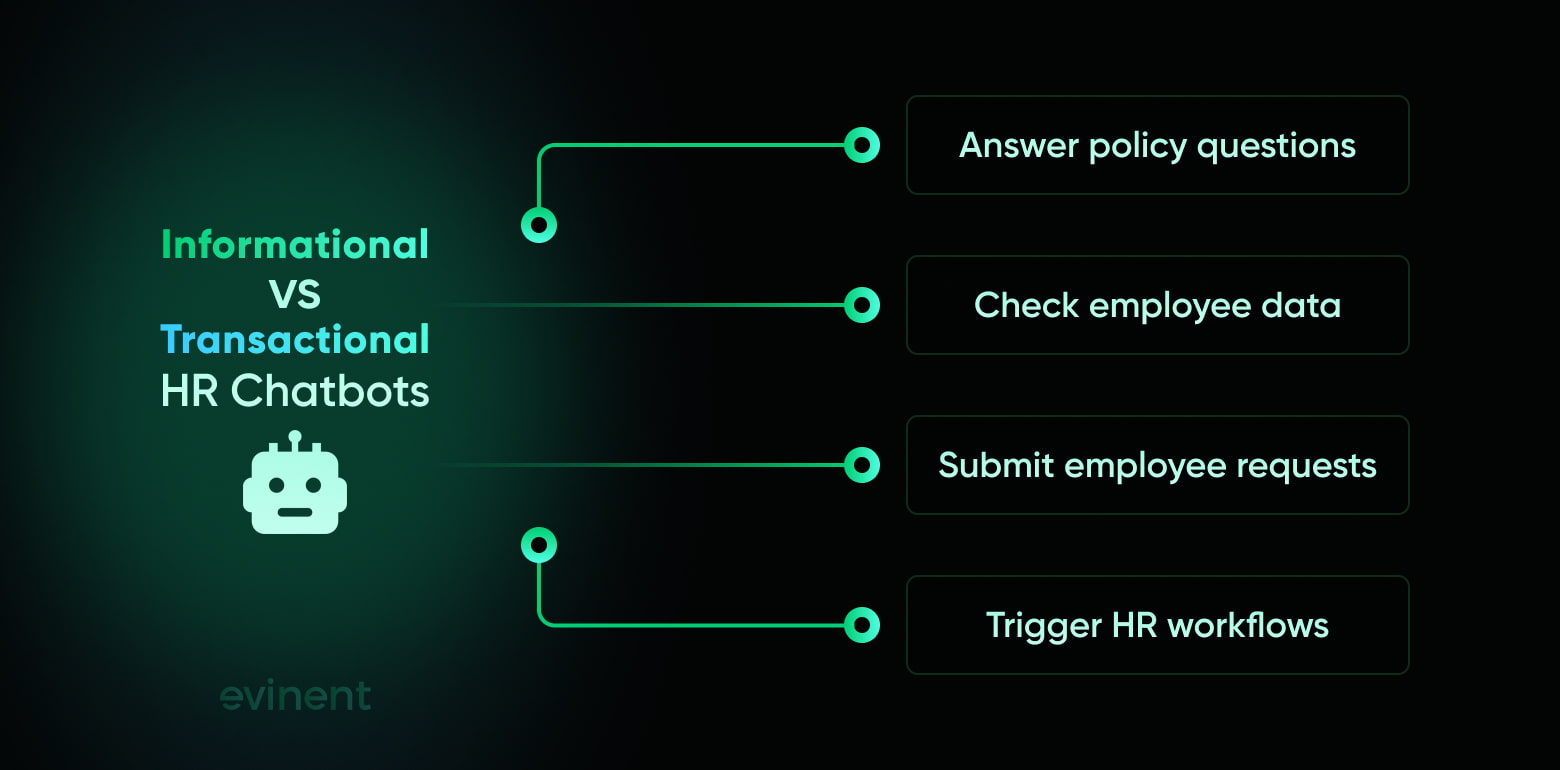
Most confusion about HR chatbots starts with one small marketing blur: vendors describe “answering” and “doing” as if they belong in the same bucket. They don’t. An informational HR chatbot can answer questions using policy documents, HR knowledge base content, intranet pages, and, when read access is available, employee-specific data. A transactional HR chatbot can go further. It can write back to the HRIS, submit requests, trigger approvals, create HR cases, and move work across systems. Same interface. Different plumbing.
Capability | Informational HR chatbot | Transactional HR chatbot |
Answers policy questions | Yes. It retrieves answers from HR policies, FAQ pages, employee handbooks, and knowledge base articles. | Yes. It answers from approved HR content and can combine that answer with employee-specific data. |
Checks employee-specific data, such as leave balance or payslip details | Sometimes. It needs secure read access to an HRIS or payroll system to do this reliably. | Yes. It reads employee-specific data from connected HRIS, payroll, benefits, and case-management systems. |
Submits requests on behalf of the employee | Usually no. It sends the employee to the HRIS portal, form, or HR contact. | Yes. It can submit standard requests such as PTO, document requests, address changes, onboarding tasks, or payroll cases. |
Updates HRIS records | No. It does not write data back into HR systems. | Yes, but only within approved workflow rules, permission scopes, and audit controls. |
Triggers multi-system workflows | No, or only through basic ticket creation. | Yes. It can trigger HR, IT, payroll, calendar, approval, and notification workflows. |
Requires HRIS read access | Optional for generic answers; required for personal answers. | Required. Without read access, it cannot validate employee-specific requests. |
Requires HRIS write access | No. | Required for real self-service actions. Write permissions must be narrow, authenticated, and logged. |
Deployment complexity | Lower. Most work sits in content setup, conversation design, and channel deployment. | Higher. It needs integration design, data mapping, identity checks, workflow testing, and security review. |
This distinction matters because a strong demo can hide a weak architecture. A vendor can show a chatbot submitting time off in a sandbox, making the experience look almost effortless. But the buyer’s real environment may be messier: Workday for core HR, SAP for legacy records, a separate payroll provider, ServiceNow for cases, SharePoint for policies, and a few country-specific tools nobody wants to touch unless something breaks. ServiceNow’s HR documentation shows how much the connected system matters: its virtual agent topics can send time-off requests to Workday or SuccessFactors only when the relevant HR Service Delivery integration is configured.
IBM’s HR agent materials point in the same direction. IBM describes HR agents that can answer HR questions, manage time-off requests, retrieve payslips, and guide employees through benefits and onboarding, while its AskHR case study says the internal assistant automates more than 80 HR tasks and handles over 2.1 million employee conversations each year. That level of capability is not created by a nicer chatbot It comes from system access, workflow logic, permissions, and a human fallback path. The chatbot is the front door; the architecture behind it decides whether the door opens into a working process or a hallway full of links.
The practical risk is easy to miss during procurement. A company that buys an informational chatbot expecting transactional capability will be disappointed. A company that buys a transactional chatbot without checking whether its HRIS supports the required API access will be ed. And a company with older HR systems may need middleware before the chatbot can safely act at all. So the right question before procurement is not “What can this chatbot do?” It is more specific, and slightly less comfortable: “What can this chatbot do when connected to our actual HRIS, with our actual approval rules, user roles, data structure, and security limits?”
HR Chatbot Use Cases by Employee Need
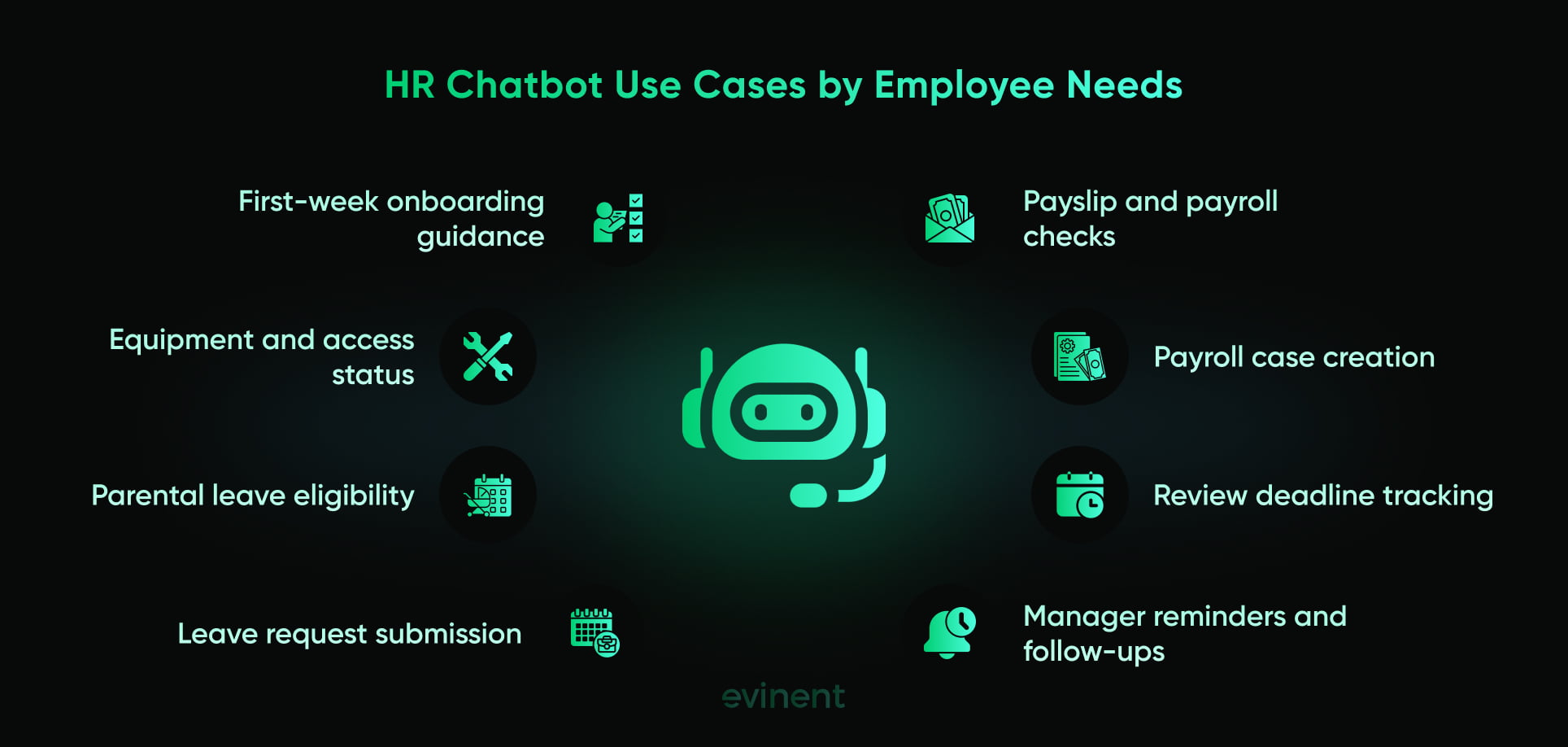
Most HR chatbot pages discuss use cases within tidy HR categories: onboarding, payroll, benefits, leave management, and performance reviews. That structure is fine for a sales page, but it’s not how employees experience HR. Employees don’t think, “I need to engage with the leave management function.” They think, “I need time off next month, and I don’t want this to mess up my pay.” A manager doesn’t think, “I require performance-cycle assistance.” They think, “Who on my team still hasn’t submitted their review?”
That’s why the better test is not whether the AI chatbot for HR has a long feature list. The better test is whether it can handle real employee situations from the first question to the next useful action.
Situation 1: New hire in their first week
A new hire needs answers, yes. But more than that, they need reassurance that the company knows what should happen next. Their first week is full of tiny unknowns: where the handbook is, whether their laptop is ready, how to access email, what training is due, who their buddy is, what meetings are already booked, and whether they missed some form buried in a welcome email.
A well-integrated HR chatbot can pull the new hire’s onboarding checklist from the HRIS and tell them what is complete, what is pending, and what needs attention today. It can check IT provisioning status, whether equipment was ordered, send the first-week schedule from calendar data, and point them to the right documents without making them dig through five systems. If the laptop is not ready, it can create or update an IT ticket. If a required form is missing, it can send the form and record completion upon submission.
Most HR chatbots do something smaller. They answer general onboarding questions and send links to the HR portal. That is better than nothing. It may even reduce a few repetitive HR emails. But it doesn’t remove the new hire’s main problem: uncertainty. The employee still has to determine which tasks apply to them, which are already done, and which team owns the next step.
This is where employee experience gets very practical. A new hire does not need a charming paragraph about company culture when they can’t access Slack or Teams. They need the blocker removed.
Situation 2: Employee requesting parental leave
Parental leave is a sharp test for any AI chatbot in HR because employees rarely need only a policy summary. They need to know what applies to them. Their entitlement may depend on tenure, employment type, location, contract terms, local law, company policy, payroll timing, manager approval, and required documents.
A well-integrated chatbot can read the employee’s HRIS record, check tenure and employment type, ask for expected dates, explain the relevant process, and start the leave request. It can notify the manager, create an HR case if the situation needs review, and explain what may happen with payroll in plain language. If the request falls outside a standard rule, it should not guess. It should collect the right context and pass the case to HR.
Most chatbots explain the parental leave policy and tell the employee to submit the request through the HRIS portal. Again, the answer may be correct. But correct is not the same as useful. If the employee still has to interpret the policy, open another system, fill out a form, notify their manager, and wait for HR to whether the request was submitted correctly, the chatbot has only moved them to the starting line.
There is also a trust issue here. Questions about parental leave, medical leave, family care, compensation, and personal status are sensitive. The chatbot needs to be accurate, calm, and careful. A bad answer in this area does more than create another ticket. It makes the employee wonder whether the company can handle their situation properly.
Situation 3: Employee with a payroll discrepancy
Payroll questions carry a different emotional weight. People do not ask about payroll out of casual curiosity. They ask because something looks wrong, and the wrong number on a payslip can mean rent stress, tax stress, childcare stress, or just a very bad Friday afternoon.
A well-integrated HR chatbot can retrieve an employee’s specific payslip, show the relevant pay period, identify line items, compare the current payslip with the previous one, and ask which items look incorrect. It can check recent changes such as unpaid leave, overtime, bonus payments, tax changes, benefit deductions, or bank detail updates. If the issue needs payroll review, the chatbot can create a support case with the employee ID, pay period, disputed line item, and conversation context already attached.
Most chatbots send the employee to the payroll portal or provide the payroll team’s contact details. That helps the employee find the right door, but it leaves them doing the investigation. It also gives payroll a weaker case to work from. “My pay is wrong” creates back-and-forth. “My March payslip shows a new benefits deduction I don’t recognize; here is the line item and pay period.” is much easier to resolve.
This is one of the clearest places where an HR chatbot that acts can reduce workload. Not because it replaces payroll judgment. It doesn’t. But it can gather clean information before the case reaches payroll, saving everyone time.
Situation 4: Manager asking about a direct report’s performance review deadline
Managers use HR systems differently from employees. They often need team-level status, reminders, approvals, and nudges. They don’t just ask, “When is the review deadline?” They ask, “Who on my team is late, what do I still need to approve, and can someone please remind the people who haven’t done it?”
A well-integrated chatbot can track the performance review cycle, check completion status for each direct report, identify missing reviews, and send reminders on the manager’s behalf. It can also flag exceptions, such as an employee on leave or a recently transferred team member, so the manager is not chasing someone who shouldn't be.
Most chatbots give the company-wide review deadline and suggest checking the performance management system. That answer is accurate, but it still leaves the manager with the admin work. The manager has to open another system, filter their team, check statuses, send reminders, and track who responds.
And honestly, this is the kind of small admin loop that quietly eats management time. No single reminder is a big deal. Ten reminders across five systems during review season? That becomes real work. A useful HR chatbot should remove that kind of friction, not describe where the friction lives.
Taken together, these four situations show the same pattern. The informational chatbot answers the first question. The transactional chatbot advances the request. For employees, that is the whole difference. They don’t want a smarter FAQ. They want the next step handled.
The HR Chatbot Integration Stack
This is the part where the chatbot stops being a chatbot project and becomes an enterprise systems project. Not a dramatic one, necessarily. But a real one. If an AI chatbot for HR is expected to submit requests, retrieve employee-specific data, update statuses, or trigger approvals, it needs more than a polished conversation flow. It needs access to the systems of record, identity controls, a maintained knowledge base, and a clear path back to human HR when the request becomes too sensitive, too complex, or simply too odd for automation.
The first requirement is HRIS read-and-write API access. Read access lets the chatbot retrieve employee-specific data: leave balances, employment type, tenure, manager relationship, payslip details, onboarding status, benefits elections, and case history. Write access lets it do the useful part: submit a leave request, update an address, open a payroll case, mark an onboarding task complete, or trigger an approval. Modern HR platforms often provide APIs for this kind of work. SAP SuccessFactors, for example, states that its HCM suite OData API provides methods for create, read, update, and delete operations. Workday’s public REST directory also describes Absence Management services for accessing worker information about leaves of absence and time-off details, as well as requesting time off and leaves of absence. But “the platform has APIs” is not the same as “your chatbot can safely use them next month.” The company still needs field mapping, permission design, validation rules, error handling, logging, and testing against real workflow conditions.
Legacy HRIS platforms make this harder. Some older systems do not expose the endpoints needed for transactional chatbot capability. Some rely on nightly batch syncs. Some exchange flat files. Some have custom approval logic built years ago, with business rules scattered across HR, payroll, local offices, and email habits nobody wrote down. In that case, the chatbot needs middleware. Think of middleware as the translator and traffic controller between the chatbot and the HRIS. It decides what the chatbot is allowed to read, what it is allowed to change, what needs approval, what should be rejected, and what must be escalated. This adds development work, usually several weeks for a focused pilot. It also prevents the worst possible shortcut: giving the chatbot broad system access and hoping nothing strange happens.
The second requirement is identity and access management. The chatbot must know who it is talking to before it shows or changes anything. That means SSO or an equivalent identity flow, role-based access, and action-level authentication. An employee can see their own leave balance. A manager can see selected status data for direct reports. A payroll specialist can access payroll cases. A contractor may have a different set of permissions. None of this should be guessed from a chat session. It needs to be verified. Write actions are even more sensitive. If the chatbot submits a request, updates a record, or creates a case, that action should be tied to the authenticated employee or manager, not hidden behind a generic service account with vague permissions. Otherwise, the chatbot becomes an access-control gap with a friendly tone.
The third requirement is a knowledge base with version-controlled policy documents. This sounds less exciting than AI agents and HRIS APIs, but it is where many deployments quietly break. A chatbot can only answer correctly if the content it reads is current, approved, and not duplicated across five conflicting sources. HR policies change. Benefits plans change. Local leave rules change. Internal processes change because one team reorganized and forgot to tell anyone. If the chatbot reads an outdated parental leave PDF or an old payroll FAQ, it can give a confident, wrong answer. That is worse than saying “I don’t know.” So the knowledge base needs ownership: who updates policies, who approves changes, how old documents are retired, how country-specific rules are tagged, and how the chatbot knows which source wins when two documents disagree.
The fourth requirement is an escalation path to human HR. No serious enterprise should expect an HR chatbot to resolve every employee situation. Some cases need judgment. Some need legal review. Some need empathy. Some simply do not fit the standard path. A useful chatbot should hand off cleanly: preserve the conversation context, route the case to the appropriate HR specialist, attach relevant employee data where permitted, and track the case through to resolution. ServiceNow’s HR Service Delivery documentation describes Virtual Agent as a way to handle repeatable HR requests and also includes live agent transfer when a conversation needs human support. Its Now Assist for HRSD documentation also includes AI features that summarize Virtual Agent interactions, sidebar discussions, HR cases, and transfer actions, helping human agents understand context faster.
All four layers have to work together. HRIS access without identity control is risky. Identity control without write access gives you a secure FAQ. A knowledge base without ongoing maintenance gets stale. Escalation without context makes employees repeat themselves, which is one of those tiny workplace indignities people remember. The integration stack is not background plumbing. It is the part that determines whether the AI chatbot for HR becomes a real employee self-service or just a softer way of saying, “Please open another system.”
Signs Your HR Chatbot Is Just an FAQ
Some warning signs show up before procurement if you know what to ask. The vendor talks about “automation” but only demonstrates answers. The chatbot can create a ticket, but cannot update the HRIS. The demo uses sandbox data instead of the buyer’s HR workflows. The implementation plan covers knowledge base upload but says little about identity, permissions, write access, audit logs, or escalation routing.
None of these signs means the product is bad. It may be a perfectly good informational chatbot. The problem starts when the buyer expects transactional HR self-service from a tool that was never designed to write safely into HR systems.
What Drives HR Chatbot Adoption
Employee adoption does not start with a launch email. It starts with the first two or three interactions. If the AI chatbot for HR gives a specific, useful answer the first time, employees try it again. If it gives a generic policy paragraph, an outdated link, or a confident answer that HR later corrects, people quietly stop trusting it. That is especially true now, because employees are curious about AI but not blindly loyal to it. Gartner’s 2025 employee AI survey found that 65% of employees are excited to use AI at work, yet 37% do not use AI even when they can, often because their coworkers are not using it either. Slack’s 2024 Workforce Index found a similar trust gap: two-thirds of desk workers had still not tried AI tools, and 93% did not fully trust AI outputs for work-related tasks. So the first interaction has to earn its keep. “Here is the parental leave policy.” is okay. “Based on your tenure and employment type, here is what likely applies to you, and here is the next request step” is much better.
The second adoption driver is channel fit. Employees are much more likely to use an HR chatbot when it appears where work already happens: Microsoft Teams, Slack, the company intranet, or the employee service portal. A standalone chatbot portal sounds clean in a project plan, but in real life, it becomes another destination, another login, another little bit of friction. And friction kills HR self-service. The employee who already has Teams open will ask a quick PTO question there. The same employee may not open a separate HR chatbot portal unless the problem is already painful. IBM’s HR chatbot overview notes that HR chatbots can be embedded in communication platforms such as Slack and Microsoft Teams, as well as HR systems such as Workday, SAP, and HRIS platforms. That detail matters because adoption is not only a behavior problem. It is a placement problem. Put the chatbot in the wrong place, and even a good tool starts life with a handicap.
The third driver is scope clarity. Employees need to know what the chatbot can and cannot do. A vague launch message like “Meet your new AI HR assistant” invites people to test everything: payroll disputes, manager issues, leave exceptions, benefits edge cases, performance review questions, address changes, and document requests. If the chatbot can only answer policy questions, that launch message creates frustration on day one. A better message is plain: “I can answer HR policy questions, check your leave balance, retrieve payslip details, and submit standard leave requests. For complex cases, I’ll connect you with HR.” It sounds less shiny, but it works better because it sets the right expectation. Deloitte’s 2025 Human Capital Trends report found that 41% of daily work is spent on non-essential tasks, while only 22% of employees say their organizations are very effective at simplifying work. An HR chatbot should remove small work loops, not create a new one wrapped in nicer language.
There is also a fourth adoption factor that rarely gets enough attention: what happens when the chatbot cannot help. If it hands the employee to HR with the full conversation context, trust survives. If it says “contact HR” and makes the employee repeat everything, trust drops. Fast. IBM’s AskHR shows why mature HR chatbot adoption depends on both automation and handoff. IBM says AskHR automates more than 80 HR tasks and handles over 2.1 million employee conversations annually, but its model still routes complex needs to human advisors. That is the sweet spot. Employees do not need the chatbot to pretend it knows everything. They need it to solve the routine stuff and pass the messy stuff to a person without losing the thread.
For enterprise planning, the target should be practical: an AI chatbot for HR with HRIS integration, in-channel access, and clear scope communication can aim for 65–75% active employee use within 90 days. A standalone informational chatbot, especially one that redirects employees to the HR portal for most actions, will usually settle at much lower usage after the novelty fades, often around 20–35%. The gap is not about employees “resisting AI.” It is about whether the chatbot saves them from work or simply gives them another place to start the same work.
HR Chatbot Procurement Questions
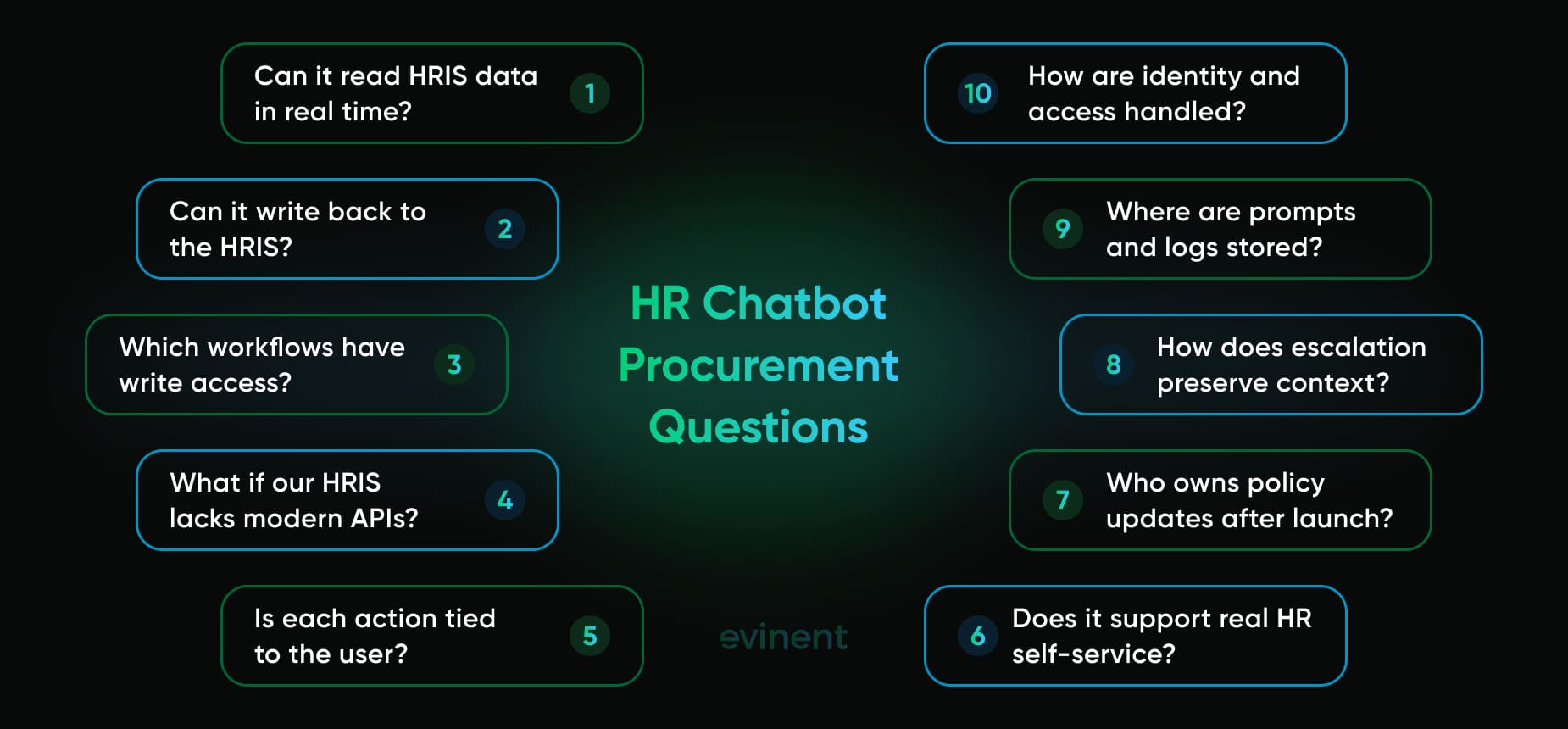
Before buying an AI chatbot for HR, the buyer should test the vendor’s claims against the company’s actual HR environment. A polished demo is useful, but it does not prove the chatbot can work with your data, your approval flows, or your security rules.
Can the chatbot read employee-specific data from our HRIS in real time?
Can it write back to our HRIS, or can it only create a ticket?
Which workflows have approved write access?
What happens if our HRIS does not expose modern APIs?
Can every action be tied to the authenticated employee or manager?
Where are s, transcripts, HRIS data, and logs stored?
How does the chatbot preserve context when escalating to a human HR representative?
Who owns policy updates after launch?
If the vendor cannot answer these questions clearly, the company may still be buying a useful FAQ assistant. But it should not expect full HR self-service.
How Evinent Builds HR Chatbots That Act
The gap between an HR chatbot that answers and one that acts is an integration problem. A chatbot can only submit leave requests, check individual balances, open payroll cases, or trigger onboarding workflows if it is connected to the systems where those actions live. That is why Evinent does not treat an AI chatbot for HR as a standalone chat window. It builds the chatbot and the integration layer behind it, so the assistant can work with the company’s real HRIS, approval paths, user roles, and security rules.
The first capability is HRIS integration, including legacy systems. Evinent connects the HR chatbot to the HRIS that the organization already runs, including platforms that lack modern REST APIs. For companies using SAP HR, older PeopleSoft environments, custom HRIS platforms, or mixed HR stacks, the chatbot usually cannot act safely through a simple plug-in. It needs middleware. Evinent builds that layer as part of the engagement, mapping fields, validating requests, checking permissions, and controlling what the chatbot can read or write for each workflow. That is what lets the chatbot submit a leave request, check an employee’s actual balance, create a payroll case, or trigger an onboarding task without giving it broad, unsafe access. This sits close to Evinent’s wider work in HR process automation, where the goal is not to add another interface, but to make routine HR work move with less manual handling.
The second capability is a 4-6-week pilot. Evinent usually recommends starting with the 3-5 highest-volume employee request types rather than trying to automate the entire HR function at once. In practice, that often means leave management, onboarding FAQ, payroll queries, policy questions, and basic manager reminders. Each workflow is scoped, integrated, tested, and reviewed before go-live. The point is to launch a working transactional chatbot in the first deployment, not an informational chatbot that “might become transactional later.” That difference matters. If the pilot only answers policy questions, it does not prove the hard part. A real pilot should demonstrate that the chatbot can operate within the client’s HR environment, with the appropriate identity checks, write access, workflow rules, and a human escalation path.
The third capability is private deployment for sensitive employee conversations. HR chatbots handle questions that are rarely neutral: health-related leave, compensation, payroll mistakes, performance concerns, family status, workplace issues, and benefits data. For some organizations, those conversations cannot pass through external AI APIs. Healthcare companies, financial services firms, public-sector teams, and enterprises with strict data policies may need the AI layer to run inside their own infrastructure. In those cases, Evinent can deploy a private AI setup in which chatbot inference, employee conversations, s, HRIS data, and logs remain within the client’s controlled environment. The chatbot still answers, retrieves data, submits requests, and routes cases. The difference is that sensitive HR data stays inside the organization’s walls.
This also paves the way for more advanced AI agents in HR. Once the company has the right HRIS connections, identity model, workflow permissions, and escalation rules, the chatbot can grow from answering and submitting basic requests to coordinating multi-step HR work across systems. But the order matters. The integration layer has to come first. Otherwise, “agentic HR” becomes another nice demo that collapses when it meets real employee data.
An AI chatbot for HR that tells employees about the leave policy and an AI chatbot for HR that submits their leave requests are different products that require different infrastructure. The first is a deployment. The second is an integration project. Evinent builds the second.
FAQ
What is the difference between an informational HR chatbot and a transactional HR chatbot?
An informational HR chatbot answers questions. It pulls from HR policies, FAQ pages, employee handbooks, benefits documents, and knowledge base articles. A transactional HR chatbot can also take action inside HR systems. It can submit leave requests, retrieve payslips, create payroll cases, update employee records, trigger approvals, notify managers, and pass complex cases to HR with the conversation context attached.
That difference matters because both products may look similar in a demo. Both use chat. Both may answer in a friendly tone. But only one can move work through the HRIS. If the chatbot cannot safely write to systems, it is not truly employee self-service. It is an answer layer.
What should an AI chatbot for HR be able to do?
A useful AI chatbot for HR should answer policy questions, retrieve employee-specific HRIS data, and complete routine requests without sending employees to another portal. In enterprise settings, that usually means leave balance checks, PTO requests, payslip retrieval, onboarding task status, payroll case creation, benefits guidance, and escalation to human HR when the issue needs judgment.
For enterprise use, the deeper question is not “Does it support HR use cases?” The deeper question is: can it do those things inside your HR environment, with your HRIS, your approval rules, your employee data, your user roles, and your security requirements? If the answer is no, the chatbot may still be useful, but its impact will be limited.
Why do many HR chatbot deployments disappoint after launch?
Many deployments disappoint because the chatbot can answer questions but cannot complete requests. Employees ask about leave, payroll, onboarding, or benefits. It gives a correct answer, then sends them to another system to do the real work. That creates the 60-day disappointment pattern: the first month looks good because employees ask simple questions, but adoption drops once they learn the chatbot cannot act.
The issue is rarely the conversation interface. It is usually the integration layer. Without HRIS read-write access, identity checks, workflow permissions, and escalation logic, the chatbot can only describe the process. It cannot run the process.
What HRIS requirements matter for a transactional HR chatbot?
A transactional HR chatbot needs secure read access, workflow-specific write access, role-based permissions, identity management, audit logs, and clear validation rules. Read access lets the chatbot retrieve employee-specific data, such as leave balances, employment type, manager relationship, onboarding status, or payslip details. Write access lets it submit requests, update records, create cases, or trigger approvals.
If the HRIS does not expose modern APIs, the company may need middleware. This is common in older HR systems, custom HRIS platforms, or mixed HR environments where data is spread across several tools. That middleware layer controls what the chatbot can read, what it can change, and when it must escalate.
Can an HR chatbot work with legacy HRIS platforms?
Yes, but usually not through a simple plug-in. Legacy HRIS platforms may rely on old APIs, batch syncs, flat files, custom fields, or undocumented approval rules. A chatbot can still work with these systems, but it needs an integration layer to connect the conversational interface to the underlying HR processes.
This is where HR process automation and chatbot development start to overlap. The goal is not only to answer questions. The goal is to let routine HR work move through older systems without forcing employees to jump between portals, forms, email threads, and manual follow-ups.
Is a private deployment necessary for an AI chatbot for HR?
Private deployment is not necessary for every company, but it is worth serious review when the chatbot handles sensitive employee data. HR conversations can involve compensation, health-related leave, payroll mistakes, family status, performance concerns, workplace conflict, benefits data, or personal documents. Some organizations cannot allow that data to pass through external AI APIs.
For healthcare, finance, public-sector organizations, and enterprises with strict internal data rules, a private AI setup can keep s, conversation logs, HRIS data, and AI inference inside the organization’s own infrastructure. The chatbot can still answer and act, but the sensitive data stays under the company’s control.
How should HR leaders measure chatbot ROI?
HR leaders should measure completed work, not only by answering questions. A chatbot that answers 30,000 questions may look impressive, but if employees still open tickets afterward, the workload has not really dropped. Better metrics include submitted leave requests, resolved payroll cases, completed onboarding tasks, fewer repeat contacts, fewer manual HR tickets, faster time-to-resolution, and cleaner handoffs to HR.
There is also a hidden ROI layer: process intelligence. A good HR chatbot shows where employees get stuck. If hundreds of people ask the same payroll question every month, the problem may not be the chatbot. It may be the payslip design, payroll timing, or unclear policy language. That insight can help HR fix the source of the confusion.
Should companies buy an HR chatbot or build one?
Companies with modern HR suites and simple workflows may get enough value from a vendor chatbot. If most HR work already lives in a single cloud platform, a prebuilt assistant may quickly cover common needs.
Companies with older HR systems, strict data controls, custom workflows, country-specific rules, or several HR tools often need a custom integration layer. In that case, the better path may be to build the chatbot around the company’s real HR environment. This is also the foundation for more advanced AI agents in HR, where the assistant does not just answer a single question but coordinates multi-step work across systems.
What employee requests should an HR chatbot escalate to a human?
An HR chatbot should escalate requests that require judgment, sensitivity, legal review, or exception handling. That includes complex parental leave cases, payroll disputes requiring investigation, workplace complaints, medical- or accommodation-related cases, performance concerns, manager conflicts, disciplinary issues, and anything where the employee’s situation falls outside standard rules.
A good chatbot does not pretend to solve everything. It solves routine work and hands off the messy work properly. The difference is whether the employee has to repeat the whole story after escalation. If the chatbot preserves context and routes the case to the right person, the employee experience still feels coherent.
Share