What is AI-assisted software development, and is it actually improving enterprise software quality?
That is one of the most common questions leaders are asking right now — and for good reason. Over the past two years, AI has moved from an experimental coding shortcut to something much closer to engineering infrastructure. It now shows up across the software development lifecycle: in requirements drafting, architecture discussions, code generation, test creation, debugging, code review, documentation, and even deployment support. For many teams, AI is no longer a side tool living in a developer’s IDE. It is becoming part of how software gets designed, built, checked, and shipped.
The adoption numbers make that clear. Google Cloud’s 2025 DORA research found that AI adoption among software development professionals reached 90%, up 14 percentage points from the prior year, and that these professionals now spend a median of two hours a day working with AI in their core workflows. The same research found that over 80% of respondents said AI improved productivity, while 59% reported a positive effect on code quality. That is not fringe behavior. That is mainstream engineering practice.
SonarSource’s 2026 State of Code report paints an equally striking picture. It states that “AI-assisted coding is officially a standard part of the developer workflow” and reports that 72% of developers who have tried AI coding tools now use them every day. Even more telling, developers estimate that 42% of the code they contribute is currently AI-generated or AI-assisted, up from just 6% in 2023. In other words, AI is no longer helping only with boilerplate or side experiments. It is already shaping real production software.
But here’s where the story gets more interesting — and much more relevant to enterprise readers. High adoption does not automatically mean high trust. Stack Overflow’s 2025 survey found that positive sentiment toward AI tools has actually dropped to 60%, down from 70%+ in 2023 and 2024, even as usage continues to rise. Professional developers remain somewhat more favorable than learners, but the message is hard to miss: teams are using AI because it is useful, not because they fully trust it.
DORA captures that tension well. Its 2025 report describes a “trust paradox”: while AI is widely seen as useful, many professionals still hesitate to trust its outputs without verification. The report also offers one of the clearest lines on the subject, saying that AI’s primary role is as an amplifier, one that magnifies an organization’s existing strengths and weaknesses. That idea matters more than the hype. If your engineering culture is disciplined, AI can help your teams move faster without losing control. If your delivery practices are weak, AI can help you create technical debt at speed.
That is why enterprise leaders should stop asking whether AI belongs in software development. It already does. The better question is how to use AI-assisted software development to improve delivery speed, reduce technical debt, protect architectural integrity, and keep security and compliance from slipping through the cracks.
Because this is the real shift: AI is not replacing software engineering. It is changing what strong software engineering looks like.
Today, the winning teams are not the ones that generate the most code. They are the ones who know where AI helps, where it misleads, and where human oversight still has to stay firmly in charge. In practical terms, that means treating AI not as a replacement for engineering judgment, but as a force multiplier for teams with strong review habits, healthy CI/CD pipelines, solid architecture governance, and clear internal policies for what AI is allowed to touch.

What Is AI Assisted Software Development?
AI-assisted software development is the use of artificial intelligence, especially large language models, machine-learning-enabled tools, and, increasingly, intelligent agents to support work throughout the software development lifecycle. That support can start as early as requirements analysis and design, continue through coding and testing, and extend into debugging, documentation, deployment, and maintenance. IBM defines AI in software development in similarly broad terms, focusing on how AI-powered tools help automate code generation and improve multiple parts of the development process, not just writing code faster.
That broader definition matters because many people still reduce the topic to autocomplete. But AI-assisted development is not just a smarter tab key. In practice, it covers code completion, code transformation, repository-aware chat, pull request review, test generation, documentation drafting, architecture support, and issue-based coding workflows. Google’s Gemini Code Assist describes itself as AI-powered assistance that helps development teams “build, deploy, and operate applications” throughout the software development lifecycle, while GitHub documents Copilot features that extend beyond inline suggestions to include code review and coding-agent workflows.
A useful way to think about it is this: traditional developer tools automate machine tasks; AI-assisted tools help with judgment-heavy tasks that used to require more human drafting, searching, and interpretation. They can summarize a codebase, explain an unfamiliar function, propose a refactor, generate tests, suggest a remediation path, or draft a pull request. GitHub’s documentation says Copilot code review can review code written in any language, identify issues from multiple angles, and suggest fixes, while Copilot’s coding agent can take a task, make the required changes, and open a pull request for human review. That is a very different model from classic IDE assistance.
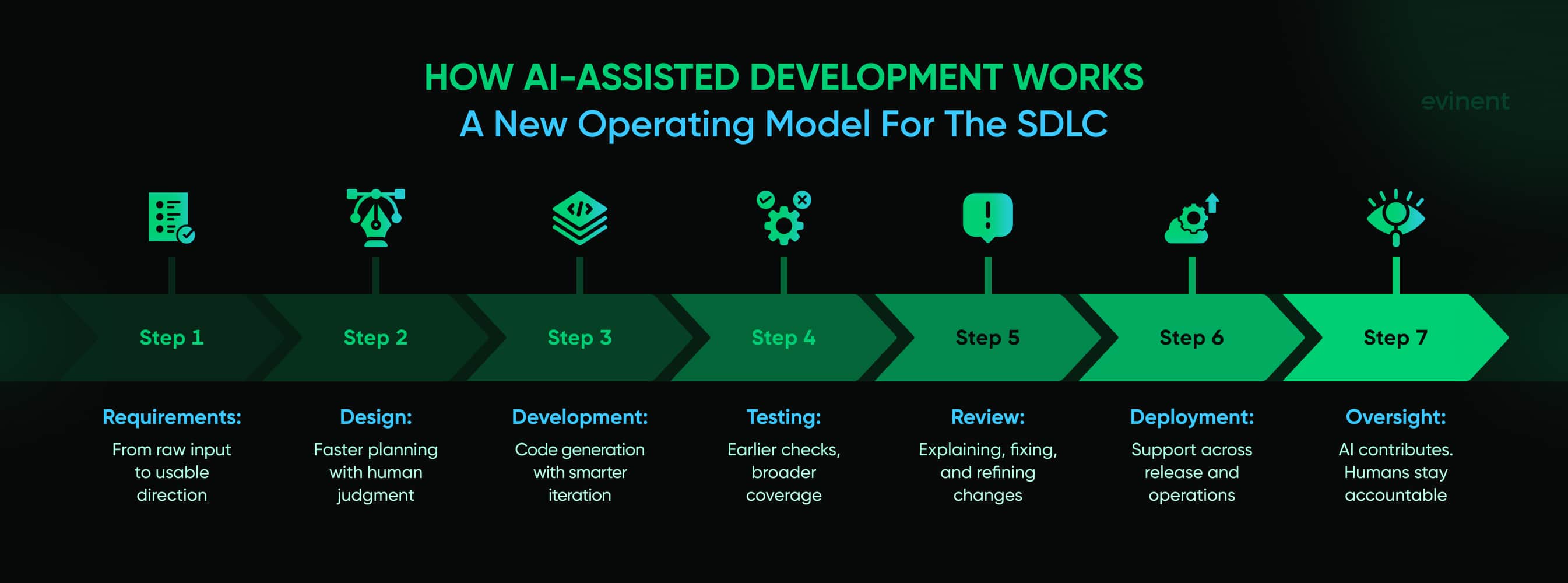
This is also why the phrase AI-assisted matters more than it may seem. “Assisted” implies that people still own the outcome. The model contributes. The engineer remains accountable. That distinction becomes especially important as teams move from chat-based help toward more agent-driven workflows. IBM defines AI agents as systems capable of autonomously performing tasks on behalf of a user by designing workflows and using available tools. AWS makes a similar point in its AI-Driven Development Life Cycle framing, where AI is treated not as a narrow helper but as a collaborator embedded across the SDLC.
That shift is pushing teams to separate a few related ideas that often get blurred together. AI in coding usually refers to local support, such as code completions, snippets, or explanations within the IDE. AI for software development is broader, encompassing testing, documentation, review, DevOps, and operations support. And AI-driven development typically implies a more autonomous workflow in which the system can plan tasks, generate artifacts, and advance work with less manual ing. AWS’s AI-DLC work makes this distinction clearer by presenting AI as part of a redesigned engineering lifecycle rather than just a developer-side productivity layer.
For enterprises, the real significance is not that AI can write code. It is the AI changes where effort sits in the SDLC. Developers spend less time producing first drafts from scratch and more time supervising, refining, testing, validating, and deciding whether an output should be trusted at all. AWS explicitly warns about “process atrophy” when teams let AI make too many decisions, arguing that AI tools should amplify human judgment rather than erode it. That idea gets to the heart of what AI-assisted software development really is: not automated software engineering, but software engineering with a new division of labor between people and machines.
So when enterprise leaders ask what AI-assisted software development means, the most accurate answer is this: it is a new operating model for building software, one where AI helps create, review, explain, and revise engineering artifacts across the lifecycle, while human teams remain responsible for architecture, security, compliance, and final quality. The tools can accelerate output. They do not remove the need for engineering discipline. In fact, they make that discipline more important.
AI-Driven Development Methodologies
As AI becomes more deeply embedded in engineering work, the conversation is shifting from tools to methodology. That shift matters. A coding assistant can save time on isolated tasks, but it does not automatically change how a team plans, reviews, governs, or ships software. AI-driven development methodologies aim to solve that bigger problem: how to integrate generative AI, large language models, natural language processing, and machine-learning-enabled tools across the entire software development lifecycle, rather than dropping them into a single stage and hoping for the best. AWS’s AI-Driven Development Life Cycle, or AI-DLC, is one of the clearest recent examples of this thinking. AWS describes it as a methodology designed to “fully ingrain AI capabilities into the very fabric of software development,” with AI acting as a central collaborator across the SDLC rather than a narrow assistant used only during coding.
What makes these methodologies worth paying attention to is that they respond to a real operational change. When AI can generate plans, write code, suggest tests, summarize architecture, and open pull requests, the old workflow assumptions start to break down. Teams no longer need a model only at the point of implementation. They need a way to define where AI participates, what level of autonomy it gets, which decisions still require human approval, and how risk tiering is applied as work moves from idea to production. That is why AI-driven development is less about a single product and more about a redesigned operating model for the SDLC.
AI-DLC in practice
The AI-Driven Development Life Cycle, or AI-DLC, reframes AI as a participant throughout the development process. AWS says AI-DLC rests on two main dimensions: AI-powered execution with human oversight and human-AI collaboration across cross-functional teams. In practice, that means AI can help create work plans, propose implementation paths, request clarification, and perform routine tasks, while humans remain responsible for business context, judgment, and critical decisions. That is a more mature model than basic code completion because it treats AI as part of the workflow design itself.
This approach becomes especially useful in large enterprise environments, where engineering work is spread across product, design, development, QA, security, and operations. A lifecycle methodology provides those groups with a shared structure for the use of generative AI in requirements, planning, development, testing, deployment, and maintenance. It also helps prevent the common failure mode in which developers use AI enthusiastically within the IDE, while the rest of the organization still operates as if nothing has changed. AI-DLC, in that sense, is not just about faster coding. It is about making AI participation legible, repeatable, and governable across the full SDLC.
Agent workflows
As AI systems become more capable, another methodological shift is taking shape: teams now have to think not only about developer experience, but also about agent experience. In plain terms, that means designing repositories, documentation, rules, context, and workflows so AI systems can operate usefully without creating chaos. Martin Fowler flagged this as one of the ideas ready for broader industry discussion in 2026, along with the supervisory engineering middle loop and risk tiering as a core engineering discipline. His point is sharp: when AI handles more first-draft execution, more human effort moves into directing, reviewing, correcting, and validating that work.
That “middle loop” idea helps explain why AI-driven development does not reduce the need for strong engineers. It changes where their value shows up. Instead of spending most of their time manually producing every artifact, experienced developers spend more time framing tasks, improving engineering, checking model outputs, spotting architectural drift, and deciding when an agent should not proceed. The methodology, then, has to support both sides of the equation: a good developer experience for humans and a good agent experience for AI systems operating within the same technical environment. Without that, teams see a lot of activity but little reliable progress.
Human oversight
The more autonomous AI becomes, the less useful it is to talk about “using AI” as if it were one thing. A team may allow AI to generate documentation freely, require human review for refactoring, and completely prohibit autonomous changes to identity, payments, or regulated data flows. That is what risk tiering really means in AI-driven development: deciding which tasks are low risk, which are sensitive, and which require explicit human checkpoints before anything moves forward. Fowler’s 2026 notes frame risk tiering as a new core engineering discipline, which feels exactly right for agentic workflows.
AWS’s AI-DLC materials reinforce the same logic from a different angle. They emphasize AI-led workflows combined with human-centric decision-making, and they explicitly warn that the gains depend on how well organizations integrate AI into engineering workflows. That is the crucial point. The methodology is not “let the model do more.” The methodology is “assign routine execution to AI, preserve human ownership where context, governance, and judgment are non-negotiable, and make those boundaries visible inside the SDLC.” When teams get that balance right, AI-driven development can improve speed and consistency without eroding security, architecture, or accountability.
Applications of AI in Software Development
Once AI moved past autocomplete, its role in software development widened fast. It now shows up across planning, implementation, testing, operations, and maintenance. That matters because enterprise teams rarely struggle with just one stage of the lifecycle. They deal with backlog sprawl, legacy code, uneven documentation, slow reviews, brittle test coverage, security pressure, and release friction all at once. Official product documentation from GitHub, Google, IBM, and AWS now frames AI as support for the full software development lifecycle, not just code generation, which is a pretty clear signal of how the market has matured.
The practical question is not whether AI can be used in software development. It can. The real question is where it creates useful leverage without creating noise, security exposure, or architectural mess. In practice, the strongest applications tend to cluster around three areas: building and refactoring code faster, improving validation and review, and reducing friction in the surrounding delivery workflow.
Code and design
The most visible use case is still code generation, but even that category has broadened. AI tools now help teams scaffold services, generate functions, refactor old modules, explain legacy code, produce UI components, and draft infrastructure or integration logic from natural-language s. GitHub’s Copilot documentation now includes not only inline coding help but also coding-agent workflows that can create pull requests, update existing PRs, and integrate with external tools such as Jira and Slack. Google describes Gemini Code Assist as support for building, deploying, and operating applications throughout the SDLC, which pushes the role well beyond simple code completion.
This is especially useful in requirement gathering and early design work. Teams can turn user stories into technical tasks, generate draft APIs, sketch out architectural options, or produce first-pass UIs for internal tools and product flows. That does not mean AI replaces architectural design. It means it can help teams get to a workable first draft faster, compare options, and reduce time lost on repetitive design artifacts. IBM also points to AI’s role in automating code generation and supporting multiple stages of software development, which aligns with how enterprises are increasingly using these tools in real-world workflows.
Testing and review
This is where AI often delivers more value than people expect. Testing automation, automated debugging, bug detection and fixing, and code review are all areas where AI can reduce drag without taking ownership away from engineers. IBM notes that AI-driven testing systems can generate adaptive test cases, prioritize critical tests, detect bugs and vulnerabilities, and suggest optimizations. GitHub documents Copilot code review as a way to review selected code, generate inline comments, and help identify issues in AI-generated or human-written code.
For enterprise teams, this matters because review and validation are often the real bottlenecks. Writing code faster is nice, but if pull requests pile up, bugs slip through, or edge cases go untested, the speed gain is mostly cosmetic. AI helps by drafting unit tests, surfacing likely defects, explaining stack traces, and flagging low-quality patterns earlier in the process. It can also improve documentation of code changes, making review easier and reducing the usual “what exactly changed here?” back-and-forth. Still, the value depends on human review staying awake. GitHub’s own review guidance stresses the combination of human expertise and automated tools, especially for larger pull requests and legacy codebases.
DevOps and security
AI is also moving into the surrounding delivery machinery: DevOps and CI/CD pipelines, deployment support, operational troubleshooting, and security enhancement. Google’s Gemini Code Assist positions itself as support for teams that need help not only to build but also to deploy and operate applications. Google’s SDLC codelab shows the same idea in practice, using AI across design, build, test, and deploy stages rather than isolating it to implementation.
That broader role is important because enterprise software quality is shaped by much more than source code. Teams also need faster incident analysis, clearer release documentation, more consistent configuration work, and stronger security review around AI-generated output. IBM highlights AI’s role in detecting vulnerabilities and inefficiencies, while AWS’s AI-DLC framing treats AI as a participant in lifecycle execution with human oversight rather than a narrow coding assistant. In other words, AI now supports the delivery system around the code, not just the code itself. That is why its impact can now be felt in operations, release cadence, and platform reliability as much as in developer productivity.
Benefits of AI-Assisted Development
The appeal of AI-assisted development is easy to understand. Software teams are under constant pressure to ship faster, reduce technical debt, improve quality, and do more with the same headcount. AI looks like an answer to all of that. Sometimes it is. But the real enterprise value is not just speed. It is the combination of faster execution, lower friction on repetitive work, and stronger support for the parts of engineering that tend to get squeezed when teams are overloaded — testing, documentation, review, and maintenance. The latest DORA research frames AI as an amplifier of existing engineering conditions, which is a useful way to read the upside. Strong teams tend to get more out of it. Weak teams can still move faster, but not always in a healthy direction.
That said, the benefits are real enough that AI-assisted software development has become standard practice for many engineering teams. SonarSource’s 2026 State of Code report says that 72% of developers who have tried AI coding tools now use them every day, and developers estimate that 42% of the code they contribute is already AI-generated or AI-assisted. When adoption reaches that level, the discussion naturally shifts from “should we use it?” to “where does it create the most value?”
Faster delivery
The clearest benefit is productivity. AI reduces time spent on repetitive tasks such as autocompletion, boilerplate code generation, test case generation, documentation drafts, and routine refactoring. Microsoft’s controlled experiment on GitHub Copilot found that developers using the tool completed a coding task 55.8% faster than the control group. Google’s 2025 DORA findings point in the same direction at the organizational level: 90% of technology professionals now use AI at work, and more than 80% believe it has improved their productivity.
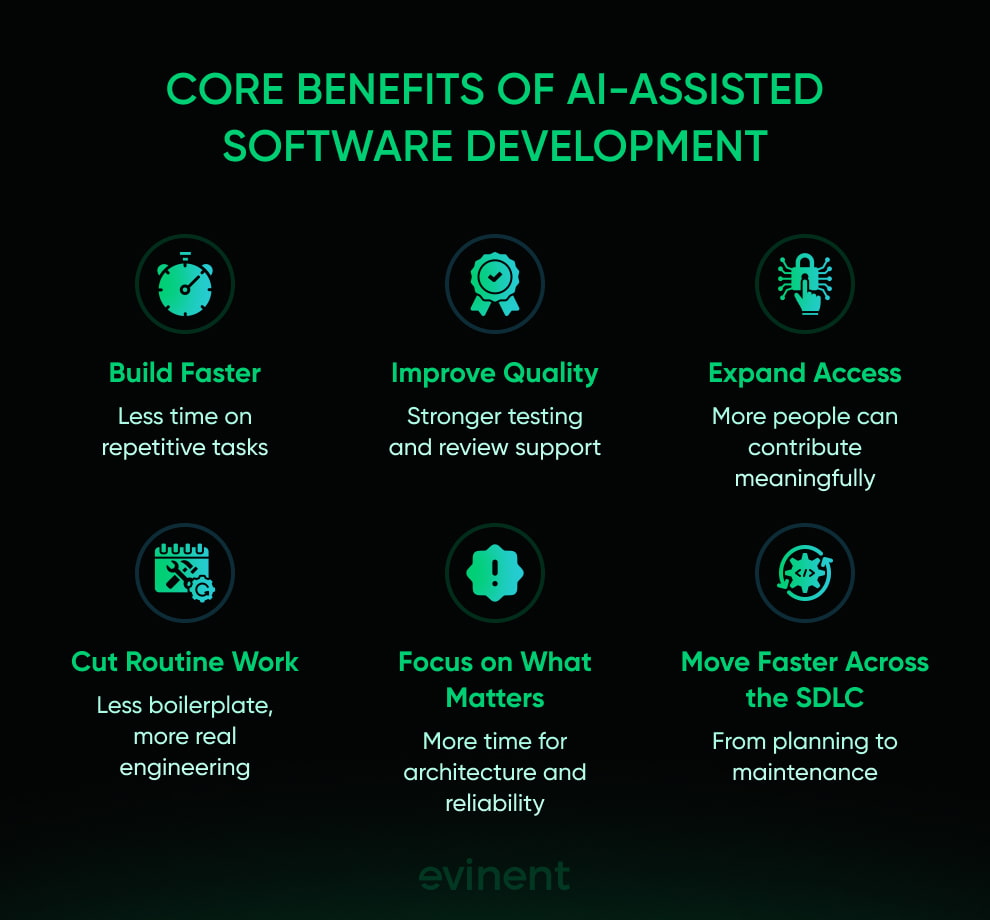
For enterprise teams, this does not just mean “developers type less.” It means that expensive engineering time can be redirected from repetitive production work to architectural decisions, platform reliability, and more complex problem-solving. Even areas like project management and requirement breakdown benefit when AI can quickly summarize tickets, propose task structures, or draft implementation plans. That kind of acceleration matters most in environments where delivery friction is spread across the full SDLC rather than concentrated in pure coding.
Better quality
AI-assisted development can also improve software quality, though this benefit is more conditional. It tends to show up when AI is used alongside strong review discipline, testing automation, and CI/CD controls. GitHub’s 2024 code-quality study found that developers with Copilot access were 53.2% more likely to pass all unit tests, and that Copilot-assisted code scored better in functionality, readability, reliability, maintainability, and conciseness. DORA’s 2025 findings add that 59% of respondents reported a positive effect on code quality.
This is one of the more interesting shifts in AI for software development. The strongest gains are not always in flashy code generation. They often appear in the quieter parts of engineering: faster bug detection and fixing, improved test coverage, stronger documentation, and more consistent review support. GitHub’s official Copilot docs explicitly position the tool as capable of generating unit tests, explaining code, and suggesting code fixes, while SonarSource’s enterprise messaging focuses on validating AI-generated code through automated code review, static analysis, and early defect detection. In other words, AI can improve quality, but mostly when it is treated as part of a verification-heavy workflow rather than a shortcut around one.
Broader access
Another benefit is that AI lowers the barrier to entry for many development tasks. Less-experienced engineers can get faster support when working with unfamiliar frameworks, debugging issues, or drafting tests and documentation. More experienced developers benefit too, mainly by offloading repetitive work and reducing cognitive load on routine tasks. That combination creates a kind of soft democratization of software development: not in the sense that everyone becomes an architect overnight, but in the sense that more people can contribute meaningfully to code, testing, no-code and low-code workflows, internal tools, and product experimentation.
This broader access also affects the business side. Teams can move from idea to prototype faster, iterate on UI generation and personalization features with less overhead, and reduce the between requirement gathering and working software. But there is an important caveat. The same forces that make development more accessible can also hide weak assumptions, encourage overreliance, or spread low-quality patterns if nobody is watching closely. So yes, AI-assisted development expands the range of who can do what. It just works best when that access is paired with clear standards, review habits, and the right human checkpoints.
Impact of AI on the Software Development Lifecycle
AI is no longer affecting just one step of the software development lifecycle. It is reshaping how teams gather requirements, design systems, write code, test changes, handle promotion and deployment, maintain software, and improve processes over time. AWS now describes generative AI as having the potential to change every phase of the SDLC, including project management, requirements gathering, design, coding, testing, deployment, and maintenance. NIST’s SSDF profile for generative AI makes the same point from a governance angle: AI-specific practices now need to be considered throughout the software development lifecycle, not bolted on at the end.
That shift changes more than tooling. It changes how engineering work is organized. Teams need clearer official policies, stronger governance gates, cleaner project repository context, and better control over where AI tools are allowed to participate. Otherwise, the organization risks getting faster local output while creating shadow engineering, uneven code quality, and a technical environment that is harder to govern. AWS’s AI-DLC framing is useful here because it treats AI as part of the SDLC's operating model, not just a productivity add-on.
Earlier stages
One of the biggest changes is happening before coding even starts. AI tools are now being used in requirement gathering, backlog shaping, technical discovery, and design. Teams can turn user stories into draft acceptance criteria, generate architecture options, summarize stakeholder notes, and create first-pass implementation plans much faster than before. AWS’s prescriptive guidance explicitly states that generative AI can support requirements gathering, design, and project management throughout the lifecycle.
That can improve speed, but it also raises the stakes for clarity. If requirements are vague, AI can turn vague thinking into polished but flawed output. This is where governance gates matter. Strong teams use AI to accelerate early-stage work while keeping human review in scope for business logic and system design. Weak teams may end up with prettier documents and faster drift. AWS’s AI-DLC model emphasizes continuous clarification and human oversight for exactly this reason.
Core delivery
In the middle of the lifecycle, AI has the most visible impact: code generation, refactoring, test creation, code review support, documentation, and debugging. This is where productivity north star goals tend to focus, because the gains are easy to see. But the broader lifecycle view matters more. AI does not just help engineers write code faster; it changes how teams validate code quality, keep documentation current, and move work through review and release. AWS’s AI-DLC materials state that AI can apply organization-specific coding practices, design patterns, and security requirements, and generate comprehensive test suites.
That sounds great, and often it is, but only if the surrounding workflow is ready for it. NIST SP 800-218A makes it clear that secure development practices for generative AI need to be integrated into the same software development lifecycle, including review, verification, and secure handling of artifacts. In other words, AI-generated output should not get a special pass. It should move through the same controlled SDLC, with stronger scrutiny where risk is higher.
Deployment and improvement
The later stages of the lifecycle are changing too. AI is increasingly used in deployment preparation, maintenance, incident analysis, release documentation, and continuous improvement loops. AWS says generative AI can directly support deployment and maintenance, while its guidance on SDLC integration emphasizes DevSecOps pipelines, collaboration, and automation of repetitive tasks. That means AI’s impact now extends into promotion and deployment decisions, post-release support, and operational follow-up, not just pre-release development.
This is also where poor controls can create long-term problems. If teams let AI produce changes without clear ownership, verification, and repository discipline, they risk creating shadow engineering that becomes harder to maintain later. If they integrate it carefully, though, AI can make continuous improvement more consistent by helping teams detect recurring issues, summarize failure patterns, and keep maintenance work from being buried under new feature pressure. That is the real lifecycle impact: AI compresses time across the SDLC, but it also makes disciplined process design more important than before.
Impact on Developers and Skill Formation
AI-assisted software development is changing more than delivery speed. It is changing the shape of software work itself. Developers are still coding, testing, reviewing, and debugging, but the balance is shifting. More time now goes into ing, evaluating, correcting, and supervising AI-generated output. That has consequences for developer experience, skill development, team structure, and the long-term health of the engineering workforce. Martin Fowler recently described this shift as a move toward a supervisory engineering middle loop — work centered on directing AI, evaluating its output, and correcting it when it goes wrong.
This matters because AI affects developers differently. For senior engineers, it can reduce cognitive load on repetitive work and free up time for architecture, system optimization, and review. For junior engineers, the picture is more mixed. Anthropic’s January 2026 study on coding-skill formation found that developers using AI assistance while learning an unfamiliar library scored worse on mastery, with outcomes depending heavily on how they used the tool. Those who used AI to build understanding did better than those who used it mainly for code generation.
New skills
One of the clearest impacts is that the required skill set is widening. Developers still need fundamental programming skills, but they now also need engineering, AI-output validation, context framing, and stronger judgment about when a suggestion is useful or risky. As agentic coding products become more capable, the value of a developer shifts further away from raw first-draft production and more toward supervision, review, and system-level thinking. Fowler’s recent writing makes that point directly: software engineering still requires engineering work, but it increasingly looks different from what many developers are trained for.
This also affects reskilling and upskilling. Teams now need to train developers not only on languages and frameworks, but on human-AI collaboration: how to question an output, ask for explanations, structure s, and spot hidden mistakes. GitHub’s current documentation on the Copilot coding agent and code review makes this shift visible in product form — developers can now assign tasks to an agent, review its pull request, and ask it to iterate, turning part of the job into guided oversight rather than direct implementation.
Learning risks
The biggest concern is overreliance. AI can reduce friction, but it can also reduce practice. Anthropic’s coding-skills study is especially useful here because it moves beyond opinion and shows that AI assistance can weaken retention when developers lean on it mainly for answers instead of understanding. The researchers also found a more hopeful pattern: stronger mastery was associated with using AI to ask conceptual questions and build comprehension while coding independently. That suggests the problem is not AI itself, but a style of cognitive offloading that replaces learning with delegation.
For engineering leaders, this has workforce implications. If junior developers rely too heavily on AI-generated code early on, they may contribute more quickly in the short term while building weaker instincts around debugging, architecture, and code quality. That creates a risk later, because the same people will eventually be expected to review and govern AI output themselves. So while AI lowers the barrier to entry, it can also make skill formation less reliable if teams do not create space for deeper understanding.
Team dynamics
AI is also changing how teams work together. Some tasks that used to clearly belong to developers now blur across roles: product teams can generate draft acceptance criteria, designers can help shape UI logic, and engineers can hand off parts of the implementation to agentic systems. That can improve developer experience by reducing routine overhead, but it can also create shadow engineering if unofficial tools and undocumented AI-generated artifacts start appearing outside standard workflows. Martin Fowler’s recent notes on agent experience and risk tiering point to exactly this problem: teams need clearer structures for how humans and agents work together inside the same technical environment.
In practical terms, the best teams are moving toward a model where AI is treated as a collaborator, not a replacement. Developers still own the system. AI helps generate options, draft code, explain context, and accelerate repetitive work. But the human team still needs to define standards, guardrails, and accountability. That is the real skill shift underneath all of this. The future developer is not just someone who writes code well. It is someone who can manage human-AI collaboration well without letting quality, learning, or ownership slip.
Risks and Challenges of AI-Assisted Development
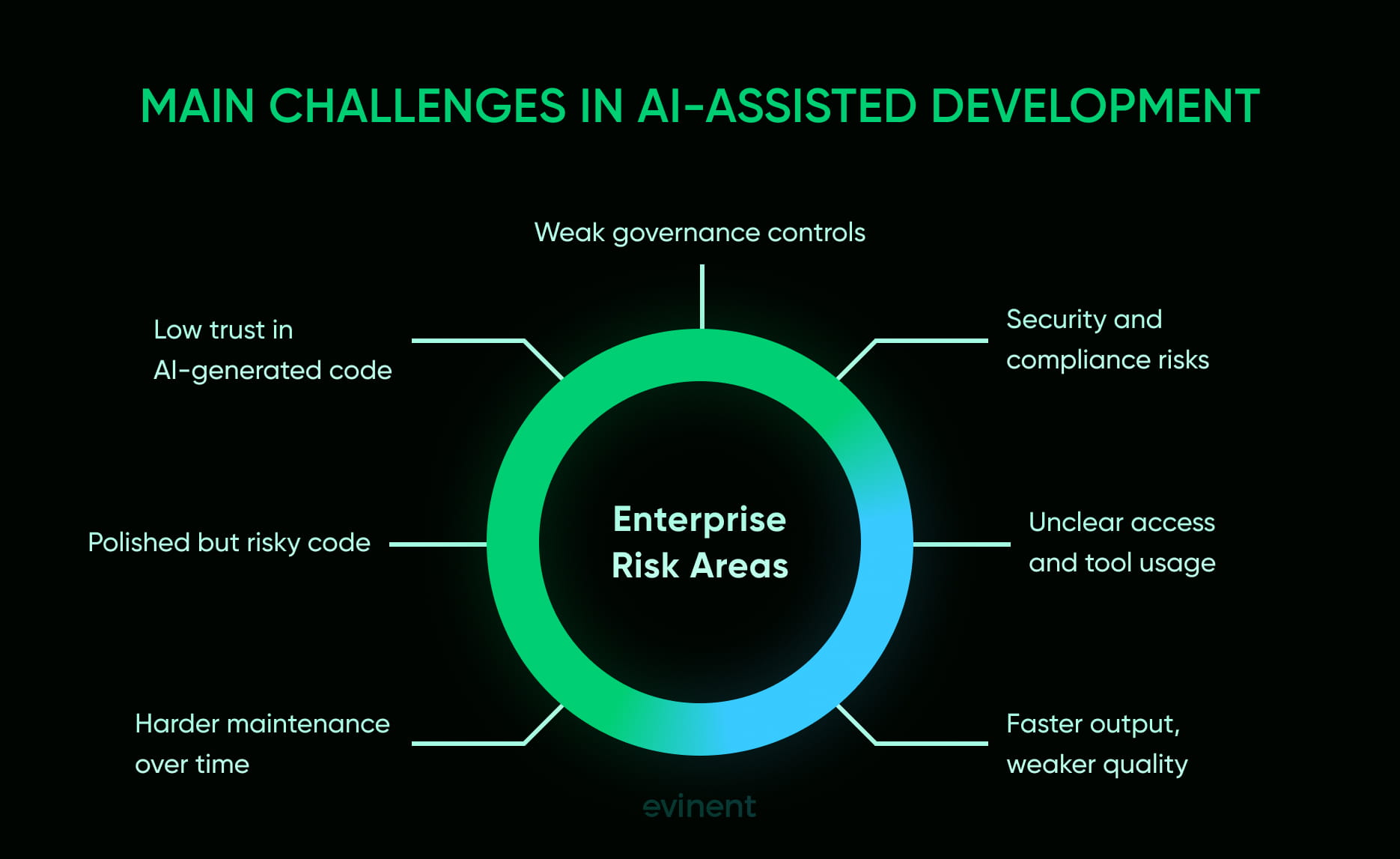
The upside of AI-assisted development is real, but so is the risk surface. That is the part enterprises cannot afford to romanticize. Once AI starts generating code, suggesting fixes, touching repositories, or participating in agentic workflows, the conversation stops being just about productivity. It becomes a question of governance, verification, access control, and long-term maintainability. NIST’s 2024 SSDF profile for generative AI makes this explicit: AI-specific practices need to be added throughout the software development lifecycle, not treated as a side note.
There is also a trust problem hiding in plain sight. SonarSource’s 2026 State of Code report found that 96% of developers do not fully trust that AI-generated code is functionally correct. That matters because AI can increase output faster than teams can increase review capacity. Google’s DORA research frames this as a “trust paradox”: AI is widely used and often helpful, but confidence in its outputs still lags behind adoption.
Security risks
The most obvious challenge is security. OWASP’s Top 10 for LLM Applications highlights risks such as injection, insecure output handling, training data poisoning, model denial-of-service, and supply chain vulnerabilities. Those are not abstract research problems. They become practical software risks when AI tools can access codebases, call tools, generate scripts, or influence downstream actions in CI/CD pipelines.
On top of that, AI-generated code can introduce ordinary but costly problems: insecure code patterns, weak validation, unsafe dependencies, and exposed credentials. The danger is not only that the model makes mistakes. It is those mistakes that may look polished enough to slip through review. That is why human oversight, threat detection, secret scanning, and automated validation are becoming non-negotiable in AI-assisted development. SonarSource now positions automated review of AI-generated code around compliance and security standards precisely because the risk is no longer theoretical.
Governance gaps
The second challenge is governance. Once AI is embedded in everyday engineering work, teams need clear official policies on which tools are allowed, what data can be shared, where AI is permitted in the SDLC, and which changes require stricter human approval. Without that, organizations end up with hidden access risks, uneven review standards, and shadow engineering that grows outside normal controls. NIST’s SSDF profile for generative AI was created for exactly this reason: to extend secure development practices to AI-related development throughout the lifecycle.
This is also where compliance questions and legal concerns start to pile up. Enterprises have to think about open-source licenses, provenance, auditability, and the lack of transparency around how outputs were produced or whether internal context was exposed during generation. Even when a tool improves speed, the organization still owns the software, the data exposure, and the consequences of shipping it. Faster automation of tasks does not reduce accountability; if anything, it raises the need for documented governance gates.
Quality drift
The third challenge is quality drift. AI can help teams code faster, but more code is not automatically better software. Google’s DORA research warns that focusing only on code generation without addressing the rest of the system can create bottlenecks elsewhere, like adding lanes to a highway that still ends in a narrow tunnel. That image is useful because it gets to the core problem: speed at the point of generation can still produce friction, rework, and lower confidence later in the lifecycle.
This is where debugging questions, maintainability issues, and knowledge silos start to show up. If developers over-rely on AI-generated code without fully understanding it, teams may accumulate systems that are harder to reason about, harder to fix, and more dependent on a few people who know what the s were doing in the first place. The result is not just code quality problems. It is organizational fragility. AI-assisted development can absolutely reduce effort, but without disciplined review, testing, and strong repository practices, it can also produce technical debt at a very efficient pace.
Getting Started With AI-Assisted Development
Most organizations do not fail with AI-assisted development because the tools are weak. They fail because adoption starts in the wrong order. Teams plug an AI assistant into the IDE, see a burst of early gains, and then realize they still lack clear policies, stable review practices, secure repository controls, or a shared understanding of where AI should and should not be used. AWS makes a similar point in its AI-Driven Development Life Cycle work: simply retrofitting AI as an assistant can reinforce existing inefficiencies rather than fix them. Google’s 2025 DORA research also pushes leaders to think beyond raw adoption and focus on the capabilities that make AI actually useful in engineering environments.
A better starting point is more deliberate. Treat AI-assisted development as an operating model change, not a tool rollout. That means defining where AI-powered execution with human oversight fits into design and planning, requirement gathering and analysis, development, testing, deployment, documentation, and maintenance and support. NIST’s SP 800-218A is especially clear here: secure software development practices for generative AI should be integrated throughout the software development life cycle, not handled as a separate afterthought.
Start small
The cleanest entry point is low-risk, high-friction work. That usually means documentation drafts, test generation, code explanation, internal tooling, migration inventory, repetitive refactoring, and issue summarization. These are areas where AI can save time without immediately exposing the business to serious compliance risks. IBM frames AI in software development in similarly practical terms, highlighting support for code generation, testing, deployment, and maintenance rather than treating AI as an all-or-nothing switch.
This kind of phased rollout also supports a progressive reliance on AI. Teams learn how the tools behave, what patterns work, where errors tend to appear, and how much review is needed before trust can grow. Starting small gives leaders concrete evidence from their own technical environment rather than vague optimism borrowed from vendor demos.
Set guardrails
Before AI becomes routine, organizations need rules. That includes approved tools, access boundaries, documentation requirements, review expectations, and decisions about which kinds of work can be assisted and which must remain fully human-led. NIST’s guidance exists for exactly this reason: to extend secure development practices into generative AI workflows across the lifecycle. IBM’s governance materials make the same case more broadly, arguing that AI governance requires processes, standards, and guardrails to ensure activity is traceable and manageable.
This is also where human oversight has to be made explicit. AWS’s AI-DLC materials describe the model as AI-powered execution with human oversight, not autonomous development with occasional review. That distinction matters. If the team cannot explain who approves AI-assisted changes, who validates outputs, and what happens when the model is wrong, then adoption has already outrun governance.
Build the workflow
Once the initial use cases are stable and the rules are clear, the next step is to integrate the workflow. That means connecting the AI assistant to real engineering activity: requirement gathering and analysis, design and planning, development, testing, deployment, documentation, and later maintenance and support. The goal is not to sprinkle AI everywhere. The goal is to place it where it reduces drag without weakening accountability. AWS’s AI-DLC and Google’s DORA companion guidance both stress that value comes from thoughtfully integrating AI into engineering workflows, with clear measurement and operating discipline.
A good rollout also measures more than speed. Teams should watch review burden, defect escape rate, documentation quality, rework, and whether AI is improving flow or simply generating more artifacts. That is how organizations move from curiosity to something more durable: a practical, governed model of AI-assisted development that helps teams work faster while keeping judgment, quality, and ownership in the right place.
How Evinent Can Help With AI-Assisted Software Development
AI-assisted software development creates the most value when applied within a controlled engineering environment — one with clear architectural decisions, secure infrastructure, disciplined testing, and sufficient delivery maturity to keep speed from turning into technical debt. That is the angle Evinent presents on its website. The company positions itself around legacy modernization, private AI automation, cloud engineering, and custom software development for enterprises and mid-sized businesses, with a stated focus on building and modernizing software faster “without losing control.” On the same page, Evinent says 78% of its projects are enterprise-focused and highlights private AI systems that run inside a client’s infrastructure to maintain control over sensitive corporate data.
What makes that relevant to AI-assisted development is simple: most enterprises do not need AI in isolation. They need AI introduced into software delivery in a way that still protects quality, architecture, security, and governance. Evinent’s published case studies suggest that this is where the company is trying to operate — not as a generic AI vendor, but as a technical partner that combines modernization work, secure implementation, and AI-based automation.
Private AI
One of the strongest examples is Evinent’s AI HR Assistant for Secure and Efficient Enterprise Recruitment. In that case study, Evinent built a private AI solution for a large retail company to automate candidate-vacancy matching while keeping all processing inside the client’s own infrastructure. The system used isolated AI agents for recruiters and candidates, avoided external API calls to OpenAI, Claude, or Gemini, and was designed around containerized deployment, role-based access control, encryption, and compliance-ready architecture aligned with GDPR and ISO 27001 expectations. Evinent also says the project used an atomic agent architecture to reduce hallucinations and improve reliability in chat-based interactions.
That is directly relevant to enterprise AI-assisted software development because it shows Evinent working on the harder side of the problem: private deployment, business-logic control, secure AI integration, and role-specific agent behavior. In other words, not “AI for the sake of AI,” but AI implementation with infrastructure, access control, and operational limits built in from the start.
Modernization
The second useful example comes from Evinent’s legacy application migration case study for e-commerce scalability and performance. There, the company describes replacing an outdated monolithic retail platform with a cloud-based microservices architecture, integrating third-party systems, redesigning the UX/UI, and adding AI-powered search and personalized product recommendations. According to the case study, the project led to a 21% increase in conversion rates, a 17% increase in average order value, and 12% lower operational costs, while also improving scalability for international growth.
This matters because AI-assisted software development is often most useful in modernization work, where teams need help understanding legacy systems, improving search and recommendation logic, documenting changes, and restructuring brittle platforms without disrupting the business. Evinent’s case study suggests it is comfortable operating in exactly that kind of environment: not just building net-new software, but improving old systems while introducing AI-driven functionality in a way that supports performance and business outcomes.
Enterprise rollout
Taken together, those examples point to a practical role Evinent can play for companies adopting AI-assisted development. The company appears best suited not as a “-to-product” shortcut vendor, but as a partner for organizations that need to combine AI with modernization, secure architecture, system integration, and controlled rollout. Its website emphasizes private AI automation, cloud engineering, legacy modernization, and enterprise delivery, while its case studies show real work in isolated AI systems and performance-focused platform transformation.
So the real value Evinent can offer in this context is not just faster development. It helps enterprises introduce AI-assisted workflows without losing control of what matters most: data protection, maintainability, system reliability, and long-term engineering quality. That is a much stronger promise than simple code generation — and for large organizations, it is usually the more important one.
Conclusion
AI-assisted software development is no longer a side experiment for curious engineering teams. It has become part of how modern software gets planned, built, reviewed, and maintained. The real shift is not that AI can generate code. It is that AI now influences the entire software development lifecycle — from requirement gathering and architecture discussions to testing, deployment, documentation, and ongoing support.
That creates real upside. Teams can move faster on repetitive work, reduce friction in review and testing, improve documentation quality, and free up experienced engineers to focus on the decisions that actually shape product quality. When used well, AI can help organizations reduce technical debt rather than add to it. It can make modernization work more manageable. It can help enterprise teams ship with more consistency.
But none of that happens automatically.
The companies getting the most value from AI-assisted development are not the ones treating it like a magic shortcut. They are the ones building a controlled system around it: clear governance, strong review discipline, secure infrastructure, well-defined workflows, and human oversight where business logic, compliance, and architecture really matter. In that sense, AI does not replace engineering maturity. It exposes it.
That is why the strategic question is no longer whether to use AI in software development. Most serious teams already are. The real question is how to use it in a way that improves speed without weakening quality, increases output without creating hidden risks, and helps teams build better software rather than simply producing more of it.
For enterprise leaders, that is the line that matters. AI-assisted software development is not about handing the SDLC over to machines. It is about redesigning how software is built so that human judgment and machine speed work together without losing control.
FAQ
What is AI-assisted software development?
AI-assisted software development is the use of AI tools, such as large language models and coding assistants, to support work throughout the software development lifecycle. That includes requirement analysis, code generation, testing, debugging, documentation, code review, and sometimes deployment support. The keyword is “assisted”: humans still own the outcome.
Is AI-assisted development the same as AI-driven development?
Not quite. AI-assisted development usually means AI helps developers with tasks while humans stay in charge of decisions and delivery. AI-driven development suggests a more autonomous model, in which AI systems or agents can plan tasks, generate artifacts, and advance work with less direct ing. In enterprise settings, that distinction matters because the governance model is different.
Can AI really improve software quality?
Yes, but only under the right conditions. AI can help improve quality by generating tests, flagging defects, explaining code, improving documentation, and supporting faster review. But it can also introduce weak logic, insecure patterns, or misleading suggestions if teams trust the output too quickly. AI helps most with quality when paired with strong testing, code review, and clear engineering standards.
What are the biggest risks of AI-assisted development?
The biggest risks usually fall into three groups: security, governance, and maintainability. Security risks include insecure code patterns, exposed credentials, and unsafe use of sensitive data. Governance risks include weak policies, unclear ownership, and shadow engineering. Maintainability risks show up when teams generate more code than they can properly understand, review, or support later.
Will AI replace software developers?
No, but it is changing how strong developers do their work every day. Less time goes into writing every first draft manually. More time goes into framing tasks, reviewing outputs, checking assumptions, improving architecture, and deciding what should not be shipped. The role is shifting from pure production toward supervision, validation, and system-level thinking.
Does AI hurt junior developer skill formation?
It can if used as a substitute for understanding. AI can speed up learning when developers use it to ask questions, explain concepts, and explore unfamiliar code. But overreliance can weaken skill formation if developers outsource too much thinking too early. That is why teams need to treat AI as a learning support tool, not just an answer machine.
Where should companies start with AI-assisted development?
A smart starting point is low-risk, high-friction work: documentation, test generation, code explanation, internal scripts, repetitive refactoring, and issue summarization. These use cases usually create value quickly without exposing the business to the highest levels of risk. From there, organizations can expand gradually once policies, review practices, and security controls are in place.
What does enterprise-ready AI-assisted development require?
It usually requires more than just buying a tool. Enterprise adoption needs clear usage policies, repository controls, secure access management, review standards, auditability, and stronger governance around what AI is allowed to do. In regulated or complex environments, private AI deployment and infrastructure-level control may also be necessary.
How does Evinent fit into this picture?
Evinent appears well-suited for companies that want to adopt AI-assisted development without losing engineering control. Based on its positioning and case studies, the company combines AI implementation with legacy modernization, secure architecture, cloud migration, and enterprise-grade delivery. That makes it relevant for organizations that need AI to support real software quality and modernization goals, not just faster code generation.
Is AI-assisted development worth it for every company?
Not in the same way. The value depends on the company’s engineering maturity, security requirements, and software complexity. Teams with stable delivery processes, decent test coverage, and clear ownership usually benefit faster. Teams with weak foundations may still see speed gains, but they are also more likely to create rework and technical debt. AI is powerful, but it tends to magnify whatever engineering habits are already there.
Share