

The Moment Your Supplier Workflow Breaks
The financial logic behind this is not difficult to understand. A manual supplier onboarding process not only increases costs, which will double with the addition of new suppliers, but also reduces resource efficiency. The working staff will spend more time validating the data, and it will be more difficult and time-consuming to fix the errors. At the end of the day, the question is not if you want to fix the workflow but if you want to buy a tool that resembles your requirements or build a tool that is exactly what you are looking for.
Typically, the breaking point doesn't come with a loud announcement. If a marketplace expands its suppliers from 10 to 50, the current procedure can work for a while. Supplier submissions are made through email. The catalog team then reformats, verifies, and uploads physically. Errors are discovered and fixed individually. Suddenly, the quantity surpasses a threshold, and the very procedure that succeeded at 10 suppliers starts devouring the team. What previously took hours now takes days. The internal capacity that was once dedicated to expanding the catalog is now diverted to maintaining it.
The monetary reasoning hardly leaves room for disagreement. Purely manual onboarding costs more than $35, 000 per supplier when the time of the employees, rework, and s are all factored in, while the figure is less than $2, 500 with well-structured, automated workflows. In traditional manual operations, onboarding timelines are extended to 6-8 weeks, with a 40% vendor dropout rate due to losing patience during the process. The problem is not whether to improve the workflow. The problem is whether to purchase a tool that gives you the general idea of what you need, or make one that fits you perfectly. (Technology Match, 2025)
In this article:
Which features differentiate a working portal from one that crashes when the workload increases?
When SaaS tools can do the trick, and when they can't.
Specific architecture decisions that affect long-term scalability.
How to calculate the total cost of ownership for 1, 3, and 5 years.
Typical errors made while moving suppliers to a new system.
Actual case study: the process of developing a supplier portal at Evinent.
What a Supplier Portal Actually Needs to Do
It's not the features demonstrated that really make a difference; it's the ones that decide if your team will still be manually correcting submissions six months after the launch. This is where the line is drawn.
Table stakes | Scale-critical |
Self-service product submission portal (basic form) | Submission with conditional fields per category |
Basic data entry | Structured data entry with validation rules per attribute |
Manual moderation queue | Moderation workflow with inline communication and audit trail |
Single admin role | Role-based access per supplier (granular permissions) |
One-by-one product edits | Bulk operations for large catalogs (CSV/API) |
Self-Service Product Submission
A basic submission form is sufficient for suppliers to get registered in the system. However, it does not automatically change based on what the suppliers are submitting. For instance, a form that is suitable for apparel will not be efficient for electronics, each one having different sets of required attributes, image specifications, and compliance fields. If the form has no conditional logic for each category, suppliers will either complete non-applicable fields or omit necessary ones. The catalog team will, therefore, end up with the mess to clean up.
Structured Data Entry With Validation
Free-text fields are a problem that is generally postponed. Suppliers put in what they believe is right, and mistakes will be revealed later through search, filters, and customer complaints. Validation rules running on the entry point (the fields that need to be filled, value formats accepted, constraints at attribute level) relocate quality control to the cheapest place: before submission hits the moderation queue.
Moderation Workflow With Inline Communication
Manual queue shows only the items that require review, but not the reasons for the previous disapproval, the exact corrections the supplier was requested to make, or the fact that the supplier has made the changes. Lack of combined communication and audit trail means that the rejection of each item leads to the formation of a new email thread. At the point of having 50 suppliers and thousands of submissions each week, such a workflow could only be seen as a backlog.
Role-Based Access Per Supplier
A single admin role means every supplier sees the same interface and has access to the same actions. At a small scale, that's manageable. At scale, it becomes a data isolation problem: suppliers seeing each other's content, internal teams unable to restrict what external users can edit, and no way to assign different permission levels to different supplier tiers. RBAC isn't a nice-to-have; it's the foundation that keeps multi-supplier operations from collapsing into a single shared mess.
Bulk Operations For Large Catalogs
Suppliers with large catalogs don't submit products one at a time. If the portal doesn't support CSV import, bulk editing, or API-based submission, those suppliers will find workarounds or they'll ask your team to handle uploads on their behalf. Either way, the operational load lands back internally. Bulk operations aren't just a convenience feature; they're what determines whether a high-volume supplier can be self-sufficient at all.
The distinction between a portal that handles 10 suppliers and one that is set up for 100 suppliers is not the list of features. Rather, it is a matter of whether each functionality is created with the actual volume in mind. The basic essentials are what make you go live. The features that are critical to scaling are the ones that prevent the operations from outgrowing the capacity of the team to manage them.
Off-the-Shelf Supplier Portal: Where It Works and Where It Doesn't
Not every marketplace has to be equipped with a tailor-made portal. No-code platforms, generic PIM systems, and enterprise SaaS vendor portals suffice a wide variety of usages -- and for some conditions of growth, they're the proper choice. What remains is where that variety ends.
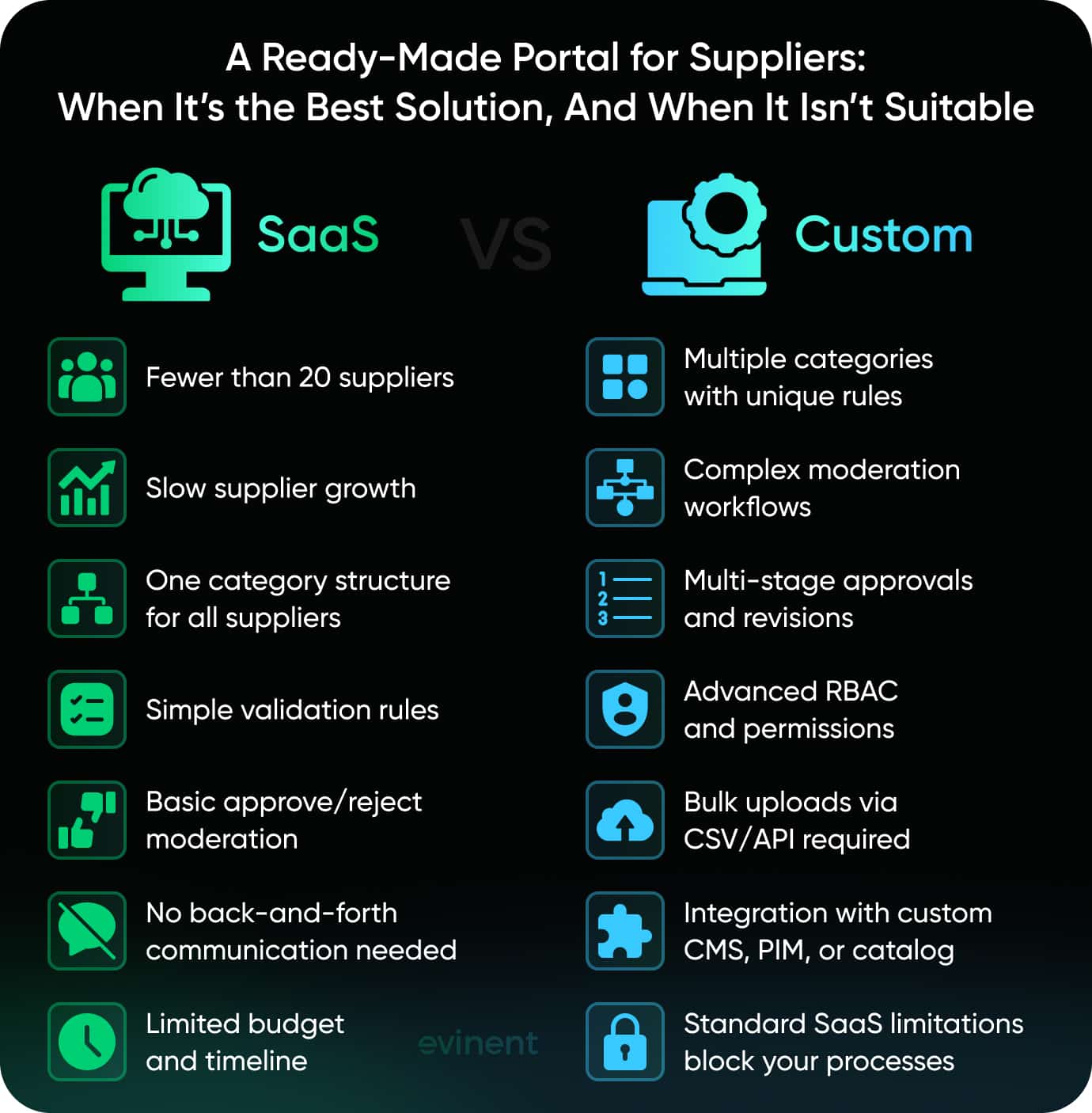
When SaaS Works
You currently have fewer than 20 suppliers, and the number of suppliers is slowly increasing.
The product categories are almost unchanged, so only one category schema can fit all the suppliers.
Validation rules are easy and the same for all attributes and categories.
Your moderation process corresponds to a basic approve/reject queue without the requirement for inline communication.
Funding and scheduling are not sufficient for undertaking custom development at this time.
When You Need Custom
Suppliers deliver goods and services in multiple categories, with each category having its own set of attributes and rules for submissions.
As part of your moderation workflow, there is a need for communication going back and forth, rechecking of changes, or approval in stages.
You want extremely detailed RBAC, various levels of permissions for different supplier categories, and simply admin vs. supplier is not sufficient.
Suppliers with large amounts of products demand uploading quickly through CSV or API; however, the SaaS tool restricts or limits that feature.
Your web portal must work with a proprietary CMS, PIM, or multi-vendor catalog system that is usually not supported by typical tools right out of the box.
The ceiling that SaaS tools have is not a flaw, but a design choice. These tools are made for the common cases only. When your workflows are different from the common ones, configuring the system becomes impossible, even when you still have many requirements.
Custom Supplier Portal: Architecture Decisions That Matter
In general, a single supplier portal development ecommerce may not be able to run successfully at both start and even two years after without a major rebuild. The largest and most significant differences in the structure explain why seemingly working supplier portals turn into nightmares over the long term.
Choosing the framework or UI libraries is not the main factor that determines the destiny of a portal; rather, it's the structural aspects, such as how the data is modeled, how the state is managed, and how various systems are connected.
If you correctly do these at the start, then the platform can evolve with the business. However, if you set them up incorrectly, then it is quite possible that you will have to do core logic rewiring while live traffic is coming in.
The core entity chain is formed by these elements:
Supplier → Submission → Catalog Entry → Published Listing
Each item in that sequence represents a different concern. Mixing them up, for instance, saving submission data as catalog data directly, will result in bad decisions that will accumulate with each new supplier and category.
Architecture Decision | What It Means in Practice | Recommended Approach | Common Mistake | What Breaks Without It |
Data Model | Products exist in two states: as submitted by the supplier and as published in the catalog. These are different schemas with different owners. | Separate Submission and CatalogEntry as distinct database entities with an explicit mapping layer between them. | Storing submission data directly as catalog data to save time upfront. | Catalog gets polluted with supplier-specific formatting, validation debt accumulates, no clean audit trail. |
Moderation State Machine | Every submission moves through defined states: draft → submitted → under review → revision requested → approved → published. Each transition has an actor, a timestamp, and optionally a message. | Model states explicitly with a transition table, not a single status column. | A status varchar field with ad-hoc string checks in application logic. | No revision history, impossible to build workflow logic on top, and moderation becomes a manual free-for-all. |
CMS Integration Layer | The portal accepts content. The CMS publishes it. These are two systems with different schemas and different release cycles. | A dedicated integration service handles the handoff — validating, transforming, and writing to the CMS asynchronously. | Direct database writes from the portal into the CMS schema. | Tight coupling breaks both systems on schema changes, failures cause silent data loss, and deployments become synchronized. |
RBAC Design | Suppliers must only see their own data. Ops teams must see across all suppliers. These are conflicting requirements that need to be resolved at the data layer, not the UI layer. | Row-level security is enforced at the database or ORM level, with explicit cross-supplier roles for internal teams. | UI-level access control only — hiding buttons but not restricting queries. | Supplier A can query Supplier B's submissions with a direct API call, but ops teams lose cross-supplier visibility when roles are misconfigured. |
API Design | The portal doesn't only serve as a UI. Suppliers push data from ERP systems, internal tools pull submission status, and analytics pipelines read catalog state. | API-first: core logic exposed through a versioned REST or GraphQL API, UI is one consumer among many. Webhooks for key state transitions. | Building the UI first and adding an API later as an afterthought. | Every integration becomes a custom project, no stable contract for external systems, webhooks get hacked on as one-off scripts. |
Such decisions don't stop here. A neat data model simplifies the implementation of a state machine. An accurately designed state machine results in a predictable CMS integration layer. Designing RBAC at the very start keeps the API surface clean. They are not flashy at all; however, they are what distinguish a portal that is still maintainable at year two from one that is being rewritten.
How Long Does It Take to Build a Supplier Portal
There is no single definitive answer; however, there is a practical range. An in-depth supplier portal development ecommerce with a fundamental submission process, moderation queue, and role-based access would take 3 to 4 months to launch the first working version (MVP). What exactly this initial version (MVP) covers, and what features will be added later, is largely dependent on how well the scope is defined before development begins.
Here is the typical layout of a phased build:
Phase | What Happens | Deliverables | Timeline |
Discovery & Architecture | Requirements gathering, data model design, tech stack decisions, and RBAC structure defined. | Architecture document, entity diagram, sprint plan | Weeks 1–2 |
Core Development | Supplier-facing submission forms, moderation queue, basic RBAC, and admin dashboard. | Working portal with submission → review → approve/reject flow | Weeks 3–10 |
Integration & Validation | CMS integration layer, validation rules per category, error handling, and internal QA. | Portal connected to the catalog system, validation live | Weeks 11–14 |
Beta & Stabilization | Real supplier onboarding, edge case fixes, performance testing, and documentation. | Stable MVP ready for production rollout | Weeks 15–16 |
The second phase usually begins 1-2 months after the first one. It is here that the portal is expanded with many new functionalities such as bulk upload via CSV or API, AI-assisted content validation, analytics dashboards, and additional supplier tiers. These types of features are intentionally left out of the MVP scope as they depend on live usage data for correct design.
Two main factors can shorten or lengthen this timeline more than anything else. One is how clearly the project's geography is defined at the time of the kickoff. Vague requirements at the discovery stage will result in additional weeks of rework even during the build phase. The other one is the level of CMS integration complexity: if the portal is going to be connected to a proprietary or an old catalog system, then you have to allocate an additional 2-3 weeks for that part alone.
A portal that goes live in 3–4 months isn't cutting corners. It's a scoped MVP built to validate the workflow with real suppliers before extending it, which is how portals stay maintainable past year one.
Total Cost of Ownership: Custom vs SaaS Over Time
Usually, the debate between build and buy begins with the wrong figure for the initial price. SaaS appears to be less costly on the very first day. Custom seems to be pricey. This comparison is valid only if the future costs are not considered because the two models have totally different cost trajectories.
SaaS Portal Pricing Models: Per-Seat, Per-SKU, Tiered
SaaS vendor portal software custom price on three models: per-seat (scales with internal users), per-SKU or per-submission (scales with catalog volume), or tiered plans with hard caps on suppliers, SKUs, or API calls. The structural problem with all three is the same — they scale with your growth. Every new supplier and every expanded catalog pushes you into a higher pricing band. Features get bundled into tiers that teams pay for but never actually use, while the capabilities that matter hit usage ceilings first.
Custom Development Cost Curve: Upfront Investment vs. Long-Term Ownership
IBM's definition of TCO includes not only the initial costs but also setup, operating, maintenance, and downtime costs, and deducts the end-of-life value. Considering a supplier portal decision, this model clearly shows where the two options differ the most, not in the initial purchase but in years two to five.
Custom is a mirror image of off-the-shelf. Most of the initial capital goes into the up-front work of architecture, development, QA, and deployment. On the other hand, the continuous cost is mainly fixed. (IBM, 2025)
SaaS | Custom | |
Year 1 | Low — subscription + setup fee | High — development + infrastructure |
Year 3 | Growing — scales with suppliers and SKUs | Low — maintenance only |
Year 5 | High — licensing compounds with supplier onboarding platform growth | Low — stable, owned codebase |
Customization | Billed separately or unavailable | Part of your development roadmap |
CMS/PIM integration | Paid connectors or custom work required | Built into the initial architecture |
Vendor lock-in | High — data tied to vendor schema | None — full data ownership |
Break-Even Point: When Custom Pays Off
In the case of a marketplace with more than 30 suppliers actively participating and a catalog that is continuously expanding, custom generally achieves break-even in 2-3 years. If the player is below that point, then SaaS is the more logical choice for the time being; you can easily forecast licensing costs, and the operational complexities don't really warrant a custom build.
Hidden Costs: Customization Fees, Integration Add-Ons, Support Tiers
SaaS contracts are rarely all-inclusive. Workflow customization beyond standard configuration is billed separately. Integrations with proprietary CMS, PIM, or ERP systems require paid connectors scoped outside the base license. Premium support tiers with guaranteed SLAs are an additional line item. These costs don't appear in the headline price but compound into a TCO that's hard to forecast at the point of signing.
Long-Term Flexibility: Cost of Changing Vendors vs. Extending Custom Code
IBM considers opportunity cost to be the most overlooked indirect cost in a platform change, among other costs, i.e., the value of time lost due to migration, retraining, and error fixing, which is not included in any contract but at the same time strongly affects the team. In the case of supplier portals, the cost of that also involves recreating moderation workflows, re-mapping supplier data schemas, and operating parallel systems until the new portal is ed. Changing SaaS vendors is so disruptive that most teams postpone it indefinitely, which is exactly the advantage vendors use at renewal. (IBM, 2025)
Neither of these options is cheaper by nature. You have to decide which cost system aligns best with your ecommerce portal development path and when the value of the flexibility of owning the product outweighs the value of the predictability of a subscription.
Common Mistakes When Migrating Suppliers to a New Portal
A portal can be architected correctly, built on schedule, and still fail at rollout. According to Gartner, 76% of logistics transformations never fully succeed, failing to meet critical budget, timeline, or KPI metrics. Supplier portal migrations follow the same pattern: the technical work gets done, but the operational transition doesn't. These are the five mistakes that cause it.
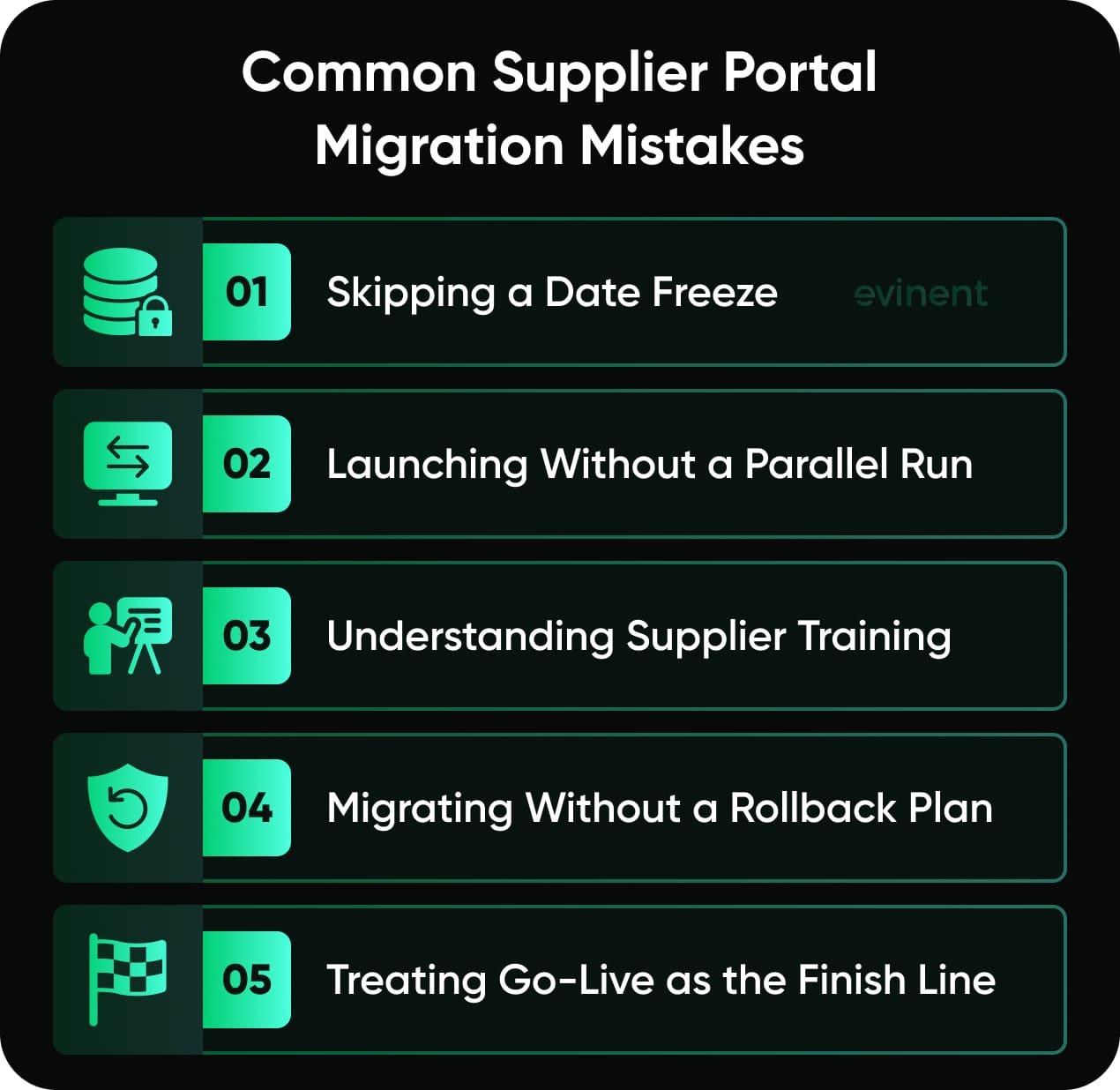
Mistake 1: No Data Freeze Before Migration
Changing supplier data when submissions are still being received is the surest way of introducing a corrupt baseline. Unless you implement a freeze period where the old system is not taking any new entries and the new system has not been launched yet you will end up working with two live datasets at the same time. This will lead to duplicate records, missing submissions, and a catalog that is not in sync from the very beginning. A freeze period of even 48-72 hours, suppliers being duly informed about it beforehand, gets rid of these types of problems completely.
Mistake 2: No Parallel Run
Disabling the legacy workflow immediately after the launch of the new portal is basically taking away the safety net before even realizing you will need it. Running a parallel operation, i.e., both systems functioning simultaneously for a certain period of time, allows you to check that the submission flow is correct, the moderation queues are getting populated as expected, and the CMS or catalog system integrations are stable even under high load from real users. It contributes to 2-4 weeks of operational overhead, but on the other hand, it is like the difference between finding out the integration errors when you have a controlled time frame versus discovering them after the suppliers have already lost their faith in the new system.
Mistake 3: Underestimating Supplier Training
Internal teams learn new tools under pressure and with direct access to support. Suppliers don't. They come to the portal with varying levels of technical confidence, different catalog sizes, and no stake in making the transition smooth on your timeline. Gartner's research shows that effectively responding to resistance and incorporating feedback during transformation initiatives increases the odds of success by 62% — the same principle applies directly to supplier adoption. Portals that include guided onboarding flows, contextual help, and a direct feedback channel during rollout see faster time-to-competency than those that send a PDF manual and open a ticket queue.
Mistake 4: No Rollback Plan
In fact, a rollback condition must be defined in each migration plan: a particular metric or level e.g., stalled submission rate, error volume, supplier drop-off, that when reached will decide a move back to the previous process. Not having such a metric puts the teams in a dilemma of either forcing the failing rollout or resorting to an unplanned decision under pressure. The idea here is that having a rollback plan is not about expecting failure, but is about having a lucid decision framework that can guide a well-organized response rather than a hasty one if adoption stalls.
Mistake 5: Treating Launch as the Finish Line
Go-live is the time when the actual effort starts. The initial 30-60 days following the launch is when various issues and problems come to light, when suppliers are presented with categories or attribute combinations that had not been part of the QA process, and when the moderation team finds workflow gaps that were not apparent during testing. Teams that view launch as the end of the project will distract themselves by shifting focus at the wrong time. A well-organized post-launch phase, having a dedicated point of contact for suppliers, weekly error triage, and a clearly defined escalation path, is what differentiates one portal that is able to stabilize quickly from the other that falls into a support backlog.
Migration failures rarely come from bad technology. They come from treating a people-and-process transition as a purely technical deployment. The five mistakes above share a common root: underinvesting in the operational layer of the rollout. Data freezes, parallel runs, rollback plans — these aren't additions to a migration plan. They're the plan.
The teams that navigate this well tend to have one thing in common: they've done it before, with a real supplier base, under real production conditions. That's the context behind how Evinent built a supplier portal for a growing marketplace — from architecture decisions through alpha testing to beta with live suppliers.
How Evinent Built a Supplier Portal for a Growing Marketplace
Building a supplier portal is not simply purchasing a product; it is more about making the right architectural decisions. The choices made during the first sprint will determine if the system can handle 50 or 500 suppliers, if moderation can be scaled without needing more staff, and if the codebase will still be maintainable two years after the product launch.
For many years, Evinent has been developing marketplace and ecommerce infrastructure for retail, logistics, and ecommerce sectors, from medium-sized to large clients. The issues we tackle in live ecommerce are structurally the same as the ones supplier portals expose at a large scale.
Why Teams Choose Evinent
15+ years of building marketplace and ecommerce platforms across retail, logistics, and ecommerce
85% client retention. Most clients return for follow-up projects — because we design for operational reality, not just technical requirements
Full-stack ownership from architecture and data modeling through QA, integration, and post-launch stabilization.
Sprint-based delivery. Predictable phases, concrete deliverables, no scope drift
Case Study: Scalable E-Commerce Platform for a Major Eastern European Retailer
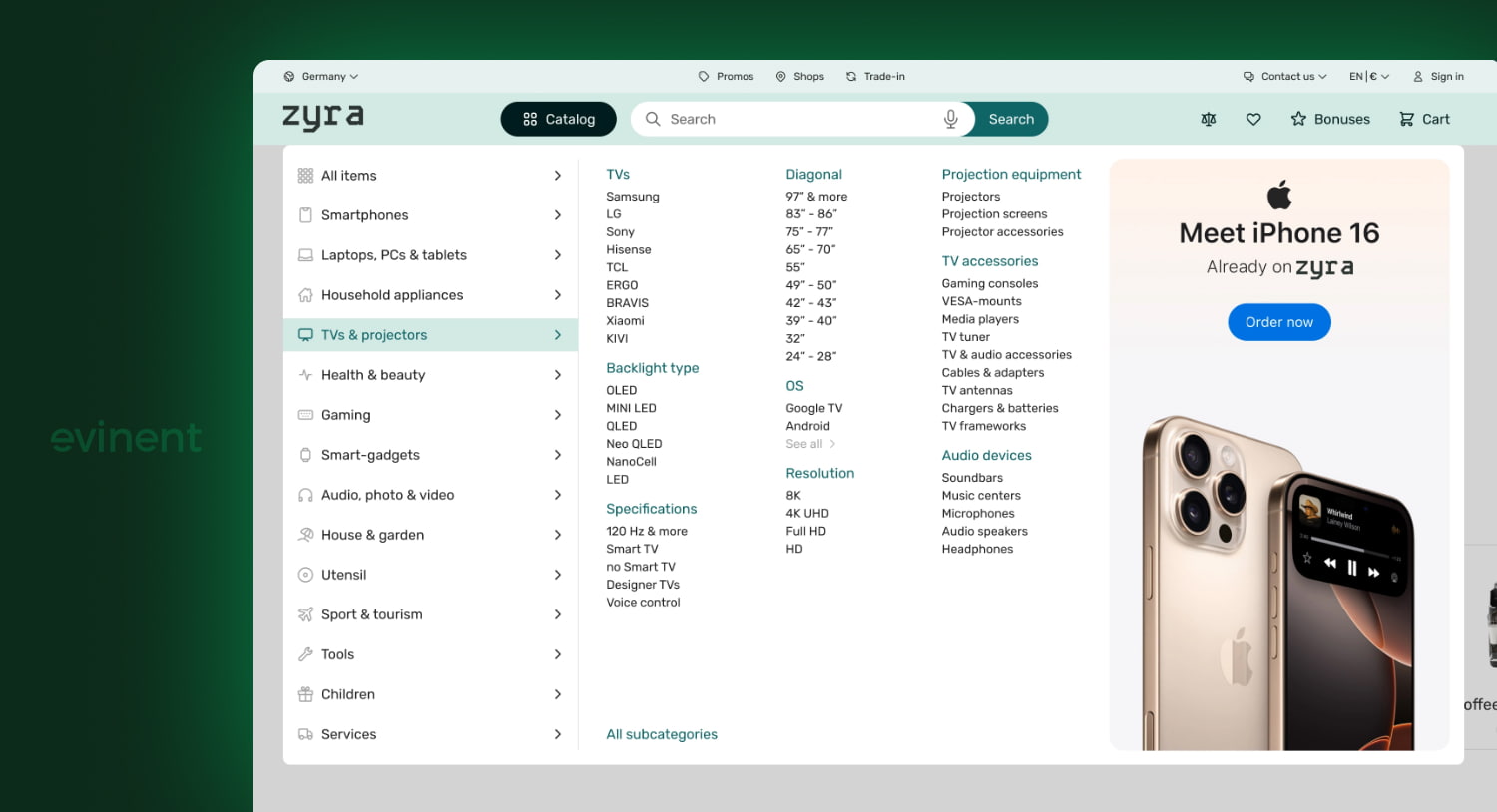
The Problem
A significant retailer in Eastern Europe contacted Evinent because their platform no longer met its needs. The catalog of products was sluggish, the flow of orders was compromised due to bottlenecks, and the system was failing when there was a sudden increase of traffic. Besides that, there were no proper tools for store managers to handle inventory and order management, and the mobile experience was very unsatisfactory everywhere. Clearly, the main issue was a system designed for one scale being suddenly asked to work on another scale.
What Evinent Built:
Evinent delivered a full-scale digital transformation over a 6+ year engagement with a dedicated development team. The scope covered every layer of the platform.
Infrastructure: Auto-scaling cloud architecture on AWS EC2 clusters with dynamic resource allocation — designed to handle peak traffic without manual intervention.
Catalog and Order Management: A fully rebuilt processing system that eliminated bottlenecks and standardized order workflows across the platform.
Mobile Applications: Two purpose-built apps — one for customers to improve the shopping experience, one for store managers to handle inventory and marketplace supplier management in real time.
AI-Powered Search: Implemented for improved product discovery, relevance, and personalized recommendations.
Security: AES-256 encryption, RBAC at the permission level, OAuth 2.0 API security, real-time threat monitoring, and regular penetration testing.
Results
Metric | Result |
Online sales growth | +320% over 2.5 months during lockdown |
Search conversion rate | +23% after AI-powered search implementation |
E-commerce share of total revenue | Grew to 60–70% of total company turnover |
Platform stability | Held under peak load conditions that crashed the previous system |
From E-Commerce Infrastructure to Supplier Portals
The architectural principles that guided the creation of that platform, data isolation, managing state under heavy load, integration layers that remain stable as volume increases, are basically the same ones deciding whether a supplier portal can easily handle more than 50 vendors, or soon it would require manual interventions. Actually, the problems are very much the same at a structural level. Even the stakes remain the same. Only the front changes: instead of customers placing orders, suppliers are listing products.
One day, you realize that your catalog team is dealing more with correcting supplier data rather than growing the catalog, which must be the signal. The process is already broken. The only questions are do you fix it for the last time or invest into infrastructures that will be able to support the growth of the business.

FAQ
How Long Does It Take to Build a Custom Supplier Portal?
An MVP of a supplier portal with the essential features, such as the main submission workflow, moderation queue, and role-based access, would usually require 3 to 4 months to accomplish. The next phase 2, which includes capabilities like bulk upload, AI-assisted validation, and analytics, gets scheduled 1-2 months after the launch time, depending on when real usage data becomes available.
What Features Does a Marketplace Supplier Portal Need?
At minimum: self-service product submission with category-specific fields, structured data entry with validation rules, a moderation workflow with audit trail, role-based access per supplier, and bulk upload via CSV or API. The last two are where off-the-shelf tools most commonly fall short.
When Should a Marketplace Build vs. Buy a Vendor Portal?
Buy when your supplier count is under 20, categories are consistent, and moderation is straightforward. Build when you need conditional submission logic per category, multi-stage moderation with inline communication, or integration with a proprietary CMS or PIM that off-the-shelf tools don't support.
How Do You Manage Product Content Quality From Multiple Suppliers?
Structured data entry with attribute-level validation right at the point of submission helps a moderation state machine that records every change and rejection, keeps inline communication tools that maintain the context of the submission instead of getting lost in email threads.
Can a Supplier Portal Integrate With Existing CMS Systems?
Yes, but of course it's the integration layer that matters. Having a dedicated integration service manage data transformation, schema mapping, and failure recovery between the portal and CMS without making the two systems highly dependent on each other is the way to go. Directly writing to the database from the portal to the CMS is like taking on debt that only grows with each schema change on either end.
Share