

What is enterprise AI, and why are so many companies suddenly treating it as a board-level priority instead of another short-lived tech trend?
Because the conversation has changed. Enterprise AI is no longer about testing a chatbot in one department or letting a few employees experiment with generative tools on the side. It is about using artificial intelligence across core business functions, with the controls, integrations, and accountability that large organizations actually need. Google defines enterprise AI as the use of AI technologies "to solve business challenges" inside an organization, while McKinsey describes the current shift more bluntly: AI use now spans everything from early employee experimentation to systems "embedded across multiple business units" that have redesigned processes around it.
The adoption curve explains why executives are paying attention. Stanford’s 2025 AI Index found that 78% of organizations reported using AI in 2024, up from 55% the year before. The same report says 71% reported using generative AI in at least one business function, more than double the prior year’s level. McKinsey’s 2025 global survey landed on the same headline number: 78% of respondents said their organizations use AI in at least one business function, up from 72% in early 2024. That is not marginal growth. That is a sharp jump in a very short time.
And access is still widening. Deloitte’s 2026 enterprise AI report says worker access to AI rose by 50% in 2025, while the share of companies with 40% or more of AI projects in production is expected to double within six months. In other words, the story is no longer just about adoption. It is the move from pilots to production. Or, as Deloitte puts it, companies are now "moving from pilot to scale as access expands." That line matters because it captures the real pressure many leadership teams are feeling right now: AI is easy to test, but much harder to operationalize well.
That is exactly where enterprise AI becomes different from general AI hype. Once AI starts touching forecasting, compliance, customer service, procurement, fraud detection, HR workflows, or internal search, it has to operate within the company’s real-world environment. It has to connect to ERP, CRM, data lakes, document repositories, and internal business rules. It has to meet governance and security requirements. It has to justify the cost. And most importantly, it must deliver business value that endures after the demo.
That is why enterprise AI is now one of the biggest digital transformation priorities for large organizations. Not because it sounds futuristic. Because it is becoming operational.

What Is an Enterprise AI?
Enterprise AI is artificial intelligence built to operate within a real business, not alongside it. Google defines it as the application of AI technologies to address business challenges within an organization. SAP describes it as the use of AI to make business and manufacturing processes less manual, less time-consuming, and less prone to human error. IBM puts the same idea in enterprise terms: advanced AI-enabled technologies integrated within large organizations to improve business functions. Taken together, that gives us a practical definition. Enterprise AI is AI designed for company-wide use, integrated with business systems, and expected to operate under enterprise rules.
That last part matters more than it may seem. A public AI tool can generate text, summarize a document, or answer a general question. Enterprise AI has to do more than that. It has to integrate with internal systems such as ERP, CRM, ticketing platforms, data warehouses, document repositories, and knowledge bases. It also has to respect permissions, audit trails, privacy policies, and compliance controls. AWS reflects this in its definition of an enterprise AI platform as an integrated set of technologies that enables organizations to experiment, develop, deploy, and operate AI applications at scale.
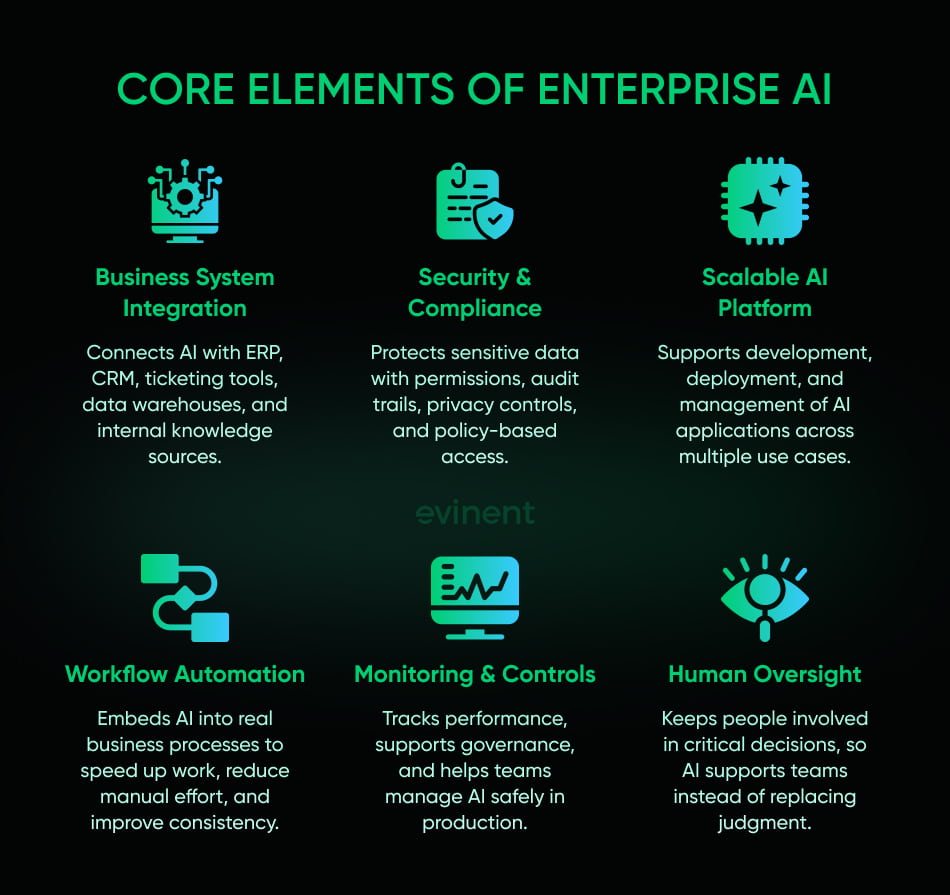
So the difference is not just size. It is an operating context. Enterprise AI is usually embedded into workflows where speed, accuracy, accountability, and system integration all matter at once. That might mean helping finance teams process invoices, helping support teams find answers faster, helping operations teams predict equipment failures, or helping recruiters screen candidates in a controlled environment. SAP explicitly frames enterprise AI around reducing manual work and improving business processes, while IBM includes automation, customer service, and risk management among its core enterprise functions.
This is also why enterprise AI is often platform-based rather than tool-based. In most large organizations, a single model is not enough. They need model access, deployment controls, reusable components, monitoring, security, and ways to connect AI to business applications. Google points to Vertex AI as its unified platform for developing, deploying, and managing models, agents, search experiences, and applications at scale. AWS makes a similar point on the infrastructure side, arguing that enterprise AI requires reusable systems to operate AI across multiple use cases rather than starting from scratch for each one.
There is another shift happening here, too. Enterprise AI used to mean mostly predictive models, recommendation engines, and workflow automation. Now it increasingly includes generative AI, enterprise search, copilots, and AI agents. Google defines AI agents as software systems that pursue goals and complete tasks on behalf of users with reasoning, planning, memory, and a degree of autonomy. AWS describes them as software programs that can collect data and perform self-directed tasks to meet set goals. In enterprise settings, that opens the door to systems that not only answer questions but also retrieve information, make decisions within limits, and take action across connected tools.
Still, enterprise AI should not be confused with fully autonomous decision-making. Most companies are not handing over critical operations to unsupervised models, and they should not. In practice, enterprise AI works best when it augments people, shortens slow processes, improves information quality, and helps teams act faster with more context. That is why the strongest enterprise AI applications usually look a little less dramatic than the hype. They are often built around better routing, forecasting, search, risk detection, and decision support. Not flashy. Just valuable.
Benefits and Value of Enterprise AI
The appeal of enterprise AI is not that it looks impressive in a demo. It is that, when used well, it can change how a business operates day to day. Faster work. Lower friction. Better decisions. Fewer expensive blind spots. That is the real value.
Still, the benefits are not all the same. Some show up as time savings. Some affect revenue. Some reduce risk. Some make the business easier to scale without adding the same amount of overhead every quarter. That is why enterprise AI is worth looking at through a few distinct lenses.
Higher productivity
One of the clearest benefits is productivity. Enterprise AI can take repetitive tasks off people’s plates, but it can also support more complex work by helping employees search, summarize, compare, draft, classify, and prioritize faster.
IBM points to productivity gains through automation, predictive capabilities, and support for real-time decision-making. SAP makes a similar case, arguing that enterprise AI helps reduce manual work and time spent on repetitive business processes. That sounds broad, and it is. But the pattern is easy to spot in real companies: support teams answer faster, finance teams process documents with less back-and-forth, HR teams move through screening tasks more quickly, and analysts spend less time digging for context buried in scattered systems.
There is now strong evidence that this is not just a theory. Microsoft’s 2025 Work Trend Index says employees are increasingly turning to AI to handle lower-value work and free time for more strategic tasks, while Deloitte reports that worker access to AI rose by 50% in 2025. Once access spreads, expectations shift with it. Teams stop seeing AI as a novelty and start asking where else it can remove drag.
Lower costs
Cost reduction is one of the most attractive promises in enterprise AI, but it works best when the target process is well chosen. AI is not a magic savings button. It tends to pay off when it removes manual review steps, reduces service volume, cuts error rates, improves resource planning, or shortens process cycles.
IBM notes that enterprise AI can help reduce costs by automating repetitive work and improving operational efficiency. AWS makes the same point from a platform perspective, emphasizing that enterprise AI can help businesses reduce inefficiencies and operate with greater consistency across teams and workflows.
This matters most in high-volume environments. Invoice processing, claims handling, document classification, customer support, compliance review, procurement routing, and internal knowledge search all have one thing in common: they create hidden administrative costs. A lot of it. Even small reductions in time per task can add up fast when multiplied across thousands or millions of transactions.
Better decisions
Another major benefit is decision quality. Enterprise AI can analyze patterns faster than humans, spot outliers earlier, and surface signals buried in large data sets. That improves planning, forecasting, and operational response.
SAP highlights predictive analytics and data-driven decision-making as central outcomes of enterprise AI. Infor also points to demand forecasting, supply chain planning, and operational intelligence as core enterprise use cases where AI can improve business performance. This is one of the less flashy but more valuable sides of AI for enterprise: it helps leaders make fewer decisions based solely on lagging data and gut feel.
For C-level teams, that can affect a lot: pricing, inventory, staffing, working capital, risk posture, and growth planning. Predictive models will not remove uncertainty, of course. Nothing will. But they can narrow the guesswork and make trade-offs easier to see.
Better customer experience
Customers rarely care whether a company uses AI. They care whether the experience is faster, clearer, and less frustrating. Enterprise AI can help with that through personalization, better support, smarter search, and more accurate recommendations.
SAP includes personalized customer experience, CRM support, and intelligent assistance among the main enterprise AI benefits. Moveworks also emphasizes AI’s role in improving employee and customer-facing service by reducing wait times and routing requests more intelligently.
This is where enterprise AI tools often prove their value quickly. Better search means customers find products faster. Better routing means more issues get solved on the first try. Better recommendations mean more relevant offers. Better support summaries mean human agents spend more time solving and less time catching up. None of that sounds dramatic on its own. Together, it can change conversion, retention, and satisfaction in a measurable way.
Stronger compliance
There is another benefit that does not always make the opening slide in AI presentations: consistency. Enterprise AI can help companies apply rules more evenly, flag unusual activity earlier, and reduce the chance that risky issues slip through simply because teams are overloaded.
HPE stresses that enterprise AI must include governance, ownership, and privacy controls, especially where customer, financial, or regulated data is involved. IBM likewise points to risk monitoring and fraud management as high-value use cases. In practice, that means AI can help compliance and risk teams review more activity without depending entirely on manual checks.
This is especially useful in finance, healthcare, insurance, and other tightly regulated environments. AI does not remove the need for human oversight. But it can improve coverage, shorten detection time, and reduce the odds of missing critical signals.
Better scalability
This is where enterprise AI gets especially interesting for growth-stage and large organizations. When a business expands, operational complexity usually grows faster than people expect. More customers, more products, more requests, more systems, more decisions. If every increase in volume requires the same increase in administrative effort, growth starts getting expensive in all the wrong ways.
Enterprise AI can help absorb that growth by handling repeatable tasks, supporting employees with better context, and keeping workflows moving without piling endless manual work onto teams. Red Hat frames enterprise AI partly in terms of platform thinking and integration, which is important here. If AI is properly connected to the business, it can support scaling. If it is bolted awkwardly onto legacy systems, it may just create more mess.
That distinction matters. Done well, enterprise AI helps a business grow without every new layer of demand creating a fresh bottleneck. Done badly, it becomes one more disconnected tool people work around.
Usable innovation
There is also the innovation argument, though I would treat it carefully. A lot of AI writing gets carried away here. Not every company needs a grand reinvention story. Sometimes the value is simpler than that.
Enterprise AI gives organizations a practical way to test new operating models, new service experiences, and new product capabilities using data they already have and workflows they already run. Google and AWS both position enterprise AI platforms as a way to move from isolated experimentation toward reusable, organization-wide AI capabilities. That is the important part. Not innovation for its own sake, but innovation that a business can support, govern, and repeat.
So yes, enterprise AI can support innovation. But in most successful cases, it does that by making the business more functional first. Faster processes. Better visibility. Smarter workflows. New products tend to come after that foundation is in place.
Compounding value
The strongest enterprise AI programs rarely win on a single metric alone. They create compound value.
A workflow gets faster. That reduces cost. Better data from that workflow improves forecasting. Better forecasting improves planning. Better planning improves service levels. Better service levels improve customer retention. Step by step, the gains start to stack.
That is why enterprise AI is becoming a strategic priority rather than just an automation project. Its value is not only in what it replaces. It is in what it improves across the business when systems, data, and people start working with less friction.
Common Use Cases and Applications
This is where enterprise AI stops sounding abstract and starts looking useful.
Most companies do not adopt enterprise AI because they want “AI” in the abstract. They adopt it because a specific process is too slow, too manual, too expensive, or too messy to keep running the same way. That is why the strongest use cases usually begin with a business bottleneck, not with a model choice.
The range is broad, but the most common enterprise AI applications tend to cluster around a few familiar areas.
Assistants and search
One of the fastest-growing use cases is the internal or customer-facing assistant. But the real value is not in having a chatbot on a screen. It is about giving employees or customers faster access to the right information.
Google positions enterprise AI around search, knowledge access, and workflow support across company systems, while IBM highlights intelligent assistants to improve service, reduce repetitive work, and support employees in daily tasks. In practice, that can mean an internal assistant who helps HR answer policy questions, a procurement assistant who surfaces contract terms, or a support assistant who pulls the right troubleshooting steps from a knowledge base, rather than having agents hunt through five different systems.
This is also where retrieval-augmented generation becomes especially useful. Instead of relying only on a model’s general training, the system can retrieve current enterprise information from approved sources before generating a response. That makes answers more grounded and far more usable in business settings.
Customer support
Customer support is one of the most natural environments for enterprise AI because it combines volume, repetition, urgency, and a constant need for context.
Enterprise AI can classify tickets, suggest responses, summarize conversations, detect intent, route cases to the right team, and help agents resolve issues faster. IBM lists customer service among the main enterprise AI use cases, and SAP includes intelligent service support and automation among the areas where AI reduces manual effort and response time.
The benefit is not just speed. It is consistency. When support teams get better access to product data, prior interactions, and recommended next steps, they can respond with fewer errors and fewer unnecessary escalations. Customers feel that difference immediately, even if they never see the technology behind it.
Fraud and risk
Fraud detection remains one of the most established enterprise AI use cases, especially in banking, insurance, payments, and e-commerce. That makes sense. Fraud patterns are difficult to catch manually at scale, especially when bad actors change tactics quickly.
IBM describes AI fraud detection as a way to analyze large volumes of transactional and behavioral data to identify unusual activity and possible risk faster than traditional rule-based systems alone. The same logic applies beyond finance. Companies use similar approaches to review claims, detect procurement anomalies, address account abuse, monitor cybersecurity, and manage compliance s.
This is one of those use cases where enterprise AI earns trust quickly when done well. A model that flags suspicious behavior earlier and with fewer false positives can save money and reduce operational noise at the same time.
Supply chain
Supply chain management has become a major AI use case because it sits right at the intersection of uncertainty, cost, and scale.
Infor highlights demand forecasting, inventory planning, logistics optimization, and operational coordination as central enterprise AI applications. Companies use AI here to predict demand more accurately, identify supply risks earlier, optimize stock levels, and adjust purchasing or production plans before problems snowball.
This matters because supply chain mistakes are expensive in both directions. Too little stock hurts revenue and customer satisfaction. Too much stock ties up cash and creates waste. AI does not make volatility disappear, but it can help organizations react faster and with less guesswork.
Predictive maintenance
In industrial settings, such as utilities, transportation, and manufacturing, predictive maintenance is one of the clearest examples of AI producing operational value.
Instead of waiting for equipment to fail, AI models can analyze sensor data, maintenance records, and usage patterns to identify early warning signs. That helps organizations schedule service more intelligently, reduce downtime, and avoid emergency repairs. Microsoft’s industrial AI guidance highlights predictive maintenance and equipment diagnostics as high-impact use cases in manufacturing environments.
It is not glamorous, maybe. But avoiding downtime on expensive equipment rarely needs glamour to prove its value.
Document AI
A huge amount of enterprise work still begins with documents: invoices, forms, statements, contracts, claims, shipping records, compliance paperwork, and onboarding files. That makes document AI one of the most practical and widely applicable categories in enterprise artificial intelligence.
Google’s Document AI platform is built to extract structured data from documents, enabling businesses to automate intake, routing, and review processes. This kind of workflow is useful in finance, healthcare, insurance, logistics, and public-sector operations, where teams often lose hours to manual data entry and repetitive verification steps.
Once document processing improves, many other workflows improve as well. That is the hidden power of this use case. It often becomes the front door to broader automation.
Sales and CRM
Sales teams generate a lot of data, but do not always get enough clarity from it. Enterprise AI can help by analyzing deal patterns, lead quality, customer behavior, churn risk, and market signals to support more accurate sales forecasting and commercial planning.
SAP includes CRM support, personalization, and decision support among common enterprise AI applications. In practical terms, this can mean AI-powered lead scoring, sales copilots, next-best-action suggestions, pricing analysis, or automated summaries for account teams.
The benefit here is often a mix of speed and judgment. Reps get more context faster, managers get a clearer view of pipeline risk, and leadership gets forecasts that are a little less dependent on optimism dressed up as certainty.
HR workflows
HR is becoming a bigger AI domain than many people expected a couple of years ago. Recruitment, onboarding, policy support, learning paths, internal mobility, and employee service requests all create repeatable workflows that AI can support.
HPE notes that enterprise AI is often used to improve internal operations across departments, and HR is a prime example. AI can help summarize résumés, match candidates to roles, answer internal policy questions, route employee requests, and assist with workforce planning.
Of course, HR is also a sensitive domain. Bias, privacy, explainability, and governance matter a lot here. So this is an area where enterprise-grade controls are not optional. They are the whole point.
Cybersecurity
Cybersecurity teams are overwhelmed by volume. Too many s, too many signals, too little time. Enterprise AI can help sort through that noise by identifying patterns, flagging anomalies, and prioritizing likely threats.
IBM and other enterprise vendors position AI-powered anomaly detection as a way to strengthen security operations, particularly where organizations need to monitor large environments in real time. This includes suspicious login behavior, access anomalies, unusual transaction flows, and other patterns that might indicate compromise or misuse.
The point is not to replace security teams. It is to give them a better filter, so they spend more time investigating meaningful issues and less time drowning in false alarms.
Industry use cases
There is also a growing class of AI-driven solutions in niche domains. Healthcare providers use AI for imaging support, patient triage, and documentation workflows. Manufacturers use it for production quality and predictive maintenance. Retailers use it for recommendations, assortment planning, and dynamic pricing. Financial institutions use it for fraud detection, underwriting support, and customer service. Logistics companies use it for route planning and warehouse coordination.
That variety matters because it shows that enterprise AI is not a single product category. It is a set of capabilities applied to different industry realities.
And that, really, is the common thread across all these use cases. Enterprise AI works best when it is attached to a real business process, a real source of friction, and a real, measurable outcome.
Implementation Strategies and Best Practices
This is usually the section where AI advice gets vague. Set a vision. Build a roadmap. Bring the organization along. All true, technically. Also not very helpful.
The reality is more grounded. Most enterprise AI projects succeed or fail on a handful of practical decisions made early: whether the business problem is clear, whether the data is usable, whether the workflow is worth improving, whether the system can connect to existing tools, and whether anyone has thought seriously about governance before launch, instead of after the first incident.
So let’s keep this concrete.
Start with the goal
The first question should not be, "Which model should we use?" It should be, "What business problem are we trying to solve, and how will we know if it got better?"
That sounds simple, but it rules out a surprising number of weak AI initiatives. If the goal is vague, the project usually becomes vague too. Teams end up building demos, not systems. McKinsey’s 2025 research shows that companies that see the most value from AI are more likely to redesign workflows and track business impact, rather than just deploy tools. BCG reaches a similar conclusion: only a small group of companies reports substantial value from AI at scale, and those organizations tend to pursue a few high-value transformations instead of scattering effort across too many pilots.
A strong starting point usually looks like this:
Reduce invoice processing time by 40%
Cut support resolution time by 25%
Improve forecast accuracy by 15%
Decrease fraud-review workload without increasing false negatives
Raise internal knowledge search success and reduce duplicate requests
That is much easier to build around than "use generative AI in operations."
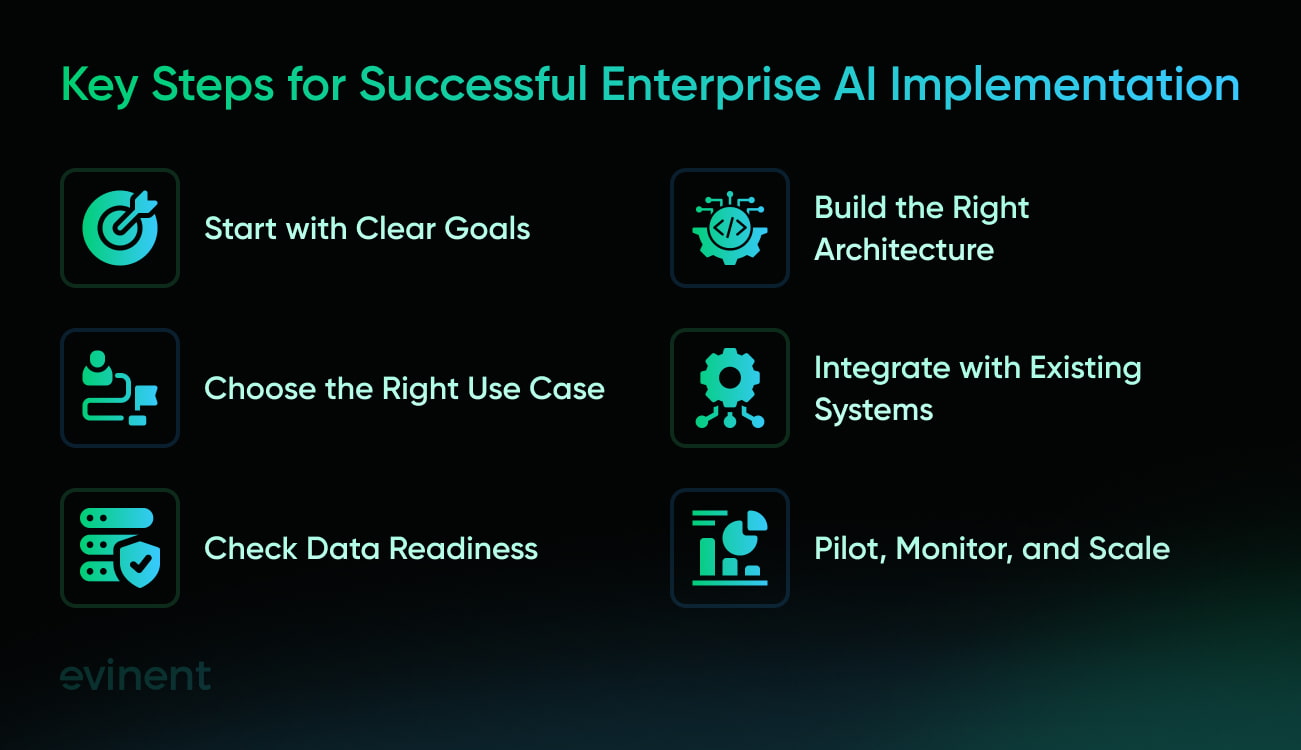
Pick the right use case
Not every process needs AI. Some need cleaner rules. Some need better interfaces. Some just need fewer approvals.
The best enterprise AI use cases usually share a few traits: high volume, repetitive patterns, costly s, excessive manual review, or too much information spread across too many systems. That is why document processing, support operations, knowledge retrieval, forecasting, and anomaly detection come up so often. They already contain friction. AI just gives the company another way to remove it. Google, IBM, and SAP all frame enterprise AI around these kinds of business problems rather than abstract innovation goals.
A good rule here: if a team cannot describe the current bottleneck in plain language, the use case is probably not ready.
Check the data
This is the part many organizations try to skip. Usually, because it is less exciting than talking about models.
But enterprise AI depends heavily on data quality, access, structure, ownership, and freshness. A knowledge assistant is only as useful as the sources it can retrieve from. A forecasting model is only as good as the inputs and historical patterns behind it. A document AI workflow falls apart quickly if the documents vary wildly and no one has defined what "correct extraction" actually means.
Stanford’s 2025 AI Index notes that AI adoption is rising rapidly, but adoption alone does not mean the data foundation is ready for scaled use. Red Hat also emphasizes that enterprise AI works best when it is part of a broader architecture and data strategy, rather than an isolated layer sitting awkwardly atop fragmented systems.
That means an early data assessment should cover:
1. Source systems and access
Which ERP, CRM, ticketing, document, or warehouse systems hold the data? Who owns them? What permissions apply? What can the AI system legally and operationally access?
2. Data quality and consistency
Is the information current? Duplicated? Inconsistent across systems? Missing key fields? Labeled in ways that are actually usable?
3. Sensitivity and governance
Does the workflow involve customer records, financial information, internal IP, regulated health data, or confidential HR content? If yes, governance decisions need to shape the architecture from day one.
Choose the right architecture
Many AI infrastructure decisions are still being made with too much attention to hype and too little to operating conditions.
Some companies are fine with cloud-native enterprise AI platforms. Some need a hybrid AI infrastructure. Some need private environments for privacy, latency, internal policy, or regulatory reasons. AWS, Google Cloud, and enterprise vendors like NVIDIA all position their offerings as ways to build and run AI at scale, but they are not interchangeable in practice. The right fit depends on your data sensitivity, workload type, internal capabilities, and integration requirements.
If the workflow touches sensitive HR, healthcare, legal, or financial data, architecture is not just a technical choice. It is a governance choice.
That is also why hybrid or private deployments keep coming up in enterprise conversations. Not because they sound sophisticated, but because some organizations simply cannot afford to treat sensitive business context as disposable.
Focus on integration
Enterprise AI fails fast when it lives in a corner.
If the tool cannot connect to real workflows, people stop using it. If the assistant cannot reach the right documentation or system records, it becomes a novelty. If the model generates useful output but no one can act on it within the existing process, value stalls.
AWS defines enterprise AI in part by integrated technologies that support experimentation, development, deployment, and operations across the business. That is a helpful framing because it reminds us that enterprise AI is not just model access. It is model access, system connection, and workflow relevance.
So integration with existing systems should not be treated as phase two. It should be part of the initial design. That includes:
identity and access systems
internal knowledge bases
ERP and CRM platforms
document repositories
ticketing tools
analytics and monitoring stacks
workflow engines and approval paths
If those connections are missing, the project may still launch, but it will struggle to make a difference.
Make pilots useful
Pilot programs are useful. But only when the goal is to learn what works under real conditions.
Too many pilots are designed to look good in a presentation rather than answer hard questions. What error types appear? Where does the model fail? Which users trust it and which users ignore it? Does it save time end-to-end, or only shift effort from one person to another? Does the workflow still work when the AI output is incomplete?
McKinsey’s research suggests that companies getting more value from AI are more likely to redesign workflows, define human validation points, and connect deployments to management systems rather than treating them as isolated experiments.
So a serious pilot should test at least four things:
1. Output quality
Is the response, prediction, or classification accurate enough for the intended task?
2. Workflow fit
Does it actually reduce effort, or does it create extra review work around the edges?
3. User behavior
Do employees trust it enough to use it? Do they over-trust it? Do they work around it?
4. Governance readiness
Are logging, permissions, fallback paths, and escalation rules already clear enough for production?
A pilot should answer those questions. If it only produces a nice screenshot, it has not done its job.
Keep human oversight
Not every enterprise AI workflow needs constant human review. But many do.
Anything involving regulated decisions, financial exposure, customer rights, employment outcomes, medical contexts, or contractual commitments requires clear rules for human oversight. That is not caution for the sake of caution. It is just good operational design.
NIST’s AI Risk Management Framework is built around the idea that AI risk must be managed across the lifecycle, with governance, measurement, and controls shaped by the context of use. In practical terms, that means organizations need to define where human review is mandatory, where AI can recommend but not decide, and where full automation is acceptable because the downside is low and recoverable.
That boundary should be written down early, not improvised in production.
Monitor early
Production AI is not "launch and move on." It needs ongoing measurement.
Models drift. Business data changes. Source documents change. Taxonomies change. User behavior changes. Even retrieval systems can decay quietly if source content becomes outdated or access rules shift.
Deloitte’s enterprise AI reporting highlights the widening gap between access and true production maturity, a useful reminder that operational discipline is part of the implementation challenge.
Continuous monitoring should usually include:
accuracy or answer-quality checks
latency and uptime
hallucination or error-rate tracking where relevant
fallback frequency
user adoption and abandonment patterns
cost per workflow or per request
compliance and access logs
business outcome tracking, not just technical output
This is where many teams get caught. They monitor the model, but not the business effect. And the business effect is the whole reason the system exists.
Share ownership
Enterprise AI is one of those areas where companies can waste months by treating it as "the data team’s project" or "something IT is handling."
It rarely works that way. Good implementations need business stakeholders, data owners, delivery teams, security, legal or compliance, and actual end users involved early enough to shape the system before bad habits harden into design choices.
IBM and HPE both emphasize governance, ownership, and responsible use as core parts of enterprise AI, not optional extras. That only works if the people who own the business process are involved, not just the people who deploy the tooling.
The business team knows what "good" looks like. Security knows what cannot be allowed. Legal knows where the risk sits. Operations knows where the bottleneck actually is. Without that mix, implementation becomes guesswork.
Roll out in stages
The smartest enterprise AI rollouts usually do not begin with company-wide deployment. They begin with one workflow, one team, one region, or one process category, then expand after the controls and results are clear.
That staged approach makes it easier to fix weak retrieval, unclear permissions, bad s, messy taxonomy, or poor process fit before those issues spread across the organization. It also gives leadership something more useful than broad AI enthusiasm: evidence.
Here’s the better sequence:
1. Define the business case
Pick a workflow with visible friction and measurable outcomes.
2. Assess data and risk
Check quality, permissions, compliance implications, and integration needs.
3. Build a narrow pilot
Test under real operating conditions with a controlled user group.
4. Measure both technical and business performance
Do not stop at accuracy. Look at time saved, error reduction, workflow speed, and user behavior.
5. Expand only after governance and monitoring are ready
Scaling weak controls just spreads weak controls faster.
Make it useful
That is really the core of it.
Enterprise AI does not need to feel magical. It needs to survive contact with messy systems, busy teams, incomplete data, compliance constraints, and skeptical users. If it does that, it becomes valuable. If it cannot, no amount of clever positioning will save it.
The strongest implementations are usually not the loudest. They are the ones that make a real workflow work better, with enough structure around them that the business can trust them.
Risks, Challenges, and Responsible AI
Enterprise AI can create real business value. It can also create new failure modes if companies move too fast, trust the wrong outputs, or treat governance like paperwork. That is the tension. The upside is real, but so is the risk.
And once AI starts touching customer data, financial records, employee workflows, or regulated decisions, the margin for error gets smaller.
Governance
One of the biggest challenges is governance. Not because companies do not care about it, but because enterprise AI cuts across too many functions at once. The model may sit on one platform, the data may come from several business systems, the users may belong to different teams, and the risk may land with legal, security, compliance, or operations.
NIST’s AI Risk Management Framework was created specifically to help organizations manage risks to individuals, organizations, and society associated with AI, and to build trustworthiness into the design, development, use, and evaluation of AI systems. That is a useful reminder that AI risk is not just a model problem. It is an operating model problem.
In practice, that means enterprise teams need clear answers to basic questions:
Who owns the system?
Who approves new use cases?
What data can the model access?
Where is human review mandatory?
How are outputs logged, tested, and monitored?
What happens when the system is wrong?
If those answers are fuzzy, the rollout usually becomes fuzzy too.
Compliance
This part is getting more concrete, not less. The EU AI Act entered into force on 1 August 2024. Prohibited AI practices and AI literacy obligations came into effect on 2 February 2025. Rules for general-purpose AI and governance obligations applied from 2 August 2025. Most of the remaining provisions apply from 2 August 2026, with some high-risk systems embedded in regulated products getting a longer transition until 2 August 2027.
That timeline matters because it turns “responsible AI” from a broad principle into something much closer to an operational requirement. The same is true on the data protection side. In December 2024, the European Data Protection Board adopted Opinion 28/2024 on AI models, addressing questions such as when AI models may be considered anonymous, whether legitimate interest can be used as a legal basis, and what happens when models are developed using unlawfully processed personal data.
So if an enterprise AI workflow touches personal data, especially in Europe, privacy and legal review cannot be bolted on at the end. They have to shape the design from the start.
Model quality
This one sounds obvious, but it's often underestimated.
Generative systems can produce answers that sound polished, confident, and completely wrong. Predictive systems can drift when business conditions shift. Classification systems can fail in edge cases that matter more than the average case. And retrieval systems can appear intelligent while drawing on outdated or incomplete sources.
That is why contextual awareness matters so much. Enterprise AI often fails not because the model lacks general capability, but because it lacks the right business context at the right moment. If the source data is stale, access is partial, or the workflow is badly framed, the output quality drops fast.
Responsible AI practices should therefore include evaluation against real enterprise tasks, not just generic benchmarks. A system that scores well in a lab but struggles inside the actual workflow is not production-ready. It is just impressive-looking.
Bias and fairness
Algorithmic bias is not new, but enterprise AI can amplify it if companies are careless. This is especially sensitive in hiring, lending, insurance, customer treatment, fraud review, and any workflow that affects access, pricing, or opportunity.
Here, the challenge is not only technical. It is procedural. Teams need to define where bias could arise, which fairness checks are appropriate, which decisions require human review, and how affected users can challenge or escalate an outcome. NIST’s AI RMF is useful here precisely because it treats risk as context-specific and calls for governance, measurement, and ongoing management rather than one-time sign-off.
A company does not need to eliminate all uncertainty before launching an AI system. That is unrealistic. But it does need to know where unfairness might show up and what safeguards are in place.
Security risks
When people think about AI security, they often jump straight to leakage or training-data exposure. Those are real concerns, but they are not the whole picture.
Enterprise AI systems can also be affected by weak access control, poor API security, compromised source data, unsafe connectors, injection, model misuse, or adversarial attempts to manipulate outputs. And because these systems are often integrated with internal tools, their blast radius can be larger than that of a standalone application.
NIST’s broader AI risk and cybersecurity work reflects this overlap. The AI RMF already frames AI as a trust, governance, and risk issue, and newer NIST cybersecurity efforts around AI focus on priorities such as model integrity, data provenance, adversarial robustness, and transparency.
In plain terms: securing an AI feature is not enough. The whole system around it needs to be secured, too.
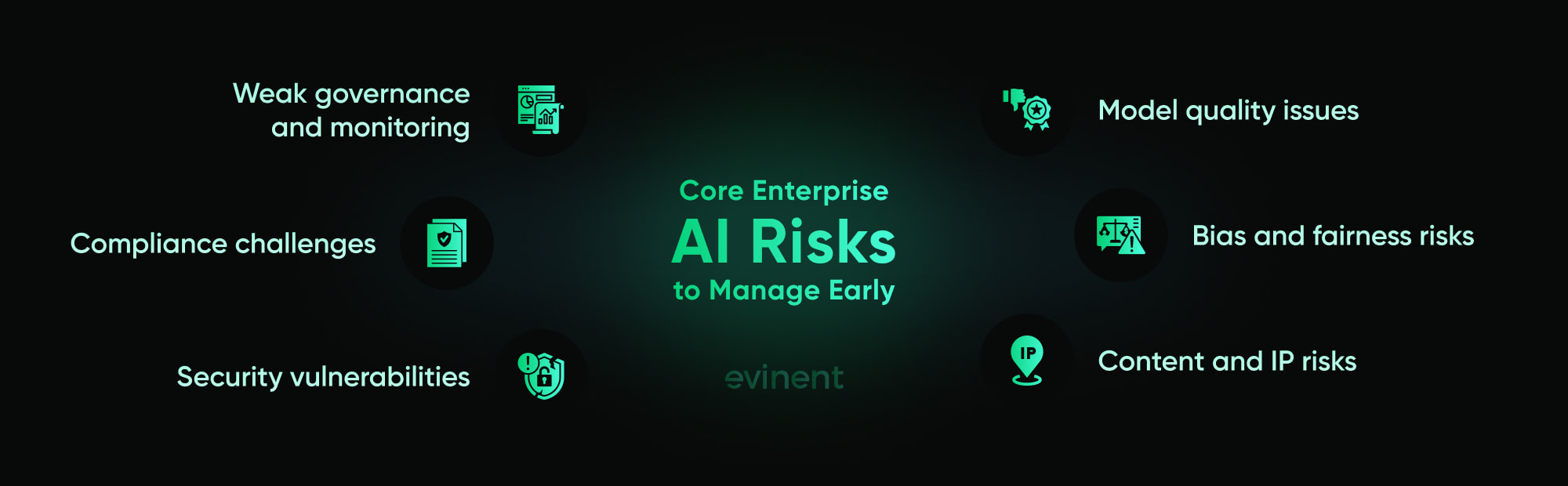
Content and IP
Generative AI adds another layer of risk because it produces content, not just predictions. That raises questions about harmful output, unsafe advice, misleading responses, copyright exposure, and ownership of generated material.
This becomes especially important when AI is used in legal, marketing, product, customer service, or knowledge workflows. Companies need rules governing what the system is allowed to generate, what must be reviewed by a human, which sources can be used, and how generated content is labeled or traced as needed.
The EU’s ongoing work on codes of practice and transparency around AI-generated content reflects how seriously regulators are taking these issues.
Change management
Honestly, this is the part many leadership teams underestimate.
Even when the technology works, employees may not trust it, may over-trust it, or may quietly work around it. Some teams worry about quality. Others worry about surveillance or job impact. Others simply do not want another tool dropped into an already messy workflow.
Responsible AI is not only about the system. It is also about the people expected to use it. That means AI literacy, clear role boundaries, practical training, and realistic communication about what the system can and cannot do. The EU AI Act’s inclusion of AI literacy obligations is a pretty strong signal that policymakers see capability and understanding as part of responsible deployment, not a nice extra.
If people do not understand the system, they will either ignore it or trust it at the wrong moments. Both are dangerous.
Real-world incidents
One useful corrective to AI hype is the growing body of evidence on actual AI-related incidents and hazards. The OECD’s AI Incidents Monitor exists for exactly this reason: to document incidents and hazards, help identify patterns, and improve collective understanding of how AI risks materialize in practice. Recent OECD work groups media-reported incidents into multiple thematic clusters, which tells you something important on its own: the risk surface is broad.
That does not mean enterprise AI should be avoided. It means responsible deployment has to be treated as part of the build, not as a reaction after something goes wrong.
Responsible AI in practice
Responsible AI is a phrase people like to use. It helps to make it more concrete.
A responsible enterprise AI program usually includes:
Clear accountability
Named owners for the system, the data, the workflow, and the risk decisions around it.
Data governance
Defined rules for what information can be used, retained, retrieved, or exposed.
Human oversight
Explicit rules for when humans review, approve, override, or audit outputs.
Testing and monitoring
Ongoing checks for quality, drift, failure patterns, and business impact after launch.
Security and compliance controls
Access restrictions, logging, privacy safeguards, auditability, and policy enforcement are built into the system.
Transparency
Users know when they are dealing with AI, what it is supposed to do, and where its limits are.
That is what makes enterprise AI sustainable. Not perfect safety. Not zero risk. Just enough structure that the company can trust what it is building and know what to do when things go off track.
Selecting and Evaluating AI Solutions and Vendors
This is where many enterprise AI conversations lose the plot.
Teams start by comparing model names, pricing tiers, or demo quality. Those things matter, sure. But they are not usually what determines whether an enterprise AI deployment works in production. The real questions are more practical: Can the solution fit your governance model? Can it connect to your systems? Can it run in the environment your risk team will accept? Can your people operate it after the vendor leaves the room?
That is the level at which vendor selection should occur.
Start with the model
Before comparing vendors, define the AI operating model the business actually needs. Is the goal to support a few narrow internal workflows? Build a reusable enterprise AI platform across teams? Run private AI in a controlled environment? Add AI capabilities to existing applications and processes?
Google describes Vertex AI as a "fully-managed, unified AI development platform" for building and using generative AI, while AWS frames enterprise AI as an integrated set of technologies for experimenting, developing, deploying, and operating AI at scale. Those descriptions are useful because they show what enterprise buyers are really choosing between: not just models, but operating approaches.
Some organizations want speed and are comfortable with managed cloud services. Others need tighter control over deployment, data handling, or infrastructure. The right choice depends less on which vendor sounds smartest and more on which platform fits the company’s operating constraints.
Check governance first
A powerful model is not enough if the governance story is weak.
IBM’s enterprise guide to AI governance defines governance as the principles, policies, and responsible development practices that align AI tools and systems with ethical and human-centered expectations. That sounds broad, but in vendor evaluation, it becomes very concrete. Can the system support role-based access? Audit trails? policy controls? model documentation? approval workflows? monitoring? human review? Those are not nice extras. In enterprise settings, they are part of the product.
This matters even more now because regulatory pressure is getting more specific. The European Commission states that the AI Act entered into force on 1 August 2024, with prohibited practices and AI literacy obligations applying from 2 February 2025, governance rules and obligations for GPAI models from 2 August 2025, and most remaining rules applying from 2 August 2026. If your company operates in Europe or affects EU users, vendor selection has to account for that compliance reality.
A good vendor assessment should therefore ask:
What logging and traceability are built in?
How are s, outputs, and model changes recorded?
What governance workflows are in place for approval and monitoring?
Which compliance and privacy controls are available out of the box?
What responsibilities stay with the customer, and what is covered by the vendor?
If those answers are vague, they are already answers.
Check deployment
This is one of the biggest dividing lines in enterprise AI.
Some companies are comfortable sending data through managed cloud AI services. Others need stronger isolation, regional controls, private infrastructure, or a hybrid deployment due to privacy, internal policy, or regulatory requirements. That is why deployment flexibility matters so much.
Google’s documentation emphasizes Vertex AI as a unified, open platform with access to a large model catalog and underlying TPU/GPU infrastructure. In plain terms, Google is selling a managed platform approach. That can be a strong fit for companies that want speed, centralized tooling, and broad access to models. But it may not be the right answer for every sensitive workflow.
So vendor selection should include a basic architectural question: where does the data go, where does inference happen, and what control does the enterprise retain?
That is not a secondary issue. For many organizations, it is the decision.
Prioritize integration
A surprisingly large number of AI tools look great until they meet a real enterprise stack.
If the solution cannot connect cleanly to identity systems, document stores, CRM, ERP, ticketing tools, analytics platforms, and workflow engines, the business ends up with one more disconnected system. AWS’s enterprise AI framing is useful here because it treats enterprise AI as a connected technology environment rather than a standalone model layer. That is exactly the right lens.
When evaluating vendors, ask questions like:
Which enterprise systems already have connectors?
How much custom integration work is required?
Can the AI layer act inside workflows, or only generate outputs?
How are permissions inherited from existing systems?
How easy is it to monitor usage across connected applications?
This is the difference between an AI feature and an AI capability. One looks good in a pilot. The other survives contact with the actual business.
Check lifecycle support
A lot of vendor messaging still focuses on model choice. That matters, but it is only one part of what enterprises are buying.
IBM’s governance materials emphasize managing the AI lifecycle, not just deployment. That includes policy management, monitoring, risk handling, and governance workflows across the full operating cycle. For enterprise buyers, that is a more useful way to think. A model may be strong today and weak tomorrow. A platform with sound lifecycle support is usually a safer investment than one that wins on raw novelty alone.
So the vendor review should cover:
deployment and release controls
observability and monitoring
incident handling
model updates and versioning
policy enforcement
support for testing and validation
cost visibility over time
This is less exciting than comparing benchmark charts. It is also far more relevant to production use.
Clarify responsibility
This part is often missed more than it should be.
Enterprise AI systems involve shared responsibility. The vendor may provide the model or platform, but the customer often owns the workflow, data access decisions, human-review policy, and final use context. Under a risk-based regulatory environment, those boundaries matter.
That is why vendor contracts, documentation, and architecture choices should make it clear who is responsible for what: security controls, logging, data retention, content filtering, compliance support, incident reporting, and operational monitoring. If those lines are blurry, governance becomes harder later — usually right when the company can least afford confusion.
Choose by fit
There is no single best enterprise AI vendor for every organization. That should be obvious, but the market still pretends otherwise.
Some platforms are stronger for managed cloud AI and broad model access. Some are stronger for governance workflows. Some are better for highly controlled environments. Some work best when the company already has a strong internal engineering capacity. Others are better when the business needs more of the platform and operating model handled for it.
So the shortlist should be built around a few practical dimensions:
Governance fit
Can the solution support the company’s risk, privacy, logging, and oversight requirements?
Deployment fit
Does the platform match the required cloud, private, hybrid, or region-specific architecture?
Integration fit
Will it connect cleanly to the systems and workflows the company already depends on?
Operational fit
Can internal teams realistically manage, monitor, and improve it over time?
Commercial fit
Do pricing, support, and implementation demands make sense for the expected business value?
That is a much better filter than “Who has the most popular model right now?”
Pick what works
That is really the core idea.
Enterprise AI selection is not a beauty contest. It is a risk-and-operations decision disguised as a technology purchase. The winning solution is usually the one that fits the company’s governance needs, integrates with real workflows, scales without chaos, and gives teams enough control to trust what they deploy.
And honestly, that is a better standard anyway.
Technology Infrastructure and Platforms
Enterprise AI does not run on models alone. It runs on an infrastructure stack that must move data, connect systems, deploy models, monitor outputs, control access, and keep costs in check. That is why enterprise AI architecture usually looks less like a single tool and more like a layered operating environment. AWS defines an enterprise AI platform as an integrated set of technologies that enables organizations to experiment, develop, deploy, and operate AI applications at scale. Google describes Vertex AI in similar terms: a unified platform for building, deploying, and scaling generative AI, machine learning models, and AI applications.
At a high level, most enterprise AI platforms include five core layers: data, model access, orchestration, deployment infrastructure, and monitoring. Miss one of them and the whole system starts to wobble. A model may work in isolation, but enterprise AI is only useful when it can retrieve the right business context, operate within approved workflows, and remain observable after launch. That is why the platform question matters so much. It is not only about raw model performance. It is about whether the surrounding stack is strong enough to support production use.
Data layer
The data layer is where everything starts. Enterprise AI systems need access to operational data, documents, knowledge bases, logs, and transactional records from systems such as ERP and CRM systems, warehouses, support tools, and internal repositories. Google’s Vertex AI documentation notes that the platform combines data engineering, data science, and ML engineering workflows, enabling teams to collaborate using a common toolset. That matters because enterprise AI depends on data engineering pipelines just as much as it depends on models. Without reliable ingestion, indexing, and permissions, even strong models produce weak results.
This is also why retrieval-augmented generation has become such a common enterprise pattern. Instead of relying only on what the model already knows, the system retrieves relevant internal information at query time. That makes responses more current and more grounded in company reality. But it also raises infrastructure demands: data connectors, vector indexing, permissions, metadata, and governance all need to be handled properly. If the retrieval layer is shallow or messy, the AI application becomes shallow or messy too.
Model access
Enterprises rarely want to rebuild everything from scratch. They want access to multiple models, tuning options, and inference paths that match different workloads. Google says Vertex AI provides access to a Model Garden with more than 200 models, including Google foundation models and partner or open models. AWS is pushing a similar platform direction through Bedrock, which it describes as a platform for building generative AI applications and agents at a production scale.
That model choice matters because enterprise use cases vary. A large multimodal model may be useful for a customer-facing assistant or document-heavy workflow. A smaller model may be better for classification, routing, or low-latency internal tasks. A company may also want different vendors for different jobs. So the infrastructure question is not “Which model is best?” It is “Which platform lets us use the right model for each workload without turning operations into chaos?”
Orchestration
A lot of enterprise AI value now sits in orchestration. Not in the model itself, but in the system that decides what data to fetch, which tools to call, how steps are sequenced, and what actions the AI can take. That is one reason agentic AI is getting so much attention. AWS says agentic AI is “the next frontier in computing,” in which intelligent agents reason, plan, and act autonomously to complete complex tasks with minimal human involvement. Whether you like the phrase or not, the infrastructure implication is clear: orchestration matters.
This is where standards like the Model Context Protocol are becoming relevant. Anthropic introduced MCP in November 2024 as an open standard for secure, two-way connections between data sources and AI-powered tools. The promise is straightforward: fewer brittle one-off integrations and a more reusable way to connect AI systems to business tools, APIs, and databases. If that ecosystem keeps growing, it could reduce one of the biggest infrastructure headaches in enterprise AI — the custom integration work for every new pairing of a model and a system.
Deployment
Once the data and orchestration layers are defined, the next question is where the AI actually runs. Some companies are comfortable with fully managed cloud services. Others need self-hosted or hybrid deployments due to data sensitivity, latency, or internal policy. That is where platform differences start to matter more sharply.
Google’s public positioning around Vertex AI is clearly cloud-first and fully managed. NVIDIA’s positioning is different. NVIDIA NIM is described as prebuilt, optimized inference microservices for rapidly deploying AI models on NVIDIA-accelerated infrastructure across cloud, data center, workstation, and edge. NVIDIA AI Enterprise extends that into a broader production software suite with microservices, frameworks, libraries, GPU orchestration, and infrastructure management. In other words, Google emphasizes unified managed services; NVIDIA emphasizes flexible deployment and controlled inference across environments.
That distinction matters for enterprise architecture. A managed platform may be the fastest route for teams that want model access, built-in MLOps, and lower internal setup burden. A more self-hosted or controlled stack may be the better choice when private data, regulated workflows, or sovereign AI requirements make shared-service deployment uncomfortable. Infrastructure should follow the risk profile, not the other way around.
Compute and inference
As generative AI and agentic workloads expand, infrastructure questions are shifting closer to compute, inference routing, and GPU management. NVIDIA AI Enterprise explicitly frames itself as a production-ready software suite for running AI workloads at scale with advanced GPU orchestration and infrastructure management. That language may sound vendor-heavy, but the underlying issue is real. Once workloads move beyond experimentation, enterprises need predictable inference performance, cost visibility, capacity planning, and resource controls.
This is especially relevant when companies start mixing workloads: chat interfaces, retrieval, document processing, batch inference, fine-tuning, and autonomous tool use. The infrastructure has to support different performance and cost profiles at once. That is why enterprise AI infrastructure is becoming more like an application platform than a single model endpoint.
Monitoring and MLOps
Enterprise AI needs observability after deployment, not just during development. Google’s Vertex AI documentation states that the platform supports both generative AI and inference workflows for MLOps. AWS also distinguishes between AI implementation, the broader integration process, and model deployment, which is only one phase within that journey. Both positions point to the same reality: production AI is a lifecycle, not an event.
That means infrastructure needs to support ongoing evaluation, version control, deployment safety, access logging, cost tracking, and rollback or fallback paths. Otherwise, a company can launch AI features but will struggle to trust them over time. Monitoring has to cover both technical health and business relevance. Latency matters, yes. But so do answer quality, drift, user adoption, error patterns, and workflow outcomes. If the platform only exposes model performance and hides business impact, leadership will end up steering blind.
Costs and ROI
This is the less glamorous side of the platform conversation, but it matters a lot. Infrastructure decisions shape the economics of enterprise AI from day one. Google’s pricing documentation for Vertex AI breaks down costs across training, deployment, and prediction or generation. That is a useful reminder that AI costs are not a single line item. It spans compute, hosting, throughput, storage, integration, and monitoring.
The practical implication is simple: platform choice affects ROI. A company may prefer managed services for speed and simplicity, or more controlled self-hosted infrastructure for cost predictability and governance. Neither is automatically right. But pretending infrastructure is just a technical detail is a mistake. It has direct consequences for margin, scale, and long-term viability.
From pilot to production
The strongest platforms do not force companies to choose between speed and discipline. They let teams move quickly in the early phase, then add the controls, integrations, and deployment options needed for production. Google leans into this through a unified platform story. AWS emphasizes broad support from first experiments to full enterprise scale. NVIDIA focuses on production-grade inference and infrastructure control. Anthropic’s MCP pushes toward a more reusable integration layer for connected agents and tools. Each of these reflects a different slice of what enterprises now need from AI infrastructure.
That is why “technology infrastructure and platforms” is not a filler section in an enterprise AI strategy. It is where many of the most important decisions live. Choose the wrong stack, and every future use case becomes harder. Choose the right one, and AI starts to look less like a series of disconnected pilots and more like a real enterprise capability.
Trends and Future Outlook
Enterprise AI is moving into a new phase. The early wave was mostly about experimentation: pilots, copilots, workflow automation, and proof-of-concept projects designed to show what the technology could do. The next phase looks more demanding. Companies now want AI systems that can act, coordinate, retain context, integrate with business tools, and operate with sufficient control for leadership to trust them in production. Deloitte’s 2026 enterprise report captures that shift well: worker access to AI rose by 50% in 2025, and the number of companies with 40% or more of AI projects in production is expected to double within six months. That is not just more adoption. It is a move from scattered use to operational scale.
Agentic AI
The biggest trend is the rise of agentic AI. Not just systems that answer questions, but systems that can plan, retrieve information, use tools, and complete multi-step work with limited supervision. BCG’s 2025 analysis says agents already account for 17% of total AI value in 2025 and could reach 29% by 2028. That is a sharp jump in a short period, and it suggests agents will become one of the main ways companies try to turn AI from an assistant into an operational layer. Deloitte points in the same direction, noting especially high potential for agentic AI in customer support, supply chain management, knowledge management, R&D, and cybersecurity.
That sounds exciting, and it is. It is also where companies are most likely to overestimate readiness. Agents are useful only when they can operate inside real enterprise boundaries: permissions, systems, fallback rules, logging, and approval thresholds. Without that, they are just more autonomous means of making mistakes.
AI in daily work
Microsoft’s 2025 Work Trend Index argues that we are seeing the rise of the “Frontier Firm,” where AI is deployed organization-wide, agents are part of the operating model, and leaders increasingly see AI as central to ROI. Microsoft also reports that 82% of leaders say this is a pivotal year to rethink core aspects of strategy and operations. That matters because it shifts enterprise AI from a specialist capability toward a general business capability. It stops being “what the innovation team is testing” and starts becoming part of how work gets organized.
You can already see where this is heading. Instead of separate assistants for separate tasks, companies are moving toward AI woven into core software, decision flows, internal knowledge access, and employee workflows. In other words, enterprise AI is becoming less of a product category and more of a layer inside everyday systems.
Integration standards
As companies try to connect AI systems to business applications, one of the biggest practical problems is still integration. Custom connectors are slow to build, expensive to maintain, and hard to scale across many tools. That is one reason the Model Context Protocol is getting attention. Anthropic introduced MCP as an open standard for secure, two-way connections between data sources and AI-powered tools, and the MCP roadmap now explicitly includes “Enterprise Readiness” as a development priority, as enterprises are already deploying it at scale and identifying gaps to address.
This may sound like plumbing. It is plumbing. But it is important plumbing. If standards like MCP mature, they could reduce one of the most frustrating parts of enterprise AI deployment: the need to rebuild the same integration logic repeatedly for every new model-tool pairing.
Private and hybrid AI
Another strong trend is the move toward more controlled AI environments. Public cloud AI services will remain important, but many enterprises are becoming less comfortable sending sensitive workflows over shared infrastructure when regulations, privacy concerns, or internal policies make such choices risky. The push toward sovereign and private AI is already visible in vendor strategy, infrastructure spending, and enterprise architecture discussions. Even outside official vendor materials, the market signal is consistent: as organizations move from pilots to production, they are paying more attention to where inference happens, where data stays, and how much control they retain.
That trend is likely to accelerate in regulated sectors and in global companies managing multiple jurisdictions. The more AI touches core records and high-risk decisions, the less attractive vague deployment models become.
Multimodal AI
A lot of early enterprise AI focused on text. Search, summarization, chat, document extraction. That is still a huge category, but the future is broader. Enterprise platforms are moving toward multimodal systems that can handle text, images, voice, documents, and structured data together. That opens the door to richer workflows: voice-driven service operations, document-plus-image processing, field support assistants, and industrial systems that combine sensor, text, and visual inputs.
This trend matters because many business processes are not purely textual. They involve scanned forms, photos, dashboards, call recordings, reports, and operational signals all at once. As multimodal enterprise AI becomes easier to deploy, the range of realistic use cases will expand.
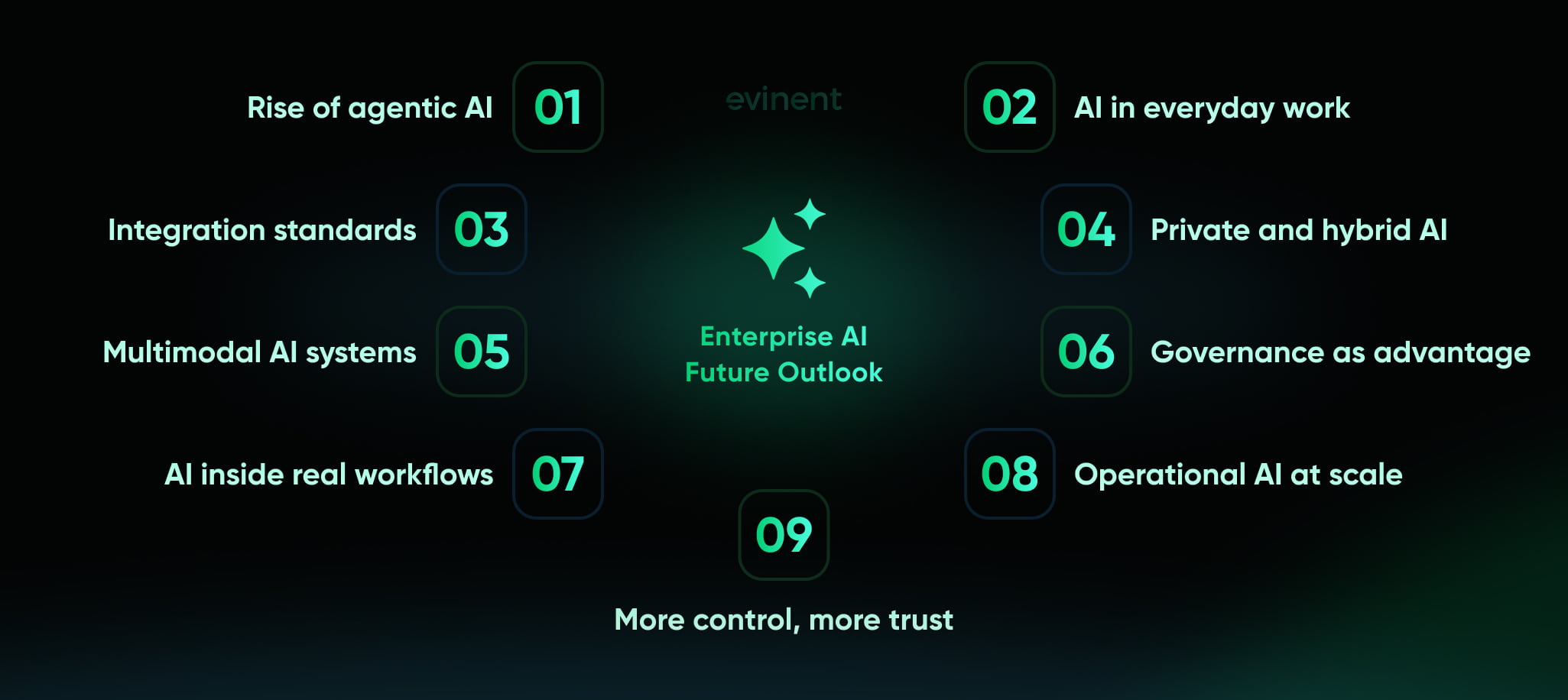
Governance as advantage
For a while, governance was treated as the boring part of AI. Something necessary, maybe, but mostly a brake on speed. That view is starting to change. As AI systems become more autonomous and more tightly integrated into business operations, governance starts looking less like friction and more like infrastructure for trust.
Deloitte’s 2026 findings suggest that access is widening faster than operational maturity. BCG’s research on the AI value gap makes a similar point from another angle: companies that create real value tend to combine leadership, clear strategic focus, and disciplined execution rather than simply deploying more tools. In that environment, governance is one of the factors that separate durable enterprise AI programs from expensive AI theater.
That is especially true as regulations become more specific and enterprise buyers demand clearer boundaries of responsibility from vendors. Companies that can demonstrate they know how to govern AI will move faster in the long run because they will spend less time arguing over fundamentals as new use cases arise.
AI in real workflows
That may be the simplest way to frame the outlook.
The future of enterprise AI is not just more models, more copilots, or more hype about automation. It is more AI inside real systems, tied to real business rules, handling real tasks under real constraints. The winners will probably not be the companies with the loudest AI messaging. They will be the companies that build the quietest, most reliable, most connected AI capabilities into the parts of the business that matter.
And that is a more interesting future anyway.
How Evinent can help with enterprise AI implementation
This is the point where many companies hit a wall. They understand the opportunity. They may even have a shortlist of enterprise AI tools or a few pilot ideas. But they still need someone who can bridge strategy, legacy systems, data reality, security, and delivery. That is where Evinent has a credible role. Its positioning centers on modernizing outdated systems, improving data workflows, reducing inefficiencies, and transforming rigid architectures into scalable, high-performance environments for enterprise and mid-sized businesses. Evinent’s internal positioning materials describe the company in almost the same terms: a partner focused on legacy transformation, flexible architectures, cost efficiency, and sustainable modernization rather than one-off feature work.
That matters because enterprise AI rarely succeeds as a clean-room project. Most companies do not start with perfect data, modern architecture, and neatly documented workflows. They start with fragmented systems, accumulated technical debt, duplicated information, and business processes that were never designed with AI in mind. Event’s positioning documents make it clear that its central strength is modernizing legacy databases and applications, optimizing infrastructure, rebuilding monolithic systems into more scalable architectures, and reducing operational overhead without compromising performance.
Build the foundation
Many AI vendors sell intelligence. The harder job is preparing the environment where that intelligence can be used safely and profitably.
Evinent’s modernization materials show a strong focus on the enterprise AI components it relies on most: database normalization, data migration, infrastructure migration, code refactoring, microservices transition, and integration with existing systems. That is a useful fit for enterprise AI projects because the foundation issues are often the real blockers. A company may want retrieval-augmented generation, internal copilots, or predictive workflows, but if the source data is fragmented and the surrounding systems cannot scale or connect cleanly, the AI layer will stay shallow.
In practical terms, Evinent can help with the parts that many enterprise teams underestimate:
assessing legacy systems and data readiness before AI is deployed
redesigning architectures for performance, scalability, and integration
moving workloads toward cloud or hybrid environments where AI workloads are easier to support
connecting AI-driven components to ERP, CRM, analytics, and operational systems already in use
introducing automation and real-time data flows without forcing a full rebuild on day one
That is the less glamorous side of enterprise AI. It is also the side that determines whether anything useful survives after launch.
Proven results
The strongest argument here is not theory. It is a delivery.
The Evinent’s legacy e-commerce modernization case shows the company rebuilding an outdated retail platform into a more scalable system with AI-powered tools, global localization support, and stronger performance. The public case study reports a 21% increase in conversion rate, a 17% increase in average order value, a 19% decrease in bounce rate, and an NPS increase from 30 to 42 after the modernization effort. The uploaded project materials the same story and metrics, as well as the broader technical work behind them: platform modernization, API integration, system optimization, and personalized product recommendations.
That example matters because it shows how enterprise AI applications often create value. Not through a dramatic “AI transformation” slogan, but through a better commerce system, better search, better recommendations, faster load times, and a more scalable architecture that improves the business in measurable ways.
The healthcare migration case points to another important strength. Evinent’s website describes a U.S. healthcare technology project focused on secure data synchronization, infrastructure setup, and legacy modernization, with advanced encryption and real-time data handling built into the solution. The project brief in your uploaded files provides additional details: middleware development, token-based authorization, certificate pinning, distributed encryption, and a scalable relational database designed to securely synchronize sensitive patient data. This is exactly the kind of groundwork that regulated enterprise AI depends on. Before a company can apply AI to clinical data, operational workflows, or healthcare support, it needs a secure, reliable, modernized infrastructure underneath.
Then there is the private AI recruitment assistant. On Evinent’s live site, that case is framed as an isolated AI pilot for enterprise recruitment, designed to automate candidate-vacancy matching while keeping all processing inside the client’s infrastructure and avoiding external API calls to OpenAI, Claude, or Gemini. The public case also states that the project used separate AI agents for recruiters and candidates, role-based access, isolated containers, and secure internal processing. For enterprise buyers worried about privacy, IP leakage, or HR data sensitivity, that is a strong signal: Evinent is not only talking about AI adoption in the abstract. It is building private AI in environments where governance and data isolation are core requirements.
Usable AI
This is probably the clearest way to position the company.
Evinent is not strongest when it tries to sound like a frontier-model lab. It is strongest when it frames enterprise AI as part of a larger modernization and systems-improvement effort. Its positioning materials consistently emphasize practical delivery: legacy system transformation, cost efficiency, scalable architecture, infrastructure migration, process optimization, and transparent execution. The live website reflects the same direction through current offerings like Private AI Automation, AI Chatbots, and analytics or search products, all placed alongside modernization, software engineering, and data services rather than floating as isolated AI hype.
That combination makes sense for enterprise buyers because most of them do not need a vendor who only knows how to call a model API. They need a partner who can:
identify which workflows are worth improving first
evaluate whether the current stack is ready for AI
modernize the systems that are getting in the way
design private or controlled deployments where needed
integrate AI into real processes, not sandbox experiments
support rollout, testing, monitoring, and future expansion
Those needs align closely with how Evinent describes its work across modernization, healthcare, e-commerce, and private AI contexts.
Where Evinent fits
Based on the materials and public case studies, Evinent appears especially well-suited for several kinds of enterprise AI implementation work.
First, legacy-heavy environments where AI depends on modernization before anything else can scale. Evinent’s modernization service pages repeatedly position the company as a provider of replatforming, refactoring, integration, and cloud transition services for outdated systems.
Second, regulated or sensitive environments where governance, privacy, and secure infrastructure matter as much as functionality. The healthcare migration case and the private AI recruitment assistant both point clearly in that direction.
Third, enterprise commerce and operations contexts where measurable business gains come from better search, personalization, system speed, and workflow reliability rather than from AI for its own sake. The e-commerce modernization case is the clearest example here.
And fourth, companies that want a phased enterprise AI roadmap rather than a giant all-at-once replacement effort. Evinent’s service materials consistently describe structured delivery: assessment, planning, migration, integration, testing, launch, and post-launch support.
Why Evinent
If the goal is to launch a flashy AI pilot quickly, there are plenty of vendors that can do that. If the goal is to implement enterprise AI in a way that works with real systems, real compliance needs, and real business constraints, the selection criteria change.
That is where Evinent’s mix of modernization, integration, private AI capability, and industry-specific delivery becomes relevant. The company’s own numbers and positioning documents highlight 15+ years of software development experience, a high share of enterprise projects, and a strong focus on scalability, security, and long-term support. The public portfolio adds concrete examples of modernized commerce platforms, secure healthcare infrastructure, workforce systems, and isolated AI pilots.
So the value proposition is fairly clear. Evinent can help organizations move from AI ambition to AI implementation by fixing the systems that hold AI back, designing controlled deployment models for high-risk scenarios, and building connected solutions that serve actual business workflows rather than just proving that a model can generate text.
And honestly, that is what most enterprises need. Not more AI theater. More AI that works.
FAQ
What is enterprise AI in simple terms?
Enterprise AI is artificial intelligence used inside a company’s real operations, not as a standalone experiment. It connects to business systems such as ERP, CRM, knowledge bases, and analytics tools, and is built with governance, security, and scalability in mind. Google, SAP, and AWS all describe enterprise AI in this broader, operational sense rather than as a single chatbot or isolated model.
How is enterprise AI different from regular AI tools?
The main difference is context and control. A public AI tool may help with drafting or summarizing, but enterprise AI must operate within company workflows, respect permissions, connect to internal data, and support monitoring and compliance. In other words, it has to function under business conditions, not just generate useful-looking output.
What are the most common enterprise AI use cases?
The most common use cases include enterprise search, virtual assistants, document processing, customer support automation, fraud detection, predictive maintenance, sales forecasting, and supply chain planning. These tend to work well because they involve repetitive tasks, large volumes of data, and clear, measurable business bottlenecks.
What are the biggest benefits of enterprise AI?
The biggest benefits usually fall into four groups: higher productivity, lower operating costs, faster decision-making, and better customer experience. When deployed well, enterprise AI can also help companies scale operations without increasing overhead at the same pace. The strongest results usually come from improving workflows, not from adding AI for its own sake.
What are the biggest risks of enterprise AI?
The main risks include weak governance, poor data quality, unreliable outputs, privacy issues, bias, security gaps, and compliance failures. These risks increase when AI is deployed in sensitive workflows without clear ownership, human-review rules, or monitoring. NIST and EU regulators both make it clear that risk management has to be part of the full AI lifecycle, not an afterthought.
How do companies measure ROI from enterprise AI?
Companies usually measure ROI through workflow-based metrics rather than abstract AI metrics. Common examples include reduced handling time, lower support cost, improved forecast accuracy, fewer manual review hours, better conversion rates, lower fraud losses, or faster document turnaround. A useful rule is simple: if the business cannot define what should improve, it will be hard to prove AI created value.
Does enterprise AI always require a full cloud migration?
No. Some companies use fully managed cloud AI platforms, while others rely on hybrid or private environments because of privacy, latency, or regulatory needs. The right architecture depends on the use case, the sensitivity of the data, and the company’s control requirements. Enterprise AI infrastructure should match operational reality, not just current market hype.
What is the role of retrieval-augmented generation in enterprise AI?
Retrieval-augmented generation, or RAG, helps AI systems pull information from trusted internal sources before generating a response. That makes enterprise assistants and search tools more accurate, more current, and more relevant to the business. It is especially useful when companies want grounded answers without having to retrain a model on all internal knowledge.
What is agentic AI, and should enterprises already use it?
Agentic AI refers to systems that can plan, retrieve information, use tools, and take multi-step actions with limited supervision. It is becoming one of the fastest-growing enterprise AI trends, but it should be adopted carefully. It works best when permissions, approvals, monitoring, and fallback rules are clearly defined, especially in high-risk workflows.
How should a company start with enterprise AI?
The best starting point is usually one workflow with obvious friction and clear business value. That means choosing a use case, assessing data readiness, defining success metrics, testing in a controlled pilot, and only scaling after governance and monitoring are in place. Companies that start with a vague “we need AI” initiative often burn time and budget without getting useful results.
How can Evinent help with enterprise AI implementation?
Evinent can help companies prepare the systems, data, and infrastructure that enterprise AI depends on, then integrate AI into real workflows in a controlled way. Its positioning and case studies show strength in legacy modernization, secure data handling, scalable architecture, private AI deployment, and integration-heavy delivery for enterprise environments.
Share