

What Are Search Engine Synonyms?
Users of the internet are seldom in agreement when it comes to the description of products — ten different people may use ten entirely different names for the very same thing. In a brick-and-mortar store, a salesperson can ask you to clarify, but online, the search engine has to figure out the request by itself.
The Baymard Institute report states that 31% of search queries on e-commerce sites “end in failure” — that is, they do not produce results.
Modern site search should not be limited to simple keyword matching if it wants to be successful in this task. It needs to understand the user's intent, recognize different ways of expressing the same idea, be able to correct misspellings, and determine that a user's wording still refers to an existing product even if the user has used different words.
That’s the point where search engine synonyms become relevant.
Search engine synonyms are not simply a set of linguistic "similar words" but rather structured mappings. They are either curated or AI-generated synonym dictionaries that communicate to the search system the terms that should be considered as equivalent. This allows the machine to recognize that a person searching with the word "pullover" may want "jacket" or a similar product category, and it varies with the context.
How Synonym Sets Work
Type of synonym | Description | Example |
|---|---|---|
Two-way synonymsType of synonym | Both terms are treated as interchangeable | NYC ↔ New York City |
One-way synonyms | One term expands to another, but not vice versa | iPhone → smartphone |
Context-specific synonyms | Meaning changes depending on user intent or seasonality | Black Friday → deals/discounts |
Such structured synonym rules help a search system to understand the user's actual intention 一 even if the user doesn't use the exact words.
What This Article Will Cover
The difference between true synonyms and related terms.
How Google, Bing, and modern algorithms interpret synonyms.
Real examples from Amazon, Netflix, and eBay.
Business benefits: higher conversions, fewer zero-result pages, better UX.
Types of synonyms relevant for e-commerce (abbreviations, multilingual terms, product jargon, etc.).
How to identify which synonyms your store needs.
How Evinent Search enhances synonym detection and overall search performance.
Search Engine Synonyms vs. Related Terms
One of the biggest misunderstandings when doing search optimization is that people consider all "similar" words to be synonyms. Actually, synonyms are words that have the same user intent, whereas related terms are just contextually connected. Confusing these different groups makes the search less accurate and causes it to return results that are not relevant.
Key Differences: Synonyms vs. Related Terms
Category | Definition | Example |
True Synonyms | Different words users use to express the same intent | “site search” = “website search tool” |
Near-Synonyms | Variations describing the same concept but with a slight nuance | “product filter” = “item filter” |
Related Terms | Terms from the same domain, but not interchangeable | “index”, “crawler”, “ranking system” |
Contextual Associations | Concepts that appear together but serve different purposes | “analytics”, “reports” |
Why the Distinction Matters
A correct synonym definition ensures that search results align with the user’s intention, rather than just matching keywords.
When related terms are incorrectly treated as synonyms:
Results become noisy and irrelevant
The user loses trust in the search engine
Engagement decreases
Bounce rates increase
Conversion suffers
UX Example: When Things Go Wrong
Imagine a situation where an individual is looking for a "website search tool." In case the apparatus considers "crawler" or "ranking system" as interchangeable words, the user might end up viewing documents describing the technology, whereas they were actually looking for a product.
This is basically a wrongful understanding of the user's goal - an error in the level of correctness that advanced searching systems have to be able to steer clear of.
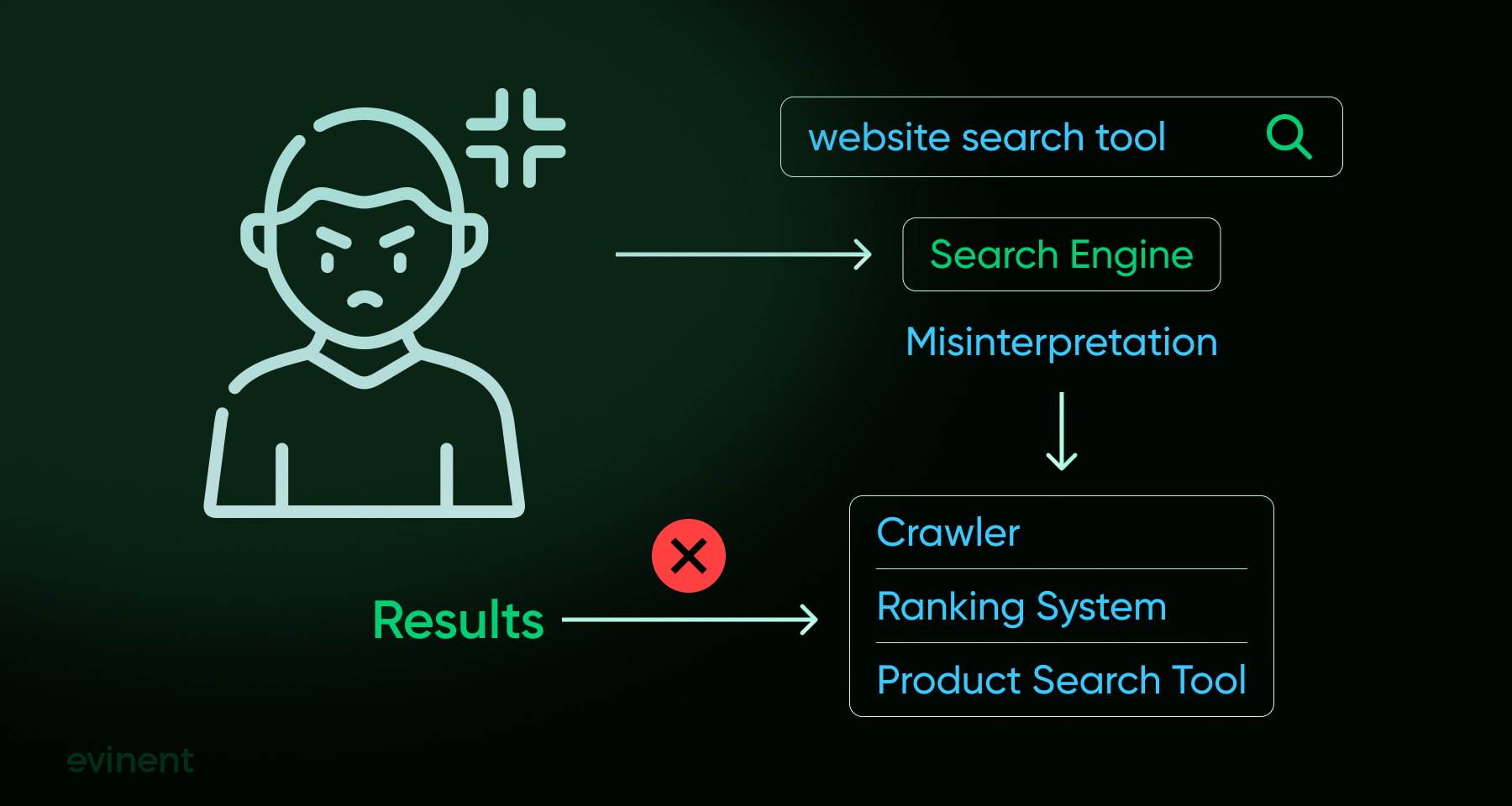
Building a precise site search experience requires understanding the difference between synonyms and related terms. Appropriate grouping enhances the return of relevant results, keeps the user's intention intact, and has a direct effect on conversions. Wrong classification, on the other hand, leads to lower quality of search and causes the dissatisfaction of users.
Synonyms in SEO: The Hidden Layer of Search Relevance
How Modern Search Engines Handle Synonyms
In essence, the present-day search engines — Google, Bing, and other AI–powered platforms — have moved beyond the stage of literal keyword matching. They are more focused on both the meaning and the user's intent. Consequently, a search such as "buy shoes online" can bring about results that have been optimized for "purchase footwear" or "order sneakers". The technology identifies these terms as various ways of conveying the same sales objective.
To make this possible, search engines combine:
semantic NLP models;
intent detection algorithms;
entity understanding;
large-scale behavioral data;
automated synonym and phrase clustering.
The result: a more intuitive search experience where users don’t have to “guess the right wording.”
SCHEME 1 — How SEO Synonym Processing Works:
User Query
↓
Intent Recognition (NLP models)
↓
Synonym Expansion
(“shoes” → “footwear”, “sneakers”, “trainers”)
↓
Relevance Scoring
↓
Search Results Displayed
This is the identical reasoning that is behind modern eCommerce search engines — or at least, the ones that put their money where their mouth is in terms of relevance.
Why Synonym Recognition Matters in SEO
Effective synonym handling gives websites a competitive advantage:
Wider keyword coverage — ranking for more phrases without keyword stuffing.
More relevant traffic — users with purchase intent find the right page faster.
Reduced friction — whether a customer types “TV,” “television,” or “4K screen,” they land in the right place.
Better indexing signals — Google rewards pages that satisfy search intent, not strict terms.
For e-commerce websites, this is a direct translation into higher conversions and better product discoverability.
A Real-Life Example of Google's Site Search Engine Synonyms in Action
Google recognizes synonyms but does not treat them as perfect substitutes. Ranking shifts happen when the meaning or intent changes, even slightly.
Queries like “edit video” vs. “video editor” return overlapping but not identical results because one reflects an action, the other a tool.
Google interprets the full context, user expectations, and typical intent behind each phrasing.
This is why replacing a keyword with its “synonym” can alter the SERP — the underlying intent isn’t always the same.
Quote from John Mueller (Google):
“We perform query understanding first — checking if any useful synonyms or entities exist in the query before retrieval and scoring.” (Paul Haahr, Google engineer.)
How Evinent Search Brings This Power to Your Store
Global search engines operate at web scale to achieve this. Evinent Search performs this function within your eCommerce store — immediately and without any coding.
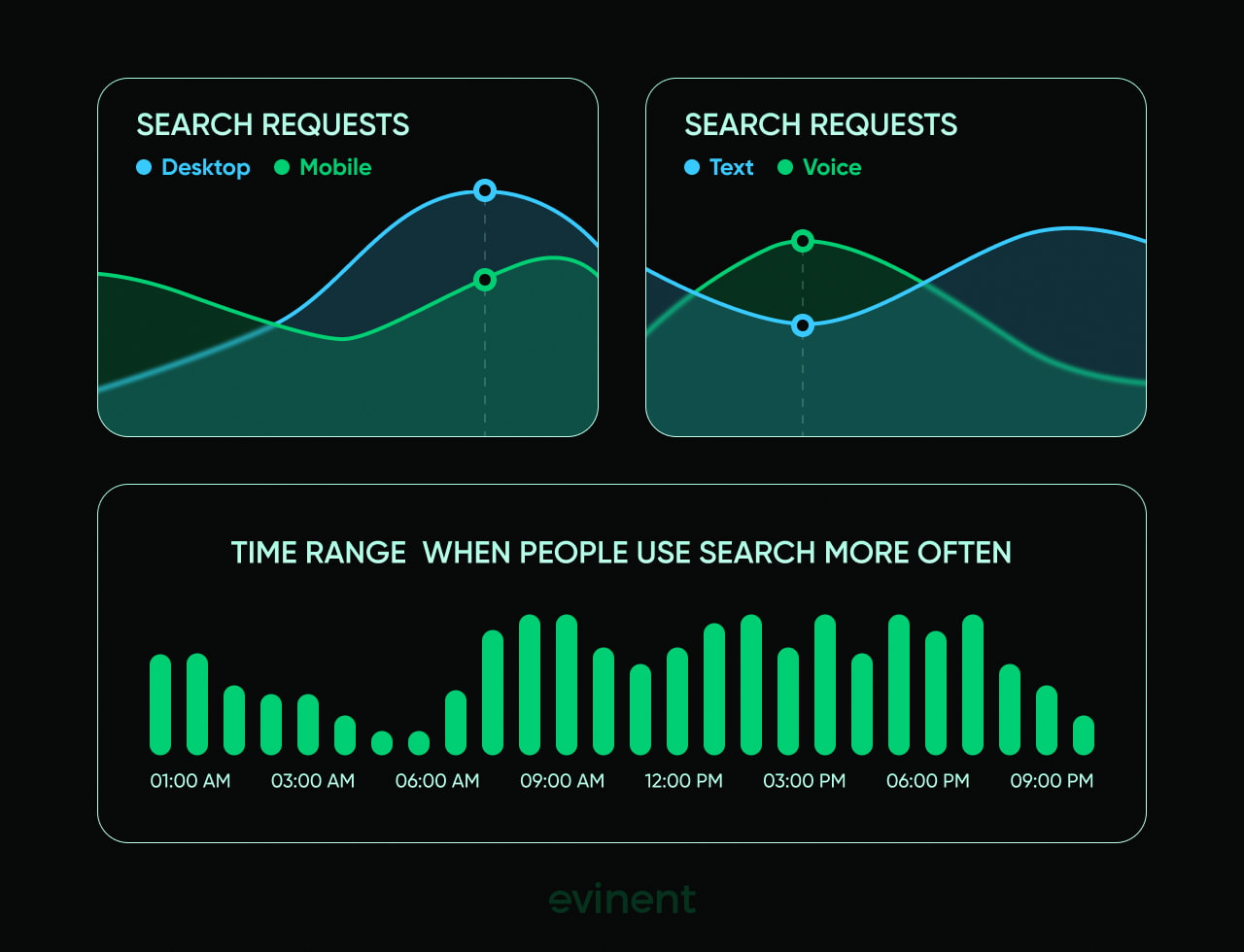
Our platform combines:
AI-generated synonym sets
manual customization for brand-specific vocabulary
one-way, two-way, and context-aware mapping
intent-driven product discovery
auto-corrections, typo tolerance, transliteration, and morphological analysis
Evinent figures out the meaning and delivers the correct products even if the users use different languages like "hoodie," "pullover," and "warm top."
What is more, the clarity that stays behind the words of the customers is converted into sales. Evinent clients' stores are in a position to declare a lift of up to 30% in their revenues as a result of the improvement in search relevance and decrease in the number of zero-result pages.
SCHEME 2 — How Evinent Search Mirrors SEO Logic Inside Your Website
User Types a Query
↓
AI Intent Engine
(meaning > exact words)
↓
Synonym Dictionary
(one-way, two-way, contextual)
↓
Smart Ranking
(relevance, behavior, popularity, attributes)
↓
Personalized Product Results
The entire process takes milliseconds — but the impact on conversions is measurable.
Search engine synonym processing is one of the major pieces of technology behind contemporary SEO that helps search engines to understand user intent and provide them with relevant content.
Evinent Search delivers the smartness of this process right to your e-commerce store so that your clients get the same high-level results as with Google with every query — thus, your company is enabled to grow the customer base from the existing traffic.
How Synonyms Power E-Commerce Search and Product Discovery
Synonyms are instrumental in the way users access products. They connect the gap between the descriptions given by the shoppers and the catalog labels. When the search is in tune with the actual customer language, it takes less time for the product to be found, pages with no results get reduced, and the whole user journey benefits from better functioning merchandising systems.
1. Matching Real User Vocabulary
It's almost unheard of that users will communicate in neat and clear product-taxonomy terms. Instead, they utilize slang, regional vocabulary, abbreviations, trends, or phrases that they have picked up from social media.
Reason: If your catalog states "moisturizer," but consumers look for "face cream," "hydration cream," "day cream," or "skin lotion," synonyms will make it possible for all these different words to point to the same relevant products.
Example:
“puffy jacket” → catalog uses “quilted coat”
“sunnies” → catalog uses “sunglasses”
“gaming laptop” → catalog uses “performance laptop”
Without synonyms, every mismatch is a lost sale.
2. Supporting Product Discovery Beyond Exact Matches
Synonyms enlarge the exploration area by linking that are related things that users desire but may use different words for. As a matter of fact, synonyms bring a number of advantages to the system: They make the product pool that is accessible by any query bigger. They catch those consumers who make less precise searches. They reveal those long-tail products which very seldom are the exact terms.
Example:
“running shoes” → also match “trainers,” “athletic shoes,” “sports sneakers.”
This improves both CTR and time-to-product.
3. Handling Ambiguous Terms with Correct Intent
Certain words have different meanings depending on the context. Synonym sets are used to direct each query to the correct intent.
Examples:
“Apple case” (brand) vs. “apple case” (fruit storage)
“bass” (fish) vs. “bass” (audio)
“charger” (phone) vs. “charger” (horse harness)
Synonym rules that are well designed stop unwanted results and make sure that every search session seems smart and not random.
4. Improving Zero-Result Prevention
The majority of situations where no results are returned are because of differences in vocabulary rather than products that are not available.
Synonyms resolve:
misspellings (“nikes” → “Nike”)
plural/singular variation (“pants” ↔ “pant”)
informal terms (“cozy sweater” → “knit pullover”)
regional vocabulary (“trainers” ↔ “sneakers”)
Search is thus not a dead end but a continuous discovery pathway.
5. Enhancing Merchandising, Filters, and Recommendation Logic
Synonym groups influence more than search—they improve every downstream system.
How they strengthen merchandising:
Broader, cleaner product groups for campaigns.
Better relevance signals for featured products.
More accurate filtering when users search by attributes.
How they improve recommendations:
Recommendation engines get more consistent data.
Related-product suggestions align better with the user's language.
Cross-selling and upselling paths become more natural.
Example:
Users who look for work backpacks may be shown curated collections of "office bags", "laptop backpacks" or "business bags" even if these words were not in their original queries."
Synonyms go far beyond just being a technical improvement—they are a powerful factor that greatly influences search relevance, product visibility, and merchandising performance. Customers who find that the site "talks their language" can get the products they need more quickly, thus they visit for a longer time and make purchases more frequently. Properly constructed synonym sets not only remove obstacles that are present at different levels of the experience but also increase both the company's profit and the customers' delight.

Types of Search Synonyms for Your E-Commerce Site
In e-commerce search, synonyms are not only linguistic equivalents but also structured regulations that link various user expressions to a single product intent. The main synonym types that a store should implement to become more relevant, lower the number of zero-results pages, and get the real user vocabulary are given below.
1. Identical Expressions
Different expressions meaning the same thing.
Examples:
“NYC” = “New York City”
“tee” = “t-shirt”
“phone case” = “phone cover”
Why they matter:
Users can interchangeably use different forms, and synonyms help in making these queries refer to the same catalog items.
2. One-Sided Synonyms
A → B, however, it is not necessary that B → A. This is a situation when one term is a more general, or a category-level, equivalent.
Examples:
“iPhone” → “smartphones” (brand → category)
“Coke” → “soda” (brand → generic)
“Nespresso pods” → “coffee capsules”
Why they matter:
Such criteria are necessary to avoid extremely narrow searches that could conceal relevant alternatives.
3. Multi-Language Synonyms
Indispensable for global retailers and multicultural marketplaces.
“zapatos” (Spanish) → “shoes”
“scarpe” (Italian) → “shoes”
“chaussures” (French) → “shoes”
Why they matter:
Users frequently mix different languages, particularly when they are on a mobile device or using browser autocompletion for a search.
4. Abbreviations, Acronyms & Industry Jargon
Users of shortened expressions or specialists language, while product catalogs are written in a formal style.
Examples:
“BT” → “Bluetooth”
“HDR” → “High Dynamic Range”
“DSLR” → “digital SLR camera”
“retinol cream” = “vitamin A cream”
Why they matter:
Not considering abbreviations is the reason for the loss of money that basically comes from the four categories of Electronics, Beauty, Health Care, and B2B.
5. Context-Dependent Equivalents
Words, that have different meanings based on the user's search intent. Synonym regulations change according to the context (seasonal, promotional or behavioral).
Examples:
“Black Friday” → “deals”, “discounts”, “sales”
“back-to-school” → “school supplies”, “laptops”, “kids' clothing”
“holiday gifts” → “Christmas gifts”, “gift sets”, “bundles”
Why they matter:
They help your search engine understand intent spikes during seasonal trends.
6. Product-Specific Variants
Different users explain product attributes in various manners.
Examples:
“4K TV” = “Ultra HD TV”
“running shoes” = “trainers” / “athletic sneakers”
“sofa” = “couch” / “sectional”
Why they matter:
Very few times users employ terms that perfectly fit taxonomy; synonyms help to bring product attributes in line with customer language.
Contemporary e-commerce search engines are expected to manage various synonym layers. These include not only linguistic equivalents but also contextual, brand-level, multilingual, and product-specific variations. As a result, the better these maps are constructed, the more sharply search relevance increases, users get products faster, and total conversion gets higher.
How to Build and Use Synonyms to Improve E-Commerce Search
One of the main features of present-day e-commerce search is the understanding of various expressions that users employ for the same product. If synonym mapping is done effectively, it can help in making the ranking more precise, keep the users from getting irritated with the search, and finally, lead to a great increase in the number of conversions - primarily on mobile devices.
The following is a workable model that integrates user experience suggestions with a sequential method for selecting appropriate synonyms.
1. Make Every Search Useful — Even Zero-Result Pages
Even when no exact matches exist, the search experience should guide users toward alternatives.
Enhancements supported by synonyms:
If a user searches for “sneekers”, synonyms + spelling correction can redirect them to “sneakers / athletic shoes.”
When someone types “winter pullover”, but your catalog uses “sweatshirt/hoodie”, synonym sets prevent dead ends.
Good UX examples:
Show “Did you mean…” suggestions based on synonym matches.
Offer related categories (“boots” → “winter shoes”) when synonyms reveal intent.
2. Optimize Mobile Search for Real User Language
On mobile, users type faster, shorter, and with more errors — synonyms help reduce friction.
Real UX improvements with synonyms:
Short queries like “red bag” get mapped to “red handbag/purse/tote.”
Abbreviations (“xl dress”, “bt headset”) still return correct product lists.
This directly increases product discovery and lowers bounce rates.
3. Make the Search Bar Visible and Intuitive
A prominent search bar helps — but synonyms make it powerful.
Examples:
Autocomplete suggests synonym-driven options:
“laptop” → “notebook,” “MacBook,” “Ultrabook.”Voice search variations (“tv set”, “tele”, “television”) return unified results.
Constructing powerful synonym dictionaries for search engines is more than merely a technical challenge — it is essentially a tool for product discovery, increasing conversion rates, and total user satisfaction. By dissecting the language of real customers, relating it to the terminology of your catalog, and constantly updating these relations, your search engine starts to "operate" like your customers.
Synonyms make sure that any query, whether it is short, long, misspelled, or an unusual expression, still brings users to relevant products and not to dead ends. When coupled with solid UX practices, they search for a dependable helper that recognizes the user's intention, lowers the chances of errors, and is thus able to generate more sales on a consistent basis.
How to Determine Which Synonyms Your Store Needs: Step-by-Step Guide
An essential prerequisite of a successful synonym implementation is understanding the way customers search. Infrequently do users enter a product name that is spelled exactly as in your catalog; hence, the establishment of authentic search language is the basis of a high-performing synonym system. This detailed guide allows you to uncover the terms that are missing, find the patterns, and construct the synonym sets that really correspond to the user's intent.
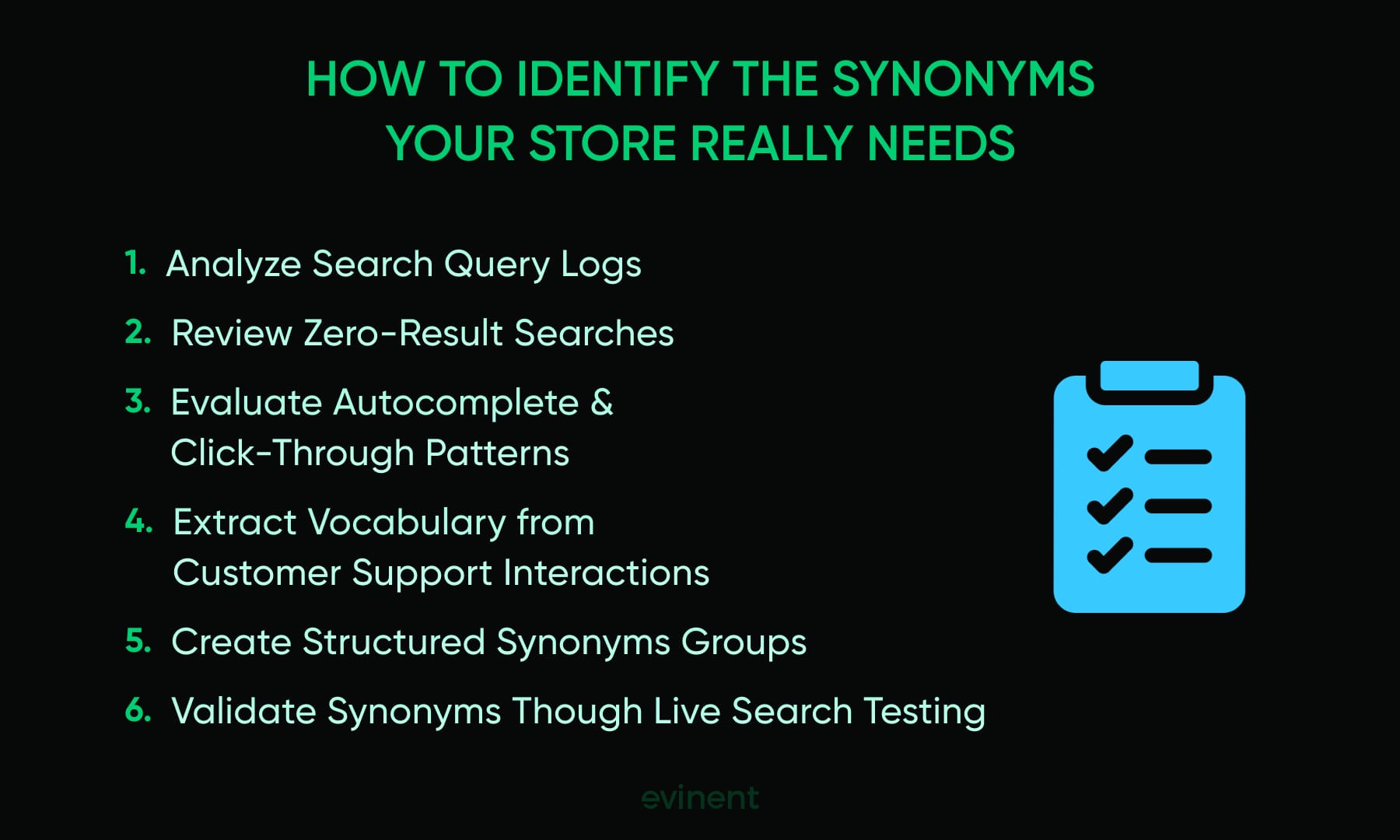
Step 1: Analyze Search Logs
Identify:
Terms users frequently type
Misspellings
Variants of the same intent (“sofa/couch/sectional”)
Step 2: Review Zero-Result Queries
These are your biggest signals of missing synonyms.
Example:
If “boho dress summer” returns nothing, break it down:
“boho” → bohemian
“dress” → maxi dress/sundress
“summer” → seasonal
Step 3: Use Autocomplete and Click-Through Data
Autocomplete is more than just a feature for convenience; it's a live metric of the way users conceptualize products. In the case where consumers are presented with various suggestions, the ones they continuously select are the words that most likely represent their user language and are the most intuitive words for them.
Step 4: Check Customer Service Interactions
Emails, chats, and support tickets show the natural vocabulary customers use.
Example: users may say “puffy jacket”, while the catalog uses “quilted coat.”
Step 5: Build Synonym Dictionaries
Create structured groups:
Two-way synonyms:
“sofa” ↔ “couch”One-way synonyms:
“Kleenex” → “tissues” (brand → generic)Context-specific synonyms:
“Black Friday” → “sales,” “discounts”
Step 6: Test in Real Search Sessions
Check:
Are results more relevant?
Are zero-result pages decreasing?
Are click-through rates improving?
An organized synonym-building method guarantees that your search engine is in line with the language your customers use. When you examine actual queries, align the natural wording with your catalog terminology, and polish these links by testing, your search results become not only accurate but also user-friendly.
By Evinent Search, this operation is a lot more than just convenient: our analytics disclose the very words users enter, bring to light zero-result patterns, and vocabulary gaps are instantly recognized by your catalog without the need for a human. Rather than taking a shot at which synonyms are important, you receive unambiguous, customer-descriptive product insights grounded in the data — and the instruments to convert that knowledge into greater relevance, deeper engagement, and more conversions.
Business Benefits of Using Search Engine Synonyms
In e-commerce, a large number of users visit your website with an approximate idea of what they want, but they don't know the exact name of the product in the catalog. A strong synonym-aware search is the way to close this gap: it matches the language of the user with the product data. Consequently, a higher number of visitors can quickly find the products that are relevant to them, which decreases the friction and enhances the route to purchase. There are five main business advantages that are backed up by the latest industry data.

1. Higher Conversion Rates
Benefit: Customers who can quickly locate the products that meet their needs are the ones who will most probably make a purchase.
How it works: By use of synonym mapping, a search for "sneaker" or "running shoes" will get the user all the items (sneakers, athletic shoes, trainers) that match the words used in the query thus making the process of buying effortless.
Example: Research by OneSearch (2025) shows that advanced search systems, including semantic matching and synonym handling, improved CTR by +1.67%, increased the number of buyers by +2.4%, and increased order volume by +3.22% (OneSearch, arXiv 2025).
2. Disproportionate Revenue from Search Users
Benefit: Users engaging with site search tend to be highly motivated and spend more.
How it works: Even a minority of visitors using search can generate a large portion of revenue. Synonym-aware search ensures that these users find all relevant options, including alternate phrasings or brand names.
Example: 24% of site visitors using search generate up to 44% of total revenue, with 45% of add-to-cart actions and 42% of conversions, showing that search-driven buyers are significantly more valuable (Constructor via InternetRetailing 2025).
3. Reduced Zero-Result Pages
Benefit: Retaining customers through a reduced number of dead ends in search, and thus less lost revenue.
How it works: Search automatically links the incorrect products for misspelled, slang, or differently phrased queries so that users are not frustrated by the “no results” pages.
Example: Studies show that up to 12% of users leave a site immediately after an unsuccessful search (Algolia, 2024).
4. Improved User Experience and Customer Satisfaction
Benefit: The users get an impression that the site "speaks" their language, which in turn helps to build trust and also increases the level of engagement.
Method: Through the use of synonyms, the search engine can comprehend the different words used, be it a new vocabulary, brand names, local terms, or abbreviations, thus it will be able to give the most appropriate results even when the user is not familiar with the catalog terminology.
Example: Algolia (2024) reports that site search users, who often rely on natural language, convert 2–3× more than general navigation users (Algolia 2024).
5. Increased Average Order Value and Cross-Sell Opportunities
Benefit: Using synonyms in search allows users to have a wider spectrum of the relevant products, which leads to an increase in the basket size.
How it works: Besides "office desk", the system can also return "standing desk", "computer workstation", and "home office table" products. In the same way, "hoodie" can be related to "zip-up hoodies" or "oversize sweatshirts"
Example: Academic case studies show that implementing semantic search and synonym handling leads to measurable growth in orders and cart value (OneSearch 2025; Semantic De-boosting 2025).
Synonym-aware search implementation should be seen as a strategic move rather than just a small UX improvement. It basically makes your e-commerce site to:
Generate more conversions from users who search for products
Keep customers with a high lifetime value
Reduce sales that are lost due to zero-result queries
Improve user satisfaction and trust in the brand
Increase average order value through wider product discovery
The use of synonym dictionaries – whether they are manual, AI-driven, or hybrid – along with the monitoring of search analytics can be your way to unlock tangible revenue growth and offer a better shopping experience.
How Evinent Can Help with E-commerce Site Search
Where generic search plugins fail, Evinent Search is a tightly focused solution created by a team with the know-how in e-commerce data, product discovery, and customer behavior analytics. The entire platform is engineered to address business problems and thus, generate a measurable revenue flow.
Evinent Search can communicate with your customers in their own language, i.e., it recognizes synonyms, related terms, slang, abbreviations, typos, and natural language queries. Our synonym intelligence and relevance engine make certain that consumers always come across the correct product even if their words are somewhat off or unclear.
Why choose Evinent Search?
Lightning-Fast Integration — No Engineering Required
Your team doesn’t need to build or maintain a search engine.
Evinent Search integrates into any e-commerce platform or custom website within minutes via API. Our engineers handle the setup, configuration, and optimization for you — ensuring correct indexing, fast performance, and relevance tuning from day one.
AI-Driven Personalization and Self-Learning Algorithms
Evinent Search continuously analyzes customer behavior to:
Identify which products users prefer
Improve ranking logic
Refine autocomplete suggestions
Personalize product recommendations
Automatically adapt to seasonal or trending queries
This helps shoppers find the right items faster, increasing both satisfaction and revenue.
Advanced Features Designed for Higher Conversions
Evinent provides a wide collection of professional-grade capabilities that instantly elevate your user experience:
Search results preview with filters in autocomplete
Accurate product ranking based on popularity and intent
Faceted search for detailed filtering
Spell correction & typo tolerance
Morphology support to avoid zero-result pages
Multilingual search out of the box
Voice search for mobile shoppers
Custom-designed search UI
Support for acronyms, abbreviations, and “wrong keyboard layout” queries
Advanced analytics dashboard showing top searches, zero-result terms, CTR, and demand trends
Custom-scheduled crawlers for frequently updated catalogs
Promotion tools for boosting selected products directly in search
Everything is built to help customers find the right product instantly — without friction.
Key Takeaways
If a search doesn't understand the language of a user in e-commerce, the latter might vary between the use of synonyms, spelling mistakes, slang, and multi-word expressions - if the search doesn't take these aspects into account, the users will be gone in a blink of an eye.
Search engine synonyms are structured dictionaries (manual, AI-driven, hybrid) that connect the different words of the same idea.
Synonyms should be distinguished from related terms: only if two terms are true equivalents can they be exchanged in queries to prevent irrelevant results.
External search engines (Google, Bing) understand the semantic meaning of a query; thus, internal search should at least be at the same level.
Platforms from the real world as Amazon, Netflix, eBay, normalize vocabulary (“rom-com”, “TV”, “notebook”), and so on, thus influencing user expectations everywhere.
Synonyms increase the findability of products, thus lowering the number of zero-result pages, helping to clarify user intents, and improving merchandising logic.
Synonym groups have directions, can be one-way, multilingual, abbreviations, jargon, context-specific, and product-specific variants.
Determining synonyms entails inspecting the search logs, looking at queries returning no results, studying the autocomplete behavior and customer support data, then creating the structured synonym sets accordingly.
Corporate effect: increased conversion, decreased abandonment, higher customer loyalty, better user experience, and more revenue coming from accurate intent matching.
Evinent affords AI-driven synonym detection, typo handling, morphology, analytics, and automated recommendations, which in a continuous fashion upgrade search performance.
Core usability features — informative zero-result pages, mobile-first search, and visible search UI — all derive considerable benefits from robust synonym logic.
Synonyms have become an indispensable element of a contemporary search tactic, and Evinent-type platforms help them to be scalable, precise, and effortlessly manageable.
Share